The Cookies Quietly Bypassing Your WordPress Page Cache
A 95 percent hit rate can hide the requests your cache was never allowed to see. How to measure the real bypass rate from logs and headers, find the cookie causing it, and rewrite the rules narrowly without serving one shopper's cart to another.

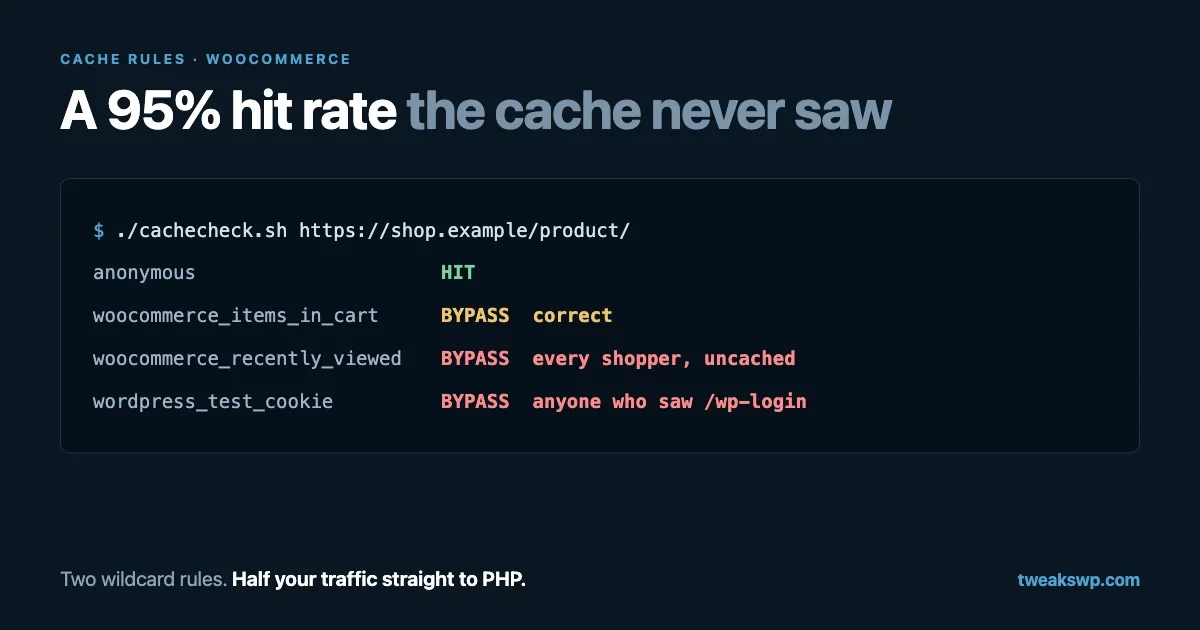
Your caching plugin reports a 95 percent hit rate. Your server is still working hard, PHP workers are still busy at lunchtime, and the site is slow for exactly the people you care about most: the ones with something in their cart.
Both things are true at once, because the hit rate you are reading counts the requests the cache was allowed to handle. Every request that carries the wrong cookie never becomes a cache lookup at all. It goes straight to PHP, and on most WooCommerce and membership sites nobody has ever measured how many of those there are.
This is a guide to measuring that number on your own site, finding which cookie is responsible, and fixing the rules without breaking the pages that genuinely must never be cached. The order matters, so resist skipping to the configuration.
Why a cookie bypasses the cache at all
A page cache stores one copy of a URL and serves it to everybody. That is safe for a post and dangerous for a cart, so every cache needs a rule for “this visitor must get their own page”. The universal signal is a cookie, because cookies are what make a request personal.
WordPress itself sets several, and the names are worth knowing exactly. From wp-includes/default-constants.php:
define( 'LOGGED_IN_COOKIE', 'wordpress_logged_in_' . COOKIEHASH );
define( 'TEST_COOKIE', 'wordpress_test_cookie' );
COOKIEHASH is an md5 of your site URL, which is why the real cookie on your site looks like wordpress_logged_in_3f2a.... Core also sets comment_author_* cookies after someone comments, and wp-postpass_* when a visitor unlocks a password-protected post.
WooCommerce adds its own. From class-wc-cart-session.php, the cart sets two:
'woocommerce_items_in_cart' => '1',
'woocommerce_cart_hash'     => WC()->cart->get_cart_hash(),
and the session handler sets a third, wp_woocommerce_session_ plus the same hash. There is also woocommerce_recently_viewed, and woocommerce_geo_hash if you use geolocation.
Only some of those mean “do not cache this”. That distinction is where sites lose their hit rate.
Step 1: measure the real bypass rate
Do not start from your plugin’s dashboard. Start from the layer that actually serves the response.
On nginx with FastCGI cache
Log the cache status on every request. In your http block:
log_format cachelog '$remote_addr $status $upstream_cache_status '
                    '"$request" "$http_referer"';

access_log /var/log/nginx/cache.log cachelog;
Reload nginx, wait for a representative slice of traffic, then count:
awk '{print $3}' /var/log/nginx/cache.log | sort | uniq -c | sort -rnYou will see HIT, MISS, BYPASS, EXPIRED and -. BYPASS is the number this guide is about: requests your rules told the cache to skip. If BYPASS is more than a few percent of page requests on a content site, or more than about a quarter on a shop, something is matching too broadly.
Now split it by URL, because the shape tells you the cause:
awk '$3=="BYPASS" {print $5}' /var/log/nginx/cache.log \
  | sed 's/?.*//' | sort | uniq -c | sort -rn | head -20
Cart, checkout and account pages at the top are correct and expected. Your home page, product archives or blog posts at the top mean a cookie is following ordinary visitors around.
On Cloudflare or another CDN
The equivalent signal is the cf-cache-status response header. For a quick read:
curl -sI https://example.com/ | grep -i -E 'cf-cache-status|cache-control|set-cookie'Watch for two things. cf-cache-status: BYPASS or DYNAMIC on a page that should be cacheable, and any Set-Cookie header on a plain anonymous request. That second one matters more than people realise: most CDNs refuse to cache a response that sets a cookie, so a plugin that starts a session on every page turns your whole site uncacheable at the edge without touching a single cache rule.
Our CDN setup guide covers the surrounding configuration; this piece is about what sits in front of it.
Find which cookie is doing it
Compare a cold request with one carrying a candidate cookie. This is the whole diagnosis in four lines:
URL=https://example.com/shop/

# Anonymous
curl -sI "$URL" | grep -i -E 'x-cache|cf-cache-status|x-fastcgi-cache'

# With a cart cookie
curl -sI -b 'woocommerce_items_in_cart=1' "$URL" \
  | grep -i -E 'x-cache|cf-cache-status|x-fastcgi-cache'

# With a harmless one that should NOT bypass
curl -sI -b 'woocommerce_recently_viewed=12|15' "$URL" \
  | grep -i -E 'x-cache|cf-cache-status|x-fastcgi-cache'
If the third request bypasses the cache, your rule is matching a prefix rather than a cookie, and every visitor who has browsed two products is now uncached. That single misconfiguration is the most common cause of a shop that “cannot be cached”.
Script the whole check
Five probes, one command. Save this as cachecheck.sh:
#!/usr/bin/env bash
# cachecheck.sh https://example.com/shop/
URL="${1:?usage: cachecheck.sh <url>}"
UA='Mozilla/5.0 (Macintosh; Intel Mac OS X 10_15_7) AppleWebKit/537.36 Chrome/140 Safari/537.36'

probe() {
  local label="$1"; shift
  local out
  out=$(curl -sS -o /dev/null -D - -A "$UA" "$@" "$URL" \
        | grep -i -E 'x-cache|cf-cache-status|x-fastcgi-cache|x-litespeed-cache|age:' \
        | tr -d '\r' | paste -sd' ' -)
  printf '%-22s %s\n' "$label" "${out:-no cache header}"
}

probe "anonymous"
probe "cart cookie"      -b 'woocommerce_items_in_cart=1'
probe "session cookie"   -b 'wp_woocommerce_session_x=1'
probe "recently viewed"  -b 'woocommerce_recently_viewed=12|15'
probe "test cookie"      -b 'wordpress_test_cookie=WP+Cookie+check'
Here is a real run against this site, which runs LiteSpeed behind Cloudflare and sells nothing:
anonymous              x-litespeed-cache: hit age: 2 cf-cache-status: HIT
cart cookie            x-litespeed-cache: hit age: 2 cf-cache-status: HIT
session cookie         x-litespeed-cache: hit age: 3 cf-cache-status: HIT
recently viewed        x-litespeed-cache: hit age: 4 cf-cache-status: HIT
test cookie            x-litespeed-cache: hit age: 4 cf-cache-status: HIT
Five hits, which is right for a content site: with no store installed, those cookie names carry no meaning and nothing should be personalised. Run the same script against a shop and the expected result is different. Lines two and three must bypass, and lines one, four and five must still hit. Any other combination is a bug: a bypass on line four or five is costing you cached pages, and a hit on line two or three means somebody’s cart contents can be served to another visitor.
Run it against several URL types, since rules often differ by path: your home page, a post, a product, a category archive, and one page from each plugin that renders something dynamic.
Step 2: know which cookies deserve a bypass
Here is the working list for a WordPress site with WooCommerce. Treat anything not on it as cacheable until proven otherwise.
Cookie | Set when | Bypass? |
|---|---|---|
| A user logs in | Yes |
| A visitor unlocks a protected post | Yes |
| Someone leaves a comment | Yes, if you show their details back to them |
| Cart is not empty | Yes |
| Cart is not empty | Yes |
| A session starts | Yes |
| Any product page is viewed | No |
| Geolocation with caching support | No |
| The login page is loaded | No |
Consent, analytics, A/B cookies | Varies | No |
Three rows on that list are the usual culprits.
woocommerce_recently_viewed is set on every product view, by everyone, forever. A rule written as woocommerce_* catches it.
wordpress_test_cookie is set when the login form loads, to check that cookies work. A rule written as wordpress_* catches it, and then anyone who has ever visited your login page is permanently uncached.
Consent cookies are set for every visitor by design. Bypassing on them defeats caching entirely, and it is an easy mistake because the cookie name often contains something like “cookie” or “privacy” that looks security-related.
Step 3: write the rules narrowly
nginx
Use a map so the logic lives in one place and is readable a year later:
map $http_cookie $skip_cache {
    default 0;

    # Logged in, protected posts, comment authors.
    "~*wordpress_logged_in_"  1;
    "~*wp-postpass_"          1;
    "~*comment_author_"       1;

    # WooCommerce: an actual cart or session, not every shopper.
    "~*woocommerce_items_in_cart" 1;
    "~*woocommerce_cart_hash"     1;
    "~*wp_woocommerce_session_"   1;
}

# Never cache the transactional pages themselves.
if ( $request_uri ~* "/(cart|checkout|my-account)/" ) {
    set $skip_cache 1;
}

location ~ \.php$ {
    fastcgi_cache_bypass $skip_cache;
    fastcgi_no_cache     $skip_cache;
    # ...the rest of your FastCGI config
}
Note what is missing: no woocommerce_ wildcard, no wordpress_ wildcard. Every entry names a cookie that means something. Our FastCGI cache guide has the full server configuration these lines slot into.
Cloudflare
In a cache rule, the bypass expression follows the same principle:
(http.cookie contains "wordpress_logged_in_") or
(http.cookie contains "woocommerce_items_in_cart") or
(http.cookie contains "wp_woocommerce_session_") or
(http.request.uri.path in {"/cart/" "/checkout/" "/my-account/"})
Do not add Vary: Cookie to cacheable responses as a substitute. It technically expresses “this response depends on cookies”, and in practice it means a separate cache entry per unique cookie string, which is a cache entry per visitor.
Caching plugins
Plugin-level caches do not need any of this for the transactional pages, because WooCommerce already tells them. WC_Cache_Helper::prevent_caching() runs on the cart, checkout and account pages, sends no-cache headers, and defines the constants caching plugins check:
wc_maybe_define_constant( 'DONOTCACHEPAGE', true );
wc_maybe_define_constant( 'DONOTCACHEOBJECT', true );
wc_maybe_define_constant( 'DONOTCACHEDB', true );
If you maintain a plugin that renders personal content, define DONOTCACHEPAGE yourself rather than asking site owners to add exclusions. It is one line and it works with every cache that respects it.
Step 4: make fewer requests personal in the first place
Rules decide what gets cached. The bigger win is reducing how often a visitor picks up a bypass cookie at all.
Find plugins that start a session on every page
A cold request should come back with no Set-Cookie header:
curl -sI https://example.com/ | grep -i set-cookieIf something appears, find the culprit by bisecting on a staging copy. The usual suspects are plugins that call session_start() or create a WooCommerce session on init for analytics, currency switching, abandoned-cart tracking or personalisation. Each of these takes one decision, applied to every anonymous visitor, and turns it into a permanent cache bypass.
WooCommerce itself is well behaved here: the cart cookies are set only when the cart is not empty, and cleared when it empties again. Anything that behaves worse than core deserves a second look.
Choose the geolocation setting deliberately
Under WooCommerce > Settings > General, “Default customer location” has an option called Geolocate (with page caching support). It works by redirecting the visitor with a location hash in the URL. From class-wc-cache-helper.php:
$redirect_url = add_query_arg( 'v', $location_hash, remove_query_arg( array( 'v', 'add-to-cart' ), $redirect_url ) );
wp_safe_redirect( esc_url_raw( $redirect_url ), 307 );
That is a genuine trade-off, not a free lunch. Pages stay cacheable, but you now cache one copy per location hash, and every visitor pays a 307 redirect on entry. If your prices and tax do not vary by country, plain “Shop base address” avoids both costs. If they do, this option is better than the plain geolocation mode, which cannot be cached at all.
Keep personal bits out of the cached page
The reason a cart page cannot be cached is that it is entirely personal. The reason a product page often is not cached is usually a small fragment: a mini-cart total in the header, a “welcome back” line, a stock counter. The fix is to serve the page from cache and fill those in afterwards, either with WooCommerce’s cart fragments or with your own small request to the Store API. Anything you can move out of the HTML is a page that can be shared by everyone.
What the bypass rate is costing you
Turning the ratio into a number makes the case for spending the afternoon, and the same log can tell you. Add request time to the log format:
log_format cachelog '$remote_addr $status $upstream_cache_status '
                    '$request_time "$request"';
Then compare the average response time of hits and bypasses, and total the seconds of PHP time the bypasses consumed:
awk '{ n[$3]++; t[$3]+=$4 } END { for ( s in n )
  printf "%-10s %7d reqs  avg %.3fs  total %.0fs\n", s, n[s], t[s]/n[s], t[s] }' \
  /var/log/nginx/cache.log
A hit is typically a handful of milliseconds because nginx serves a file. A bypass is a full WordPress boot, so the gap is usually two orders of magnitude. Multiply the bypass count by the average bypass time and you have the seconds of PHP work per day that correct rules would remove.
That number matters most at your peak minute rather than your daily total, because PHP-FPM has a fixed number of workers. If each bypass occupies a worker for 400 milliseconds, a pool of 10 workers can serve about 25 bypassed requests per second before requests start queueing, and queueing is what visitors experience as “the site went down for a bit”. Our PHP-FPM tuning guide works through that arithmetic properly, including how to pick the pool size once you know the real request mix.
When most of your traffic is logged in
Everything above assumes anonymous visitors are the majority. On a membership site, a community or an LMS, that is not true. Members are logged in, the logged-in cookie is correct to bypass on, and no amount of rule tuning will change it. The page cache is simply not the tool.
What works instead, in the order worth trying:
- A persistent object cache. Logged-in requests still run WordPress, so the win is in making that run cheaper: query results, options and expensive computations served from Redis or Memcached instead of being rebuilt. This is the single biggest lever for logged-in traffic, and our notes on running one at scale cover the failure modes.
- Fragment caching inside the page. The member-specific part of a template is usually small. Cache the expensive shared parts, such as an activity feed’s rendered markup or a directory listing, with a transient keyed by the query rather than the user, and leave only the personal fragment uncached.
- Per-role caching, carefully. Some caches can store a separate copy per role, which works when a role sees identical output. It is safe for “all subscribers see the same members directory” and unsafe the moment a template prints a name. Test this one by logging in as two different members and comparing the HTML, not by reading the setting’s description.
- Not caching, but doing less. On logged-in pages the usual wins are the boring ones: fewer autoloaded options, fewer queries per request, no per-row lookups in a loop. A cache that never gets used cannot hide any of that.
The practical split: keep the page cache for the anonymous side of the site, where it does almost all the work for almost no risk, and treat the logged-in side as a separate performance problem with its own tools.
Step 5: verify, then keep measuring
After changing the rules, rerun the three curl commands from step 1 and confirm three outcomes: anonymous is a hit, cart cookie is a bypass, recently-viewed is a hit. Then check the log ratio again the next day, when real traffic has been through.
It is also worth confirming you have not cached something you should not have. Log in, load your account page, and make sure you see your own details. Then open a private window and load the same URL, and make sure you see the login form rather than somebody’s order history. A caching mistake in this direction is far more serious than a low hit rate, which is the reason to change the rules narrowly, one line at a time.
Two measurements are worth keeping permanently: the ratio of cache statuses, and the count of PHP requests per minute at peak. When the second one rises without traffic rising, a new plugin has started setting a cookie. Pair this with the numbers in our TTFB guide and you can tell the difference between “the server is slow” and “the server is being asked to do work a cache should have absorbed”.
One more place cookies cost you
Cookies are sent with every request to the domain they were set on, including images, CSS and fonts. A visitor carrying four cookies uploads those four cookies again with each of the sixty asset requests on your page. It is a small cost per request, and on a media-heavy page it is not nothing.
More importantly, a Set-Cookie on an asset response is a reason for a CDN to stop caching that asset. That happens when a plugin hooks something global and sets a cookie during a request that was meant to serve a file, usually because the file is being served through PHP rather than directly. Check with:
curl -sI https://example.com/wp-content/uploads/2026/09/example.jpg \
  | grep -i -E 'set-cookie|cf-cache-status|cache-control'
You want a long Cache-Control, a cache hit, and no Set-Cookie at all. If media is served from a separate domain or a CDN hostname that never sets your site’s cookies, this problem disappears by construction, which is one of the quieter arguments for offloading assets.
Two questions that come up
Should I cache pages for logged-in users?
Only when you can show the output is identical for everyone in that group, and only with a cache that keys on the role or user. The failure mode is serving one member’s page to another, which is worse than any speed problem you are solving. Start with an object cache instead, and revisit page caching for logged-in users once you have measured that it is still the bottleneck.
My host manages caching. Is any of this my problem?
The rules are theirs, the cookies are yours. A managed host’s defaults are usually sensible for core and WooCommerce, and they cannot know that the plugin you installed last week starts a session on every page view. Run the script above against your own site regardless of who wrote the configuration; it takes a minute and it tests the thing that actually matters, which is the response your visitors get.
The short version
- Log
$upstream_cache_status(or readcf-cache-status) and count HIT, MISS and BYPASS. - List the bypassed URLs. Cart and checkout are fine; your home page is not.
- Test each candidate cookie with
curl -bto find which one triggers the bypass. - Replace every wildcard cookie rule with named cookies.
- Never bypass on
woocommerce_recently_viewed,wordpress_test_cookieor consent cookies. - Check for a
Set-Cookieon anonymous requests, and remove whatever is doing it. - Pick the geolocation mode on purpose, knowing what each one costs.
- Move personal fragments out of cacheable pages.
- Re-test with all three curl variants, then confirm no personal page is being cached.
The reason this is worth an afternoon is that it is the one performance change that costs nothing to run. You are not buying a bigger server or a faster plugin. You are letting the cache you already pay for do the job it was already configured to do, for the visitors it was quietly excluded from serving.
Plugins we build and run
We maintain these ourselves, which is why we can support them on your site.
- BuddyNextThe self-hosted community engine for WordPress
- BuddyXFree community theme, Pro when you outgrow it
- ReignPremium community theme. Add pieces, build anything
- JetonomyCommunity forum and Q&A for WordPress
- EventonomyEvents and RSVPs for WordPress communities
- LearnomyCourses and learning communities on WordPress
- ListoraDirectories and listings your members can browse
- SnipShareCode sharing built for developer communities
- WB Ad ManagerAd placements that turn traffic into revenue
- WP Career BoardA job board your community actually uses
- WP Sell ServicesSell services with offers, orders, and payouts
- MediaVersePhotos, video, and media albums for members
- WB GamificationPoints, badges, and rewards that keep members active
- Product RoadmapPublic roadmaps with voting your users trust