Fatal Error After Updating to WordPress 7.1.1 with Composer: What Broke and How to Fix It
The Composer package for WordPress 7.1.1 and 7.0.5 was published without wp-includes, so a deploy of the security release leaves every request fatal on wp-settings.php line 34. How to confirm it, three ways back online, and the build-time guard that stops the next one.

You did the right thing. A WordPress security release landed on 17 September, you ran your deploy, and now every request returns this:
Warning: require(/var/www/site/wp-includes/version.php): Failed to open stream:
No such file or directory in /var/www/site/wp-settings.php on line 34

Fatal error: Uncaught Error: Failed opening required
'/var/www/site/wp-includes/version.php' in /var/www/site/wp-settings.php:34
Stack trace:
#0 /var/www/site/wp-config.php(102): require_once()
#1 /var/www/site/wp-load.php(50): require_once('...')
#2 /var/www/site/wp-blog-header.php(13): require_once('...')
#3 /var/www/site/index.php(17): require('...')
Nothing you wrote is wrong. The WordPress you just installed is missing its wp-includes directory, because the Composer package for 7.1.1 was published without it.
This guide covers what happened, how to confirm it in one command, how to get back online in two minutes, and the part that matters more than this one incident: why a broken package on a security release is a worse problem than a broken package on any other day, and what to add to your pipeline so the next one stops at build time instead of in production.
What is actually broken
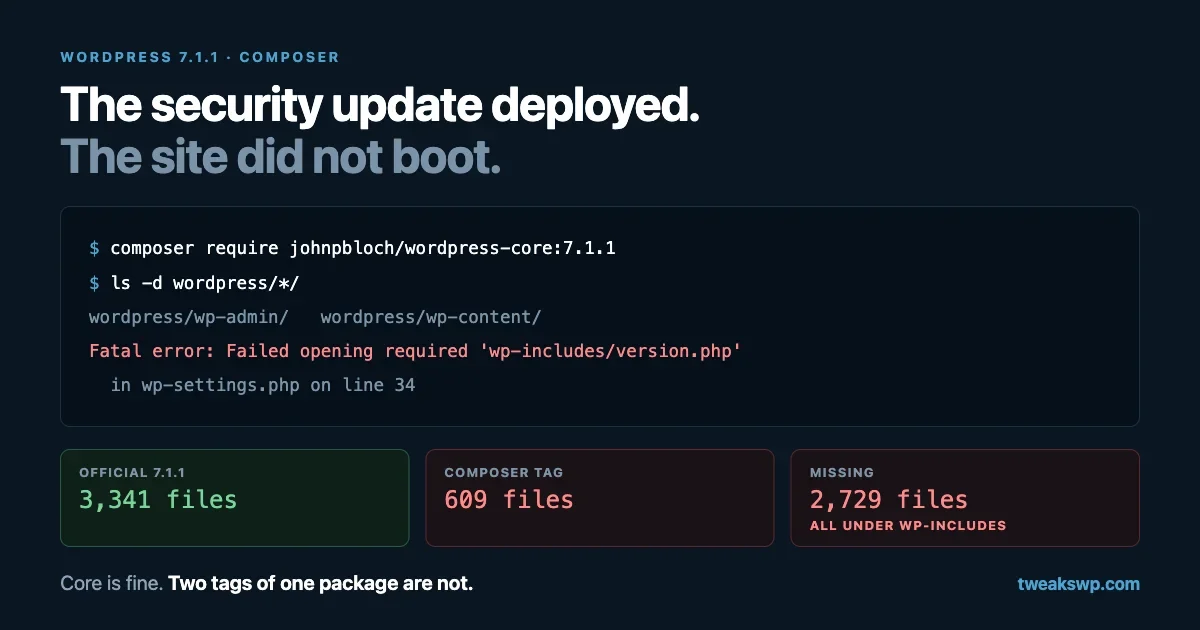
The johnpbloch/wordpress-core package is the most widely used way to install WordPress core with Composer. Its 7.1.1 tag, published on 17 September, contains only two top-level directories. We installed it to check rather than taking anyone’s word for it:
$ composer require johnpbloch/wordpress-core:7.1.1
$ ls -d wordpress/*/
wordpress/wp-admin/
wordpress/wp-content/
No wp-includes. The root files are all present, including wp-settings.php, which is what produces that particular error: line 34 of wp-settings.php is require ABSPATH . WPINC . '/version.php';, and the directory it points at does not exist.
Three more things we confirmed, because the boundaries of a bug are the useful part:
- 7.1.0 is fine. The same install command with
7.1.0produceswp-admin,wp-contentandwp-includes. - 7.0.5 is affected too. The 7.0.5 tag, published in the same batch, has the same two directories. If you are on the 7.0 branch and took the security update, you are in the same position.
- The other core package is fine.
roots/wordpress-no-contentat 7.1.1 installs a completewp-includeswith 292 entries.
So this is not a problem with WordPress 7.1.1 itself. The release is fine. Two tags of one Composer mirror of it are not, and the issue for it has been open since the day of the release.
Confirm it in one command
From your web root, on the server or in your build output:
test -f wp-includes/version.php && echo present || echo MISSINGIf that says MISSING, you have this bug and not something else. It is worth being this specific, because “white screen after an update” has a dozen causes, and the fix for each is different. A missing directory is unambiguous.
If you have several sites, run it across all of them before you start fixing anything:
for d in /var/www/*/current; do
  printf '%-40s %s\n' "$d" "$( [ -f "$d/wp-includes/version.php" ] && echo ok || echo MISSING )"
done
Get back online
Pick whichever of these matches how you deploy. All three take about two minutes.
Option 1: roll back to the last good tag
composer require johnpbloch/wordpress-core:7.1.0 --update-with-dependencies
ls -d wordpress/wp-includes/   # confirm before deploying
This gets the site running immediately. Understand what it costs you: 7.1.0 is the release that 7.1.1 fixed, so you are back on vulnerable core. Treat it as a holding position for hours, not weeks, and do the rest of this section today.
Option 2: restore the release from an untouched source
If you would rather stay on 7.1.1, take core from WordPress.org directly and leave Composer to manage everything else:
wp core download --version=7.1.1 --force --skip-content--skip-content leaves wp-content alone, so your themes, plugins and uploads survive. This is the fastest way to be both online and patched, and it is the option we would pick on a production site right now.
Option 3: switch packages
The Roots package is a drop-in alternative that is not affected:
composer remove johnpbloch/wordpress-core
composer require roots/wordpress-no-content:7.1.1
Switching mid-incident means changing your install paths and testing your deploy, so this is the calm-Monday option rather than the right-now one. Worth a note in your backlog either way.
After any of the three
wp core version                 # confirms what is actually installed
wp core verify-checksums        # compares core files against WordPress.org
curl -sI https://example.com/ | head -1
Checksum verification is the step people skip. It is the only one that tells you no other file went missing in the same deploy.
Proving it is the package and not the release
Worth doing once, both because it settles the question and because the technique is reusable the next time a build produces something strange.
Download the official release into a temporary directory. WP-CLI verifies the archive’s hash as it goes, so you know the comparison baseline is genuine:
$ wp core download --version=7.1.1 --path=/tmp/wp711 --skip-content
Downloading WordPress 7.1.1 (en_US)...
md5 hash verified: 89482586a9f092a4888ac29d2f769834
Success: WordPress downloaded.
Then count, and diff the file lists:
$ find /tmp/wp711 -type f | wc -l
3341

$ find wordpress -type f -not -path "*/wp-content/*" | wc -l
609

$ diff <(cd /tmp/wp711 && find . -type f -not -path "./wp-content/*" | sort) \
       <(cd wordpress  && find . -type f -not -path "./wp-content/*" | sort) \
  | grep -c '^<'
2729
Two thousand seven hundred and twenty-nine files present in the official release and absent from the package, and every one of them under wp-includes. The first few give the flavour:
< ./wp-includes/abilities-api.php
< ./wp-includes/admin-bar.php
< ./wp-includes/ai-client.php
< ./wp-includes/class-wpdb.php
< ./wp-includes/functions.php
That is the entire engine of WordPress. Nothing under wp-admin or the root files is missing, which is why the site fails at the first require rather than doing something stranger and harder to diagnose.
Keep this technique. “Diff the artifact against a trusted copy and count” answers most build mysteries faster than reading logs does.
Why this one matters more than an ordinary broken package
A package that fails to install is an inconvenience. A package that fails to install on the security release is a different shape of problem, because of what the release contains and how the rest of the ecosystem behaves around it.
WordPress 7.1.1 carries 11 security fixes. Two are worth naming. Patchstack calls the first Click2Shell: a crafted link that a logged-in administrator clicks, which chains into installing a theme and from there into code execution. The second is an unauthenticated stored cross-site scripting issue in wpautop(), the function that turns line breaks into paragraphs on nearly every site. We took the first one apart in a separate piece on how a jQuery selector became a remote shell.
Now look at the sequence a Composer-managed team actually lives through:
- The release lands, and everyone says update immediately.
- Your pipeline updates, and the site fatals.
- You roll back to be online, which puts you back on the vulnerable version.
- The incident is now “our deploy broke”, and the security update quietly stops being today’s job.
Step four is the dangerous one. The site is up, the alerts are quiet, and the actual exposure is unchanged. If you rolled back this week, put a reminder in for tomorrow morning, not for “when the package is fixed”.
There is a related timing detail worth knowing while you plan. Plugin and theme releases on WordPress.org now sit in an automated security review before they are distributed, which we covered in the release cooldown piece, and sites check for updates on a twice-daily schedule. None of that applies to core minor releases, which is why core reaches sites quickly, but it does apply to the plugin fixes that usually follow a core security release. “Patched upstream” and “patched on your site” are separated by hours in the best case.
Make the next one fail at build time
The fix for this class of problem is not vigilance. It is a check that runs every time, in the place where failure is cheap.
A post-install guard in composer.json
Composer will run a script after every install and update. Two lines turn a silent bad package into a failed build:
{
  "scripts": {
    "post-install-cmd": [
      "@verify-core"
    ],
    "post-update-cmd": [
      "@verify-core"
    ],
    "verify-core": [
      "test -f wordpress/wp-includes/version.php || (echo 'Core install is missing wp-includes' && exit 1)"
    ]
  }
}
Adjust the path to your install directory. A non-zero exit fails the composer step, which fails the build, which means the artifact never reaches a server.
A slightly stronger version
Checking one file proves the directory exists. Checking a handful of load-bearing files across the tree catches a partial extract too:
#!/usr/bin/env bash
# bin/verify-core.sh
set -euo pipefail
ROOT="${1:-wordpress}"

for f in \
  wp-includes/version.php \
  wp-includes/functions.php \
  wp-includes/class-wpdb.php \
  wp-admin/admin.php \
  wp-settings.php
do
  [ -s "$ROOT/$f" ] || { echo "FAIL missing or empty: $f"; exit 1; }
done

php -r 'require "'"$ROOT"'/wp-includes/version.php"; echo "core ", $wp_version, " looks complete\n";'
That last line is the part worth keeping: it reads the version out of the file you just installed, which is the closest thing to “this is really WordPress” that you can assert without a database.
In CI
If you build artifacts in CI, run the same script there, before the artifact is uploaded:
- name: Install dependencies
  run: composer install --no-dev --prefer-dist --no-interaction

- name: Verify core is complete
  run: ./bin/verify-core.sh wordpress
A build that fails is a deploy that never happens. That is the entire goal.
And a check after deploy
Build-time checks cannot see a release that half-transferred. One request after the deploy finishes closes that gap:
code=$(curl -s -o /dev/null -w '%{http_code}' https://example.com/)
[ "$code" = "200" ] || { echo "Post-deploy check failed: HTTP $code"; exit 1; }
Wire that to whatever you use for rollback. Most deploy tools can run it as the last step and revert the symlink automatically when it fails.
The wider point about vendored core
Managing core with Composer is a good practice and we would not tell anyone to stop. It gives you a lockfile, reproducible builds and a review trail for the thing that runs everything else. It also introduces a step that is easy to forget: between WordPress.org and your server sits a third party who generates that package.
That party is doing you a favour, usually for free. The package is generated by automation, and automation has bad days. This particular bad day put two tags into the world that install a WordPress which cannot boot.
So the useful question is not “should we trust it”, which is unanswerable, but “what do we assert before it reaches production”. For core, that is a short list:
- The install has a complete
wp-includes. - The version it reports is the version you asked for.
- Core files match WordPress.org checksums.
- The site returns 200 after the deploy.
Each of those is one line. Together they turn this week’s incident into a failed build with a clear message.
The same reasoning applies to everything else your pipeline pulls in, which is a longer conversation we started in our piece on supply chain risk in WordPress dependencies. If you are still deciding how to structure environments around all this, the wp-config guide for dev, staging and production covers where these checks belong.
Two places the check needs repeating
Docker builds. If core is installed during an image build, the guard belongs in the Dockerfile, as its own layer, so the build stops rather than producing an image that looks fine until it runs:
RUN composer install --no-dev --prefer-dist --no-interaction \
 && test -f /var/www/html/wp-includes/version.php \
 || (echo "core install incomplete" && exit 1)
There is a second trap here. If a previous build cached a layer that installed a good version, a later build can appear to succeed while shipping something you did not test. When you are debugging anything that smells like a packaging problem, rebuild with --no-cache before concluding anything.
Anything that syncs files. Deploys that rsync a built directory to a server can transfer partially when a run is interrupted. The post-deploy HTTP check above is what catches that, and it is the reason to keep it even after the build-time guard exists. One checks what you built; the other checks what arrived.
What your monitoring should have said first
If the first report of this came from a person, that is worth ten minutes of attention on its own, because this failure is as loud as failures get: every URL, including the admin, returning a fatal.
Three cheap things catch it:
- An uptime check that requests a real page, not just the TCP port or a static file. A fatal returns HTTP 500 with a body, so any check that asserts a 200 and a known string in the HTML will fire.
- An alert on PHP fatal errors in the log. One line in your log shipper, matching
PHP Fatal error, gives you the reason in the alert rather than sending you looking for it. - A deploy-time check in the pipeline, as above, which is the only one that prevents the outage instead of reporting it.
If you run several sites and only have appetite for one of the three, take the last one. Detection is useful, prevention is cheaper, and in this case prevention is a single test -f.
Questions people are asking
Is my data affected?
No. Nothing touched the database, and wp-content is intact: themes, plugins and uploads are where they were. This is a missing-files problem, and restoring the files restores the site. Do not restore a database backup for this.
Can I just wait for WordPress to auto-update?
No, for two reasons. Core cannot run at all, so nothing in WordPress is executing to perform an update. And on a Composer-managed site, core is a dependency you deploy rather than something the site updates in place. The fix comes from your pipeline either way.
Is WordPress 7.1.1 itself broken?
No. The official release is complete, as the file count above shows. Sites that update through the dashboard, WP-CLI or a host’s updater are unaffected. This is specific to two tags of one Composer package.
Should I stop managing core with Composer?
Not on the strength of one incident. You would be trading a lockfile, reproducible builds and reviewable dependency changes for the ability to avoid a bad tag once. Add the guard, keep the workflow.
How will I know when it is fixed?
The tags get rebuilt and a normal composer update brings a complete install. Until then, run the one-line check after the update and before the deploy, which is exactly what the post-install script does for you.
If you manage sites for clients
A few practical notes for anyone doing this across a fleet this week.
Check before you are told. The failure is total: every page, including the admin. Clients notice, and they notice at the worst time. Run the loop from earlier across every site you manage and know your own number before the first email arrives.
Say what happened plainly. “The security update itself is fine. The packaging of it that our deployment system uses was published incomplete. We restored the site within minutes and it is now running the patched version.” That is accurate, it does not blame WordPress, and it does not pretend the deploy went well. Our notes on updating WordPress safely cover the wider process around this.
Write down which sites you rolled back. This is the one that bites. Rolled-back sites look healthy and are not patched. A list with two columns, site and current core version, is enough. Generate it rather than maintaining it:
for d in /var/www/*/current; do
  printf '%-40s %s\n' "$(basename "$(dirname "$d")")" "$(wp core version --path="$d" 2>/dev/null || echo unknown)"
done
Watch the issue rather than retrying blindly. When the tags are rebuilt, the fix arrives as a normal composer update. Until then, repeated updates just reinstall the same broken tag, and each attempt is another outage if it goes out automatically.
The timeline, for your incident notes
Worth recording while it is fresh, because this is the kind of thing that gets misremembered as “the 7.1.1 update broke our sites”, which is not what happened.
When | What |
|---|---|
17 September | WordPress 7.1.1 released with 11 security fixes, including Click2Shell and the |
17 September, about 22:35 UTC | The 7.1.1 and 7.0.5 Composer tags are published, both without |
Within the hour | An issue is opened against the package describing exactly this |
Days later | The issue is still open, with the discussion running on it, and the tags unchanged |
Two details in that table are the ones to carry forward. The gap between the release and the broken packaging was minutes, not days, so a team that deploys security releases promptly was the most likely to be hit. And the report existed almost immediately, which is a reminder that when a deploy fails on the day of a release, checking the package’s issue tracker is faster than debugging your own pipeline.
Add a line to your runbook: on a core security release, deploy to staging first, run the file check, then promote. That is fifteen extra minutes on the day and it converts this class of incident into a non-event.
The checklist
- Confirm the cause:
test -f wp-includes/version.php. - Get online: download core with
--skip-content, or pin 7.1.0 as a short-term holding position. - Verify:
wp core version, thenwp core verify-checksums. - If you rolled back, schedule the real update for tomorrow and write it down.
- Add the post-install guard to
composer.jsontoday. - Add the same script to CI so a bad package fails the build.
- Add a post-deploy HTTP check wired to rollback.
- Across a fleet, produce the site-and-version list and keep it until every row says 7.1.1.
The uncomfortable part of this incident is that it punished the teams doing the most disciplined thing: managing core as a dependency, deploying it through a pipeline, and applying security releases the day they land. The lesson is not to stop doing any of that. It is that a pipeline without assertions is just a faster way to ship whatever you were given.
Plugins we build and run
We maintain these ourselves, which is why we can support them on your site.
- BuddyNextThe self-hosted community engine for WordPress
- BuddyXFree community theme, Pro when you outgrow it
- ReignPremium community theme. Add pieces, build anything
- JetonomyCommunity forum and Q&A for WordPress
- EventonomyEvents and RSVPs for WordPress communities
- LearnomyCourses and learning communities on WordPress
- ListoraDirectories and listings your members can browse
- SnipShareCode sharing built for developer communities
- WB Ad ManagerAd placements that turn traffic into revenue
- WP Career BoardA job board your community actually uses
- WP Sell ServicesSell services with offers, orders, and payouts
- MediaVersePhotos, video, and media albums for members
- WB GamificationPoints, badges, and rewards that keep members active
- Product RoadmapPublic roadmaps with voting your users trust