Partner Enablement Training with Learnomy: How to Build a Network That Stays Consistent

Updated September 2026.
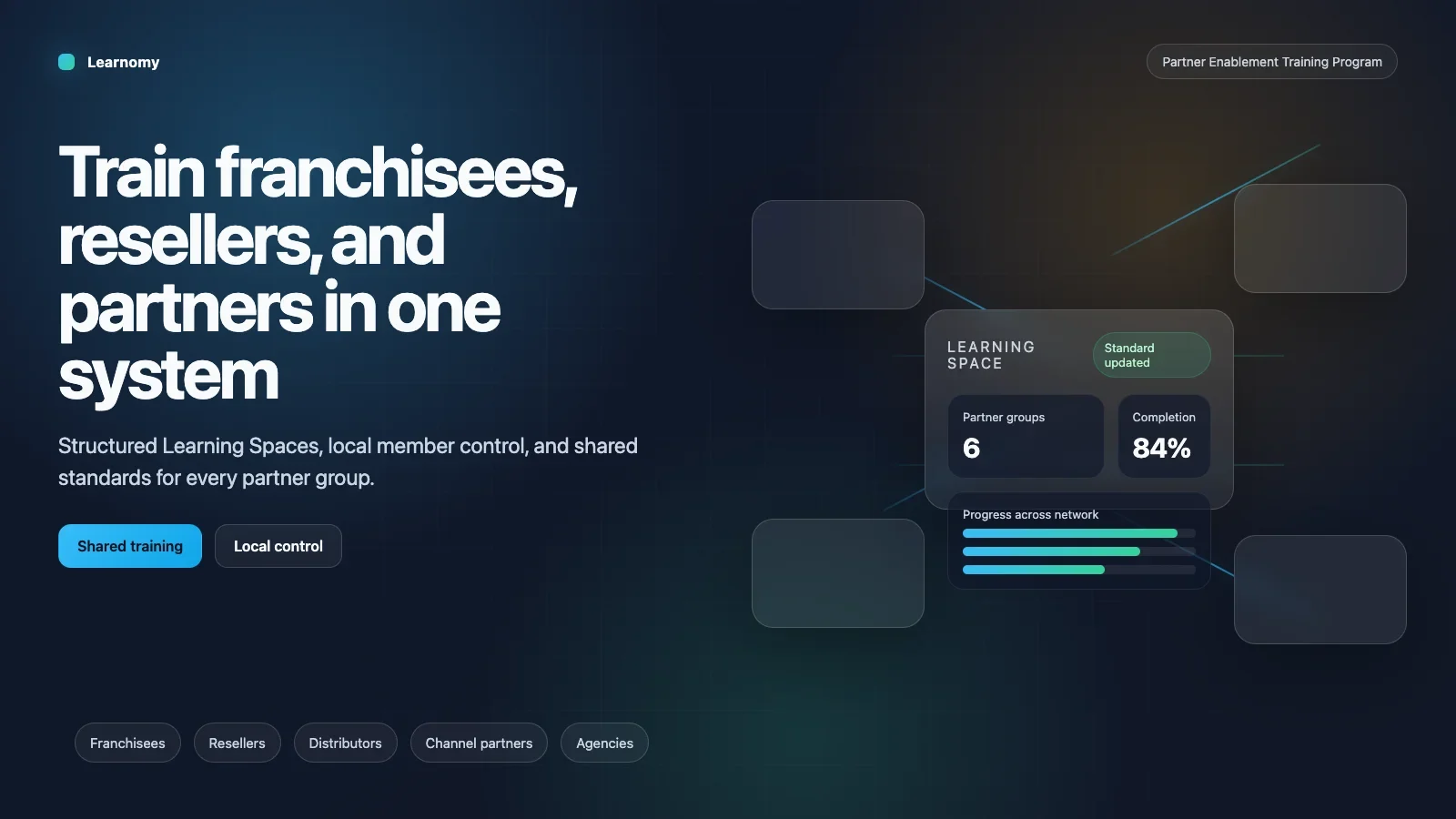
If you are building training for franchisees, resellers, distributors, channel partners, or implementation partners, the system has to do more than hold content. It has to keep the network aligned while letting local people manage their own work. That is the part most teams underestimate at the beginning, because training looks simple when you only have one business unit, one manager, and one spreadsheet. The moment you add a second location, a second owner, or a second layer of access, the whole thing changes shape.
That is the problem this cluster solves.
Partner enablement is the larger idea. The practical answer is a private training portal built around Spaces, learning paths, roster control, and reporting. Learnomy gives you that structure without turning head office into the place where every small change has to be processed by hand. That is the difference between a content library and a training system that can survive growth.
This hub is the map. The individual posts are the detailed routes.
In this guide
- What partner enablement is really about
- Why the portal comes first
- How the six posts fit together
- What Learnomy contributes
- What the network needs to stay sane
- How the portal should feel to the learner
- How the portal should feel to head office
- Designing the roster and access model
- Reporting that people actually trust
- Certifying partner completion
- Running a multi-region or multi-language network
- How to roll out the system
- What a realistic rollout timeline looks like
- Common mistakes to avoid
- Keeping the system alive after launch
- Who owns what
- Short checklist before you launch
- Why this matters for growth
- The business outcome you are really buying
- How to brief the internal team
- More on Learnomy for training
- Frequently Asked Questions
- Final thought
What partner enablement is really about
People often hear the term partner enablement and think it means course selling or generic onboarding. It does not. It means you are teaching external businesses how to represent your brand, your process, and your promise without letting every location invent its own version of the truth.
That includes franchisees, resellers, distributors, channel partners, implementation partners, and agencies. They are not employees, but they still need standards. They need training that is consistent, a portal that is private, and a way to know what matters now and what comes next.
That is why this topic is operational before it is educational. You are not only asking what content should be taught. You are asking who can see it, who owns the roster, who sees the network, and how you keep the whole thing from turning into a manual support job.
That is where Learnomy becomes useful. Not because it is a place to upload videos, but because it can act like the operating layer for the partner network.
Why the portal comes first
The biggest mistake teams make is starting with content. They write a lesson, upload a video, and assume they have started a program. They have not. They have only started a folder.
The first decision is the container. Where do partners log in? What do they see? Who manages the roster? What stays local? What does head office see? If those answers are vague, the setup becomes messy as soon as the network grows.
A portal is not only a front end. It is a set of rules. A good portal tells the business who belongs where, who owns what, and what a user is allowed to do without asking for permission every time.
The cluster starts there because every other decision depends on it. If the portal is wrong, the rest of the structure will always feel slightly off even when the content is good.
How the six posts fit together
The six posts are not random supporting articles. They are the stack that makes the model workable from start to finish.
What Is Partner Enablement? defines the concept and shows why the term includes franchisees, resellers, distributors, channel partners, and implementation partners. It is the idea piece, the one you send to someone who needs the broader frame before they think in features.
How to Build a Partner Training Portal with Learnomy is the practical setup guide. It shows the private portal, the Space model, the learning path, roster import, reporting, and white-label structure.
How to Train Franchisees Online with Learnomy narrows the story to the franchise case. That matters because franchises have one of the clearest use cases for consistency, local ownership, and brand protection.
How to Organize Multiple Franchise Locations in One Training System explains the network view and the regional layer. It is the article for operators who are already past the first few locations and are now thinking about scale.
How to Give Each Partner Their Own Training Space focuses on separation, privacy, and local ownership. This is the piece that keeps the system clean once more than one partner is active.
How to Track Partner Training Progress Across a Network covers reporting, exports, oversight, and what head office should do with the data once training is running.
Read together, those six posts answer the whole question: not just what the platform is, but how it stays usable once the network has real scale and real pressure.
What Learnomy contributes
Learnomy matters here because it separates structure from content. Most training tools are strong at one of those things and weak at the other. They can host material, but they do not organize the network cleanly. Or they can organize people, but they do not make the learning sequence easy to manage.
Learnomy gives you the pieces that partner enablement actually needs:
- a private portal for controlled access
- Spaces for each partner or location
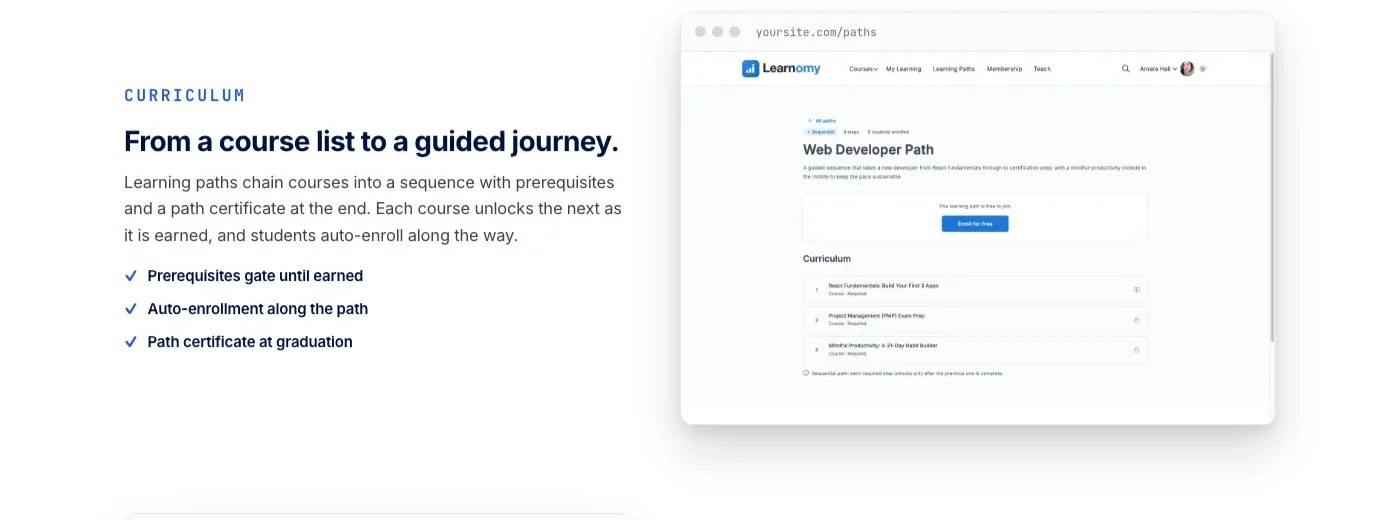
- learning paths for a shared sequence
- CSV roster import for real-world lists
- reports for head office visibility
- white-label branding for one network identity
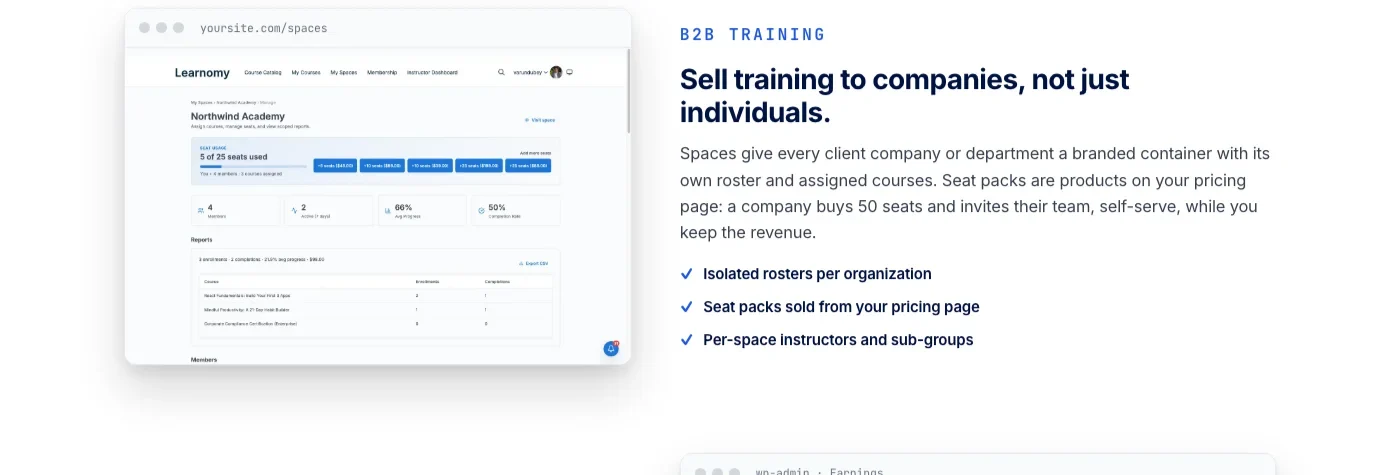
Each one solves a different operational problem. Together they give you a training model that can scale without losing the plot. The feature list should not be read as a bag of tools. It should be read as a system design.
What the network needs to stay sane
A healthy partner network needs a few things at the same time. It needs local ownership so the people closest to the work can manage it. It needs central standards so the brand does not drift. It needs visibility so head office can see what is happening. And it needs privacy so one partner does not end up inside another partner’s business.
Those requirements are easy to say and hard to maintain without software that understands the shape of the problem.
That is why the words matter. If you call everything a course, people start thinking in isolated lessons. If you call everything a resource, the system feels passive. If you call everything a member, you blur the difference between partners, staff, and managers. The vocabulary tells people how to think about the system, and the system behaves accordingly. Get the naming wrong early and every later conversation about the network inherits the same confusion, since people will keep arguing past each other using words that mean different things to each of them.
This cluster tries to use plain language for that reason. A Space is a Space. A learning path is a sequence. A report is a report. A roster is a roster. Simple words keep the process legible.
How the portal should feel to the learner
The learner should not feel like they have entered a giant LMS. They should feel like they have entered the right place for their job. That is a small difference on paper and a large difference in practice.
When a partner logs in, they should see only the training that belongs to them. When a local manager logs in, they should see the people they are responsible for. When head office logs in, they should see the rollup, not a random pile of unrelated tasks.
That clarity is what makes the system feel trustworthy. No noise, no accidental overexposure, no support tickets caused by the wrong person seeing the wrong roster.
That is also why the portal should stay private by default. The network is not a public audience. It is an operating environment.
How the portal should feel to head office
Head office does not need more visibility than it can use. It needs the right visibility. The point of reporting is not to create another dashboard that looks useful and still requires manual interpretation. The point is to make the state of the network obvious enough that leaders can act without chasing every branch.
That means the system should answer practical questions quickly. Which locations are behind? Which partners have not started? Which areas need attention before launch? Which team is moving fastest? Which region is drifting?
If the report can answer those questions directly, it saves time and it saves arguments. If it cannot, people go back to email, spreadsheet exports, and guesses.
Designing the roster and access model
Before any content gets written, someone has to decide who plays which role in the network, because the roles determine what each person is allowed to see and touch. A typical partner network settles into four layers: the partner admin who manages their own location’s people, the local manager who tracks day-to-day completion, the regional lead who oversees a cluster of partners without owning any single one, and head office, which needs the rollup rather than the detail.
Each layer needs a different view of the same data. A partner admin who can see another partner’s roster is a privacy problem waiting to surface, usually at the worst possible time, like a dispute or an audit. A regional lead who can only see their own single location cannot actually do the regional job they were hired for. Getting this layering right before the first Space is built saves a rebuild later, because retrofitting access boundaries onto a network that has already grown used to loose permissions is a slow, political process.
Scoped managers are the detail that makes this workable in practice rather than just on a whiteboard. Instead of a single admin account that can see and edit everything, a scoped manager role can be limited to the partners or locations they actually run. That distinction matters once the network passes a handful of locations, because at that point nobody wants, or should have, a single login that touches the entire business by default.
Offboarding deserves the same attention as onboarding. Partners leave networks, contracts end, and locations close. When that happens, access needs to be revoked cleanly without deleting the historical record of what that partner completed. A terminated partner should disappear from active rosters immediately while their completion history stays intact for any compliance or dispute review that comes later. Building that expectation into the rollout plan from day one avoids an awkward scramble the first time a partner relationship actually ends.
Reporting that people actually trust
Reporting only earns trust when it answers questions people are already asking, not when it decorates a dashboard with numbers nobody requested. For a partner network, the handful of metrics that matter are completion rate by Space, time from enrollment to completion, last-activity date per learner, and a simple at-risk flag for anyone who has stalled past a set number of days.
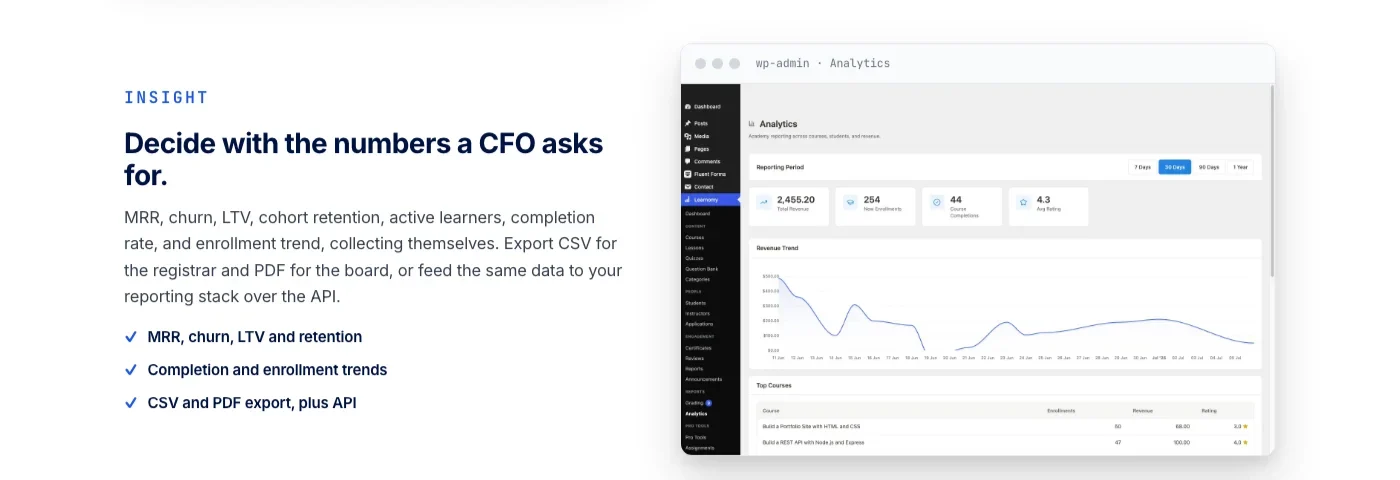
Completion rate on its own can be misleading. A partner at ninety percent completion after two years tells a very different story than a partner at ninety percent after two weeks. Pairing the completion percentage with a timestamp turns a vanity number into an operational signal head office can actually act on.
Export cadence matters more than most teams plan for upfront. Some businesses need a weekly CSV pulled into a broader operations dashboard; others only check in monthly ahead of a leadership meeting. Whichever cadence fits the business, decide it before launch rather than after the first person asks for a number nobody has been tracking. A report that has to be manually reconstructed on request is not a reporting system, it is a favor someone in operations keeps doing by hand. The underlying discipline is the same one that matters in any training program: knowing exactly who is progressing and who has quietly stalled, before it becomes a renewal-season surprise.
Certifying partner completion
For a lot of partner programs, a completed course is not just a learning milestone, it is a contractual one. Franchise agreements often reference required training as a condition of opening or renewing. Reseller agreements sometimes tie certification to which price tier or deal registration a partner can access. When that is true, a completion record has to hold up as evidence, not just as a green checkmark in an admin screen.
That is where certificates on completion earn their place in the structure. A certificate gives the partner something to keep, a manager something to file, and head office something to point to if a dispute ever comes up about whether required training actually happened. It turns a soft claim, “we trained them,” into a specific, dated, retrievable record. A credential worth keeping does more work than the certificate PDF itself suggests, well beyond just proving compliance.
The practical rule is to decide upfront which modules are certificate-worthy and which are informational. Not every lesson needs a certificate attached; treating everything as equally critical dilutes the ones that actually matter for compliance or contract purposes. Reserve certificates for the training that someone, somewhere, might eventually need to prove happened.
Running a multi-region or multi-language network
Partner networks rarely stay inside one country or one language for long, and the structure has to hold up once that happens. The core mistake to avoid is treating translation as a content problem alone. It is also a structural one: a regional lead in one market needs to see their own partners without wading through a roster full of names and locations from a market they do not manage.
Spaces and scoped access solve most of this before translation even comes into the conversation. Group partners by region first, then decide which content needs local variants. Some training, brand standards, safety policy, core process, should probably stay identical across every market so the promise to the customer does not shift depending on which country they are in. Other training, local compliance rules or region-specific procedures, genuinely needs to differ, and the structure should make room for that without duplicating the entire learning path per region.
Reporting needs the same regional lens. A head office rollup that blends every market into one number hides more than it reveals. A regional breakdown, even a simple one, tells leadership which markets are moving and which ones need attention, which is a far more useful signal than a single global completion percentage.
How to roll out the system
If you are implementing this in a real business, do not try to build the full network at once. Start with one partner. One Space. One learning path. One roster owner. One report view. That is enough to prove the model.
Once the first location works cleanly, add the second. Once the second works, add the regional layer if the structure needs it. That is the point where the system starts to feel like a living operation instead of a project with a launch date.
Most teams fail when they try to make the whole network perfect before any of it is real. The right move is to make the first slice boringly correct and then repeat it.
The best implementation order is simple. First, decide the portal boundary. Second, define the first Space. Third, map the learning path. Fourth, prepare the roster import. Fifth, turn on the reporting view. Sixth, apply the white-label identity. That order works because each step depends on the one before it. Teams often want to start with the look and feel, which is understandable, but structure always matters more than style. A clean system with plain branding is better than a beautiful system that does not behave correctly. Once the foundation is stable, the presentation layer can be polished without pulling focus away from the rules that make the network work.
What a realistic rollout timeline looks like
Teams routinely underestimate how long a proper partner enablement rollout takes, mostly because the software setup itself is fast and the organizational decisions around it are not. Standing up a private portal and one Space can happen in an afternoon. Deciding who owns the roster, which content is mandatory versus optional, and how disputes about completion get resolved takes considerably longer, because those are business decisions, not configuration steps.
A workable timeline for a first partner or first location usually runs two to four weeks: a week to define the roles and access model, a week to build the learning path and import the roster, and one to two weeks running it live with a small group before expanding. Adding the second and third partners moves faster once the pattern is proven, often down to a few days each, because the decisions from the first rollout carry forward instead of being renegotiated.
The regional layer, if the network needs one, is worth adding only after several partners are live and the head office rollup has real data to organize. Building a regional view against a network of one or two partners is solving a problem that does not exist yet, and it tends to add complexity the team then has to maintain without getting any benefit from it.
Common mistakes to avoid
One mistake is to treat partner enablement as a course library. Another is to centralize every local change so head office becomes a bottleneck for tasks that should be routine. Another is to give every partner the same access without separating the space, which is how one partner ends up seeing another partner’s roster. Another is to publish reports that no one trusts because the underlying structure is messy. A fifth mistake, easy to miss early on, is skipping the offboarding plan and only thinking about it once the first partner actually leaves.
Those mistakes all point to the same root issue: the model was not designed clearly enough before the first Space went live. The fix is always structural, not a better piece of content or a nicer-looking dashboard.
Keeping the system alive after launch
After launch, the right question is not “did we publish it?” The right question is “did the network use it the way we expected?” Watch the Spaces. Watch the roster updates. Watch the report. Watch for repeated gaps. That is where the real learning happens.
Do not treat the portal as a one-time project. Training networks change, partners change, rules change, and the system should be built so those changes can happen without rethinking the whole structure every time. If the page still makes sense after the first launch, the second launch, and the next network change, it is doing the job you needed it to do.
Who owns what
In the ideal model, head office owns the standards. Local managers own the roster. Regional leads own the group view where the business needs it. The system administrator keeps the structure clean. Those responsibilities should be visible from the beginning so nobody has to guess who should act when something changes.
That is what makes the cluster operational rather than purely descriptive. It explains not just what the system is, but how responsibility should be divided inside it.
Short checklist before you launch
Before launch, make sure the portal is private. Make sure the first Space is scoped correctly. Make sure the learning path is in the right order. Make sure the roster import matches the real business list. Make sure the report view is useful to head office and local managers. Make sure the branding reflects the network. If all of that is true, the system is ready enough to go live.
You do not need perfection to start. You need a clean enough structure that the first users can make sense of it without help.
Why this matters for growth
Smaller networks can get away with informal processes. Bigger networks cannot. A business with twenty partners or twenty locations needs a repeatable model. Otherwise every new branch makes the training setup more fragile, not less.
The system should get easier to run as the network grows. If it gets harder every time a new person joins, the design is wrong. The right goal is not just to publish content; it is to build a framework that still makes sense after the fiftieth hire, the tenth location, and the next regional rollout.
The business outcome you are really buying
When a company buys a partner training system, it is really buying continuity. It wants the network to keep behaving the same way even when people change, locations grow, and the business gets more complicated. That is a better way to describe the outcome than saying we implemented training.
Learnomy fits that goal because the structure is designed around the business relationship, not around a generic list of lessons. That is what makes the model durable.
How to brief the internal team
When you brief the internal team, start with the problem, not the tool. Say that the network needs a training model that keeps external businesses aligned while still giving local people room to manage their own roster and progress. That is the actual problem. The site is the answer.
If you lead with features, the team may think in screens. If you lead with the problem, the team thinks in process, and process is the right level for this kind of site.
Key takeaways
- Start with the portal boundary, not the content. Content only works once the container, who sees what, is defined.
- A Space per partner, a shared learning path, CSV roster import, and reporting are the four pieces that make the model scale.
- Reserve certificates for compliance-critical or contract-critical modules, not every lesson.
- Roll out one partner and one Space first. Prove the model before adding the regional layer.
- Head office should own standards and see the rollup. Local managers should own the day-to-day roster.
Frequently Asked Questions
What is partner enablement training?
It is the training and access system a company builds for the external businesses that represent it, franchisees, resellers, distributors, channel partners, and implementation partners, so the network stays consistent instead of drifting into separate versions of the same brand.
Do all partners need the same training?
No. The core standards should be shared, but the sequence and depth often differ by partner type. A franchisee needs operational and brand training a reseller does not, while a reseller needs product and sales training a franchisee does not.
Who should manage the roster, head office or the local partner?
Local managers should own their own roster day to day. Head office should own the standards and see the network rollup. Centralizing every roster change at head office creates a bottleneck that gets worse as the network grows.
How many partners should be live before adding a regional layer?
There is no fixed number, but most networks feel the need once a single person can no longer track every partner individually, often somewhere between five and fifteen active locations depending on how much attention each one needs.
What happens to a partner’s training record when the partnership ends?
Access should be revoked so the former partner can no longer log in, while the completion history stays available to head office for compliance or dispute purposes.
Should certificates be required for every training module?
No. Reserve certificates for modules tied to compliance, contract requirements, or brand standards. Treating every lesson as certificate-worthy dilutes the ones that actually need to hold up as proof later.
How do you handle partners operating in different countries?
Group them by region using Spaces first, then decide which content should stay identical everywhere, like brand standards, and which content genuinely needs local variants, like regional compliance rules.
What is the biggest sign the structure was designed wrong?
Head office gets pulled into routine tasks that should be handled locally, or one partner can see data that belongs to another partner. Both point to a permissions model that was not scoped tightly enough from the start.
Does a small network, under five partners, need this much structure?
Not all of it at once. A single Space, one learning path, and basic reporting cover most small networks fine. The roster boundaries, regional layer, and certificate rules matter more as the number of partners and the stakes attached to their training both grow.
More on Learnomy for training
Partner enablement is one side of the same structure. If you are training your own staff rather than external partners, the setup looks similar but the audience changes: see how to build an employee onboarding training platform with Learnomy for the internal-hire version of this model.
And if you are still comparing platforms before committing to a structure at all, our Kajabi alternatives comparison looks at where a course-and-community platform like this fits against hosted options.
Final thought
The best partner training systems do not feel impressive after five minutes. They feel reliable after five months. That is what you want here: a system that quietly keeps the network aligned even when staff changes, locations grow, and the people in head office are too busy to babysit every update.
The real output of this cluster is not just six posts. It is a workable model for how partner training should be organized in the first place, one that a business can hand to a new operations lead on their first week and expect them to understand within an hour, not a quarter. Clear boundaries, one standard, local ownership, and a report that tells the truth: keep those four ideas intact and the whole cluster stays coherent even as the network grows from one partner to fifty.
Build the portal this cluster describes
Private Spaces, learning paths, CSV roster import, and reporting your head office can trust, all in one platform you own.
Plugins we build and run
We maintain these ourselves, which is why we can support them on your site.
- BuddyNextThe self-hosted community engine for WordPress
- BuddyXFree community theme, Pro when you outgrow it
- ReignPremium community theme. Add pieces, build anything
- JetonomyCommunity forum and Q&A for WordPress
- EventonomyEvents and RSVPs for WordPress communities
- LearnomyCourses and learning communities on WordPress
- ListoraDirectories and listings your members can browse
- SnipShareCode sharing built for developer communities
- WB Ad ManagerAd placements that turn traffic into revenue
- WP Career BoardA job board your community actually uses
- WP Sell ServicesSell services with offers, orders, and payouts
- MediaVersePhotos, video, and media albums for members
- WB GamificationPoints, badges, and rewards that keep members active
- Product RoadmapPublic roadmaps with voting your users trust