Best LMS with Student Progress Tracking in 2026
Compare the best LMS with student progress tracking in 2026, including Learnomy, LearnDash, Tutor LMS, LifterLMS, and MasterStudy LMS, for instructor dashboards and student-facing progress.
Most LMS comparisons ask the same question: which plugin builds a course fastest. That is not the question that decides whether a program actually works. The question that matters once real students are enrolled is whether anyone can see how they are doing while there is still time to do something about it. Can a student open their own dashboard and see exactly how far through the material they are, not just a list of course titles they clicked once. Can an instructor open a class of forty learners and spot the six who stopped moving nine days ago, without opening forty individual profiles one at a time. Can a program director pull a cohort completion rate for a board report without exporting three spreadsheets and reconciling them by hand. This guide compares the WordPress LMS options built to answer those questions, starting with Learnomy, a complete learning platform where per-lesson completion, instructor visibility, and exportable reporting sit in the core product, then working through the established names that show up in every shortlist: LearnDash, Tutor LMS, LifterLMS, and MasterStudy LMS.
In This Guide
- What to Look for in an LMS with Student Progress Tracking
- 1. Learnomy: Progress Visibility Built Into the Core Platform
- 2. LearnDash
- 3. Tutor LMS
- 4. LifterLMS
- 5. MasterStudy LMS
- Progress Tracking Compared at a Glance
- How to Choose an LMS for Progress Visibility
- Common Mistakes When Evaluating Progress Tracking
- Frequently Asked Questions
Key Takeaways
- Progress tracking is not one feature. It is three separate views of the same data: what the student sees, what the instructor sees, and what a program director can export for a report.
- Learnomy builds per-lesson completion, a weighted gradebook with class average and pass rate at a glance, an essay-grading queue, and sequenced learning paths into the core platform, so an instructor is not stitching together a separate reporting plugin to answer a simple “who is stuck” question.
- LearnDash, Tutor LMS, LifterLMS, and MasterStudy LMS each track completion in their own way, and each pushes deeper cohort-level reporting into an add-on rather than the base plugin.
- A student-facing progress bar and an instructor-facing dashboard are not the same feature. Confirm a platform genuinely offers both before assuming progress tracking is covered.
- Exportable data (CSV for a registrar, a report for a funder, a CSV for your own analysis) matters more than any single dashboard once a program answers to someone outside the classroom.
- The right platform depends on whether you are running one self-paced course, a multi-section class with several instructors, or a cohort-based program where a stalled learner needs a human follow-up before they quietly disappear.
What to Look for in an LMS with Student Progress Tracking
“Progress tracking” shows up on nearly every LMS product page, but the phrase covers a wide range of actual capability. A plugin that shows a student their own percent-complete is doing something real, but it is not the same thing as a plugin that lets an instructor see an entire class at a glance, or one that rolls a cohort’s numbers into something a program director can hand to someone else. Before comparing individual platforms, it helps to separate the specific capabilities that “progress tracking” is actually being asked to cover.
- Per-lesson completion, not just per-course. A course marked “in progress” tells you almost nothing. A platform that tracks which specific lesson a student stopped on tells you where the actual friction is.
- An instructor view that surfaces who is stuck, not just who enrolled. A list of enrolled students is not a progress report. Look for a gradebook or dashboard that highlights low completion, a missed deadline, or a pending review without requiring the instructor to click into every profile.
- A progress indicator the student actually sees. Learners who can see their own percent-complete and what is left tend to finish at a noticeably different rate than learners navigating a flat, unordered list of lessons.
- Cohort-level and class-level rollups. A single average completion rate for a whole section, or a pass rate across a quiz, tells a program more in five seconds than reading forty individual student records.
- Exportable or API-accessible progress data. The moment progress numbers need to leave the platform, for a registrar, a compliance file, a funder, or your own reporting stack, native export or a documented API stops being optional.
- Grading that reflects real assessment, not just automated quiz scoring. An essay-grading queue or a manual-override option matters the moment any part of a grade depends on a human reading an answer.
- Sequenced curriculum with prerequisites. Progress means less when a student can jump to the last lesson on day one. Prerequisites that gate the next step until the current one is actually finished make a completion percentage mean what it claims to mean.
- Certificates tied to verified completion. A certificate that fires the moment someone clicks “enroll” is not tracking progress at all. One that fires on verified completion, and can be checked afterward, is doing the job a progress system is supposed to do.
None of these capabilities matter equally in every setup. A solo creator running one self-paced course cares mostly about the student-facing progress bar. A program with several instructors and a real cohort cares just as much about the instructor dashboard and the export button, because that is where a stalled learner either gets noticed in week two or gets discovered in week twelve, when it is too late to help. Keep your own situation in mind through the comparisons below, and revisit the buying criteria section once you have narrowed things down to two or three real candidates.
1. Learnomy: Progress Visibility Built Into the Core Platform
Learnomy is not “an LMS plugin” in the traditional sense. It is a complete learning platform for WordPress, courses, quizzes with anti-cheat tracking, verifiable certificates, built-in checkout, and instructor accounts for every teacher on staff, built by one team instead of assembled from a stack of separate vendors. For the specific question this guide is built around, who is on track and who is stuck, that matters because progress visibility usually gets treated as an afterthought bolted onto a course builder. In Learnomy it sits in the core product, from the moment a student opens a lesson to the moment a program director needs a number for someone outside the classroom.
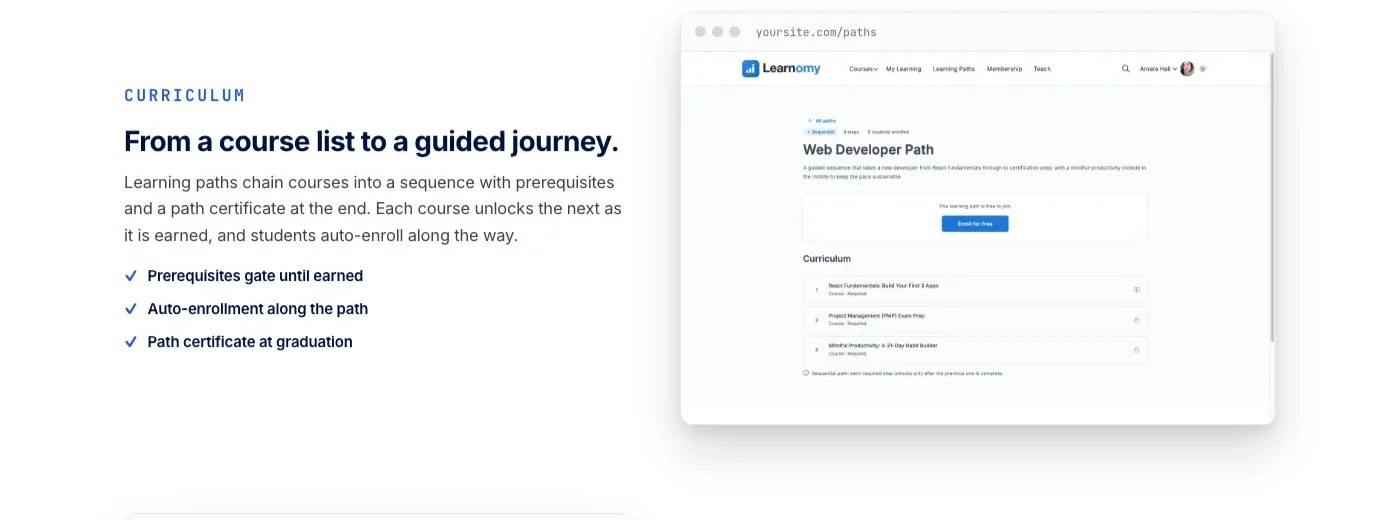
Start with what the student sees. Courses are built from video, audio, PDF, and reading lessons through a drag-and-drop builder, and as a student moves through that sequence, their own progress reflects back to them, including offline through the platform’s PWA support, so a student on a spotty connection does not lose track of where they left off. Structured learning paths chain courses into a sequence with prerequisites, so a student has to actually finish an introductory unit before a follow-on course unlocks, and a path certificate arrives once the full sequence is complete. That is a meaningfully different signal than a flat list of courses a student can jump around at will. A completion percentage only means something when the platform enforces the order behind it.
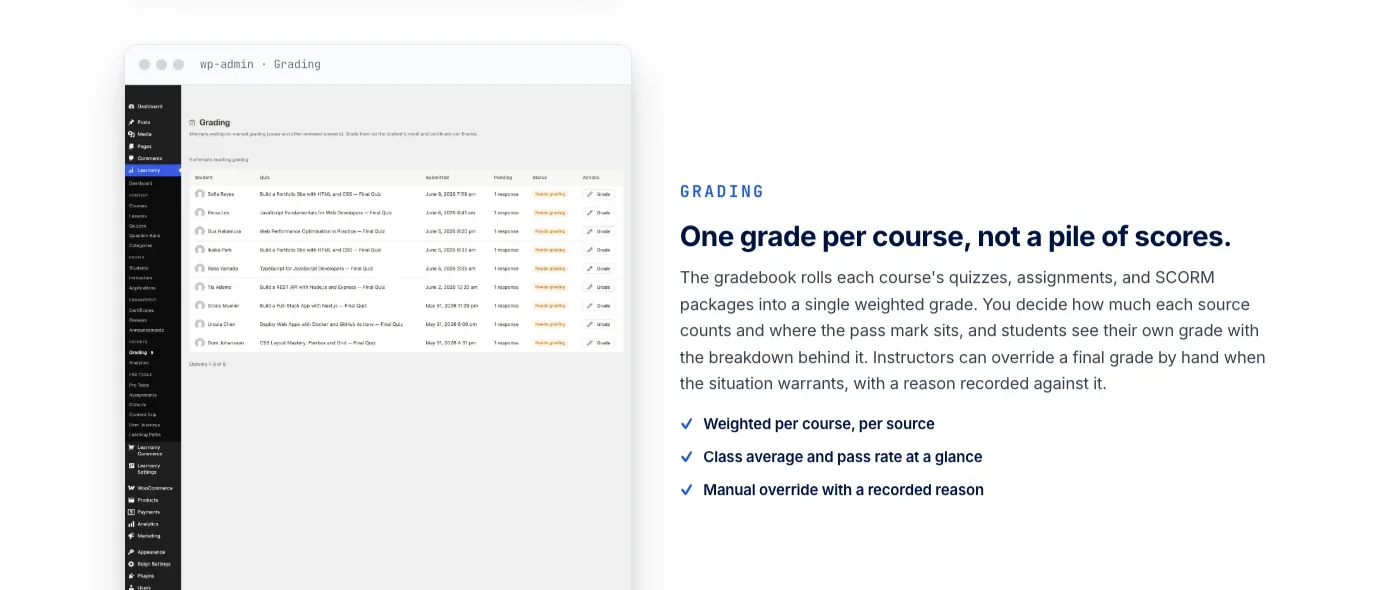
Now turn to what the instructor sees, which is where most LMS plugins quietly stop being useful. Learnomy’s gradebook rolls each course’s quizzes, assignments, and any SCORM packages into a single weighted grade, with the class average and pass rate visible at a glance rather than buried in a per-student export. An instructor can see in one screen whether a section is broadly on pace or broadly stalling, before drilling into any individual record. Six quiz types with partial credit and question banks feed that gradebook, alongside anti-cheat tab-switch tracking that flags when a learner leaves the quiz window during a timed assessment, and an essay-grading inbox for the written answers that auto-grading cannot touch. When a score needs a human judgment call, an instructor can override it manually, with the reason recorded against that student’s record rather than silently overwritten.
Multiple instructors are a first-class part of the platform rather than an afterthought. Instructor accounts let each teacher manage their own courses, grade their own students, and see their own gradebook, so a program does not have to hand every staff member the same administrator login just to let them track their own section’s progress. That structure is what makes cohort-level visibility workable once a program grows past a single instructor watching one small group by memory.
A progress bar the student can see and a dashboard the instructor can trust are two views of the same number.
Certificates are cryptographically signed and QR-verifiable on a public verify page, with a visual certificate designer built in, so a completion credential is tied to something a future employer or school can actually check rather than a name printed once a course was clicked open. For programs that answer to someone outside the immediate classroom, reporting depth grows alongside the platform’s business layer. Direct Stripe and PayPal checkout runs with no platform fees on what students pay, memberships come with trials and an automatic pricing page, and once a program adds instructors, revenue sharing lets each one track their own portion from a dedicated dashboard. At the platform’s upper capability tier, reporting extends into completion trends, enrollment activity, and exportable data, CSV for a registrar, a report for a board, so cohort-level numbers do not have to be assembled by hand every reporting cycle.
Any program currently running LearnDash, Tutor LMS, or LifterLMS and weighing a switch does not have to start from a blank course catalog. Learnomy includes a migration wizard built specifically for those three plugins, designed to bring existing courses and content across rather than forcing a rebuild from scratch, which matters for anyone who has spent years building out material on one of those platforms and has been holding off purely because of the rebuild a switch would otherwise require.
Learnomy does not stop at courses and grading. The platform grows into a full learning community around your program, with course discussion boards and Q&A alongside the lessons, gamified learning through points, badges, and streaks that give younger or less self-directed learners an extra reason to keep moving between assignments, and a job board for graduates once a program’s students are ready to look for work, all from the same team rather than a patchwork of third-party plugins. It also protects course videos from casual downloading and sharing, which matters for programs distributing recorded lessons or licensed material. On the design side, Learnomy ships a real branding layer with theme tokens, dark mode, and layout options, so the platform looks like your program’s own site rather than a template with a swapped logo. For the fuller lineup of options beyond progress tracking specifically, our complete WordPress LMS plugin comparison covers the broader course-selling landscape, and if your program serves K-12 or higher-ed classrooms specifically, our guide to the best LMS for schools goes deeper on multi-teacher rollouts and gradebook needs.
2. LearnDash
LearnDash has been one of the default choices for serious WordPress course sites for years, and its progress tracking reflects that maturity. Every course shows a visual progress bar as a student completes lessons and topics, and drip-feed scheduling releases material on a calendar or based on an individual student’s enrollment date, which keeps a cohort moving through material at roughly the same pace rather than letting fast movers finish in a weekend and slow movers stall for months. The built-in reporting dashboard gives an admin a per-student view of course and quiz completion, and a focus mode strips the theme away during a lesson so a student’s attention stays on the material rather than a sidebar full of widgets.
Where LearnDash asks more of a program is in how much of its deeper reporting lives outside the core plugin. Its ProPanel add-on layers engagement and completion analytics across a wider group of students, course-by-course and cohort-by-cohort, but that is a separate purchase rather than something included in the base install. LearnDash also does not sell courses on its own; checkout runs through WooCommerce or Easy Digital Downloads, which adds a plugin to the setup for any program charging for access. It integrates well with community and BuddyPress-style plugins for programs that want course activity visible in a member feed, which is part of why it shows up so often at universities and larger training organizations that already have that infrastructure in place. LearnDash remains a solid pick for a program that wants a mature, widely supported progress bar and reporting dashboard at the individual level, and does not mind paying for a separate add-on once cohort-level analytics become the actual requirement.
3. Tutor LMS
Tutor LMS, built by Themeum, leans into a frontend-first workflow that shapes how its progress tracking works day to day. Students see their enrolled courses and a percent-complete progress bar from a frontend dashboard, and instructors get a matching frontend view of their own courses and enrolled students, quiz attempts, and results, without ever touching the WordPress admin. That matters for a program with several instructors who should not each need a full administrator login just to check how their own section is doing.
The gap shows up at the cohort level. Deeper completion analytics, instructor earnings reports, and a more detailed gradebook live behind Tutor LMS’s paid add-ons rather than the free core, and monetization runs through WooCommerce or Easy Digital Downloads rather than a built-in checkout. Course content can be gated behind prerequisites, so a student cannot skip ahead to the final lesson without finishing what comes first, which keeps an individual completion percentage honest even before any add-on is installed. A program evaluating Tutor LMS for progress visibility specifically should budget for the reporting add-on if seeing more than one student’s status at a time turns out to matter, which for any program past a handful of learners, it usually does.
4. LifterLMS
LifterLMS built its reputation on membership sites as much as courses, and its progress tracking reflects that membership-first structure. Engagement triggers can send an email, award a certificate, or unlock the next piece of content automatically based on a student’s progress, which turns completion tracking into something that acts on its own rather than sitting passively in a dashboard waiting to be checked. Its built-in student management screen gives an instructor a per-student view of course and lesson completion across a class, and a gradebook rolls quiz results into an overall course grade.
Voucher-based bulk enrollment is available in the core plugin rather than gated behind a paid tier, which is a genuine convenience for a program selling or assigning access to a whole cohort at once and then needing to track that specific group’s completion as a unit. Where LifterLMS pushes work into add-ons is in advanced quizzes, assignment grading, and gamification, each handled by separate purchases layered onto the core. Checkout connects through Stripe or PayPal via its own payment gateways add-on. LifterLMS is a strong fit for a program built around recurring or bulk-purchased access, where tracking a defined cohort’s progress through content matters as much as tracking any single learner.
5. MasterStudy LMS
MasterStudy LMS is a newer entrant with a noticeably modern frontend, built around a course marketplace layout, and its progress tracking leans toward keeping that experience visually current for the student. A student dashboard shows enrolled courses with a percent-complete indicator per course, and instructors get a frontend statistics view covering enrollment counts and quiz results for the courses they manage. Built-in gamification, points and badges awarded as a student moves through material, gives an extra, visible signal of progress beyond a plain percentage bar, which tends to matter more for programs serving younger or less self-directed learners.
MasterStudy also supports live lessons through BigBlueButton or Zoom integrations, which makes attendance itself a piece of progress data for programs running cohort-based live sessions alongside self-paced material, something most WordPress LMS options do not track natively at all. Deeper reporting and analytics live behind its paid add-ons rather than the free core, and WooCommerce handles checkout. A dedicated Elementor widget add-on covers programs building marketing pages with a page builder rather than full site editing. MasterStudy is worth evaluating for a program that wants a marketplace-style student experience with built-in gamification cues and at least some live cohort sessions, understanding that instructor-side cohort reporting past the basics is where its paid tier comes into play.
Progress Tracking Compared at a Glance
Lined up side by side, the real pattern in this list is where each platform draws the line between what a student sees, what an instructor sees for free, and what requires a paid add-on to see across a whole cohort.
Platform | Student-facing progress | Instructor view (free) | Cohort-level rollups | Exportable data |
|---|---|---|---|---|
Learnomy | Per-lesson, with offline PWA sync | Weighted gradebook, class average and pass rate at a glance | Native, in core | Native, plus API access |
LearnDash | Visual progress bar per course | Per-student completion in reporting dashboard | Via ProPanel add-on | Via ProPanel add-on |
Tutor LMS | Percent-complete on frontend dashboard | Per-student quiz results, frontend view | Via paid add-ons | Via paid add-ons |
LifterLMS | Percent-complete, engagement-triggered | Student management screen, per-student completion | Native for voucher-based cohorts | Limited in core, deeper via add-ons |
MasterStudy LMS | Percent-complete plus points and badges | Frontend statistics, enrollment and quiz results | Via paid add-ons | Via paid add-ons |
How to Choose an LMS for Progress Visibility
The right platform depends less on a feature checklist than on who actually needs to see the progress data, and how quickly they need to act on it. These three situations cover most programs searching for progress-tracking specifically, and most fit clearly into one of them once the real question is named.
A single instructor watching one class closely
When one instructor teaches everyone directly, the student-facing progress bar and a simple per-student view usually cover the need without any add-on. LearnDash’s built-in reporting dashboard, Tutor LMS’s frontend student list, and LifterLMS’s student management screen all work reasonably well here, and Learnomy’s gradebook does the same job with the added benefit of the essay-grading inbox and anti-cheat tracking built in rather than layered on separately. At this scale, the instructor can still notice a stalled student by memory, so the platform mostly needs to confirm what the instructor already suspects.
Multiple instructors, each responsible for their own section
Once a program has several instructors, each needing to see their own section’s numbers without a shared administrator login, the question shifts to how cleanly a platform separates that data by instructor. Learnomy’s native instructor accounts give each teacher their own gradebook and class average out of the box, so a program does not need to configure roles or permissions to keep one teacher’s view separate from another’s. Tutor LMS’s frontend-first design does something similar for course management, though its deeper reporting still depends on its paid add-ons once a program wants to compare sections against each other rather than just view them individually.
A cohort-based program that needs to catch stalled learners early
Cohort programs, where a group of students is expected to move through material together on a shared timeline, have the most to lose from progress tracking that only shows a percentage after the fact. A stalled learner needs to be visible in week two, not discovered in a completion report after the cohort has already ended. Learnomy’s class average and pass rate at a glance, paired with its sequenced learning paths and prerequisite gating, surfaces a stalling section before an instructor has to go looking for it, and the platform’s exportable reporting means a program director can pull a cohort’s numbers for a funder or a board without reconstructing them from several screens. LifterLMS’s engagement triggers offer a related benefit, automatically nudging a student who has gone quiet, though its cohort-wide reporting is thinner than a dedicated program-management view. This is also where a job-specific build shows the pattern in practice: one organization used Learnomy’s team seats and role-based learning paths to build a private employee onboarding platform where progress reporting had to answer to HR and a manager, not just an instructor, which is exactly the exportable, cohort-level view a program at this stage tends to need.
Common Mistakes When Evaluating Progress Tracking
Most disappointing progress-tracking setups are not caused by picking a platform that lacks the feature entirely. They come from assuming a demo screenshot of “progress tracking” answers a question it was never built to answer, or skipping a check that only becomes obvious once a real cohort is three weeks in and someone has quietly stopped logging in.
- Confusing a student-facing progress bar with instructor-facing visibility. A platform can show a student their own percentage clearly while giving an instructor almost nothing at the class level. Confirm both sides exist before assuming the feature is covered.
- Assuming “reporting” in the marketing copy means it ships free. Several platforms on this list push cohort-level analytics into a paid add-on. Check the pricing page’s fine print, not just the feature list on the homepage.
- Not testing what a stalled student actually looks like in the dashboard. Enroll a test account, complete half a course, then stop. See whether the instructor view actually flags that account as behind, or just shows it as “enrolled” indefinitely.
- Ignoring export until a report is due. If a funder, a registrar, or a compliance file will ever need this data outside the platform, confirm the export format exists before the first deadline, not after.
- Treating quiz completion as the whole progress picture. A student can pass every quiz and still be behind on assignments, discussions, or a required project. Look for a gradebook that rolls up more than quiz scores alone.
- Skipping prerequisite gating. Without it, a completion percentage can be misleading. A student who jumped straight to the final lesson can show as “80% complete” while having skipped everything that mattered in between.
- Underestimating how many instructors will eventually need their own view. A dashboard that works fine for one teacher watching everyone can get crowded or ambiguous the moment three more instructors join and all need to see only their own section.
- Not checking whether progress persists offline or across devices. A student who loses their place after switching from a laptop to a phone, or after a spotty connection drops midway through a lesson, experiences that as the platform losing their progress, whether or not it technically did.
Frequently Asked Questions
What is the best LMS for tracking student progress in WordPress?
Learnomy builds per-lesson completion, a weighted gradebook with class average and pass rate visible at a glance, and sequenced learning paths into its core platform, which makes progress visibility a native part of the product rather than an add-on. LearnDash, Tutor LMS, LifterLMS, and MasterStudy LMS all track completion as well, though each pushes cohort-level reporting into a paid add-on.
What’s the difference between student-facing and instructor-facing progress tracking?
Student-facing tracking is a progress bar or percentage the learner sees for their own course. Instructor-facing tracking is a dashboard or gradebook that lets a teacher see an entire class or cohort at once, including who is behind, without opening every individual student’s profile. A platform can offer one without the other, so confirm both before assuming progress tracking is fully covered.
Can I export student progress data from a WordPress LMS?
It depends on the platform and, for several of them, on which add-on is installed. Learnomy includes exportable reporting and API access as part of its platform. LearnDash, Tutor LMS, and MasterStudy LMS generally push deeper export and reporting into their paid add-ons, while LifterLMS offers limited export in its core plugin.
How do I see which students in a cohort are falling behind?
Look for a gradebook or dashboard that surfaces a class average, a pass rate, or a completion rollup at the top level, rather than requiring you to open each student’s individual record. Learnomy’s gradebook shows class average and pass rate directly, and LifterLMS’s engagement triggers can automatically flag or email a student whose progress has stalled.
Does gamification actually help with student progress?
Points, badges, and streaks give a learner an additional, visible signal that they are moving forward, which tends to help most with younger or less self-directed students. Learnomy and MasterStudy LMS both offer gamified progress cues. It works alongside a real completion percentage rather than replacing the need for one.
Can I migrate my existing courses and progress data to Learnomy?
Learnomy includes a migration wizard built specifically for LearnDash, Tutor LMS, and LifterLMS, designed to bring existing courses and content across rather than requiring a manual rebuild. Always test a migration on a staging copy of your site before running it on production, and confirm how the migration handles existing completion records for enrolled students.
Do prerequisites actually improve progress tracking?
Yes. Without prerequisites, a student can skip ahead to a later lesson, which makes a completion percentage misleading, since it can show high progress even when foundational material was never actually finished. Learnomy’s learning paths gate each course until the one before it is completed, and Tutor LMS and Tutor LMS-style platforms offer similar content-gating for the same reason.
Is per-lesson tracking better than per-course tracking?
Per-lesson tracking gives a far more specific picture of where a student actually stopped, compared to a course simply marked “in progress.” That specificity matters most for an instructor trying to figure out which part of the material is causing the friction, rather than just knowing that friction exists somewhere in the course.
See Every Learner’s Progress on a Platform You Own
A student who can see their own progress, an instructor who can spot a stalled learner before week three, and a program director who can export a cohort’s numbers without reconstructing them by hand do not need to live in three different plugins. Learnomy puts per-lesson completion, a weighted gradebook, sequenced learning paths, and exportable reporting in one learning platform you control, on the WordPress site you already run. Whether you are running a single class or a multi-instructor program, the platform is built to show you who’s on track, and who needs a check-in, without waiting for a report card to tell you.
Plugins we build and run
We maintain these ourselves, which is why we can support them on your site.
- BuddyNextThe self-hosted community engine for WordPress
- BuddyXFree community theme, Pro when you outgrow it
- ReignPremium community theme. Add pieces, build anything
- JetonomyCommunity forum and Q&A for WordPress
- EventonomyEvents and RSVPs for WordPress communities
- LearnomyCourses and learning communities on WordPress
- ListoraDirectories and listings your members can browse
- SnipShareCode sharing built for developer communities
- WB Ad ManagerAd placements that turn traffic into revenue
- WP Career BoardA job board your community actually uses
- WP Sell ServicesSell services with offers, orders, and payouts
- MediaVersePhotos, video, and media albums for members
- WB GamificationPoints, badges, and rewards that keep members active
- Product RoadmapPublic roadmaps with voting your users trust