Best WordPress LMS Plugins in 2026
Compare 8 WordPress LMS plugins for 2026, including Learnomy, LearnDash, Tutor LMS, and LifterLMS, and find the right fit for your courses, membership site, or team.
Picking a WordPress LMS plugin is not just a features checklist. It decides how your students pay you, how your quizzes hold up against cheating, whether your certificates mean anything once someone tries to verify them, and how much of your school’s operation actually lives on your own site instead of scattered across three or four vendor dashboards. This guide compares eight WordPress LMS plugins for 2026, starting with Learnomy, a complete learning platform built to replace the LMS-plus-several-add-ons approach most WordPress course sites end up with, then working through the established names most course creators already have on their shortlist. None of these plugins are bad software. The mismatch usually happens when a plugin built for one kind of course business gets pushed into a different one, and that mismatch is what this guide is built to help you avoid.
In This Guide
- What to Look for in a WordPress LMS Plugin in 2026
- 1. Learnomy: The Complete Learning Platform
- 2. LearnDash
- 3. Tutor LMS
- 4. LifterLMS
- 5. MasterStudy LMS
- 6. LearnPress
- 7. Sensei LMS
- 8. WP Courseware
- WordPress LMS Plugins Compared at a Glance
- How to Choose the Right LMS Plugin for Your Situation
- Common Mistakes When Picking a WordPress LMS Plugin
- Frequently Asked Questions
Key Takeaways
- An LMS plugin is only one piece of a course business. Selling, certifying, and paying instructors matter as much as the course builder itself.
- Learnomy bundles courses, quizzes with anti-cheat tracking, verifiable certificates, direct checkout, and instructor revenue sharing into one platform, so you are not stitching together a separate membership plugin, certificate add-on, and payment bridge.
- LearnDash, Tutor LMS, and LifterLMS remain strong, well-established choices, each with a different balance of cost, flexibility, and ecosystem depth.
- LearnPress and WP Courseware suit specific budgets and workflows but ask you to buy more of the experience piece by piece.
- Sensei LMS is the right call almost exclusively if your course site already runs on WooCommerce and you want the two tightly aligned.
- The best plugin depends on whether you are a solo creator, running a membership site, training a company, or running a school, not on which plugin has the longest feature list.
What to Look for in a WordPress LMS Plugin in 2026
Course builders and quiz types get most of the attention in LMS reviews, but they are rarely what determines whether a course site succeeds. Before comparing individual plugins, it helps to know which questions actually separate a good fit from a frustrating one.
- How do you get paid? Some plugins need a separate membership or payment plugin bolted on. Others handle checkout natively.
- Can your quizzes be trusted? Anti-cheat measures, question banks, and partial credit matter the moment a course result carries any weight.
- Do certificates hold up? A certificate that cannot be verified is a PDF, not a credential.
- What happens when you outgrow one instructor? Revenue sharing and instructor dashboards decide whether your school can scale past you.
- How much do you own? Every plugin here runs on WordPress, but some still depend on separate paid add-ons for functionality that should be core.
- What does switching cost you later? Migration support, or the lack of it, determines how locked in you become.
- Who is actually going to take the course? A corporate training rollout has different needs than a public course marketplace, and a plugin built for one rarely feels natural for the other.
- Does the plugin match your theme, not fight it? Some LMS plugins render their own templates that ignore your site’s design entirely, which shows up as a jarring switch the moment a visitor clicks into a course.
None of these questions have a universal right answer. A plugin that scores well on checkout and revenue sharing might be overkill for someone publishing a single free course, and a lightweight plugin that skips certificates entirely might be exactly right for an internal training library nobody needs to show off. Keep your actual situation in mind while reading through the options below, and revisit the buying criteria section once you have a shortlist of two or three plugins. A plugin demo always looks capable in a five-minute walkthrough; the questions above are the ones that only surface once real students, real payments, and a real second instructor show up.
1. Learnomy: The Complete Learning Platform
Learnomy is not “an LMS plugin” in the traditional sense. It is a complete learning platform for WordPress, courses, quizzes with anti-cheat tracking, verifiable certificates, built-in checkout, memberships, and instructor revenue sharing, all built by one team instead of assembled from a stack of separate vendors. That distinction matters because the traditional WordPress answer to online courses has usually meant an LMS plugin plus a membership plugin plus a certificates add-on plus a payment bridge, each with its own license, its own updates, and its own integration gaps.
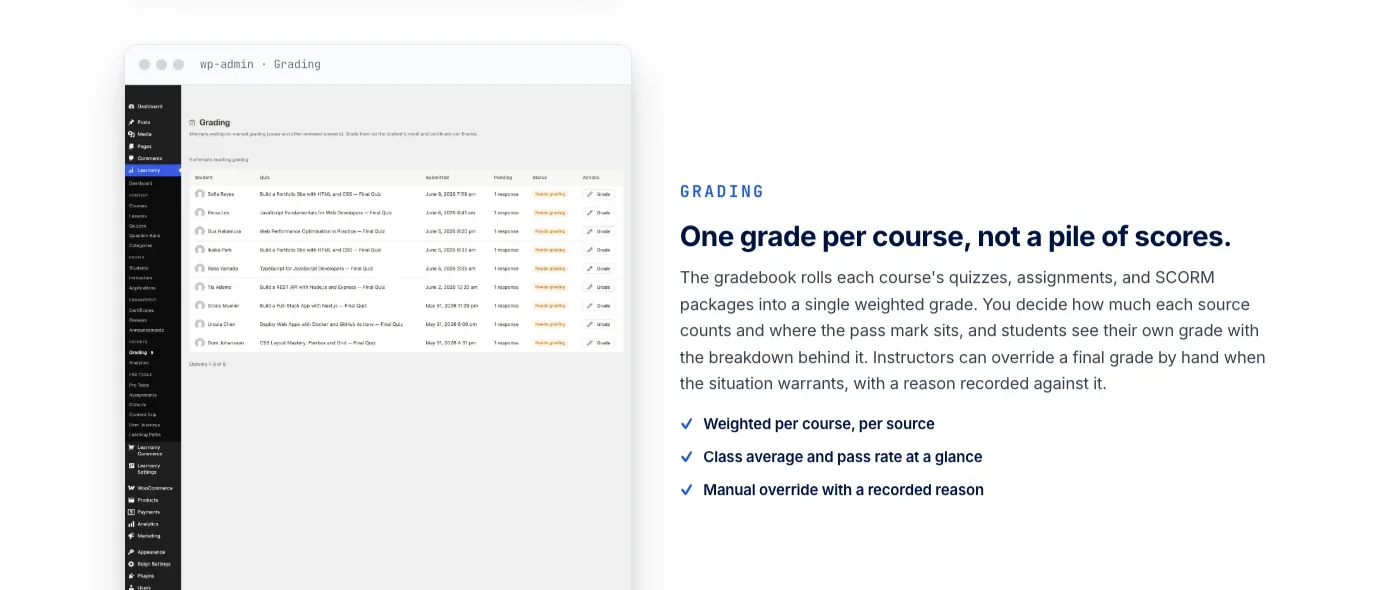
The course side covers what you would expect from a serious LMS: unlimited courses with video, audio, PDF, and reading lessons, a drag-and-drop builder, and templates that override the same way a well-built WooCommerce theme does. Where Learnomy separates itself is in the assessment layer. It ships six quiz types with partial credit and question banks, plus anti-cheat tab-switch tracking that flags when a learner leaves the quiz window, and an essay-grading inbox for instructors who need to review written answers by hand instead of relying on auto-grading.
Certificates are cryptographically signed and QR-verifiable on a public verify page, with LinkedIn sharing and a visual certificate designer built in, so a completion credential can actually be checked by anyone who receives it, not just trusted at face value.
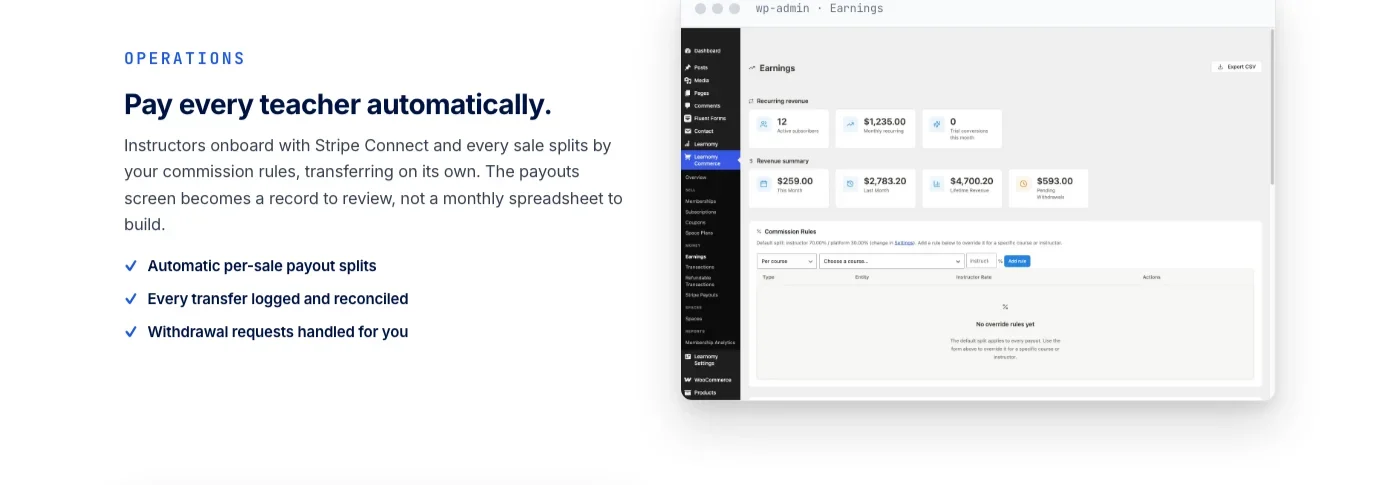
The business layer is where Learnomy stops looking like a plugin and starts looking like the platform it competes with. Checkout runs directly through Stripe and PayPal with no platform fees on what students pay, plus a WooCommerce adapter for stores that already have one. Memberships come with trials and an automatic pricing page, and when a school grows past a single instructor, Udemy-style revenue sharing lets teachers apply, get approved, and track their own earnings from a dedicated dashboard. Automated payouts and deeper revenue analytics become available as a school’s needs grow, without requiring a separate payments plugin at any stage.
Anyone currently running LearnDash, Tutor LMS, or LifterLMS and considering a switch does not have to start from zero. Learnomy includes a migration wizard specifically for those three plugins, built to bring courses and content across rather than forcing a rebuild. That matters for anyone who has spent years building out a course catalog on one of those plugins and has been holding off on switching purely because of how much rebuilding it would take.
Learnomy does not stop at courses and checkout. The platform grows into a full learning community around your school, with course discussion boards and Q&A alongside the lessons, gamified learning through points, badges, and streaks, and even a job board for your graduates, all from the same team rather than a patchwork of third-party plugins. It also protects course videos from casual downloading and sharing. On the design side, Learnomy ships a real branding layer with theme tokens, dark mode, and layout options, so a school looks like that school, not like a template with a different logo.
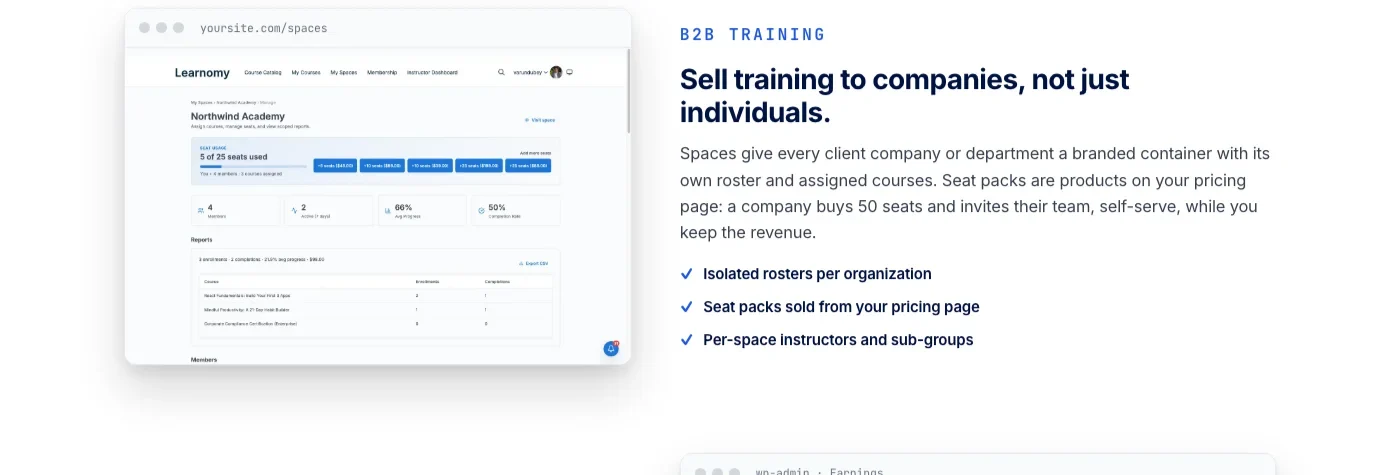
This kind of platform depth is exactly why companies use Learnomy for structured training beyond public courses. One team used it to build a private employee onboarding training platform with role-based learning paths and drip scheduling, and another used the same team seat and roster tools to run partner enablement training across a franchise and reseller network without losing consistency between locations. Neither build required a separate membership plugin, a separate reporting tool, or a separate certificate service to get there.
The traditional WordPress course stack asks you to become your own systems integrator. A complete learning platform removes that job entirely.
2. LearnDash
LearnDash has been one of the default choices for serious WordPress course sites for years, and it earned that position with a genuinely capable course builder. Content is organized around courses, lessons, topics, and quizzes, with drip-feed scheduling that releases material on a calendar or based on a learner’s enrollment date. Assignments, timed quizzes, and a reporting dashboard round out the core experience, and its focus mode strips the theme away during lessons so learners are not distracted by sidebar widgets and footer menus.
Where LearnDash shows its age a little is in how much of its ecosystem lives outside the core plugin. Deeper analytics, some integrations, and several workflow conveniences are handled by a wider add-on and reporting ecosystem rather than being native to a single install. It also does not sell courses on its own; checkout runs through WooCommerce or Easy Digital Downloads, which means an additional plugin is part of the setup for most stores. It integrates well with community and BuddyPress-style plugins for schools that want course activity visible in a member feed, which is part of why it remains popular with universities and larger training organizations that already have that kind of infrastructure in place. LearnDash remains a solid pick for anyone who wants a mature, widely supported course builder and does not mind assembling checkout and community separately, and its long track record means most hosting providers and page builders have already been tested against it.
3. Tutor LMS
Tutor LMS, built by Themeum, leans into a frontend-first workflow. Instructors can build entire courses, quizzes, and certificates from the frontend dashboard rather than the WordPress admin, which makes it a comfortable option for multi-instructor sites where you do not want every teacher inside wp-admin. The quiz builder supports several question types, and course content can be gated behind prerequisites so learners complete material in a set order.
Monetization runs through WooCommerce or Easy Digital Downloads rather than a built-in checkout, and several of its more advanced capabilities, like content drip, live class integrations with Zoom or Google Meet, and detailed gradebooks, live behind its paid add-ons. Its ecosystem also extends into course bundles, subscription-based access, and instructor earnings reports once those add-ons are in place, which makes Tutor LMS flexible over time, though the full experience ends up spread across a base plugin and a set of extensions rather than arriving as one unified system from day one. Budget both the time and the shopping list before you promise a launch date to instructors.
4. LifterLMS
LifterLMS built its reputation on membership sites as much as courses, and that shows in how the plugin is structured. Courses, memberships, and content restriction all sit in the same core plugin, with engagement triggers that can send emails, award certificates, or unlock content automatically based on a learner’s progress. Its gradebook and reporting tools are solid for tracking completion across a cohort, and voucher-based enrollment is available in the core plugin rather than gated behind a paid tier, which is a meaningful convenience for anyone selling course access in bulk to schools or corporate buyers.
Checkout connects through Stripe or PayPal via its own payment gateways add-on, and while the core plugin is generous for a free tier, gamification, advanced quizzes, and assignment grading are handled through separate add-ons. LifterLMS is a strong fit for anyone building a membership-driven education site where courses are one part of a broader recurring-revenue offer rather than the entire product.
5. MasterStudy LMS
MasterStudy LMS is a newer entrant with a noticeably modern frontend, built around a course marketplace layout that would not look out of place on a hosted platform. Instructors get a frontend course builder, and the plugin supports live lessons through BigBlueButton or Zoom integrations, which makes it one of the few WordPress LMS options built with live cohorts in mind from the start rather than as an afterthought.
Gamification with points and badges is built in, and cloud storage integrations help with hosting video content off your own server. A dedicated Elementor widget add-on covers anyone building their marketing pages with a page builder rather than full site editing, and WooCommerce handles the checkout side. MasterStudy is worth a look for anyone who wants a course marketplace look and feel out of the box and plans to run at least some live sessions alongside self-paced content, though the marketplace styling is more of a visual starting point than a full multi-vendor payout system.
6. LearnPress
LearnPress is a lightweight, free core plugin with a drag-and-drop curriculum builder, basic quizzes, and a certificate add-on for course completion. Its biggest appeal is cost of entry: the core plugin covers the basics of building and structuring a course without asking for payment up front, and it has a wide following among developers who build custom course sites on top of it because the base plugin stays out of the way.
The tradeoff is that LearnPress’s ecosystem is built almost entirely from individually sold add-ons. Certificates, advanced quizzes, content drip, prerequisites, and WooCommerce payment integration are each separate purchases rather than bundled tiers, which means the real cost of a fully featured LearnPress site can add up quickly once you start adding the pieces most course creators end up needing. It is a reasonable starting point for a very simple, low-budget course, but plan for that add-on shopping list before committing.
7. Sensei LMS
Sensei LMS is built by Automattic, the team behind WooCommerce, and that lineage is the entire pitch. It is a blocks-based course builder that integrates tightly with the WordPress block editor and WooCommerce checkout, which makes it the most natural choice if your course site is really a WooCommerce store that happens to sell courses rather than a dedicated school. Full site editing compatibility means course pages inherit your theme’s blocks and patterns instead of rendering a separate template system.
Its feature set is intentionally simpler than the other plugins on this list: lessons, quizzes, and course progress tracking, built to feel like a natural extension of the block editor rather than a separate system layered on top. There is less depth in areas like advanced quiz types, certificates, or instructor management, so Sensei suits stores adding a course or two to an existing catalog more than it suits building a dedicated online school from scratch. If your roadmap includes multiple instructors or a dedicated school brand down the line, it is worth weighing that limitation early rather than after the catalog has grown.
8. WP Courseware
WP Courseware, from Fly Plugins, takes a spreadsheet-style approach to building courses, modules, and units, which longtime users tend to find fast once they are used to it. Drip content, quizzes, and a gradebook are all part of the core plugin, question banks can be imported and exported in bulk, and it pairs well with dedicated membership plugins like MemberPress or Restrict Content Pro for sites that want tighter control over who can access what.
It does not include its own checkout or certificate builder in the base package, so those typically come from the membership plugin or an add-on rather than natively. Zapier-style automation connections are available for teams that want enrollment or completion events to trigger actions elsewhere, such as adding a learner to an email list. WP Courseware tends to show up most often on corporate training and paid coaching sites where the course structure needs to be tightly controlled and the operator is already comfortable pairing several plugins together to get a complete setup, rather than expecting one plugin to cover the entire student journey on its own.
WordPress LMS Plugins Compared at a Glance
None of these columns tell the whole story on their own, but lined up side by side they show the real pattern in this list: most plugins ask you to add a payment tool or a certificate add-on before they cover a course business end to end.
Plugin | Best for | Standout feature | Built-in checkout | Certificates |
|---|---|---|---|---|
Learnomy | Complete online schools and corporate training | Instructor revenue sharing with no platform fees | Yes, Stripe and PayPal direct | Verifiable, QR-checked |
LearnDash | Universities and established training programs | Mature drip-content and reporting ecosystem | Via WooCommerce or EDD | Yes, built in |
Tutor LMS | Multi-instructor frontend course creation | Frontend course and quiz builder | Via WooCommerce or EDD | Add-on based |
LifterLMS | Membership-driven education sites | Engagement triggers tied to learner progress | Via payment gateway add-on | Yes, built in |
MasterStudy LMS | Course marketplaces with live sessions | Native live class integrations | Via WooCommerce | Yes, built in |
LearnPress | Very simple, low-budget courses | Free, lightweight core plugin | Add-on based | Add-on based |
Sensei LMS | WooCommerce stores adding a course or two | Native block editor integration | Via WooCommerce | Limited |
WP Courseware | Corporate training paired with a membership plugin | Spreadsheet-style course builder | Via membership plugin | Add-on based |
How to Choose the Right LMS Plugin for Your Situation
The “best” plugin changes depending on what you are actually building. These four situations cover most WordPress course sites, and most creators fit clearly into one of them once they think it through.
Solo creator selling your own courses
If it is just you, prioritize a plugin that handles checkout without forcing you to run WooCommerce for a single product line. Learnomy’s direct Stripe and PayPal checkout removes that dependency entirely, while Tutor LMS and Sensei LMS work well if you are already comfortable managing a WooCommerce store around your course. LearnPress can work too, as long as you budget for the certificate and drip content add-ons you will likely want once the course is live.
Membership site with course access as a perk
When courses are part of a broader recurring membership rather than the whole product, LifterLMS’s content restriction and engagement triggers are purpose-built for that model, and its voucher system helps if you sell bulk access to groups. Learnomy’s memberships with trials and automatic pricing pages cover the same need if you would rather not run a separate membership plugin alongside your LMS, and its built-in checkout means the membership and the courses share one system instead of two.
Corporate training or employee onboarding
Company training needs seats, rosters, and a way to keep each department or location separate, not just a course catalog. This is where team-based tools matter more than public-facing marketplace features. Learnomy’s team training tools give a company its own seats and roster without needing to buy user accounts one at a time, which is the same structure behind this employee onboarding training platform build. WP Courseware, paired with a membership plugin for access control, is a reasonable alternative for teams that already have that pairing in place.
School or academy with multiple instructors
Once more than one teacher is involved, revenue sharing and instructor dashboards stop being a nice-to-have. LearnDash and Learnomy both handle multi-instructor structures well, though Learnomy’s instructor applications and dashboards are built specifically around a school scaling past its founder, with revenue splits handled natively instead of through a separate payout tool. LearnDash’s stronger fit here is for schools that already have established reporting workflows and do not mind assembling checkout separately.
Common Mistakes When Picking a WordPress LMS Plugin
Most bad LMS choices are not caused by picking a genuinely weak plugin. They come from picking a good plugin for the wrong situation, or skipping a question that only becomes obvious after launch, usually right around the time a second instructor joins or the first support ticket about a certificate comes in.
- Choosing based on name recognition alone. The most talked-about plugin is not automatically the right fit for a membership site, a corporate training portal, or a single-course launch.
- Ignoring the checkout dependency. Several plugins on this list need WooCommerce or Easy Digital Downloads to actually sell a course. Confirm that before you commit, not after.
- Underestimating quiz integrity. If a certificate or quiz result carries any real weight, anti-cheat tracking and question banks stop being optional extras.
- Forgetting to plan for growth. A plugin that works for one instructor can become expensive or awkward the moment a second or third instructor joins.
- Skipping the migration question. If you are already running a course site and considering a switch, check what a plugin’s migration tools actually support before assuming your content will transfer cleanly.
- Treating certificates as decoration. A completion certificate that cannot be verified by anyone outside your site is not a credential, it is an image file.
- Not testing the learner experience on mobile. A course builder that looks great in the admin can still produce a lesson page that is awkward to read on a phone. Preview lessons the way your actual learners will see them before launch.
- Waiting too long to plan for a second instructor. Revenue sharing, instructor applications, and payout logistics are much easier to set up before you have a teacher waiting on their first payment than after.
Frequently Asked Questions
What is the best free WordPress LMS plugin?
LearnPress and Sensei LMS both have generous free cores, and Learnomy’s free tier covers courses, quizzes, certificates, and direct checkout without requiring a separate membership or payment plugin. Which one counts as “best” depends on whether you need built-in checkout or are comfortable pairing the LMS with WooCommerce.
Do I need a separate membership plugin alongside my LMS plugin?
Not always. LifterLMS and Learnomy both include membership functionality in their core setup. LearnDash, Tutor LMS, and LearnPress typically rely on a separate membership or payment plugin for that layer.
Can I sell courses without WooCommerce?
Yes. Learnomy connects directly to Stripe and PayPal without WooCommerce in the middle, though it also offers a WooCommerce adapter for stores that already use it. Most of the other plugins on this list route checkout through WooCommerce or Easy Digital Downloads.
Which LMS plugin works best for a corporate training portal?
Look for team seats, roster management, and role-based learning paths rather than a public course marketplace layout. Learnomy and WP Courseware, each paired with the right add-ons or a membership plugin, both fit that need, and LearnDash works well for larger training organizations with existing reporting requirements.
What’s the difference between an LMS plugin and a complete learning platform?
An LMS plugin typically handles courses and quizzes, then leaves selling, certifying, and paying instructors to separate plugins. A complete learning platform like Learnomy builds all of that into one system, so there is no integration gap between the course builder and the business side of running a school.
Can I switch from LearnDash or Tutor LMS without losing my content?
Learnomy includes a migration wizard built specifically for LearnDash, Tutor LMS, and LifterLMS, designed to bring existing courses across rather than forcing a manual rebuild. Always test a migration on a staging copy of your site before running it on production.
Do WordPress LMS plugins support certificates?
Most do, though the depth varies. LearnDash, LifterLMS, and MasterStudy LMS include certificates natively. LearnPress, Tutor LMS, and WP Courseware typically handle certificates through an add-on. Learnomy’s certificates are cryptographically signed and verifiable through a public QR-based verify page rather than being a static image or PDF.
Which plugin is best for a single course creator versus a full online school?
A single creator usually wants the simplest path to checkout, which points toward Learnomy, Sensei LMS, or Tutor LMS depending on whether WooCommerce is already part of the stack. A full school with multiple instructors benefits more from revenue sharing and instructor dashboards, where Learnomy and LearnDash are the stronger fits.
Build Your School on a Platform You Own
Courses, quizzes, certificates, checkout, and instructor payouts do not need to live in five different plugins from five different vendors. Learnomy puts all of it in one learning platform you control, with no platform fees on what your students pay you. Whether you are launching a first course, training a team, or migrating away from another plugin entirely, the platform is built to grow with the school rather than ask you to replace it later.
Plugins we build and run
We maintain these ourselves, which is why we can support them on your site.
- BuddyNextThe self-hosted community engine for WordPress
- BuddyXFree community theme, Pro when you outgrow it
- ReignPremium community theme. Add pieces, build anything
- JetonomyCommunity forum and Q&A for WordPress
- EventonomyEvents and RSVPs for WordPress communities
- LearnomyCourses and learning communities on WordPress
- ListoraDirectories and listings your members can browse
- SnipShareCode sharing built for developer communities
- WB Ad ManagerAd placements that turn traffic into revenue
- WP Career BoardA job board your community actually uses
- WP Sell ServicesSell services with offers, orders, and payouts
- MediaVersePhotos, video, and media albums for members
- WB GamificationPoints, badges, and rewards that keep members active
- Product RoadmapPublic roadmaps with voting your users trust