WP Rocket Fatal Error After WordPress 7.1, Reported in July
Recovery steps first, then what actually broke, three corrections to the coverage, and a timeline showing the fault was reported with its own fix six weeks before the release that made it universal.

WordPress 7.1.0 was released on 19 August 2026. Within hours, sites running WP Rocket began returning a white screen, and the people who owned them could not log in to do anything about it.
One report from the thread describes the scale better than any summary: 95 WP Rocket installations across 12 servers, 29 of them fataling.
The recovery instructions come first, because anyone arriving here with a dead site does not need the analysis yet. The analysis follows, along with three corrections to how this is being reported, and a timeline that is the actual story.
Everything below is drawn from the public issue tracker, the vendor’s own documentation and the reports in the thread. Where something is disputed or unconfirmed, it is marked as such rather than smoothed over, because a fair amount of what was published about this within a day of it breaking is wrong.
The short version, for anyone who needs only that: update WP Rocket to 3.23.2.2 or later. Versions below that are affected.
Getting back in
The reason this is worse than an ordinary plugin fault is where the error fires. It happens on init, which means it takes out the front end, wp-admin, admin-ajax and the REST API together. There is no working dashboard to deactivate the plugin from, and the usual advice to disable plugins one at a time assumes an admin screen you no longer have.
Three routes back, in order of how quickly they work.
Rename the plugin folder
The fastest fix if you have file access. WordPress deactivates a plugin whose directory it can no longer find.
# Over SSH
mv wp-content/plugins/wp-rocket wp-content/plugins/wp-rocket.disabled

# Or over SFTP, rename the folder in your client
The site returns immediately, uncached and slower, but reachable. This is WP Rocket’s own first recommendation.
WP-CLI, which still works when the site does not
Worth knowing even if you have never used it, because a fatal on init does not necessarily stop the command line.
# Update straight to the fixed release
wp plugin update wp-rocket

# Or take it out of the picture entirely
wp plugin deactivate wp-rocket

# If the fatal blocks the normal bootstrap, skip plugins to run the command
wp --skip-plugins plugin update wp-rocket
That third flag is the one people forget. --skip-plugins loads WordPress without any plugin code, which is exactly the state you need in order to act on a plugin that is crashing the bootstrap.
Recovery mode
WordPress emails the site administrator a recovery link when it detects a fatal error, which opens the dashboard with the offending plugin paused. It is the intended route for exactly this situation.
It also depends on the site being able to send email, which is the assumption most likely to fail on the day you need it. If your site has never had its mail properly configured, the recovery email is not coming, and the earlier options are what you have.
There is a second catch worth knowing. The recovery link goes to the address stored as the site administrator email, which on a site built by an agency is frequently somebody who left, or a mailbox nobody monitors. Checking that field across a fleet takes one command and is worth doing today rather than during the next incident.
wp --skip-plugins option get admin_emailRecovery mode arrives by email. If your site's mail was already broken, so is your recovery route.
Finding the exposure across a fleet
If you manage more than a handful of sites, the useful question is which of them are carrying the combination rather than which ones have already fallen over. A site can be running an affected version and simply not have triggered it yet.
#!/usr/bin/env bash
# Reports WP Rocket version and core version per site.
# Anything below 3.23.2.2 is exposed.
for site in "$@"; do
  wpr=$(wp --ssh="$site" plugin get wp-rocket --field=version 2>/dev/null)
  core=$(wp --ssh="$site" core version 2>/dev/null)
  [ -z "$wpr" ] && continue
  printf '%-34s core:%-8s wp-rocket:%s\n' "$site" "${core:-?}" "$wpr"
done
Add the trigger condition to that sweep if you want to prioritise. The fault needs a callback registered on deleted_post or transition_post_status whose generated identifier happens to be purely numeric, and one confirmed source of that is a specific Elementor version, covered below.
One caution on the sweep. If a site is already fataling, the plugin-version lookup may fail through the normal bootstrap, so run it with --skip-plugins and treat an empty result as needing a look rather than as an absence.
What actually broke
The error is specific and short:
Uncaught TypeError: substr(): Argument #1 ($string) must be of type string,
int given in .../wp-rocket/inc/ThirdParty/Plugins/CDN/Cloudflare.php:562
The line in question walks WordPress’s hook registry looking for its own callbacks so it can unregister them:
if ( substr( $key, - strlen( $method ) ) !== $method ) {
    continue;
}
The mechanism, as set out in the original bug report, is a property of PHP rather than of WordPress. WordPress stores registered callbacks in $wp_filter[$hook]->callbacks[$priority], keyed by an identifier generated for each callback. PHP automatically casts array keys that are purely numeric strings into integers. So when a callback’s generated identifier happens to consist only of digits, its key in that array is an integer rather than a string, and substr() receives a type it will not accept.
The fix is a cast, and it was written in the bug report itself:
if ( substr( (string) $key, - strlen( $method ) ) !== $method ) {
    continue;
}
One detail is worth adding, because it explains why this had not surfaced earlier. Passing an integer to substr() is not normally fatal. Under PHP’s default coercive typing it is converted and the call succeeds, which is easy to confirm:
# Coercive mode: no error, returns the string "42"
php -r 'var_dump( substr( 42, 0, 3 ) );'

# Strict mode: the exact error from the reports
php -r 'declare(strict_types=1); substr( 42, 0, 3 );'
The message quoted above is the strict-mode one, so the file involved declares strict_types=1. That is a good practice and it is also what converted a silent coercion into a fatal. Files that opt into strict typing get told about their bad assumptions loudly, which is the point of strict typing, and it means the blast radius of an assumption like this depends on a declaration at the top of the file rather than on the line that makes it.
The general lesson is worth separating from the specific plugin, because any code that walks the hook registry is exposed to the same thing. The keys in that array are an implementation detail, not a documented contract, and treating them as guaranteed strings is an assumption that holds until the day it does not.
Confirming it is actually this, and not something else
A white screen after an update is not diagnostic on its own. Before applying any of this, confirm you are looking at this fault rather than a coincidence, because 19 August produced plenty of unrelated breakage too.
The error text is specific enough to be conclusive. Find it in the PHP error log rather than guessing.
# Wherever your host writes PHP errors. Common locations:
tail -n 200 wp-content/debug.log
tail -n 200 /var/log/php-fpm/error.log
tail -n 200 ~/logs/error_log

# Narrow to this fault
grep -n "Cloudflare.php" wp-content/debug.log | tail -20
You are looking for substr(), a type error, and Cloudflare.php in the same line. If the log shows a different file or a different error, this article is about something else and applying its fix will waste time you do not have.
If no log exists at all, that is worth fixing once the emergency is over. A site with error logging switched off does not fail less often, it just fails without telling you what happened, and the first ten minutes of any incident go into recreating information that should already have been written down.
One further check, because it distinguishes this from a partial update. Confirm which version is actually installed rather than which one you believe you installed:
wp --skip-plugins plugin get wp-rocket --field=version
grep -m1 "Version:" wp-content/plugins/wp-rocket/wp-rocket.php
Those two disagreeing is itself a finding, and it points at the update problem described further down rather than at the type error.
Three corrections to the coverage
A number of posts appeared within a day of this breaking, and three claims in them are wrong in ways that matter operationally.
It is not a WordPress 7.1 bug
The most consequential correction. A commenter on the thread reports the fatal occurring on stable WordPress, before 7.1, and identifies the trigger: Elementor 4.2.3 causes it and 4.2.2 does not, because the newer version registers a numerically-keyed callback on one of the two hooks involved.
So 7.1 widened the population of sites that met the condition. It did not introduce the fault, and the fault was reachable without it. If you are holding back your core update as the mitigation, you are mitigating the wrong variable.
It is not specific to PHP 8.3
Several write-ups pin this to PHP 8.3. Reports on the thread span 8.2, 8.3 and 8.4, and one commenter says so explicitly while noting most of the other reports happened to be on newer versions.
Downgrading PHP is not a workaround, and would be a bad idea even if it were.
The hotfix did work, and a separate problem is being confused with it
This one cuts the other way, in the vendor’s favour, and it is worth stating carefully.
A separate issue was opened after the hotfix, titled as the critical error still existing. Reading it, the errors reported there are different: a missing class in the plugin’s main file, and an undefined method in an unrelated component. One of the reports shows a plugin path containing a version-numbered directory, which is characteristic of an update that did not complete cleanly rather than of the original fault persisting.
WP Rocket state they cannot reproduce it and have asked for access to an affected environment. On the evidence available, the type error was fixed in 3.23.2.2, and the post-update reports look like partial-update artifacts. If you updated and got a new and different error, reinstalling the plugin cleanly is the thing to try before concluding the fix failed.
Why one plugin took down whole estates
A single incompatible plugin does not normally produce the pattern described in that thread, where somebody loses 29 sites in a morning. Three properties combined to make it behave that way, and each one is worth recognising because they will combine again.
The fault fires during bootstrap
Most plugin faults are scoped. A broken checkout breaks checkout. A broken block breaks one page. This one fires on init, before anything is rendered, so every entry point fails identically: front end, admin, AJAX and REST.
That single property is what converts an incompatibility into a lockout. The tools you would normally reach for are behind the door that is now shut.
The trigger arrived on a schedule, everywhere at once
Core auto-updates are the reason WordPress recovers from security problems as well as it does. They also mean a compatibility fault does not roll out gradually. It arrives on a large number of sites within the same window, which is why several people in that thread describe waking up to an estate that had failed overnight rather than to one site with a problem.
This is the argument for staggering rather than disabling, covered further below. The mechanism that protects you is the same mechanism that synchronises the failure.
The dependency is nearly uniform across a fleet
Agencies standardise. The same caching plugin, the same page builder, the same stack across every client, because that is how you keep a portfolio maintainable by a small team.
The cost of that standardisation is correlated failure. A fault in a component you have installed everywhere is not one incident, it is one incident multiplied by your client count, and it lands on the day you are least able to work through it site by site.
None of those three is a mistake on its own. Bootstrapping early is normal for a caching plugin. Auto-updating core is correct. Standardising a stack is good practice. It is the combination that produces the outcome, and the combination is the normal state of a managed WordPress fleet. That is the same shape as the class of bug that only appears once real infrastructure is attached: every individual decision is defensible, and the failure lives in how they meet.
The timeline, which is the actual story
Everything above is a routine type error with a one-line fix. What makes this worth writing about is when it was known.
Date | What happened |
|---|---|
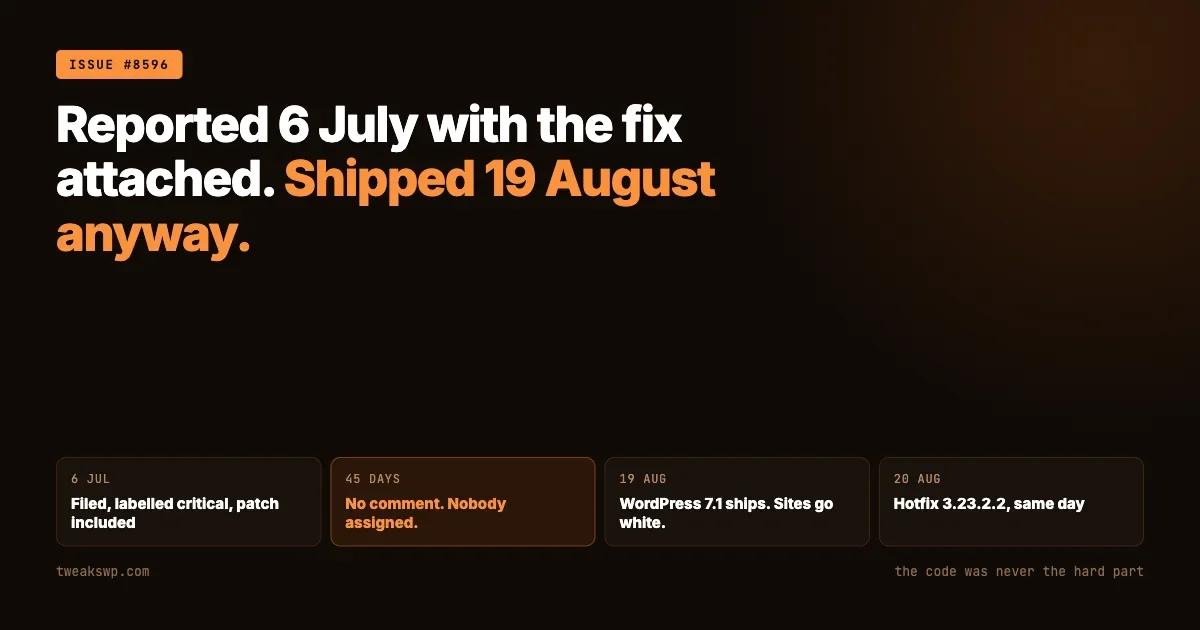
6 July 2026 | Issue #8596 opened. Correct diagnosis, exact file and line, and the one-line fix included in the report. Tested against WordPress 7.1 alpha. |
6 July to 18 August | No comments on the thread. 45 days. |
19 August | WordPress 7.1.0 released. First comment appears on the issue the same day, confirming it on stable. |
20 August | Seven further issues opened for the same fault. Production reports arrive through the morning. |
20 August | A maintainer responds, a fix is put in progress, and hotfix 3.23.2.2 ships the same day. |
The issue was labelled by the vendor’s own team as priority: critical and severity: critical. It carried a correct diagnosis and a working patch from the day it was filed.
Two things are true at once here and both belong in the record. Once it broke in production, the response was fast: acknowledged, patched and released inside a single working day, with an interim mitigation posted for people who could not update immediately. That is a good incident response.
And it was reported six weeks earlier, against an alpha of the release that would make it universal, by someone who had already worked out the fix. The gap between those two facts is the part worth learning from, and the people in that thread who described losing every client site at once are not being unreasonable about it.
What this should change about how you update
The instinct after an incident like this is to switch off automatic updates. That instinct is wrong, and acting on it will hurt you more than this did.
The plugins with unauthenticated vulnerabilities disclosed in the past fortnight cover several million installations between them, and the reconnaissance that precedes an attack on them is covered in every way your site hands out usernames. Sites that do not auto-update are the ones that stay exploitable for months, and the release immediately before this one was itself a security release closing an authenticated remote code execution path. Trading a rare compatibility fatal for a permanent security exposure is a bad trade, and the fatal at least announces itself.
Four adjustments that address the real problem without that cost.
- Stagger core updates across a fleet rather than disabling them. A handful of sites take the release first. If they survive a day, the rest follow. This converts a fleet-wide outage into a small one, and costs nothing when the release is fine.
- Make sure the recovery path exists before you need it. Confirm the administrator address on each site can actually receive mail, and confirm somebody has file access that is not the WordPress dashboard. Both of those are free to check and useless to discover during an outage.
- Watch the repositories of the plugins you depend on most. This was public, correctly diagnosed and labelled critical for six weeks. Anyone subscribed to that repository could have seen it and applied a one-line patch, or planned around the release date.
- Know your WP-CLI recovery commands before the day you need them. Particularly
--skip-plugins. Reading documentation while clients are calling is the worst possible time to learn it.
A fifth is worth adding for anyone running client sites commercially: decide now what you tell clients when this happens, and send it before they ask. An outage explained within the hour by the person responsible for the site reads as competence. The same outage discovered by the client first reads as neglect, regardless of whose code caused it.
The third point is the one most people skip and the one that would have helped most here. Watching a repository is not a substitute for a vendor’s own process, and it is a cheap early-warning signal on exactly the dependencies whose failure takes your whole estate down at once.
If you maintain a plugin, the other half of this
Most readers here operate sites rather than ship plugins, but the same repository is instructive from the other side, and the lesson is not the one it first appears to be.
The obvious reading is that a critical bug was ignored. The more useful reading is that a report arrived carrying everything needed to close it, was labelled correctly, and still did not get picked up, which suggests the gap was in triage capacity rather than in judgement. Reports that arrive against an alpha describe a problem that does not exist yet for anyone paying you, and a queue prioritised by present customer impact will sort them below things that are broken today. That sorting is defensible right up until the release date arrives.
Two practices address it directly.
Treat a bug filed against a core alpha or beta as dated rather than as low priority. It is not a report about now, it is a report about a fixed future date on a published schedule. WordPress release dates are known months ahead, and anything reproduced against a pre-release has a deadline attached whether or not anyone writes it down.
Test against the release candidate before it ships, not after. The whole point of a release candidate is to give the ecosystem a window, and this fault was reproducible in the alpha. A single automated run of the plugin’s test suite against WordPress trunk would have surfaced it, and the cost of that is a scheduled job rather than a person’s attention.
It is the same category as the fresh-install assumption described in the gap between a patch existing and a patch being applied. There is a defensive coding point too, and it generalises past this incident. Anything that reads WordPress internals rather than a documented API is consuming an implementation detail. The hook registry, the shape of its keys, the internal structure of core objects: none of that is a contract, and code that walks it should validate what it finds rather than assume the shape it saw last time.
Summary
Update WP Rocket to 3.23.2.2 or later. If a site is already down, rename the plugin directory or use WP-CLI with --skip-plugins, then update and re-enable.
Do not hold back your core update as a mitigation, because 7.1 was not the cause. Do not downgrade PHP, because the fault is not version-specific. If the update produced a new and different error, reinstall the plugin cleanly before assuming the fix failed.
And take the wider point rather than the vendor-specific one. A one-line type error, publicly reported with its own fix attached, sat for six weeks and then took down sites at scale the moment a core release made the trigger common. The code was never the hard part.
Plugins we build and run
We maintain these ourselves, which is why we can support them on your site.
- BuddyNextThe self-hosted community engine for WordPress
- BuddyXFree community theme, Pro when you outgrow it
- ReignPremium community theme. Add pieces, build anything
- JetonomyCommunity forum and Q&A for WordPress
- EventonomyEvents and RSVPs for WordPress communities
- LearnomyCourses and learning communities on WordPress
- ListoraDirectories and listings your members can browse
- SnipShareCode sharing built for developer communities
- WB Ad ManagerAd placements that turn traffic into revenue
- WP Career BoardA job board your community actually uses
- WP Sell ServicesSell services with offers, orders, and payouts
- MediaVersePhotos, video, and media albums for members
- WB GamificationPoints, badges, and rewards that keep members active
- Product RoadmapPublic roadmaps with voting your users trust