AI Finds WordPress Vulnerabilities Faster Than Fixes Ship
Discovery got faster on both sides. Distribution of the fix did not. What AI actually changed about finding plugin bugs, what it did not, and the WP-CLI commands to measure your own exposure window.

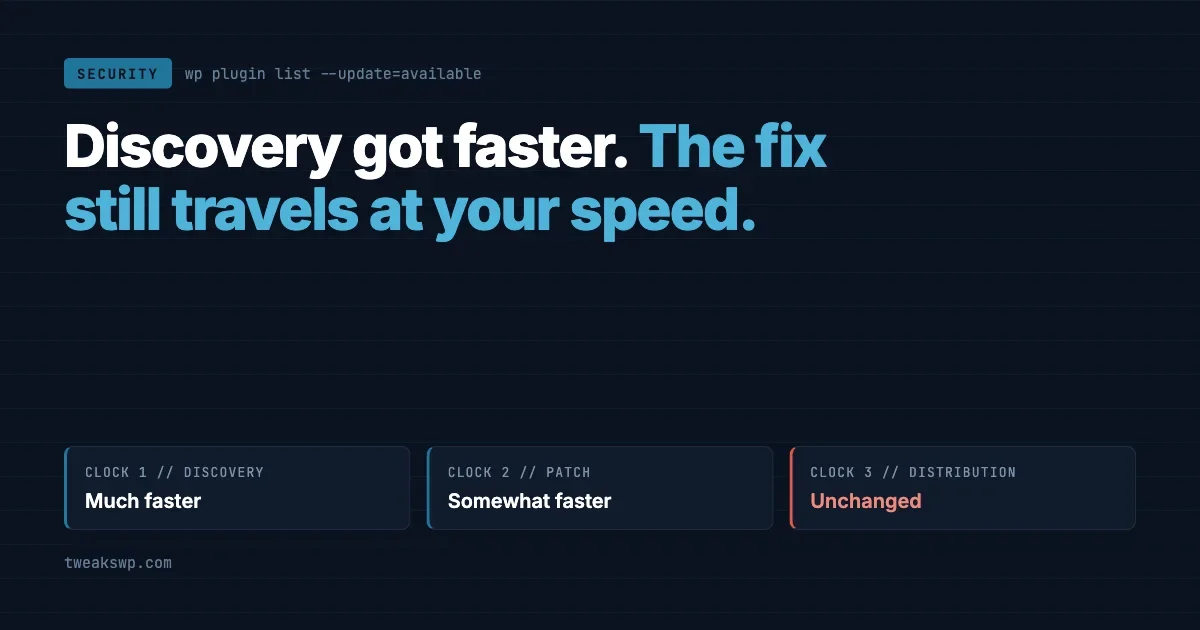
There are three clocks in every plugin vulnerability, and they do not run at the same speed.
- Discovery. Someone finds the bug.
- Patch. The author ships a fixed version.
- Distribution. The fix reaches your sites, and the firewall rule reaches your firewall.
AI has made the first clock dramatically faster. It has made the second somewhat faster. It has done almost nothing to the third, which is the one you actually operate.
That is the whole argument of this article, and it is why “AI helps defenders too” is true and not reassuring. Both sides did get faster. They got faster at different parts of the chain, and the part that got left behind is the part that decides whether your sites are exposed on a given Tuesday.
What actually changed on the offensive side
Skip the marketing framing about AI writing malware. The change that matters to anyone running WordPress is duller and worse: the cost of reading code carefully fell by an order of magnitude.
Reading the repository stopped being expensive
The plugin repository holds tens of thousands of plugins. Auditing one properly is hours of work by someone who knows what a nonce is for and where WordPress checks capabilities. That labour cost is what protected the long tail. Nobody was going to hand review a plugin with 400 installs.
The labour cost is what changed. A first pass over a codebase looking for the standard WordPress mistakes is now cheap enough to run broadly rather than selectively. The mistakes have not changed at all:
- An
wp_ajax_nopriv_handler that performs a privileged action. check_admin_referer()present,current_user_can()missing, so any logged in subscriber passes.- User input reaching
$wpdb->query()withoutprepare(). update_option()driven by a POST field with no allowlist.- A REST route registered with
'permission_callback' => '__return_true'. - File operations taking a path from the request.
These are the same six patterns that have produced WordPress advisories for a decade. What is different is that finding them across the long tail no longer requires a person willing to spend an afternoon per plugin.
Patch diffing got faster too
A patch is a disclosure. When an author ships 3.4.1 with a quiet “security fix” line, the diff between 3.4.0 and 3.4.1 shows exactly what was wrong and therefore exactly what to attack on every site still running 3.4.0.
This has always been true. Reading a diff and working out how to reach the vulnerable path used to take skill and time. Summarising a diff and explaining what the old code allowed is precisely the kind of task language models are good at.
The practical consequence is that the safe interval between a patch appearing and exploitation starting is shrinking. Any update policy built on “we batch updates every two weeks” was designed for a slower version of this.
Variant hunting
When one plugin turns out to have a broken capability check in its AJAX handler, the same mistake usually exists in a dozen others, often because their authors copied the same tutorial. Searching for a known bad pattern across many codebases is mechanical work, which makes it exactly what automation is for.
Expect vulnerabilities to arrive in clusters of similar bugs across unrelated plugins rather than as isolated one-off advisories.
What did not change
Being fair about the limits matters, because overstating this leads to bad decisions.
Finding a suspicious pattern is not the same as having a working exploit. Most candidates are false positives: the capability check is two functions up, the input is sanitised somewhere unexpected, the path is unreachable in a default install. Turning a candidate into something that works against a real site still takes a person who understands the target.
What automation produces is a much longer list of leads. The skilled work moved from finding candidates to filtering them, which is a real change in throughput rather than a change in what is possible.
That distinction matters when you are deciding how worried to be. Nothing described here is a new class of attack. There is no novel technique to defend against, no setting to change that did not already exist. Every vulnerability in this picture is one of the same familiar mistakes, found sooner and in more places.
Which is good news, in a narrow sense. The defences that worked before still work. You do not need a new product. You need the existing practices applied to more plugins, more often, and faster than the schedule you set when advisories arrived at a slower pace.
What changed on the defensive side
The same capability points the other way, and it is genuinely useful.
Triage. Security teams receive far more reports than they can process, and most are noise. Sorting the plausible from the nonsense is the bottleneck, and it is a filtering problem.
Review before release. The best use available to anyone who ships code. A pass over your own diff asking specifically about capability checks, nonces, escaping and prepared statements catches the standard mistakes before they become an advisory. This works because you are checking your own code, where you can verify every answer.
Log analysis. Describing an odd request pattern in plain language, and asking what it resembles, is faster than reading raw access logs at 2am.
Notice that all three help the people who build and analyse. None of them shorten the distance between a published patch and a patched site. That gap is operational, and it is yours.
The asymmetry that decides your exposure
Here is where the two sides stop being symmetric.
An attacker who improves discovery gets value immediately. A new lead is worth something the moment it exists, and it applies to every unpatched site on the internet at once.
A defender who improves discovery has to then ship a patch, wait for it to be reviewed and released, wait for site owners to apply it, and wait for a firewall rule to reach the tier those owners actually pay for. Every one of those steps involves human scheduling and commercial decisions.
We documented one version of that lag already. A firewall vendor shipping a rule to paying customers weeks before the free tier receives it means the free tier has a known exposure window measured in weeks, published openly, and entirely predictable to anyone who cares to look.
Faster discovery on both sides plus unchanged distribution equals a wider gap, not a narrower one.
That is the honest cost and benefit. Better tools for defenders are real. They land on the parts of the chain that were never your bottleneck.
How one advisory moves through a fleet
Abstract timelines are easy to nod at, so here is the concrete shape of a bad week, using the pattern we have watched repeatedly rather than any single incident.
Stage | Who is acting | Where your sites stand |
|---|---|---|
Bug found in a plugin on 40,000 sites | A researcher, or someone who will not be filing a report | Exposed, unaware, and so is everyone else |
Report filed, author notified | Researcher and plugin author | Still exposed. Nothing is public |
Patched version released, changelog says “security fix” | Plugin author | The clock you control starts here |
Diff read, exploitation begins | Anyone watching the repository | Exposed until each site updates |
Advisory published, firewall rule ships to paid tiers | Security vendor | Paid tiers covered. Free tiers waiting |
Rule reaches free tier | Security vendor | Covered, weeks after the exploitation began |
Read down the third column. The only row where your own action changes the outcome is the third one, and it arrives before the advisory that would have told you to care. Every site that updated promptly skipped the entire bottom half of that table.
What AI compresses is the distance between row three and row four. The rows below that move at the speed of a vendor’s release schedule and a commercial tier decision, neither of which is going to accelerate on your behalf.
Using it on your own code, concretely
If you ship plugins or maintain client custom code, this is where the defensive side pays off immediately, because you can verify every answer against code you own.
Run a pass over your diff before release and ask about the specific WordPress failure modes rather than for a general opinion. Generic requests produce generic reassurance. Narrow ones find things:
- Every
add_action('wp_ajax_...')and itsnoprivtwin: which capability is checked, and where? - Every
register_rest_route(): what does thepermission_callbackreturn, and is it ever__return_trueon a writing route? - Every
$wpdbcall: is the variable part insideprepare(), or concatenated in? - Every echo of a value that came from the database: which escaping function, and is it the right one for that context?
- Every file path built from request data: what stops
../?
Then verify each finding by hand. The value is in the exhaustive sweep of a boring checklist across a large diff, not in the judgement. Treat the output as a list of places to look, in exactly the way an attacker does.
The same checklist belongs in your review process whether or not a tool runs it, which is the actual point. The tool makes an existing discipline cheap enough to apply every time instead of before major releases only.
Measure your own exposure window
Opinions here are worth less than numbers from your own fleet. These are the numbers worth having.
How far behind is each site right now
# Per site: everything with an update waiting
wp plugin list --update=available --fields=name,version,update_version --format=table

# Across a fleet, from a file of paths
while read -r SITE; do
  echo "== $SITE"
  wp --path="$SITE" plugin list --update=available --fields=name,version,update_version --format=csv
done < sites.txt
Count the rows. That total is your queue. If it takes more than a few seconds to scroll, your update policy is not a policy.
What is installed but not running
wp plugin list --status=inactive --fields=name,version --format=table
wp theme list --status=inactive --fields=name,version --format=table
Deactivated is not uninstalled. The files are still on disk and still reachable by URL. A vulnerability that runs before WordPress checks whether the plugin is active does not care about your admin screen. Deleting unused plugins is the single highest value cleanup on most fleets, and it costs nothing.
wp plugin delete $(wp plugin list --status=inactive --field=name)Read the list before you run that. Some sites keep a deliberately inactive plugin for seasonal use.
Has anything already been modified
wp core verify-checksums
wp plugin verify-checksums --all
This compares files on disk against the official checksums. It catches the crude cases: an injected file, a modified core file, a backdoor added to a plugin. It will not catch a compromise that lives entirely in the database, and it produces noise for anything you patched by hand, which is a good argument against patching by hand.
How long a patch actually takes to land
This is the number that describes your operation, and almost nobody measures it. Pick the last three security updates you applied. For each, find the date the version was released and the date it reached your slowest site.
# When did this site last change its plugin files?
find wp-content/plugins -maxdepth 2 -name "*.php" -newermt "-30 days" -print | head -20
If the honest answer is “somewhere between four days and three weeks, depending on who noticed,” then that range is your exposure window, and it is the number every argument about AI in security should be measured against.
Four changes that actually narrow the window
None of these are exciting. All of them beat buying a tool with AI in the name.
1. Auto-update the tail, stage the core
The usual objection to auto-updates is that an update might break the site. That is a real risk, and it applies mainly to the handful of plugins doing heavy lifting: the commerce plugin, the page builder, the membership system.
It applies far less to the twenty small plugins that add a widget or a redirect. Those are the ones most likely to carry an unreviewed vulnerability and least likely to break anything when updated.
# Turn auto-updates on for everything, then exclude the load-bearing ones
wp plugin auto-updates enable --all
wp plugin auto-updates disable woocommerce elementor learndash
Split the fleet by blast radius rather than treating every plugin as equally dangerous to update.
2. Keep the inventory as data
When an advisory names a plugin, the only question that matters is which of your sites run it, and the answer has to arrive in seconds.
# Nightly: dump every site's plugin list to one CSV
while read -r SITE; do
  wp --path="$SITE" plugin list --fields=name,version,status --format=csv \
    | tail -n +2 | sed "s|^|$SITE,|"
done < sites.txt > /var/log/wp-inventory-$(date +%F).csv

# Later, when an advisory lands
grep -i "ninja-forms" /var/log/wp-inventory-*.csv
An inventory that lives in someone’s memory is not an inventory. This is the same discipline behind a staged rollout plan, which we walked through for the 7.1 fleet rollout, and it pays off far more often during a security event than during a scheduled upgrade.
3. Verify the firewall is actually loaded
Plenty of sites run a security plugin whose firewall never actually engages, because it was never switched from basic protection to the extended mode that loads before WordPress. The dashboard shows green either way.
# Is a firewall prepended at the PHP level?
wp eval 'echo ini_get("auto_prepend_file") ?: "none";'
grep -r "auto_prepend_file" .user.ini php.ini .htaccess 2>/dev/null
If that returns nothing, your firewall runs as a plugin, which means it runs after WordPress has already loaded every other plugin, including the vulnerable one. That is a meaningful difference during an active campaign.
4. Reduce what you run
Every plugin is code with the same access as WordPress itself. Thirty-eight plugins is thirty-eight independent decisions to trust a stranger’s release process.
If AI has lowered the cost of auditing the long tail, then the long tail is where the next batch of advisories comes from, and the small forgotten plugin is now a worse bet than it was two years ago. Removing three plugins you do not need is a permanent reduction in exposure that requires no ongoing effort.
5. Decide in advance what an unpatchable advisory looks like
Most incident plans assume a fix exists. The uncomfortable case is an advisory against an abandoned plugin where no patched version is coming, and that case is going to get more common as the long tail gets audited.
Removal is then the only remedy, and removal breaks something on a live site. Work out beforehand which plugins on your fleet you could pull today without a client meeting, and which ones would need a replacement built first.
# Plugins with no update in a long time, per site
wp plugin list --fields=name,version,update,auto_update --format=csv

# Cross-check against the repo's last-updated date before you trust one
wp plugin get <slug> --field=version
A plugin whose last release was three years ago is not stable, it is unattended. The distinction only shows up on the day an advisory lands, and by then the choice is between a broken feature and an open door.
Keep that judgement written down next to the inventory. During an incident nobody has time to work out which of forty plugins is load bearing, and that is exactly when someone will be asked to decide in ten minutes.
What does not help
The pitch | The reality |
|---|---|
AI-powered scanning that finds unknown threats | Ask what it reads and what it compares against. If it is signatures, it is a signature scanner with new branding, and it inherits the same distribution lag |
Blocking AI crawlers in robots.txt as a security control | Attack traffic ignores robots.txt. This is a content licensing decision, not a security one |
Asking a chatbot whether a plugin is safe | It has no view of that plugin’s current code or advisory status, and will produce a confident answer anyway |
Waiting for the vendor rule instead of updating | The rule reaches your tier on the vendor’s schedule. The update is available now |
The pattern in that table is worth naming. Each of these substitutes something automated for the manual work of knowing what you run and updating it, and the manual work is the part that was actually protecting you.
The part that is genuinely uncomfortable
If cheap code review is now available to everyone, then a large number of small plugins are going to be found wanting over the next couple of years. Not because anything got less secure, but because nobody had looked before.
Some of those authors stopped maintaining their plugin years ago. There will be advisories with no patch, on plugins with real install counts, and the only fix will be removal. Plan for that rather than for a version bump.
The counterweight is that the same capability is available to you. Running a review pass over a plugin you depend on, before you install it on ninety sites, is now a realistic thing to do rather than an afternoon you will never spend.
What to do this week
- Run the inventory dump and put it somewhere greppable.
- Delete every inactive plugin and theme you cannot justify.
- Enable auto-updates for everything except your load-bearing plugins.
- Check whether your firewall is actually prepended, on your three most important sites.
- Measure the real time between a security release and your slowest site being patched. Write the number down.
That last number is the one to argue about. Everything else in this article is context for it. Discovery got faster on both sides, the fix still travels at the speed of your operation, and the only variable you control is how quickly a patch that already exists reaches the sites you are responsible for.
If that number is measured in hours, the acceleration described here barely touches you, because you were never sitting in the exposed window long enough for it to matter. If it is measured in weeks, no security product is going to close the gap for you, and the vendor tier you pay for decides how long you wait for cover you could have made unnecessary by updating.
Measure it first. Then decide whether anything else on this page deserves your budget.
Plugins we build and run
We maintain these ourselves, which is why we can support them on your site.
- BuddyNextThe self-hosted community engine for WordPress
- BuddyXFree community theme, Pro when you outgrow it
- ReignPremium community theme. Add pieces, build anything
- JetonomyCommunity forum and Q&A for WordPress
- EventonomyEvents and RSVPs for WordPress communities
- LearnomyCourses and learning communities on WordPress
- ListoraDirectories and listings your members can browse
- SnipShareCode sharing built for developer communities
- WB Ad ManagerAd placements that turn traffic into revenue
- WP Career BoardA job board your community actually uses
- WP Sell ServicesSell services with offers, orders, and payouts
- MediaVersePhotos, video, and media albums for members
- WB GamificationPoints, badges, and rewards that keep members active
- Product RoadmapPublic roadmaps with voting your users trust