WordPress 7.1 Lands in 15 Days. Here Is the Fleet Rollout Plan.
WordPress 7.1 ships 19 August. A staged four-wave rollout for agencies: the inventory commands, which sites go last, what to verify where, the rollback decision, and why front-end smoke tests will miss everything.

WordPress 7.1 ships on 19 August, timed to the closing day of WordCamp US. If you run one site, that is a calendar note. If you run forty, it is a project, and the difference between a good week and a bad one is whether you decided the order in advance.
This is not the same problem as routine patching. A security release you apply everywhere within hours; a major release you stage, because the failure mode is not “we were slow” but “we broke sixty client sites simultaneously and cannot tell which change did it”.
Here is the plan, sized for an agency or anyone maintaining more than a handful of installs.
What is actually in this one
Worth knowing what you are rolling out, because it determines what you test.
The changes most likely to surface as a client complaint:
- The post editor is always iframed. Previously conditional; now unconditional. Custom blocks that reach for global
documentorwindowbreak, and the conditionality removal is the reason your earlier testing may not have caught it. - The 40px control default is permanent. Layouts built around smaller controls shift.
- jQuery UI 1.14.2, dropping Internet Explorer and Edge Legacy support and removing
$.fn._form,$.ui.ieand related APIs. - Media library infinite scroll on by default, which matters on large libraries and needs its own measurement before you decide anything.
- Icons inherit currentColor, so CSS
filltinting stops working.
Notice the shape: almost all of it is editor-side. The front end of a typical site is largely unaffected, which is good news and also a trap, it means smoke-testing the front end will tell you nothing. The breakage lives where your clients work, not where their visitors do.
Build the inventory first
You cannot stage a rollout across sites you have not counted. Start here, because the output drives every later decision:
wp site list --field=url | while read -r url; do
  printf '%s\t%s\t%s\t%s\n' \
    "$url" \
    "$(wp core version --url="$url")" \
    "$(wp plugin list --status=active --format=count --url="$url")" \
    "$(wp theme list --status=active --field=name --url="$url")"
done | column -t
Four columns: site, current core version, active plugin count, active theme. Save it. That file is your rollout order.
Then find the sites carrying custom blocks, which are the ones at real risk:
wp site list --field=url | while read -r url; do
  hits=$(wp plugin list --status=active --field=name --url="$url" \
    | while read -r p; do
        grep -rl "registerBlockType" "$(wp plugin path --url="$url")/$p" 2>/dev/null | head -1
      done | wc -l)
  [ "$hits" -gt 0 ] && printf '%s\t%s custom-block plugins\n' "$url" "$hits"
done
Crude, and good enough. Any site appearing in that second list needs a human to open the editor before it goes to 7.1.
Order the fleet into waves
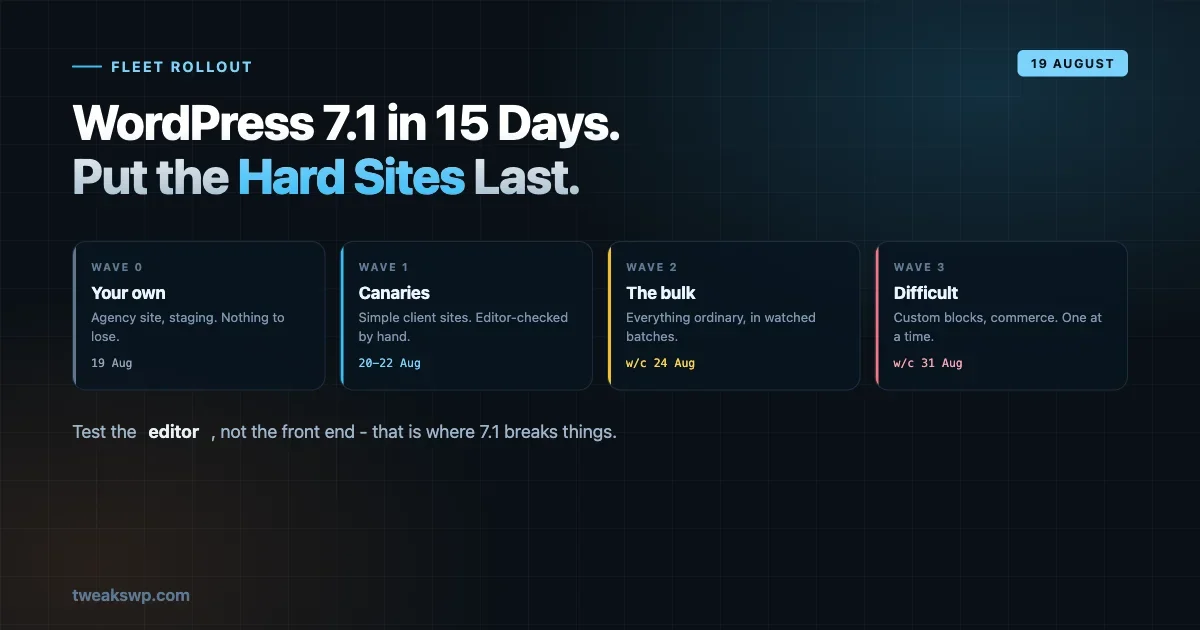
Four waves, and the ordering principle is blast radius ascending.
Wave 0 - your own sites. Your agency site, your staging boxes, anything where a broken editor costs you nothing but embarrassment. Go on release day.
Wave 1 - simple client sites. Stock or near-stock themes, small plugin counts, no custom blocks, low traffic. These are your canaries: enough real-world variation to surface problems, low enough stakes that a problem is recoverable. Two or three days after release.
Wave 2 - the bulk. Everything ordinary. Only once wave 1 has run clean for several days.
Wave 3 - the difficult ones. Sites with custom blocks, heavy page builders, e-commerce, anything where the client notices within minutes. These go last and each one gets individual attention rather than a batch command.
The instinct to do the important sites first, while you are fresh and paying attention, is understandable and wrong. Attention is worth less than information, and wave 3 benefits from everything the earlier waves taught you.
Do not upgrade blind on release day
The single highest-value thing you can do is not on release day at all. It is testing against Beta or RC now, on a copy of your two or three most complex sites.
# On a staging clone only.
wp core update --version=7.1-RC1 --force
wp core update-db
Then open the editor - not the front end - and click through:
- Insert each custom block your site uses
- Edit an existing post that contains them
- Check any block with a popover, tooltip, or anything that measures dimensions
- Open a template in the Site Editor
- Load the media library grid if the library is large
That list is short because the failure surface is narrow. Fifteen minutes per site, and it converts release day from discovery into confirmation.
The rollout command
Once a wave is decided, the mechanics are dull, which is the goal:
#!/bin/bash
# upgrade-wave.sh, takes a file of URLs, one per line.
set -uo pipefail
WAVE="$1"
LOG="upgrade-$(basename "$WAVE")-$$.log"

while read -r url; do
  [ -z "$url" ] && continue
  echo "=== $url" | tee -a "$LOG"

  before=$(wp core version --url="$url")
  wp db export "backup-pre71-$(echo "$url" | tr -c 'a-z0-9' '-').sql" --url="$url" >>"$LOG" 2>&1 \
    || { echo "BACKUP FAILED, skipping" | tee -a "$LOG"; continue; }

  wp core update --url="$url" >>"$LOG" 2>&1
  wp core update-db --url="$url" >>"$LOG" 2>&1

  after=$(wp core version --url="$url")
  status=$(curl -s -o /dev/null -w '%{http_code}' "$url")
  printf '%s: %s -> %s (HTTP %s)\n' "$url" "$before" "$after" "$status" | tee -a "$LOG"
done < "$WAVE"
Three things in there are deliberate. The backup is a hard gate, if the export fails, the site is skipped rather than upgraded, because an upgrade you cannot reverse is not a plan. Before and after versions are both recorded, so the log answers “did this actually apply” rather than “did the command run”. And the HTTP check is a smoke test, not a pass, a 200 means the site loads, which as established tells you nothing about the editor.
What to verify, and where
Split verification by cost.
Automated, every site. HTTP status on the homepage and one interior page. Core version confirmed. wp plugin list --status=active unchanged, catching plugins deactivated by a fatal.
wp plugin list --status=active --field=name --url="$url" | sort > /tmp/after.txt
diff /tmp/before.txt /tmp/after.txt && echo "plugins unchanged"
Manual, wave 1 and wave 3 only. Open the editor. This is the part that cannot be automated cheaply and is the only part that finds the iframe problems.
Client-reported, everything else. Realistic rather than defeatist. On wave 2 you are relying on the earlier waves having caught the systemic issues, and on clients telling you about the rest. Make sure they know an update happened and how to reach you, an editor oddity reported the same day is a small problem; the same oddity discovered three weeks later is a mystery.
Tell clients before, not after
The operational plan above is most of the job. The rest is communication, and it is the part agencies skip because it feels optional.
It is not. An editor that behaves slightly differently is a support ticket if nobody warned the client, and a non-event if somebody did. Same change, same site, entirely different Monday.
A short note a few days ahead does the work:
WordPress 7.1 is released on 19 August. We will update your site during the week of [date]. Most of the changes are behind the scenes, but the post editor gets a small visual refresh - controls are slightly larger and the editing area is more isolated from the rest of the admin. Nothing about your live site changes for visitors. If anything looks wrong when you next edit a page, reply to this and we will look the same day.
Three things that note does. It sets a date, so the change is expected rather than mysterious. It says visitors are unaffected, which is the client’s first fear. And it invites a report, which converts a silent annoyance into information you can act on.
For sites in wave 3, make the note personal rather than templated, and send it before the upgrade rather than after. Those are the clients most likely to notice and most expensive to lose confidence with.
One thing not to include: a list of everything in the release. The client does not need to know about jQuery UI or currentColor, and a technical inventory makes a routine update sound alarming.
The rollback question
Decide this before you need it, because deciding it at 22:00 with a client on the phone produces bad choices.
Core has a rollback path:
wp core update --version=7.0.1 --force --url="$url"
wp core update-db --url="$url"
It works, and it is not free. Downgrading core after a database upgrade can leave schema changes in place, so pair it with the database export the rollout script took. That is why the backup is a hard gate rather than a nice-to-have.
But rollback is rarely the right answer for an editor-side bug. If a custom block is broken, downgrading the whole site to fix one block is disproportionate, fixing the block is usually faster and always more durable. Reserve rollback for a fatal, a white screen, or something affecting visitors.
Write down which failures justify a rollback before the wave runs, and make sure whoever is on call has that list.
Hold plugin and theme updates separately
A mistake worth avoiding: bundling the core upgrade with a sweep of plugin and theme updates because you are already in there.
It saves an hour and costs you the ability to diagnose anything. When a site misbehaves after you applied core 7.1 plus nineteen plugin updates plus a theme bump, you have no idea which one did it, and the only way back is bisecting an upgrade you have already shipped.
Separate them by at least a day. Core first, verify, then plugins. The safe update workflow covers the per-site version of this discipline, and it applies unchanged at fleet scale - the only thing that grows is the number of times you repeat it. If a plugin author has shipped a specific 7.1 compatibility release, that is the exception - apply it alongside core, because it exists precisely to be applied together, and note in your log that you did.
The same reasoning applies to PHP version bumps. If a site is due to move from 8.2 to 8.3, do it a week before or a week after, never the same day.
The three-week view
Now to 18 August. Test two or three complex sites against RC. Fix what you find. Build the inventory. Decide the waves.
19 August. Wave 0 only. Watch. Resist doing more because it went smoothly.
20 to 22 August. Wave 1, the canaries. Editor-check each one properly.
Week of 24 August. Wave 2, the bulk, in batches you can watch.
Week of 31 August. Wave 3, individually.
That is deliberately slower than most people plan for, and the slowness is the feature. Nothing bad happens if a client site runs 7.0.x for two extra weeks. Quite a lot happens if forty of them break on the same afternoon.
The one-line version
If you take nothing else: test the editor, not the front end, and put the hard sites last.
Almost everything in 7.1 that can break a client site breaks it where the client works. A rollout plan built around front-end smoke tests will pass every check and still generate support tickets on Monday.
The fleet auto-update setup handles routine security patching and should keep running through all of this, it is the mechanism for the releases you apply immediately. This is the counterpart for the ones you stage. Knowing which category a release falls into, and having a different process for each, is most of what separates a fleet that upgrades calmly from one that fights every August.
Plugins we build and run
We maintain these ourselves, which is why we can support them on your site.
- BuddyNextThe self-hosted community engine for WordPress
- BuddyXFree community theme, Pro when you outgrow it
- ReignPremium community theme. Add pieces, build anything
- JetonomyCommunity forum and Q&A for WordPress
- EventonomyEvents and RSVPs for WordPress communities
- LearnomyCourses and learning communities on WordPress
- ListoraDirectories and listings your members can browse
- SnipShareCode sharing built for developer communities
- WB Ad ManagerAd placements that turn traffic into revenue
- WP Career BoardA job board your community actually uses
- WP Sell ServicesSell services with offers, orders, and payouts
- MediaVersePhotos, video, and media albums for members
- WB GamificationPoints, badges, and rewards that keep members active
- Product RoadmapPublic roadmaps with voting your users trust