How to Build an Employee Onboarding Training Platform with Learnomy

Updated September 2026.
A practical setup for private staff training, role-based learning paths, drip scheduling, CSV roster import, progress reporting, and certificates.
Most companies think onboarding is a checklist problem.
It is not.
Onboarding is a structure problem.
If people join all year round, if different roles need different training, and if HR needs to know who is on track without chasing managers every week, then a simple course site is not enough. You need a real onboarding training platform.
That is where Learnomy fits.
That is the difference between hosting content and running onboarding.
If you have ever tried to manage new hires with spreadsheets, email threads, shared folders, and scattered check-ins, you already know the problem. Everything works until the first month gets busy. Then the process starts leaking.
Someone is enrolled too early. Someone else is missed. One manager is doing things differently from another. HR has to ask for updates. Training gets out of sync.
That is not onboarding. That is damage control.
In this guide
- Start with a private portal
- Build a track per role, not one generic induction
- Make the drip follow the hire date, not a shared calendar
- Assign training by role or group
- Use CSV import because HR already lives in spreadsheets
- Give HR visibility without making them chase people
- Certificates make the record real
- Why learning paths and drip belong together
- What the full Learnomy setup looks like
- What belongs in onboarding versus ongoing training
- Deciding what to build first if you are starting from nothing
- What this solves for a growing company
- What the first week should feel like
- How I would name the structure
- Measuring whether onboarding is actually working
- Onboarding remote and distributed hires
- The manager’s role, not just HR’s
- Common onboarding platform mistakes
- Compliance and the audit trail
- Frequently Asked Questions
- Two posts that fit this model
- What I would tell the team before launch
- Onboarding seasonal and contract hires without building a second system
- The part nobody wants to admit
Start with a private portal
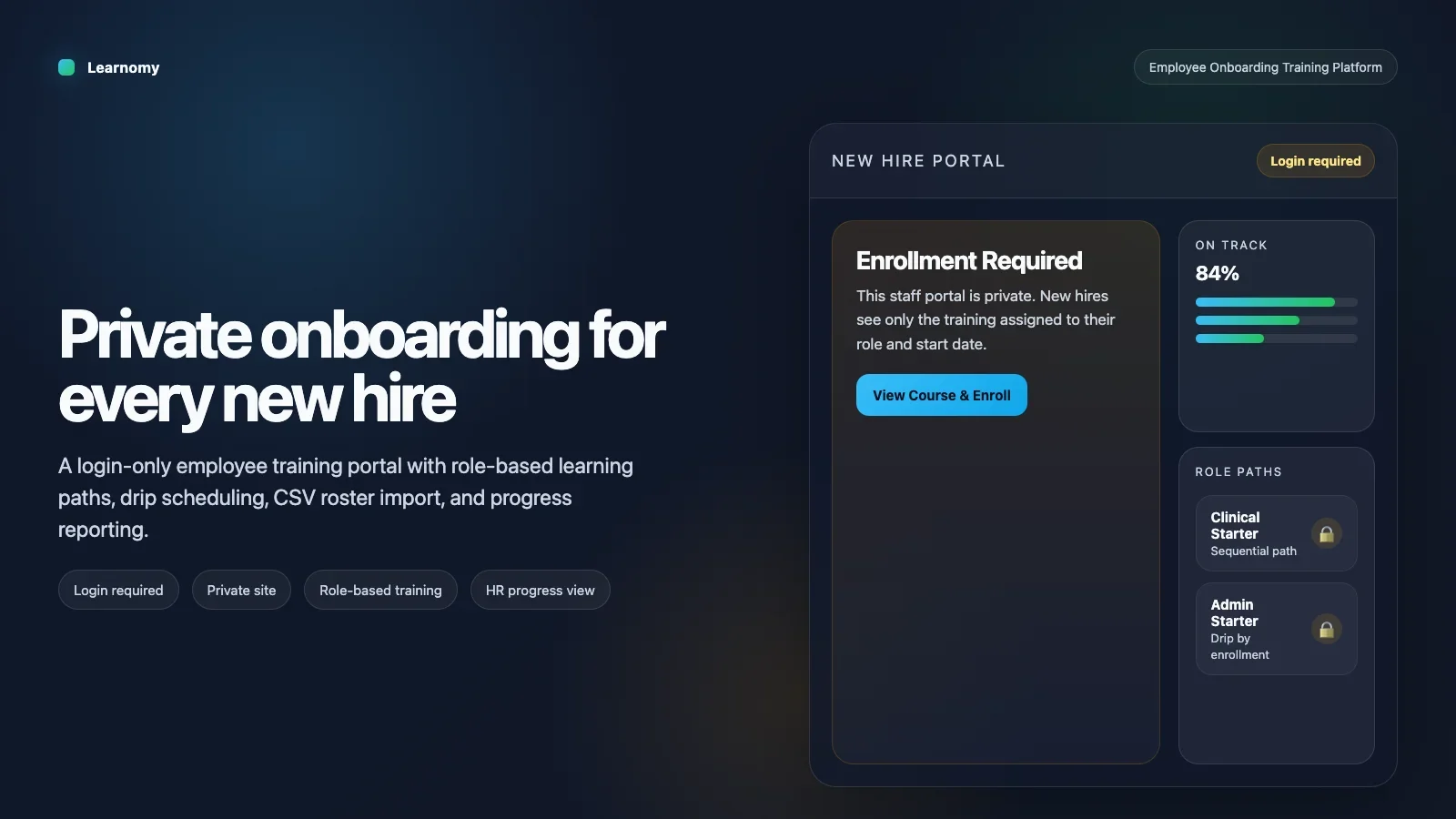
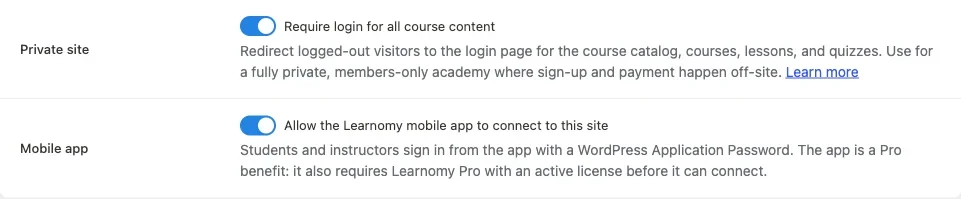
The first thing an employee onboarding platform needs is privacy.
This should not be public content. It should not live in the same world as your marketing site. It should not be something a logged-out visitor can stumble into.
Learnomy has a built-in private site setting for exactly this. That is the right starting point for staff onboarding because it closes the whole learning environment behind login. One switch, and the portal is no longer public.
When onboarding is private, you can stop thinking like a publisher and start thinking like an operations team. You control who gets in. You control what they see. You control the pace, and you stop reacting to onboarding problems after they have already cost someone their first productive week.
Build a track per role, not one generic induction
This is where most onboarding systems get lazy.
They create one company induction and force everyone through it.
That sounds efficient until you look closely. A clinical hire and an admin hire do not need the same training sequence. A manager and a support rep do not need the same path. A new starter in finance should not be sitting through training that only applies to operations.
Learnomy supports learning paths, which is exactly what this kind of setup needs.
A learning path is a structured sequence of courses. You can build one path per role. That means your onboarding can be role-based instead of one-size-fits-all.
That is a better design because onboarding is not just about information. It is about order.
Some things must happen first. Compliance first. Security first. Basic policies first. Then the role-specific work can begin.
A sequential learning path makes that happen.
Make the drip follow the hire date, not a shared calendar
This is the part that turns a course list into an actual onboarding system.
If you are onboarding new hires every week or every month, a shared calendar does not work. A person who starts in March should not follow a sequence built around a September cohort. That is the wrong shape for employee onboarding.
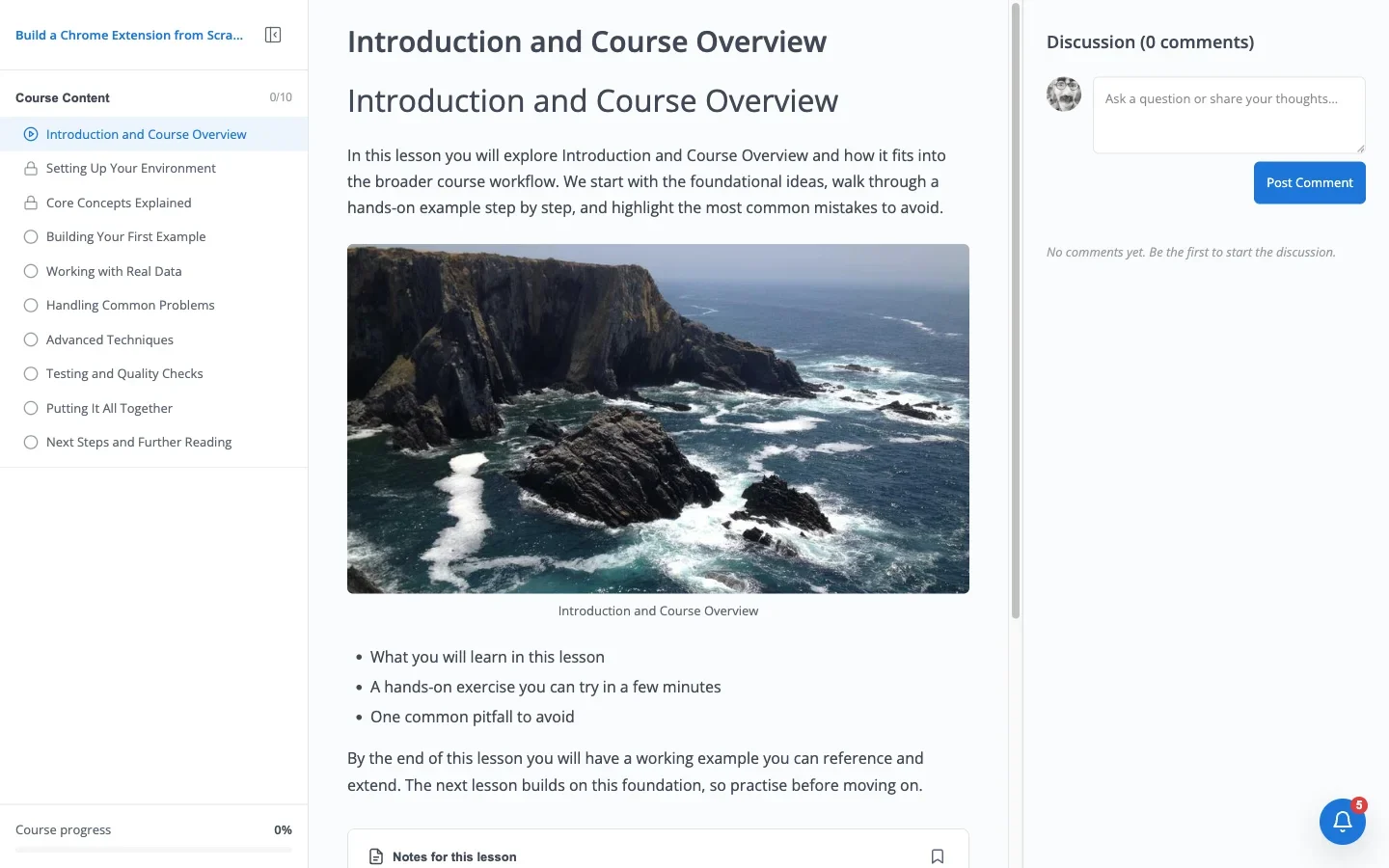
Learnomy’s content drip solves that by letting lessons unlock based on enrollment timing.
That means onboarding content can open in stages after a person joins, which is what you want for real staff training. Day one should feel like day one no matter when the hire happens. Week two should not depend on everyone joining at the same time.
When onboarding is scheduled by each person’s start date, the experience stays consistent without being rigid.
Assign training by role or group
A good onboarding platform does not ask you to assign every course manually, one by one, forever.
That gets old very quickly.
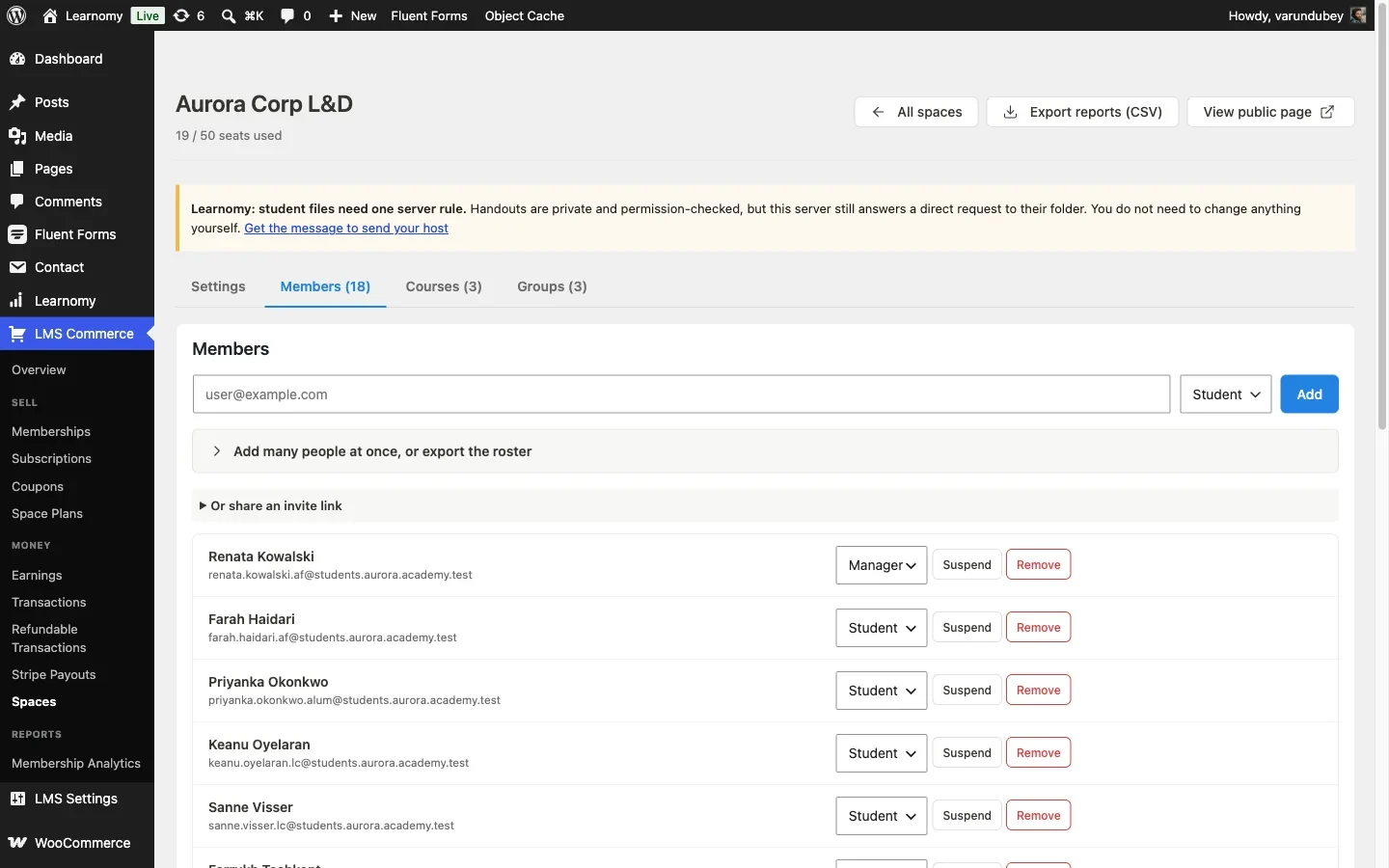
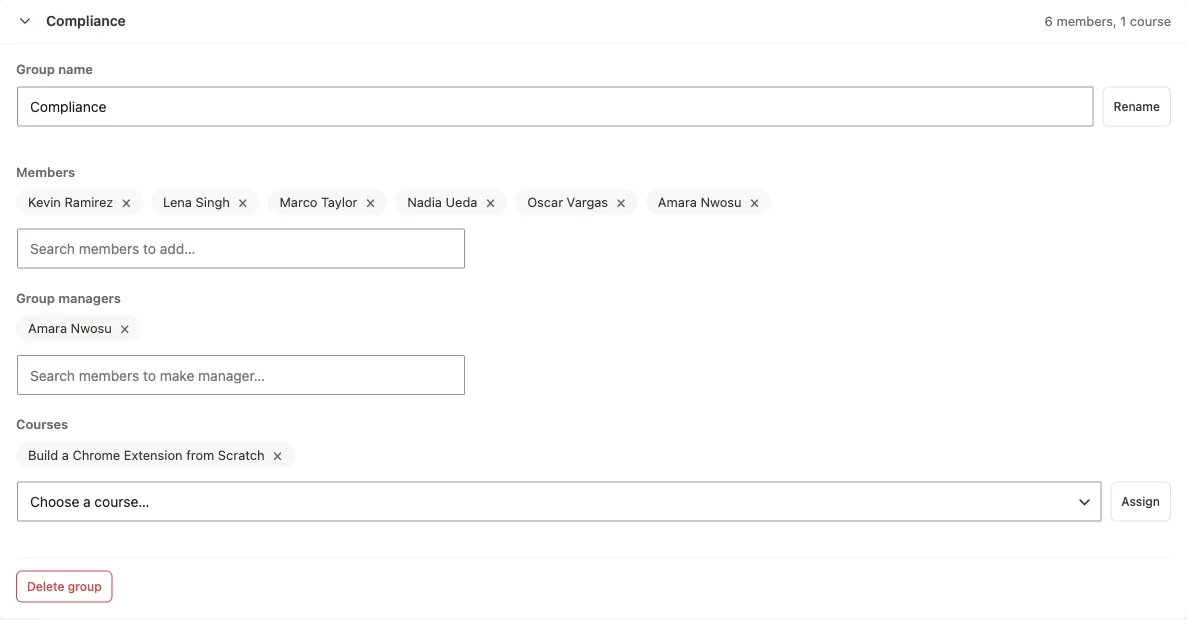
You want to assign the right learning track to the right role, and let the system handle the rest. Learnomy’s Spaces model is useful here because it gives you a way to group people and manage access in a structured way.
For employee onboarding, that can mean department groups or role groups. Engineering gets one path. Sales gets another. Support gets another. HR can see the whole picture. Local managers can see their own teams.
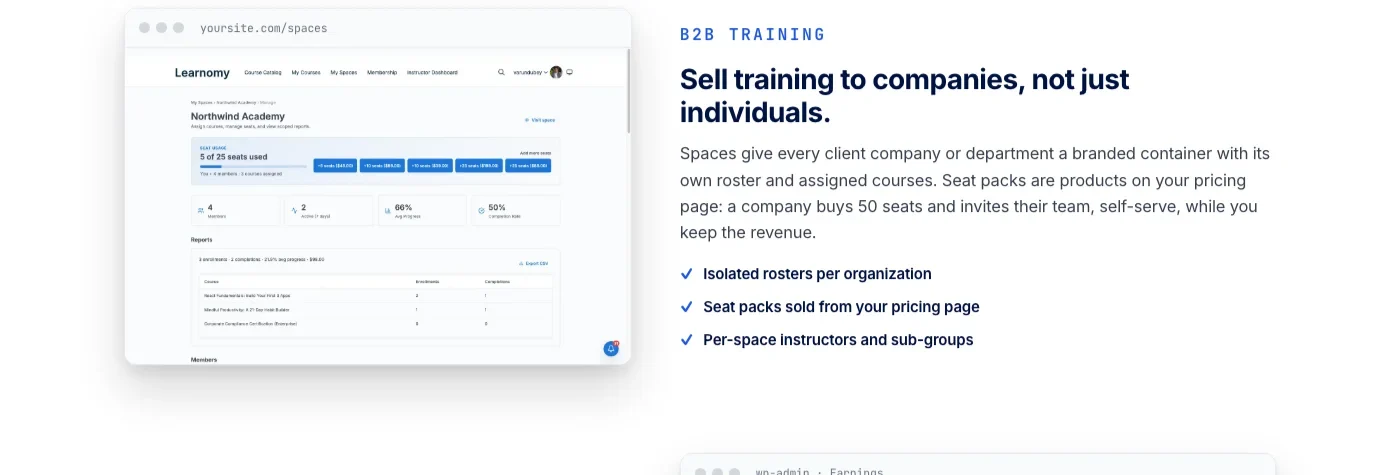
That gives you a clean operating model.
One action to place a new hire into the right space or group. One assignment to give them the right onboarding path. No manual course-by-course setup every time a person joins.
Use CSV import because HR already lives in spreadsheets
This is one of those boring details that matters a lot in real companies.
HR already has the roster in a spreadsheet. They always do.
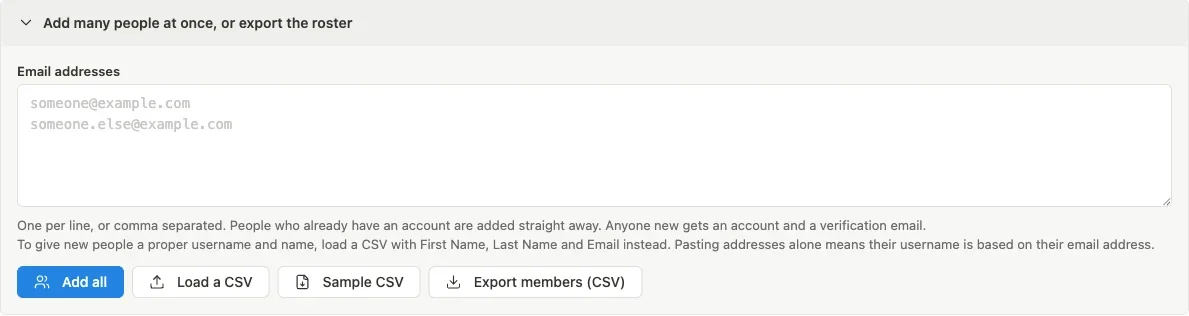
So if your onboarding platform makes them retype names into a form one by one, you have already lost. The system should work with the way teams actually operate.
Learnomy supports CSV roster import, which is exactly what you want here. You can load multiple people at once, keep the roster organized, and avoid a long manual setup process.
Give HR visibility without making them chase people
Onboarding breaks when nobody can see what is happening.
HR should not have to message line managers for every update. They should not have to guess who is behind, who has started, or who is still waiting to complete a compliance step.
Learnomy gives you progress reporting for exactly that reason.
Once the training is running, the platform becomes a reporting system as well as a training system. HR can see completion. Managers can see their team. The business can see whether new hires are moving through the right sequence, knowing exactly who is progressing and who has quietly stalled, instead of finding out weeks later.
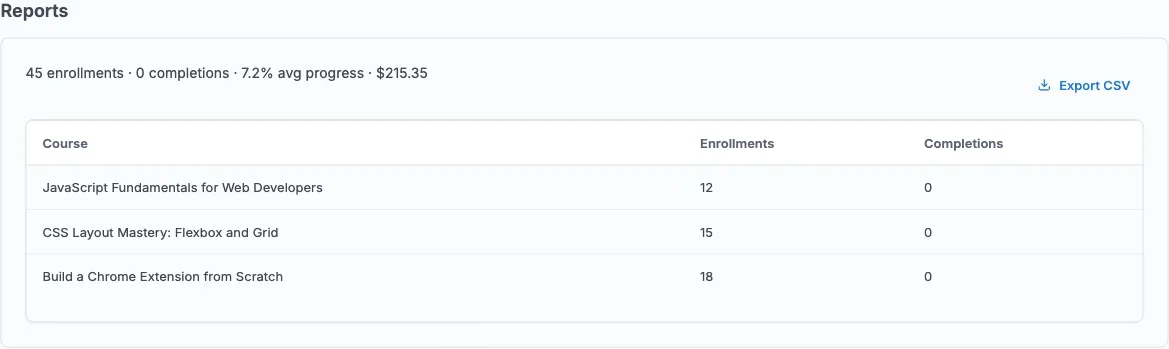
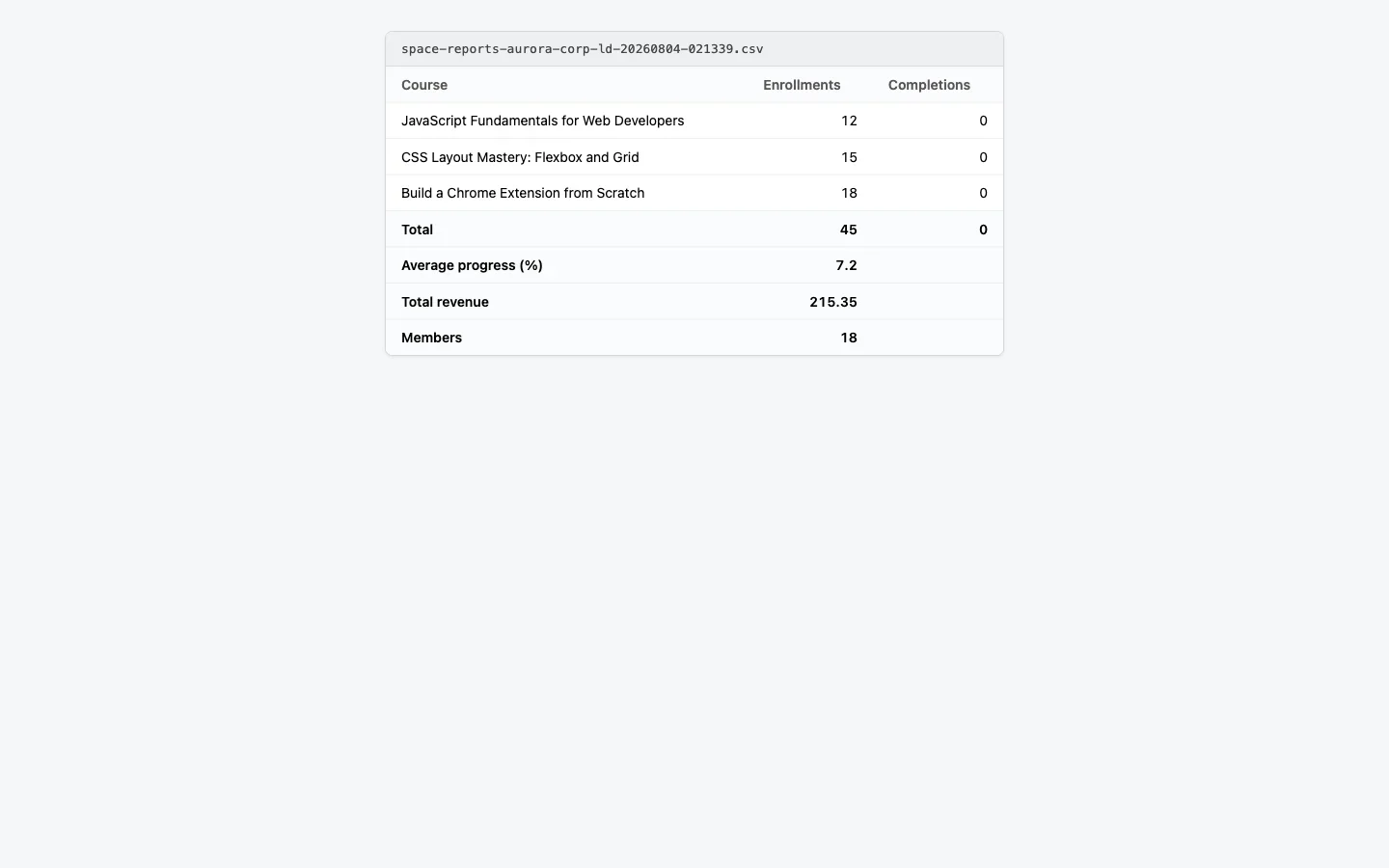
That is what makes onboarding manageable at scale.
The platform stops being a content bucket and becomes a view of real progress.
Certificates make the record real
Some onboarding steps are not just educational. They are evidence.
That is especially true for compliance, information governance, safety, and policy training. If somebody completes a required module, you need that completion recorded cleanly, and recorded honestly: a passing score only means something if the assessment behind it actually holds up, not a checkbox someone clicked through in ninety seconds.
Learnomy supports certificates on completion, which gives the onboarding process a proper end point. That matters because a certificate is not just a nice extra. In many organizations, it is the record that proves the training happened.

Why learning paths and drip belong together
This is the part people often miss.
A learning path gives you structure. Drip gives you timing.
You need both.
Without a path, onboarding becomes a pile of courses. Without drip, it becomes a wall of content dumped on day one. Put them together and you get a proper onboarding sequence that respects order and pacing.
That is what a real employee onboarding training platform should do.
What the full Learnomy setup looks like
If I were building an employee onboarding site in Learnomy, I would structure it like this.
A private portal first. Then role-based learning paths. Then drip rules tied to each new hire’s enrollment. Then spaces or groups for department-level access. Then CSV import for roster management. Then progress reporting for HR. Then certificates for completion evidence.
That is the basic shape.
What belongs in onboarding versus ongoing training
Not every piece of company knowledge belongs in the onboarding path, and cramming it all in is one of the fastest ways to make a new hire disengage before their first week is over. Onboarding should cover what someone needs to function safely and productively in their first days: security basics, core policies, the tools they will touch immediately, and enough context about the team to know who to ask when something is unclear.
Deeper role expertise, advanced product knowledge, or skills that only become relevant a few months in belong in ongoing training, not onboarding. Mixing the two produces a learning path that is either too shallow to actually prepare someone or so long that nobody finishes it in a reasonable timeframe. The dividing line is usually urgency: if a new hire genuinely needs it in week one to avoid a mistake or a blocked task, it is onboarding. If it makes them better at the job over the following months, it is ongoing training, and it should live in a separate, longer learning path rather than being bolted onto the first-week sequence.
A useful pattern is to structure the path in three horizons: day one covers access, safety, and where things are; week one covers role basics and the immediate team; the first month covers the deeper role-specific material that does not need to be rushed. Drip scheduling maps naturally onto this structure, since each horizon can unlock automatically as the relevant number of days passes from the hire’s actual start date.
Deciding what to build first if you are starting from nothing
Teams that have never had a structured onboarding platform often stall trying to plan the entire system before building any of it. The better approach mirrors how a rollout should work for a partner network: build the smallest real version first, then expand it.
Start with the private portal and a single role’s learning path, usually whichever role the company hires most often. Get the drip timing right for that one path before building a second. Add CSV roster import once there is an actual list of upcoming hires to load, not before. Turn on progress reporting once there is real data flowing through the system, since a report with no data in it tells you nothing about whether the reporting view itself is useful.
Certificates and the audit trail can come slightly later unless the company operates in a regulated space where compliance evidence is required from day one. In that case, build the certificate step alongside the very first learning path rather than retrofitting it once training has already been happening informally, since retrofitting means the earliest hires never get a clean, dated completion record.
This sequence matters more than getting every detail right on the first attempt. A working version with one role and a handful of hires teaches the team where the real friction is far faster than a fully planned system that has never touched a real new hire.
What this solves for a growing company
Once a company starts hiring continuously, onboarding stops being a one-off task. It becomes a system that has to run all the time.
That is when most organizations start feeling the cost of a weak setup.
Someone misses a course. Someone gets the wrong sequence. Someone joins late. Someone leaves and their access is never handled properly. Someone in HR exports a report that does not match what the managers think is true.
A proper onboarding platform removes a lot of that friction.
You stop handling onboarding through side conversations. You stop rebuilding the process every month. You stop depending on one person remembering how it all works.
What the first week should feel like
The first week decides whether a new hire feels guided or abandoned.
If the portal is cluttered, if the next lesson is unclear, or if the manager has to keep explaining the same thing over and over, the system is already failing.
What you want instead is a calm sequence. The learner logs in, sees the right track, and understands what is due now. Nothing more. Nothing hidden. Nothing random.
How I would name the structure
Names matter because they tell people how to think about the system.
If you call everything a course, people start thinking in isolated lessons. If you call everything a file or a resource, the system feels passive. Neither label is enough for onboarding.
I would use one clear structure. The site is the private onboarding portal. The role setup is the learning path. The department container is the space or group. The schedule is the drip. The record is the certificate.
Measuring whether onboarding is actually working
A portal that looks organized is not the same as a portal that works. The only way to know which one you have built is to watch a handful of numbers instead of trusting that the structure is doing its job.
Time to first completion is the most useful early signal. If new hires are not finishing their first module within a day or two of their start date, either the content is too long, the drip timing is wrong, or nobody told them where to log in. Dropout point matters just as much as completion rate. A cohort that finishes compliance training but stalls on the role-specific path is telling you something different than a cohort that stalls right at login, and the fix for each is not the same.
Manager feedback closes the loop that reporting alone cannot. A dashboard can tell you someone finished a module. It cannot tell you whether the new hire actually understood it or just clicked through. A short check-in between the manager and the new hire at the two-week mark, informed by what the report shows and what the manager has directly observed, catches gaps a completion percentage will never surface on its own.
Onboarding remote and distributed hires
Remote onboarding fails in a specific, predictable way: the new hire has no ambient context. In an office, a new employee picks up dozens of small cues just by being physically present, how people talk to each other, what actually gets prioritized, who to ask about what. Remote hires get none of that by accident, so the platform has to carry more of the load deliberately.
That means the learning path for a remote hire often needs an extra layer that an in-office track can skip: a clear map of who does what, where to ask questions, and what the first real deliverable looks like. The private portal setup still applies exactly the same way, but the content inside it needs to work harder because there is no hallway conversation filling in the gaps.
Time zones complicate drip scheduling in a way that is easy to miss until it causes a problem. If content unlocks based on a server timestamp and a remote hire is eight hours out of sync with head office, day one training can land at an unusual local hour, or a live session invite can arrive after the session already happened. Building the drip schedule around each hire’s actual local start date, not a single company-wide clock, avoids that entire class of friction.
The manager’s role, not just HR’s
It is tempting to treat onboarding software as an HR tool that runs quietly in the background while managers focus on real work. That framing undersells how much the manager’s involvement determines whether onboarding actually lands.
A scoped manager view matters here for a practical reason: a manager who can see their own new hire’s progress without digging through a company-wide report is far more likely to actually check it. If checking progress requires filing a request to HR or hunting through an export meant for a different audience, most managers simply will not do it, and the new hire loses the one person best positioned to notice they are stuck.
The healthiest pattern splits responsibility cleanly. HR owns the structure: the learning paths, the drip rules, the roster import, the company-wide reporting. Managers own the relationship: checking in when the report shows a stall, answering the questions the training does not cover, and making the new hire feel like a person rather than a completion percentage. Neither role replaces the other, and a platform that only serves one of them is only half finished.
Common onboarding platform mistakes
The most common mistake is treating the platform as a video library instead of a sequence. Uploading every policy document and training video without a learning path behind it produces a pile, not a program, and new hires respond to a pile by skimming it rather than absorbing it.
A second mistake is building one induction for the entire company and calling it onboarding. That approach might survive a ten-person company. It does not survive a company hiring across engineering, sales, support, and operations at the same time, because half the content will be irrelevant to any given new hire, and irrelevant content trains people to stop paying attention to all of it, including the parts that matter.
A third mistake is ignoring what happens when someone leaves partway through onboarding. Access should be suspended cleanly, and whatever they did complete should stay on record rather than disappearing along with their account. Skipping this until the first departure forces an awkward, manual cleanup exactly when the team has the least time to do it.
A fourth mistake, and one that only shows up months in, is never revisiting the learning paths after the first version ships. Roles change, policies update, and a learning path built for how the company worked a year ago quietly drifts out of date. Treating the onboarding structure as a living document that gets reviewed on a schedule, not a one-time project, keeps it useful past the first few cohorts.
Compliance and the audit trail
For regulated industries, or any company that has ever had to answer “can you prove this training happened,” the audit trail is not optional. A certificate is the visible end of that trail, but the record behind it, who completed what, on what date, under which version of the content, is what actually holds up under scrutiny.
That is why it matters to decide early which onboarding modules are compliance-critical and which are simply useful. Compliance-critical modules need a clean, exportable completion record tied to a specific person and date, kept even after that person’s access is suspended or their employment ends. Useful-but-not-critical modules do not need the same rigor, and treating every single lesson as audit-grade evidence just adds friction without adding real protection.
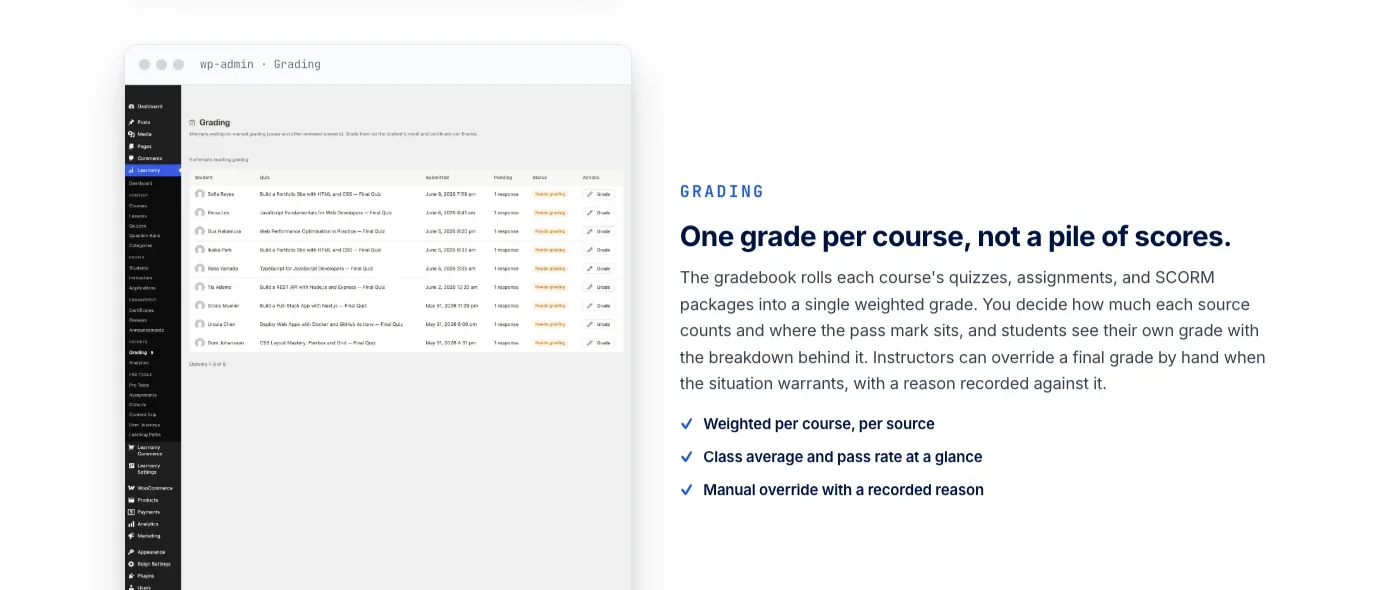
A practical habit worth building in from day one: export the completion report on a fixed schedule, monthly is common, and store it somewhere outside the platform itself. That gives the business a record that survives even if roles change, logins get reassigned, or the platform configuration shifts down the road.
Key takeaways
- Onboarding is a structure problem, not a checklist problem. Start with a private portal, not a document dump.
- Build one learning path per role instead of a single generic induction.
- Drip content against each hire’s actual start date, never a shared company calendar.
- Reserve certificates for compliance-critical modules, and keep the completion record even after someone leaves.
- Watch time-to-first-completion and dropout point, not just a raw completion percentage.
Frequently Asked Questions
Should seasonal or contract hires go through the same onboarding as permanent staff?
Not the full path, but not nothing either. Build a shorter learning path covering access, safety, and required compliance training, and keep the deeper role and culture content for permanent hires whose path length actually fits.
What is the single biggest predictor that onboarding will go smoothly?
Whether the manager actually engages with the reporting during the first two weeks. A well-built path with a disengaged manager still produces a new hire who feels unsupported, while an imperfect path with an attentive manager usually works out fine.
How long should employee onboarding take?
There is no universal number, but most structured programs run somewhere between one and four weeks of active training, layered on top of ongoing role-specific learning that continues well past the formal onboarding period.
Should every department share the same onboarding path?
Share the parts that apply to everyone, company policy, security basics, brand and culture context, and branch into role-based paths for anything specific to a department. Forcing every hire through identical content regardless of role wastes time and trains people to skim.
What happens to a new hire’s training record if they leave the company?
Access should be suspended immediately so a former employee cannot log back in, while their completion history stays on record for HR or compliance purposes.
How do you onboard hires who join outside a fixed cohort schedule?
Tie the drip schedule to each person’s individual enrollment date instead of a shared calendar, so day one always feels like day one no matter when someone actually starts.
Who should have visibility into onboarding progress, HR or managers?
Both, scoped differently. HR needs the company-wide rollup to spot systemic issues. Managers need visibility limited to their own new hires so they can act on it without wading through unrelated data.
Two posts that fit this model
If you are building this kind of site on WordPress, onboarding is not the only problem you will solve. You also need to think about the wider platform around it.
For a broader look at community-style structures on the same site, see Best Social Community Themes & Plugins for WordPress (2026).
And if your use case leans more toward forums, groups, or support spaces, Best WordPress Forum & Community Plugins (2026): Complete Comparison gives you the adjacent thinking.
If the people you are training are outside the company instead of inside it, franchisees, resellers, or channel partners, the same structure applies with a different audience. See What Is Partner Enablement? for the concept, or Partner Enablement Training with Learnomy for the full setup.
What I would tell the team before launch
Before you switch this on for everyone, sit with the people who will actually use it.
Ask HR how they maintain the roster. Ask managers what they need to see. Ask what causes the most friction during the first seven days of a new hire. That conversation is usually more valuable than another hour spent inside settings menus, because it surfaces the gaps a settings screen can never show you: the question every new hire asks in their first week that nothing in the current path actually answers.
Onboarding seasonal and contract hires without building a second system
Companies that bring on seasonal staff, contractors, or short-term hires often end up running onboarding twice, once for permanent employees through the real platform, and once informally for everyone else through a shared document or a quick verbal walkthrough. That split usually happens because a full-time learning path feels like overkill for someone starting a six-week contract, but the informal version leaves contractors without the same safety, security, and policy grounding permanent staff get.
The better fix is a shorter, separate learning path built for exactly this group rather than skipping structure altogether. A contractor path can drop the deeper role-specific and company-culture content and keep only what is genuinely required: access, safety, the specific task scope, and whatever compliance training applies regardless of employment type. Spaces or groups make this easy to manage, since contractors can sit in their own group with their own shorter path without disturbing the structure built for permanent hires.
This matters more than it looks on paper for one reason: audits and safety incidents rarely check whether someone was full-time or short-term before asking whether they were trained. A contractor with no training record is the same liability as a permanent employee with no training record, just with a shorter runway to fix it before their contract ends.
The part nobody wants to admit
The hard part of onboarding is not the software. It is the agreement about how the organization should work.
If that agreement is missing, no LMS fixes it. People will still assign the wrong track, HR will still chase managers, and the reports will still get debated instead of trusted.
That is why the best onboarding systems feel almost boring once they are set up correctly. Boring means the rules are clear enough that nobody has to improvise every day.
That is the real reason a platform like this exists. It gives the company one place where the promise stays the same even when the people change. That is what consistency looks like when it is built properly.
That is the job Learnomy is really doing here: not replacing the judgment calls a growing company has to make, but giving those judgment calls somewhere consistent to live once they are made, so the tenth new hire gets the same considered treatment as the first.
Build onboarding that runs itself
A private portal, role-based learning paths, drip scheduling, CSV rosters, reporting, and certificates, all in one platform you own.
Plugins we build and run
We maintain these ourselves, which is why we can support them on your site.
- BuddyNextThe self-hosted community engine for WordPress
- BuddyXFree community theme, Pro when you outgrow it
- ReignPremium community theme. Add pieces, build anything
- JetonomyCommunity forum and Q&A for WordPress
- EventonomyEvents and RSVPs for WordPress communities
- LearnomyCourses and learning communities on WordPress
- ListoraDirectories and listings your members can browse
- SnipShareCode sharing built for developer communities
- WB Ad ManagerAd placements that turn traffic into revenue
- WP Career BoardA job board your community actually uses
- WP Sell ServicesSell services with offers, orders, and payouts
- MediaVersePhotos, video, and media albums for members
- WB GamificationPoints, badges, and rewards that keep members active
- Product RoadmapPublic roadmaps with voting your users trust