Every Way Your WordPress Site Hands Out Usernames
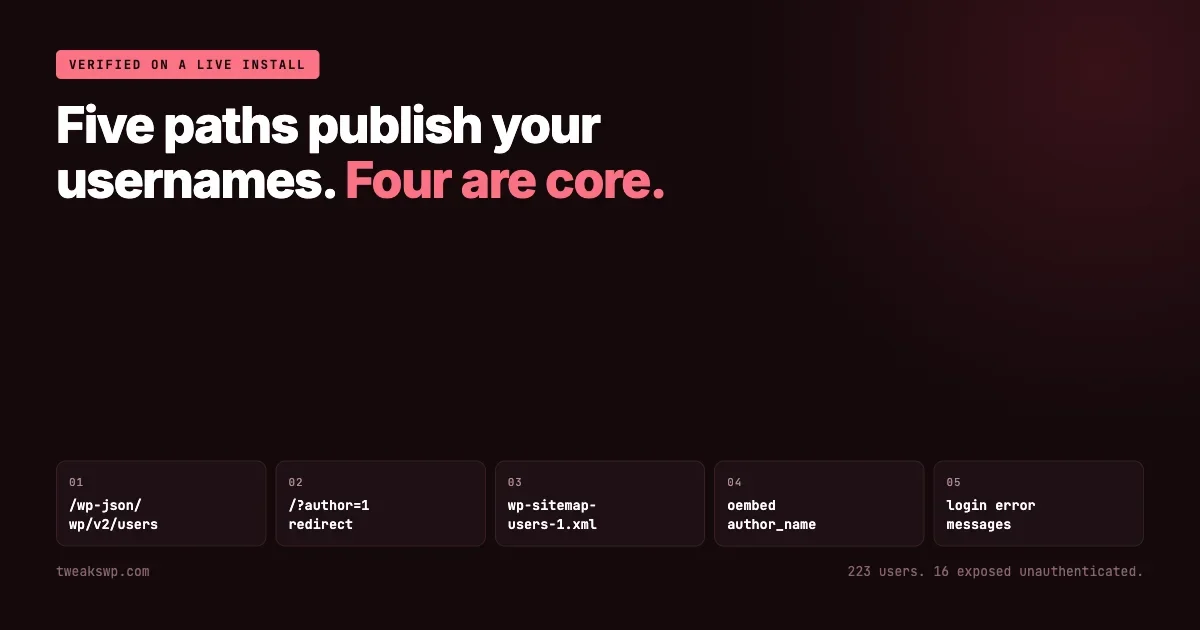
WordPress publishes usernames through five separate paths, most of them core behaviour. Each one tested against a live install, with the fix, the fleet audit, and what to do first instead.

A WordPress username is half of a credential. The other half can be attacked indefinitely, but only once an attacker knows what to attack. That is the entire value of enumeration: it converts a guess about two unknowns into a guess about one.
WordPress publishes usernames through at least five separate paths, most of them core behaviour rather than misconfiguration, and most hardening guides cover one or two. What follows was tested against a current WordPress install rather than reproduced from a checklist, with the output included so the results can be checked.
A caveat belongs at the top rather than the bottom. Hiding usernames is defence in depth. It is not a substitute for strong passwords, two-factor authentication or rate limiting, and a site that relies on username secrecy as its primary protection has a worse problem than enumeration. What closing these paths does is remove the free reconnaissance step, which raises the cost of everything that follows.
What the username is actually worth
It is worth being specific about why this matters, because “usernames leak” on its own sounds academic.
The window between a vulnerability becoming known and your sites being patched is the subject of a separate piece on discovery and distribution; enumeration is what makes that window worth exploiting on your site specifically.
Credential stuffing becomes viable. Breached password lists are enormous and freely circulated. They are useless without a matching account name on your site. Supply the username and every reused password that person has ever had becomes a candidate, tested at whatever rate your login endpoint permits.
Password spraying becomes targeted. Rather than many passwords against one account, which trips lockouts, an attacker tries one plausible password against every known account. A complete user list turns that from guesswork into a sweep, and because each account sees only one attempt, per-account rate limiting does not notice.
Phishing gets more convincing. A message that addresses somebody by the username they actually log in with reads as internal. That single detail moves a phishing attempt from obviously generic to plausibly real, and it costs nothing to obtain.
Role information compounds it. The vectors below leak more than names. An author archive, a member directory or a REST response frequently reveals which accounts publish, which implies which accounts have elevated capabilities. That tells an attacker which three of your two hundred accounts are worth the effort.
One: the REST users endpoint
The most direct path, and the one most people know about, though frequently not what it actually returns.
curl -s https://example.com/wp-json/wp/v2/usersUnauthenticated, this returns every user who has published content. The response includes the display name, the author archive link, and the field that matters most:
[{"id":49,
  "name":"Aisha Hassan",
  "link":"https://example.com/author/aurora_aisha_hassan/",
  "slug":"aurora_aisha_hassan"...
That slug is the user nicename. By default WordPress derives the nicename from the login when the account is created, so on the large majority of sites the slug is the username. It is not guaranteed, because a nicename can be changed independently afterwards, but a site that has never deliberately changed one is publishing its logins.
Restricting the endpoint to authenticated requests is a few lines:
add_filter( 'rest_authentication_errors', function ( $result ) {
    if ( ! empty( $result ) ) {
        return $result;
    }
    if ( ! is_user_logged_in()
        && false !== strpos( $_SERVER['REQUEST_URI'] ?? '', '/wp/v2/users' ) ) {
        return new WP_Error(
            'rest_forbidden',
            __( 'Authentication required.' ),
            array( 'status' => 401 )
        );
    }
    return $result;
} );
Check the site afterwards. Some themes and page builders read this endpoint for author boxes, and blocking it without checking is how an author byline becomes empty across the site.
Why a clean-looking check can mislead
An important nuance, and the reason a quick look at this endpoint reassures people it should not.
Unauthenticated requests do not return every user. Core restricts the query to accounts that have published something in a post type visible to REST. From class-wp-rest-users-controller.php:
$prepared_args['has_published_posts'] = get_post_types(
    array( 'show_in_rest' => true ),
    'names'
);
On the install used for this article the difference is stark. The site has 223 user accounts. The unauthenticated endpoint reports X-WP-Total: 16.
Two conclusions follow, pulling in opposite directions.
The reassuring one is that a membership site with thousands of non-publishing members is not exposing all of them here. The endpoint leaks the authors, not the audience.
The unreassuring one is that the sixteen it does expose are, almost by definition, the accounts that can publish. That is the set with elevated capabilities, which is the set an attacker wants. A filter that hides the majority while publishing exactly the privileged minority is not the protection it appears to be.
It also means testing this endpoint on a site with few published posts tells you very little. A staging copy with three posts will look almost clean and the production site will not.
Two: the author ID redirect
Older than the REST API and still present.
curl -s -o /dev/null -w "%{url_effective}\n" -L "https://example.com/?author=1"
# https://example.com/author/varundubey/
A numeric author ID resolves to the author archive, and the archive URL contains the nicename. Walking the integers from one upward maps the user table, and the numbers are sequential, so there is no searching involved.
The redirect can be intercepted before it resolves:
add_action( 'template_redirect', function () {
    if ( is_author() && ! empty( $_GET['author'] ) && ! is_user_logged_in() ) {
        wp_safe_redirect( home_url(), 301 );
        exit;
    }
} );
Three: the core user sitemap
This one is genuinely under-discussed, because it arrived in core comparatively recently and hardening guides written before it have not caught up.
Since WordPress 5.5, core generates XML sitemaps, and one of them lists author archives:
curl -s https://example.com/wp-sitemap-users-1.xml | grep -oE '<loc>[^<]+</loc>'

<loc>https://example.com/author/alice/</loc>
<loc>https://example.com/author/appreview/</loc>
<loc>https://example.com/author/aurora_aisha_hassan/</loc>
A complete, machine-readable list of every publishing user, delivered as a file whose entire purpose is to be crawled. It requires no probing at all, and unlike the author redirect it does not need the attacker to guess how many users exist.
Core provides a filter for it:
add_filter( 'wp_sitemaps_add_provider', function ( $provider, $name ) {
    return ( 'users' === $name ) ? false : $provider;
}, 10, 2 );
If an SEO plugin manages sitemaps instead of core, check that plugin’s own author-sitemap setting as well. Several ship it enabled, and disabling the core provider does nothing about a sitemap the plugin generates itself.
Four: oEmbed
The least known of the five, and it works on any published post.
curl -s "https://example.com/wp-json/oembed/1.0/embed?url=https://example.com/?p=1"

{"author_name":"varundubey",
 "author_url":"https://example.com/author/varundubey/",
 "title":"Hello world!"...}
The endpoint exists so that other sites can render a preview card when someone links to yours, which is a reasonable feature. The author name it returns is the nicename, so it leaks the same value as everything above, through a route that survives most hardening because nobody thinks of oEmbed as a user endpoint.
add_filter( 'oembed_response_data', function ( $data ) {
    unset( $data['author_name'], $data['author_url'] );
    return $data;
} );
The cost of removing it is that embed cards elsewhere lose the byline. For most sites that is an acceptable trade; for a publication whose author attribution travels with shared links, it may not be.
Five: the login form tells you
The previous four leak usernames passively. This one answers questions.
Core returns distinct errors depending on which half of the credential was wrong. From wp-includes/user.php:
new WP_Error(
    'invalid_username',
    __( '<strong>Error:</strong> Unknown username. Check again or try your email address.' )
);
Against a different error code, incorrect_password, for an account that does exist. So the login form is an oracle: submit any password against a candidate username and the response tells you whether the account is real.
This is a deliberate usability decision by core rather than an oversight. Telling somebody they typed their username wrong is genuinely helpful, and most people logging in are not attackers. It is still an oracle, and on a site where the login page is public it can be queried at whatever rate your rate limiting permits.
add_filter( 'login_errors', function () {
    return __( 'The username or password is incorrect.' );
} );
One consequence worth accepting knowingly: legitimate users who mistype a username now get a less helpful message, and some of them will contact support instead of trying again.
Six: whatever your plugins added
The five above are core. The sixth is the category that no hardening guide can enumerate for you, because it is different on every site.
A worked example from our own code, since a concrete one is more useful than a warning.
WP Sell Services shipped a public vendor search. It matched against WordPress login names as well as display names, which meant the search box on a marketplace page would confirm whether a given login existed. Because it matched partially, it could be walked: type a letter, read which vendors come back, extend the string. Usernames were discoverable one character at a time, by anyone, with no authentication and no tooling beyond a browser.
It was fixed in 1.6.0 by removing login names from the searchable set. The interesting part is not the bug, it is the shape: a feature nobody would classify as a user endpoint, on a page nobody would audit for enumeration, doing exactly what the REST users endpoint does but through a search box.
Any search that matches against login names is a user endpoint, whatever the feature is called.
The question to ask of every plugin that has a search, a directory, a member list, an author filter or an autocomplete: what column is it matching against? If the answer includes user_login, that feature enumerates users regardless of what it was built for.
What does not leak what you think
Two items appear on enumeration checklists that did not hold up when tested, and correcting them saves effort better spent elsewhere.
Feeds carry display names, not logins
RSS is frequently listed as an enumeration vector. It is worth checking what it actually emits:
curl -s https://example.com/feed/ | grep -oE '<dc:creator>.*</dc:creator>'

<dc:creator><![CDATA[App Reviewer]]></dc:creator>
<dc:creator><![CDATA[Lena Singh]]></dc:creator>
Those are display names. On a site where the display name has been set to a human name, which is the default for anyone who filled in their profile, the feed publishes something an attacker cannot log in with.
The exception is a site where display names were never changed, in which case the display name may still be the login. That is worth checking once rather than assuming either way, and it is the same underlying question as the nicename: is the public-facing identity the same string as the credential?
Disabling XML-RPC is not an enumeration fix
XML-RPC belongs in a hardening discussion, because its multicall behaviour historically allowed many authentication attempts inside a single request, which defeats naive rate limiting. That is a brute-force amplification concern and a real one.
The same reasoning applies to bot traffic claiming an identity it does not have, covered in the piece on verifying crawlers. It is not, however, where usernames come from. Turning it off does nothing about the five vectors above, and a site that disables XML-RPC and considers enumeration handled has closed a different door.
Auditing a fleet
All five core vectors are checkable without logging in, which makes them scriptable across every site you manage.
#!/usr/bin/env bash
# Reports which enumeration paths are open on each site.
for site in "$@"; do
  echo "== $site"

  rest=$(curl -s -o /dev/null -w '%{http_code}' "$site/wp-json/wp/v2/users")
  [ "$rest" = "200" ] && echo "  OPEN  rest users endpoint"

  final=$(curl -s -o /dev/null -w '%{url_effective}' -L "$site/?author=1")
  case "$final" in *"/author/"*) echo "  OPEN  author id redirect -> $final";; esac

  smap=$(curl -s -o /dev/null -w '%{http_code}' "$site/wp-sitemap-users-1.xml")
  [ "$smap" = "200" ] && echo "  OPEN  core user sitemap"

  oem=$(curl -s "$site/wp-json/oembed/1.0/embed?url=$site/?p=1")
  case "$oem" in *author_name*) echo "  OPEN  oembed author_name";; esac
done
Two notes on running it. Point it at sites you are responsible for; probing endpoints on somebody else’s site without permission is a different activity with a different name. And expect false negatives behind a firewall that rate-limits or challenges automated requests, in which case a 403 means your WAF answered rather than that the endpoint is closed.
Run it against a list of sites and the output is a per-site punch list. The login-error vector is deliberately not in the script, because probing it means submitting failed logins, which will trip your own rate limiting and pollute your logs. Check that one by reading the code or trying it once by hand.
Multisite, where the count multiplies
On a network, users are global while content is per site, and that combination changes the exposure in a way worth checking explicitly.
The REST filter described above restricts unauthenticated results to users who have published, but it evaluates that per site. A user who publishes on one site in the network is exposed through that site’s endpoint. The same person may be invisible on every other site in the network while being fully enumerable on one.
The practical consequence for anyone auditing is that checking the main site is not checking the network. Each site has its own endpoints, its own sitemap, and its own set of published authors, so the audit has to run against every hostname rather than once against the primary.
# Enumerate the sites first, then audit each one
wp site list --field=url | while read -r url; do
  total=$(curl -s -I "$url/wp-json/wp/v2/users" | grep -i '^x-wp-total:' | tr -d '\r')
  printf '%-40s %s\n' "$url" "${total:-no header}"
done
There is a second-order effect worth knowing. Because the network shares one user table, a login discovered on the least important site in the network is a valid login on every site in it. The blog nobody maintains is a full-strength enumeration source for the site that matters.
What actually reduces risk, in order
Closing every path above is worth doing and it is not the most valuable thing on this page. Ranked honestly:
- Two-factor authentication on privileged accounts. Makes a known username and a correct password insufficient. Nothing else on this list comes close.
- Rate limiting on the login endpoint. Turns an unlimited guessing budget into a finite one, which is what makes the remaining measures meaningful.
- Distinct login and display identity. If the nicename is not the login, every vector above leaks something that is not a credential. This is the single change that neutralises four of the five at once.
- Closing the endpoints. Removes the free reconnaissance.
- Generic login errors. Closes the oracle, at a small cost in usability.
Point three deserves emphasis because it is cheap and rarely done. Setting a nicename that differs from the login means the REST endpoint, the author archive, the sitemap and the oEmbed response all publish a value that is useless for authentication. The username stops being exposed rather than being hidden, which is a stronger position and needs no filters at all.
# Check whether the nicename matches the login
wp user list --fields=ID,user_login,user_nicename,roles

# Change the public-facing slug without touching the login
wp user update 1 --user_nicename=editorial-team
Changing a nicename changes author archive URLs, so redirect the old ones if those URLs have been shared or indexed.
Verifying the change took
Every filter in this article can be added and silently fail to apply, usually because it was placed in a theme that is no longer active, loaded too late for the hook, or overridden by a security plugin doing its own thing on the same filter.
The check is the same command that found the problem. Run the audit script again after deploying, from outside the site, logged out.
Two details make that check trustworthy rather than reassuring. Use a browser session that is definitely not authenticated, because a logged-in administrator sees the full response from several of these endpoints and will conclude nothing changed. And bypass any page cache, since a cached copy of the old response will happily serve the leak for hours after the fix shipped.
# Logged out, cache-busted
curl -s "https://example.com/wp-json/wp/v2/users?_cb=$(date +%s)" | head -c 200
If the response still lists users, the filter is not running. That is a more common outcome than it should be, and it is the reason this article ends with a verification step rather than a list of snippets.
What not to bother with
Two measures appear in most hardening lists and earn less than their reputation.
Renaming the admin account to something obscure. Worth doing, and it does not survive any of the five vectors above, all of which report whatever the username actually is. It defeats a dictionary of common logins and nothing else.
Moving the login URL. Reduces automated noise in the logs, which has real operational value. It is not a security control: the login form is still reachable by anybody who finds the new address, and the address is frequently discoverable from redirects, password-reset emails or a plugin that links to it.
Neither is harmful. Both are frequently listed above two-factor authentication, which is the wrong order.
A third belongs here for a different reason. Blocking the REST API wholesale, rather than the users route, breaks a great deal of modern WordPress: the block editor, several admin screens, and any plugin that talks to itself over REST. It is regularly recommended and it trades a working site for a narrow gain that the targeted filter achieves anyway.
Summary
WordPress publishes usernames through the REST users endpoint, the numeric author redirect, the core user sitemap, oEmbed responses and the login form’s error messages. Four of those are silent and passive; the fifth answers direct questions. Every one was verified against a current install for this article.
Beyond core, any plugin feature that matches against login names is a user endpoint whether or not anyone calls it one, and that category is the one your hardening checklist cannot cover for you.
The highest-value response is not closing paths. It is making the value they leak worthless: two-factor authentication on the accounts that matter, rate limiting on the login, and a public nicename that is not the login. Close the endpoints afterwards, by all means. Just do it in that order.
Plugins we build and run
We maintain these ourselves, which is why we can support them on your site.
- BuddyNextThe self-hosted community engine for WordPress
- BuddyXFree community theme, Pro when you outgrow it
- ReignPremium community theme. Add pieces, build anything
- JetonomyCommunity forum and Q&A for WordPress
- EventonomyEvents and RSVPs for WordPress communities
- LearnomyCourses and learning communities on WordPress
- ListoraDirectories and listings your members can browse
- SnipShareCode sharing built for developer communities
- WB Ad ManagerAd placements that turn traffic into revenue
- WP Career BoardA job board your community actually uses
- WP Sell ServicesSell services with offers, orders, and payouts
- MediaVersePhotos, video, and media albums for members
- WB GamificationPoints, badges, and rewards that keep members active
- Product RoadmapPublic roadmaps with voting your users trust