Your WordPress Snippets Are Not in Your Deploy
Code stored in a database row has no diff, no deploy and no review. Here are the WP-CLI commands that find every snippet, shortcode and unauthenticated AJAX action on a site you inherited, and the order to migrate them safely.

Clone the repository for a WordPress site you did not build. Read every file. You still do not know what that site does, because WordPress snippets stored in the database are not in the repository you just read.
Somewhere in the database there is a snippet that rewrites the checkout total. A page builder widget is running a shortcode that queries a third-party API on every load. A plugin add-on registers a REST route nobody documented. None of it is in the repository you just read, none of it appears in a diff, and none of it was ever reviewed by a second person.
That gap has a cost on an ordinary Tuesday, when you spend two hours tracing behaviour that has no source file. It has a much larger cost on the Tuesday a vulnerability is disclosed, because the code you cannot see is also the code you cannot audit.
This article is about finding it, deciding where it should have lived, and moving it there without breaking the site.
Four places site logic lives
Every piece of custom behaviour on a WordPress site is in one of four locations. They look interchangeable when you are writing the code. They are not remotely interchangeable afterwards.
A snippet plugin’s database row. WPCode, Code Snippets, and the rest store PHP in wp_posts or a custom table and evaluate it at runtime. Writing code this way takes fifteen seconds and needs no deployment, which is the entire appeal and the entire problem.
The theme’s functions.php. In version control, usually. Also coupled to a theme you may one day replace, at which point the behaviour disappears with it. This is where a decade of WordPress tutorials told people to put things that were never about presentation.
An mu-plugin. A file in wp-content/mu-plugins/ that loads automatically, cannot be deactivated from the admin, and survives a theme switch. In version control, deployed with your code, reviewable.
A real plugin. Same as an mu-plugin with an on/off switch and a header, appropriate when the behaviour is genuinely optional or needs to be reused across sites.
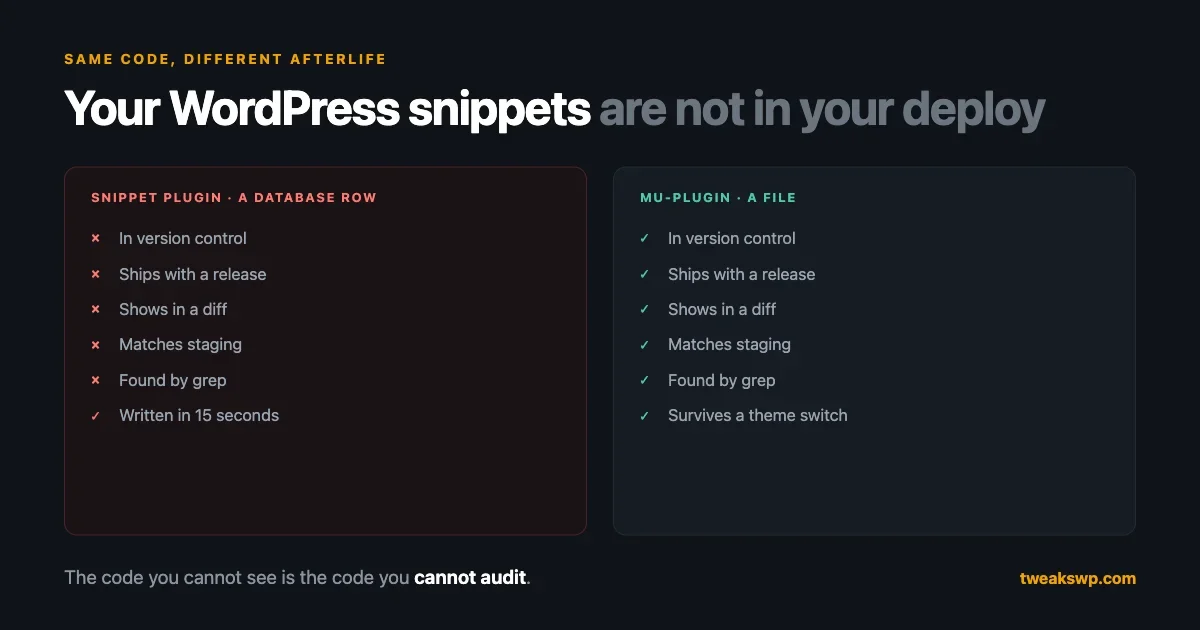
The differences only show up under pressure. Here is the scorecard that matters.
The scorecard
Six questions, asked of each location. None of them are about how the code is written.
Is it in version control? Database rows are not. Everything else is. This single answer drives most of the others.
Does it deploy? If you push a release, does this change go with it? A snippet does not. It lives in the database, so it travels with a database export and nothing else, which means it arrives in production through a completely different mechanism than the rest of your code, if it arrives at all.
Can it be reviewed? A pull request shows a diff. A snippet edited in wp-admin produces no diff, no author record you can trust, and no moment at which a second person looks at it before it is live on production. That is not a process failure, it is the absence of a process.
Does staging match production? This is where snippet plugins quietly ruin your week. Staging is usually a database copy from some point in the past, so your staging snippets are whatever they were on the day of that copy. You test a change against a set of active snippets that does not match production, it works, you ship, and it does not work. Nothing in your tooling will tell you why.
Can you roll it back? Code rolls back by deploying the previous commit. A snippet rolls back if somebody remembers what it said before, or if the plugin keeps revisions, which some do and some do not.
Can you find it in a year? Grep finds code. Grep does not find database rows. When the person who wrote the snippet has left, the only way to discover it is to click through an admin screen you have to already know exists.
Scored against those six, the database row fails five. That is not an argument about code quality. Plenty of snippets are well written. It is an argument about everything that happens to code after it is written.
Why this is a security question too
The same invisibility that makes snippets hard to maintain makes an entire class of code hard to audit, and snippets are only one part of it.
Consider what the recent Elementor Pro file upload vulnerability actually required. The bug lived in the Forms module of a premium add-on, reachable by any unauthenticated visitor through an AJAX action, on any site that had published a page containing a form with a file upload field. Three things had to be true, and not one of them is visible in a repository. Whether that module is active is a database setting. Whether such a page exists is content. Whether the field is on it is a page builder configuration.
So the question “am I exposed” cannot be answered by reading code. It can only be answered by querying the running site. That is the shape of the problem for page builders, plugin add-ons, and snippet plugins alike: the configuration is the attack surface, and the configuration is not in your repository.
We made the broader version of this argument in how supply chain attacks got smarter and why your WordPress dependencies are next. This is the same problem one layer in: not the dependencies you installed, but the code and configuration living inside your own site that never passes through your pipeline.
The half that is not snippets
Snippet plugins are the easy case, because at least they are honestly labelled as code. The harder case is behaviour stored as content.
A shortcode inside a post body is a function call written by whoever edited the page. A page builder widget is a serialised blob in postmeta that a rendering engine turns into markup, queries, and sometimes HTTP requests. Neither is in your repository, neither shows in a diff, and both can invoke code with the same privileges as everything else.
Find where shortcodes are actually used, rather than which ones are registered:
wp db query "SELECT ID, post_title FROM wp_posts
WHERE post_status='publish' AND post_content REGEXP '\\[[a-z_]+'
LIMIT 40"
And list what is registered, so you can spot the ones nothing uses and the ones you cannot account for:
wp eval 'global $shortcode_tags; echo implode(PHP_EOL, array_keys($shortcode_tags));'For builder content, the question worth asking is narrower and more useful than a full inventory: which published pages contain an input the public can submit? That is the population the Elementor case turned on, and it is answerable directly:
wp db query "SELECT p.ID, p.post_title FROM wp_posts p
JOIN wp_postmeta m ON m.post_id = p.ID
WHERE p.post_status='publish'
AND m.meta_key='_elementor_data'
AND m.meta_value LIKE '%\"widgetType\":\"form\"%'"
Adjust the meta key for whichever builder is in use. The output is short, and it is the list you actually care about during an incident: not every page, just the ones that accept something from a stranger. Keep it next to your wp_ajax_nopriv_ list, since together they describe almost your whole unauthenticated surface.
None of this is code you can move into an mu-plugin, and that is the point. You cannot eliminate builder-stored configuration, so the goal shifts from moving it to knowing it: having the query, running it when an advisory lands, and not having to guess.
Auditing a site you inherited
Assume nothing and query the running site. WP-CLI answers most of this in a few commands, and they are all read-only.
Start with what is actually active, because the plugins list in the admin includes things that are installed and switched off:
wp plugin list --status=active --fields=name,version,updateThen look for snippet plugins specifically. If any of these are active, you have database-stored code:
wp plugin list --status=active --field=name | grep -iE "snippet|wpcode|code-block|functionality"Snippet plugins register their own post type, so once you know which one is in use you can count what it holds. For WPCode and Code Snippets the stored items are queryable as posts:
wp post list --post_type=wpcode --post_status=any --fields=ID,post_title,post_statusIf the plugin uses a custom table instead, find it and read it directly:
wp db query "SHOW TABLES LIKE '%snippet%'"Next, the mu-plugins directory, which is the one place custom code can run with no admin UI representation at all:
wp eval 'foreach (wp_get_mu_plugins() as $f) echo basename($f), PHP_EOL;'Then the hook surface, which tells you what is actually attached to the parts of WordPress you care about:
wp eval '
global $wp_filter;
foreach (["init","wp_head","template_redirect"] as $h) {
  echo $h, ": ", isset($wp_filter[$h]) ? count($wp_filter[$h]->callbacks, COUNT_RECURSIVE) : 0, PHP_EOL;
}'
Finally, the question the advisory case above turns on: does anything on this site accept input from a logged-out visitor? Count published content that contains a form, and list the AJAX actions registered for unauthenticated users:
wp eval '
global $wp_filter;
foreach (array_keys($wp_filter) as $h) {
  if (strpos($h, "wp_ajax_nopriv_") === 0) echo $h, PHP_EOL;
}'
That last list is your genuinely exposed surface. On most sites it is between five and twenty entries, and it is far more useful than a plugin count as a picture of risk. Save the output. It is the baseline you compare against the next time an advisory lands.
Where each thing should end up
Having found it, sort it. Three rules cover almost everything.
If it must always run, it is an mu-plugin. Security headers, disabling a core behaviour, a required filter, anything whose absence is a bug. Making it deactivatable from the admin is not flexibility, it is a switch that will eventually be flipped by someone who does not know what it does.
If it is genuinely optional or reused across sites, it is a plugin. With a header, a version, and a changelog. The moment the same snippet exists on three sites, it is a plugin, and pretending otherwise means you will fix the same bug three times.
If it is about how the site looks, it belongs to the theme. That is the real dividing line for functions.php, and it is much narrower than how the file gets used in practice. Template logic, yes. Business logic that would still be needed after a redesign, no.
There is no fourth rule, because “leave it in the database” is never the right answer for code you intend to keep. Our complete mu-plugins guide covers the mechanics of the destination, including the one that surprises people, which is that files in subdirectories are not auto-loaded.
Migrating WordPress snippets without breaking the site
The order matters more than the technique.
Export before you touch anything. Most snippet plugins have an export function. Use it, and commit the export file to your repository as a record even though it is not runnable code. If there is no export, copy each snippet into a text file. You are about to disable things, and the undo has to exist first.
Group before you move. Twenty snippets are rarely twenty concerns. They are usually four or five, with several near-duplicates that accumulated because it was easier to add a new one than find the existing one. Consolidating during the move is most of the value, and it is also where you find the two snippets that contradict each other.
Move one group, deploy, verify, then disable the original. Not the other way around. For a window, the code exists in both places, and this is the only genuinely dangerous moment in the process, because a snippet and an mu-plugin both adding the same hook means the behaviour fires twice. Keep that window short and test the specific behaviour rather than assuming.
Watch for load order. Snippet plugins run when the plugin runs, which is normal plugin load time. An mu-plugin runs earlier, before regular plugins. Code that depended on something a plugin had already registered will now run before that thing exists. This is the single most common surprise in a migration, and it usually presents as a fatal on an undefined function. The fix is almost always wrapping the logic in the right hook rather than running it at file scope.
Delete last, and only after a full deploy cycle. Disabled is reversible in one click. Deleted is not.
Detecting drift before it bites
If you are going to keep a snippet plugin on a site that also has staging, at least make the drift visible. Snippets are queryable, so a comparison is two commands and a diff.
# on each environment
wp post list --post_type=wpcode --post_status=any \
  --fields=post_title,post_status --format=csv | sort > snippets-prod.csv
Run the same on staging, then diff the two files. What you are looking for is not identical content, since titles alone will not catch an edited body, but the shape of the disagreement: snippets active on production and missing from staging, or the reverse. That list is the set of behaviours your staging tests cannot tell you anything about.
Running this before a release takes a minute and converts a category of mystery bug into a known difference. It is not a fix, it is a smoke alarm, and it is worth having on any site where the migration above is not happening this quarter.
A worked example
Here is one migration end to end, because the load order warning above is much clearer with something concrete attached to it.
The snippet, found in a database row, titled “hide prices for guests”:
// Stored in WPCode, runs at plugin load time
add_filter( 'woocommerce_get_price_html', function( $price, $product ) {
    return is_user_logged_in() ? $price : '<span class="login-for-price">Log in for pricing</span>';
}, 10, 2 );
Moved to wp-content/mu-plugins/acme-guest-pricing.php, it needs two changes that are easy to miss:
<?php
/**
 * Plugin Name: Acme Guest Pricing
 * Description: Replaces price display with a login prompt for logged-out visitors.
 */

defined( 'ABSPATH' ) || exit;

add_action( 'plugins_loaded', function () {
    if ( ! class_exists( 'WooCommerce' ) ) {
        return;
    }

    add_filter( 'woocommerce_get_price_html', 'acme_guest_price_html', 10, 2 );
} );

function acme_guest_price_html( $price, $product ) {
    if ( is_user_logged_in() ) {
        return $price;
    }

    return '<span class="login-for-price">' . esc_html__( 'Log in for pricing', 'acme' ) . '</span>';
}
Three things changed and each one is the general lesson.
The registration moved inside plugins_loaded. The original ran at plugin load time, when WooCommerce was already present. An mu-plugin runs before regular plugins, so adding the filter at file scope would work by luck, and the class_exists guard would be checking for a class that has not loaded yet. Deferring to plugins_loaded restores the assumption the snippet was written under.
The closure became a named function. A closure cannot be removed with remove_filter, which is fine in a snippet you will never reuse and a problem in code you may need to unhook from a child theme or a test.
The output got escaped and translatable. The snippet emitted raw markup with a hardcoded string, which nobody catches in an admin textarea and any reviewer catches in a diff. That is the review gap from the scorecard, made specific.
The behaviour is identical. What changed is that it now has a filename, a commit, an author, and a reviewer, and that anyone reading the repository in two years will find it.
When a snippet plugin is the right answer
Being fair to the tools, because a blanket rule you cannot follow is worse than a nuanced one you can.
A snippet plugin is a reasonable choice when the site has no deployment pipeline at all, and the realistic alternative is editing functions.php through the theme file editor on production. That is a real situation on a large share of WordPress sites, and a snippet plugin with revisions is strictly better than the alternative.
It is also reasonable for something genuinely temporary. A redirect for a campaign that ends in three weeks, a notice for a maintenance window. The test is whether you would be annoyed to find it still running in a year. If the honest answer is that you would not care, it can live in the database.
What makes it the wrong answer is a site that does have a pipeline, where the snippet plugin exists as a way around it. That is not a tooling choice, it is process debt with a friendly UI, and the cost lands on whoever inherits the site rather than on whoever saved the fifteen seconds.
What containers and modern hosting change
If you are running Docker, Coolify, CloudPanel, or any setup where the application is built into an image, this stops being a preference and becomes a correctness problem.
The premise of an immutable deployment is that the running container is reproducible from the repository. Code in the database breaks that premise completely. Rebuild the container and your snippets are still there, because they were never in the image, which sounds convenient right up to the moment you need to reproduce a bug in a fresh environment and cannot, because the environment is missing behaviour that exists only in a database you did not copy.
The same applies in a milder form to any host with a staging workflow. Push-to-staging moves files. Snippets are not files. Whatever you tested was not what is running.
Our guide to environment-specific wp-config.php covers the neighbouring problem of configuration that should differ per environment, which is the one case where something genuinely should not be identical across your pipeline.
The check to run this week
Pick one site. Ideally one you inherited rather than one you built.
- Run the audit commands above and write the numbers down: active plugins, stored snippets, mu-plugins,
wp_ajax_nopriv_actions. - For every stored snippet, answer one question: if this vanished tonight, would anyone notice? A surprising share of them are dead, left active because nobody was sure.
- Move the top three by risk, which means the ones touching money, authentication, or anything a logged-out visitor can reach.
- Add the audit to your handover checklist so the next person inherits a number rather than a surprise.
The goal is not zero snippets. It is that nothing important is invisible. A site where every consequential behaviour has a file, a diff, and a deploy is a site you can reason about at two in the morning, and that is the only test of this that ever really matters.
Plugins we build and run
We maintain these ourselves, which is why we can support them on your site.
- BuddyNextThe self-hosted community engine for WordPress
- BuddyXFree community theme, Pro when you outgrow it
- ReignPremium community theme. Add pieces, build anything
- JetonomyCommunity forum and Q&A for WordPress
- EventonomyEvents and RSVPs for WordPress communities
- LearnomyCourses and learning communities on WordPress
- ListoraDirectories and listings your members can browse
- SnipShareCode sharing built for developer communities
- WB Ad ManagerAd placements that turn traffic into revenue
- WP Career BoardA job board your community actually uses
- WP Sell ServicesSell services with offers, orders, and payouts
- MediaVersePhotos, video, and media albums for members
- WB GamificationPoints, badges, and rewards that keep members active
- Product RoadmapPublic roadmaps with voting your users trust