How to Track Partner Training Progress Across a Network
Use Learnomy reports to see which partners finished training, which locations are behind, and where to act next.

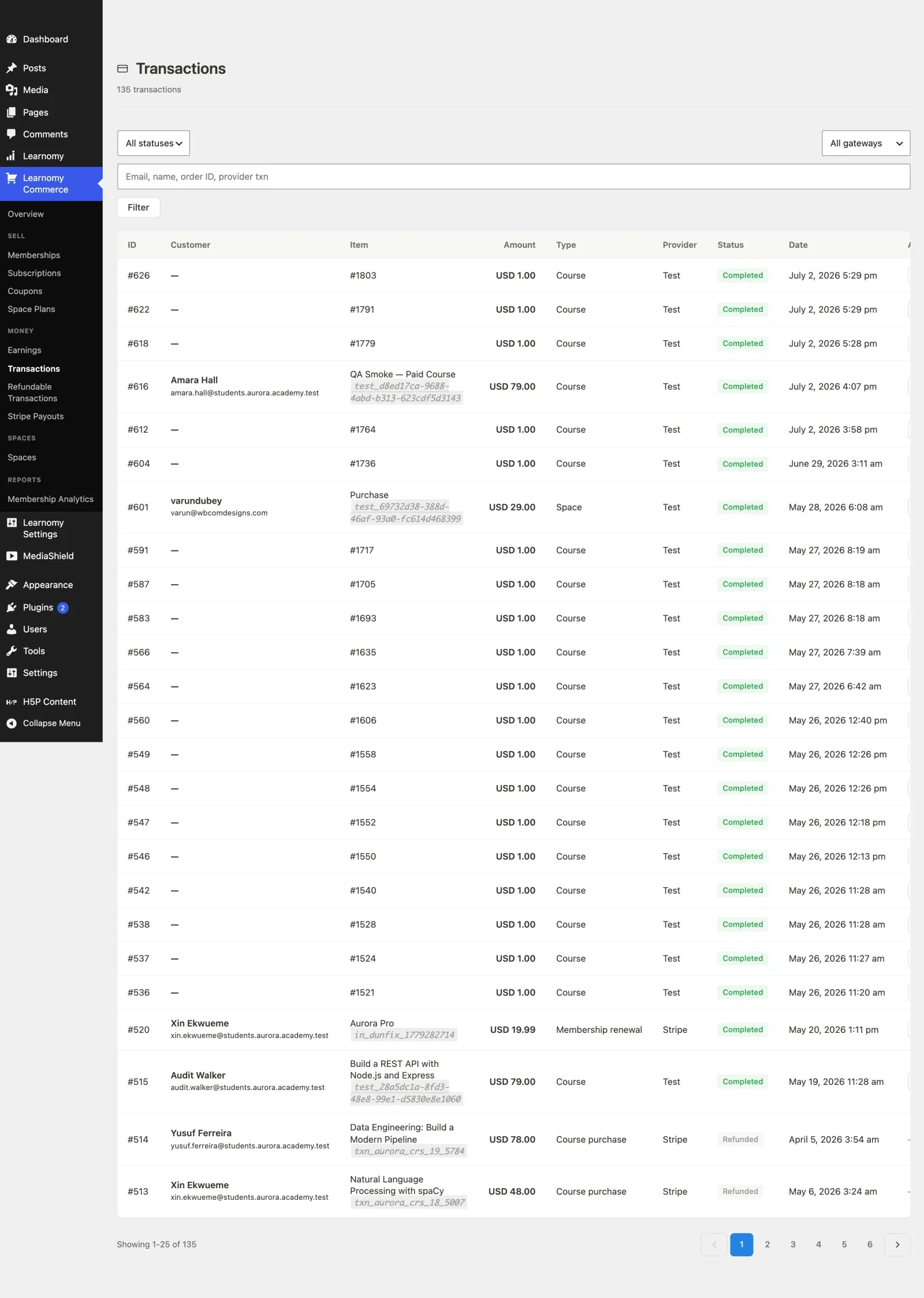
Training only matters if you can see what happened after the assignment.
That is where a lot of partner programs get weak. The portal exists, the courses are there, but nobody has a reliable answer to a simple question: who has actually finished the training? If the answer takes a spreadsheet, three emails, and a phone call, the system is too slow.
Learnomy solves that with progress reporting. In a partner network, that means head office can see the rollup while each location can still see its own results. It is not just a reporting feature. It is the part that makes the rest of the system measurable.
Why progress tracking matters in partner networks
A partner network is too large to manage by memory. If the only way to know whether a branch is on track is to email someone and wait for a reply, the system is already too slow.
Progress tracking turns training into something operational. You can see who started, who finished, and where the gaps are before they become customer-facing problems. That matters a lot when the training includes compliance, product standards, launch readiness, or anything else that must not be left to guesswork.
The report is not there to create pressure. It is there to show the state of the network clearly enough that the right person can act on it.
What Learnomy gives you
Learnomy reports let you look at completion per Space and, where needed, export the data for the people who still want a spreadsheet. That sounds boring. It is also exactly what real operations teams need.
The useful part is not the number alone. It is the ability to answer specific questions without reconstructing the answer manually. Which locations are behind? Which people have not started? Which groups are moving faster than others? Which region needs help before the launch date? Those are the questions that matter when the network is live.
That kind of visibility turns training into a management tool instead of a hope-driven process.
How to use the report without micromanaging people
The point of a report is not to hover over local managers. It is to give head office a clean view and let the local owner act on it.
That means the report should be visible enough to drive action, but not so invasive that every location feels watched for no reason. Learnomy’s Space-level structure helps with that because the data stays scoped to the right place.
It is the difference between oversight and interference. Oversight says, “I can see where help is needed.” Interference says, “I will manually ask everyone the same question every week.” One builds trust. The other destroys it.
Why exports still matter
Even when the system is working well, someone eventually wants the data outside the LMS. Audits, reviews, and internal meetings still happen in spreadsheets.
That is why exportable progress reports are useful. They let you carry the data into another workflow without retyping everything by hand. The report is useful inside the portal, and the export is useful when the portal has to prove itself somewhere else.
That may sound like a small convenience, but it matters because people trust data more when they can move it into the format they already use.
How reporting connects to the rest of the structure
Progress reporting works best when the rest of the setup is already clean. If the roster is messy, the report is messy. If the Spaces are mixed together, the report is harder to trust. If the learning path is unclear, completion means less.
That is why reporting is the last piece of the structure, not the first. You build the portal, organize the Spaces, standardize the track, and then use the report to see whether the system is actually being used.
In other words, the report confirms whether the model is real. It does not create the model by itself.
What a good dashboard changes
A good dashboard removes guesswork.
Instead of asking each branch for an update, you open the report and look. Instead of wondering whether the rollout is working, you can tell. Instead of managing the network through side conversations, you see the state directly. That makes the whole setup feel lighter for everyone involved.
It also makes the leadership conversation better. Leaders can focus on action, support, and consistency instead of spending time arguing about whether the numbers are real.
That is a big reason reporting matters in training systems that serve external partners. Without a trustworthy view, every conversation becomes an opinion contest.
What the report should answer
The report should answer the basic operational questions quickly. Which locations are complete? Which locations are stuck? Which people have not started? Which managers need a nudge? Which partner groups are moving faster than expected? Which ones are behind?
If the report can answer those questions cleanly, the team can move quickly. If it cannot, the team goes back to manual tracking, which means the system has not really solved the problem yet.
Those questions are simple, but they are the exact questions a busy network needs to answer every week.
What to do with the report once you have it
The report should not sit there as a passive scorecard. Someone has to use it.
Head office should review the rollup. The local manager should review the local data. The regional lead should review the regional view where relevant. Then each person should act on the gap they own. That is the part that turns reporting into improvement.
The worst possible behavior is to collect data and then do nothing with it. The next worst behavior is to use it as a blame tool. The best use is to turn it into a short, practical conversation about what needs attention and who is going to fix it.
What not to do
Do not overload the dashboard with useless fields. Do not collapse all locations into one flat list if the structure needs separation. Do not ask every manager to interpret the same report in a different way. And do not make the report so public that it creates pressure without context.
The report should be readable, but it should also respect the structure of the network. A partner should see their own work. A manager should see their own team. Head office should see the rollup.
That line is worth protecting because the reporting layer can easily turn into a surveillance layer if it is not designed carefully.
How Learnomy fits the workflow
Learnomy fits because the Space model gives you a natural reporting boundary. Each space is a location or partner. That means completion can be read in context rather than dumped into one undifferentiated pool.
Once the structure is clean, reporting becomes easier to trust. Once reporting is trusted, the business can act faster. That is the whole loop. Structure creates visibility. Visibility creates action. Action creates consistency.
That is what a partner network needs.
How this helps with audits and compliance
In many partner systems, some training is not just educational. It is evidence. That is especially true for compliance, product standards, launch readiness, and certain policy courses.
When completion is tracked clearly, the business has a record that can be used in reviews or audits. That record is only useful if the reporting model is clean. If the spaces are mixed, the roster is wrong, or the training sequence is unclear, the record loses value very quickly.
That is another reason the report sits at the end of the structure. The system needs to be organized before the evidence becomes meaningful.
What good looks like
When the report is working well, nobody is guessing anymore. Instead of asking each branch for an update, you open the report and look. Instead of wondering whether the rollout is working, you can tell. Instead of managing the network through side conversations, you see the state directly.
That is what makes the whole setup feel lighter for everyone involved. It also makes the network easier to scale because the organization can see the effects of training without rebuilding the process every week.
A good dashboard is not glamorous. It is useful. That is the point.
Where this article fits in the cluster
This article is the reporting layer. It is the last major piece in the structure because it depends on the portal, the spaces, and the learning path already being in place. If any of those earlier steps are weak, the report will reflect that weakness.
That is why the cluster starts with the concept and moves toward the operational details. It is also why this page should be read after the structure pages, not before them.
Related reading
Read How to Build a Partner Training Portal with Learnomy if you want the full setup first. Then read How to Train Franchisees Online with Learnomy for the standards-first version.
If the structure is still the bigger question, How to Give Each Partner Their Own Training Space and How to Organize Multiple Franchise Locations in One Training System are the two posts to read next.
Try Learnomy here: learnomy.app | live demo | YouTube video
References worth keeping nearby: WordPress Users and WordPress Roles and Capabilities.
How the data should be used
The data should be used to support the local manager, not replace them. If the report shows that a location is behind, the next step is usually a short conversation, not a long investigation. The system should make that conversation easier by showing the facts clearly.
That is why the report works best when it leads to action. A location can correct a roster, catch up on a course, or check whether the right people were added to the right Space. Those are practical moves, not abstract analytics.
When to escalate
Escalation should happen when the same problem repeats or when the gap is large enough to affect the customer-facing side of the business. If a single site is late because someone missed a login, that is a local fix. If several sites are late because the same step is confusing, that is a training or process problem.
The report helps you tell the difference. That is the value. It prevents every issue from being treated like a network crisis.
How exports help leadership
Leadership often wants data in a portable form. The export makes that possible without rebuilding the report by hand. It also lets the business use the same data in audit packets, review decks, and internal planning documents.
The important part is that the data remains readable outside the portal. That makes the system more useful across the rest of the business, not just inside the training team.
What a healthy tracking habit looks like
When the habit is healthy, people check the report on a schedule, not only when something goes wrong. That makes training feel like an ongoing operation instead of a fire drill. It also helps the network learn to trust the data rather than argue with it.
That habit takes a little discipline, but it pays off fast. Once the team knows that the report is the normal place to look, the training process gets much more stable.
What to remember
Tracking matters because it makes the network visible. If the report is clean, the business can act early, support the right people, and keep the training process from turning into guesswork.
The goal is not more data. The goal is better decisions.
And better decisions are what keep the network moving without unnecessary friction.
That is why reporting should stay simple, current, and easy to read.
That rule matters more than any single dashboard feature.
Simple reporting is what keeps the workflow moving.
It keeps the network honest too.
And honesty is what makes the data worth using.
That is the difference between a report that gets ignored and a report that drives action.
That is why the report should be checked regularly, not only after something breaks.
Plugins we build and run
We maintain these ourselves, which is why we can support them on your site.
- BuddyNextThe self-hosted community engine for WordPress
- BuddyXFree community theme, Pro when you outgrow it
- ReignPremium community theme. Add pieces, build anything
- JetonomyCommunity forum and Q&A for WordPress
- EventonomyEvents and RSVPs for WordPress communities
- LearnomyCourses and learning communities on WordPress
- ListoraDirectories and listings your members can browse
- SnipShareCode sharing built for developer communities
- WB Ad ManagerAd placements that turn traffic into revenue
- WP Career BoardA job board your community actually uses
- WP Sell ServicesSell services with offers, orders, and payouts
- MediaVersePhotos, video, and media albums for members
- WB GamificationPoints, badges, and rewards that keep members active
- Product RoadmapPublic roadmaps with voting your users trust