Know When a Scheduled Task Did Not Run: Monitoring WP-Cron and Action Scheduler Failures
WordPress keeps no record of failed cron jobs. We broke WP-Cron and Action Scheduler tasks on WordPress 7.1.3 and built tested checks for overdue events, failed actions, missed posts and a heartbeat.

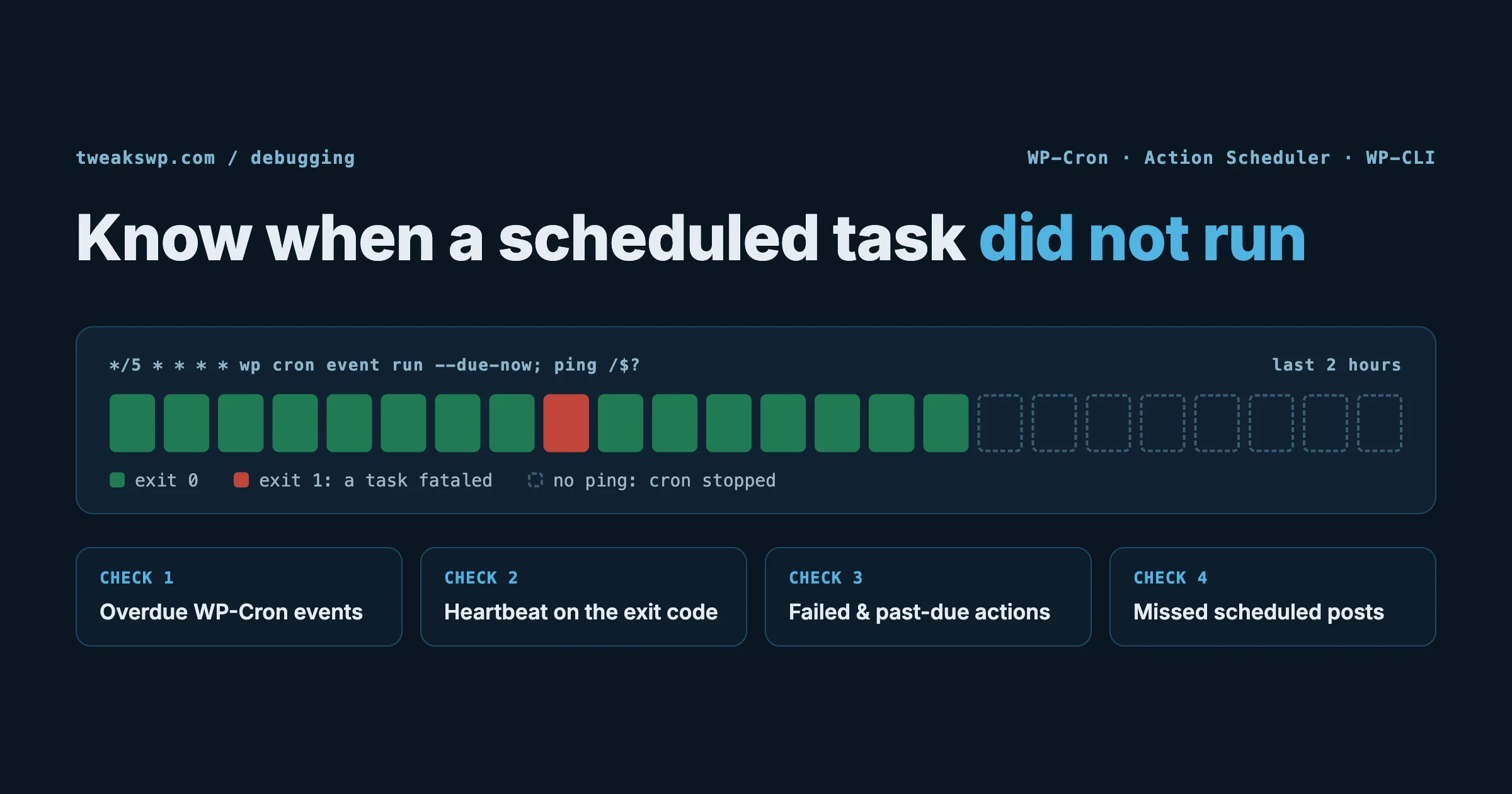
A scheduled task that fails rarely announces itself. The renewal email does not go out, the scheduled post sits at “Missed schedule”, the nightly sync stops, and the first person to notice is a customer. WordPress keeps no history of what ran, and most monitoring checks whether the homepage loads, not whether the jobs behind it are running.
This guide is about detection, not setup. If WP-Cron is not running at all, start with our guide to debugging WP-Cron when scheduled tasks are not running. Here we cover how to spot WordPress cron jobs not running, every few minutes and without logging in, and how to catch WP-Cron and Action Scheduler jobs that run but fail. Everything below was tested on WordPress 7.1.3 with WP-CLI 2.12.0 and Action Scheduler 4.2.0, and several results surprised us.
The short version
- Run WP-Cron from server cron with
DISABLE_WP_CRONset, and send a heartbeat using the exit code ofwp cron event run --due-now. It exits 1 when a task fatals, so the heartbeat reports failure. - Do not trust the default event list.
wp cron event listshows an event two hours late as “now”. Compare thetimefield with the clock instead. - Query Action Scheduler for failed and past-due actions.
wp action-scheduler runexits 0 even when actions fail, so its exit code tells you nothing. - Check for missed scheduled posts: any post still in
futurestatus with a date in the past. - Put all four checks in one script that exits 1 on any problem, and run it from cron or your monitoring tool. The tested script is below.
How we tested
We ran WordPress 7.1.3 on the official wordpress:php8.3-apache Docker image (PHP 8.3.35) with MariaDB 11, WP-CLI 2.12.0, and the Action Scheduler 4.2.0 plugin from WordPress.org, the same library WooCommerce and many other plugins bundle. A must-use plugin registered three test hooks:
<?php
// wp-content/mu-plugins/cron-test.php
add_action( 'tw_ok_hook', function () { update_option( 'tw_ok_ran', time() ); } );
add_action( 'tw_fail_hook', function () { throw new Exception( 'tw_fail_hook: remote API returned 500' ); } );
add_action( 'tw_fatal_hook', function () { tw_function_that_does_not_exist(); } );
One that works, one that throws an exception (like a failed API call nobody caught), and one that hits a PHP fatal error (like a missing function after a plugin update). We scheduled them as WP-Cron events and as Action Scheduler actions, ran them every way WordPress runs them, and recorded what each tool reported.
What happens when a WP-Cron task fails
These results are the reason monitoring matters. A failing WP-Cron task does more damage than most people expect:
Test | What happened |
|---|---|
One-off event that fatals | Removed from the schedule before it ran. It is gone and will never retry. |
Recurring event that fatals | Rescheduled for its next run before it ran, so it fails again every interval. |
Uncaught exception in a task | Treated exactly like a fatal error: |
A fatal task queued before a working task | The working task did not run in that pass. One broken job blocks everything behind it. |
Calling | HTTP 200 and nothing ran: the crashed run never released the cron lock, so WordPress waits out the 60-second lock timeout. |
Anything logged by WordPress | Nothing. The only trace was the PHP fatal error in the server error log. |
WordPress removes or reschedules an event before running its callback, which is why a crash cannot leave it stuck in the queue. That protects the schedule, but it also means a failed one-off task leaves no record anywhere in WordPress. You cannot look at the cron list afterwards and see that something failed; you can only see that it is no longer there.
WordPress does have two actions with error-sounding names, cron_reschedule_event_error and cron_unschedule_event_error. They fire when WordPress fails to save the schedule, not when your task fails, so they will not catch any of the cases above.
Check 1: WordPress cron jobs not running (overdue events)
The obvious check is to list events and look for ones in the past. The default output hides exactly that:
$ wp cron event list --fields=hook,next_run_gmt,next_run_relative
hook            next_run_gmt          next_run_relative
tw_ok_hook      2026-10-17 14:57:15   now
tw_fatal_hook   2026-10-17 14:57:16   now
Both events were two hours overdue when we ran that. next_run_relative says “now” for anything already due, whether it is one second or one week late. To see real lateness, ask for the time field (a Unix timestamp) and compare it with the clock:
NOW=$(date +%s)
wp cron event list --fields=hook,time --format=csv | tail -n +2 |
  awk -F, -v now="$NOW" -v grace=900 '$2 < now-grace {printf "%s overdue by %d min\n", $1, (now-$2)/60}'
tw_ok_hook overdue by 120 min
tw_fatal_hook overdue by 120 minThe 15-minute grace (grace=900) avoids false alarms from events that are only a minute or two behind because cron runs every five minutes. One overdue event usually means nothing is running WP-Cron at all, so this single check catches the most common failure: DISABLE_WP_CRON set with no server cron behind it.
wp cron test is also worth knowing. It checks whether WordPress can spawn WP-Cron over a loopback request. On our test site, where the site could not reach its own public URL, it failed with a clear message:
Error: WP-Cron spawn failed with error: cURL error 7: Failed to connect to localhost:8097 after 0 ms: Could not connect to serverThat is the classic “WP-Cron does nothing on page loads” cause on hosts that block loopback requests. It is a one-time diagnosis, though, not monitoring.
Check 2: a heartbeat from server cron
The checks above tell you about the past. A heartbeat tells you that jobs ran in the last few minutes. The pattern is a dead man’s switch: every run pings a URL, and a monitoring service alerts you when the pings stop or report failure. Healthchecks.io, Cronitor and similar services all work this way.
The key question is whether the cron command tells you it failed. We checked the exit codes:
Command and situation | Exit code |
|---|---|
| 0 |
| 0 |
| 1 |
| HTTP 500 |
| HTTP 200, nothing ran |
WP-CLI gives you an honest exit code, so use it. Healthchecks.io accepts the exit code in the ping URL, which reports success and failure in one line:
# crontab -e  (as the user that owns the site files)
*/5 * * * * cd /var/www/html && wp cron event run --due-now --quiet; curl -fsS -m 10 --retry 3 -o /dev/null "https://hc-ping.com/YOUR-UUID/$?"
We tested the logic with a fatal task in the queue: the first run produced a ping to /1 (failure) and the next clean run a ping to /0 (success). If cron stops running entirely, no ping arrives at all and the service alerts on the missing heartbeat.
Avoid building the heartbeat on curl https://example.com/wp-cron.php. As the table shows, wp-cron.php returns 200 whenever it decides not to run, including when another run holds the lock. That 200 means “the request reached WordPress”, not “your jobs ran”.
Set DISABLE_WP_CRON when you move to server cron:
wp config set DISABLE_WP_CRON true --rawIn our tests, with WP-Cron still enabled, page loads kept taking the cron lock to attempt their own loopback spawn. Our server-side call to wp-cron.php then found the lock held and quietly ran nothing. With DISABLE_WP_CRON set, the server call ran every due task. Our guide on how to disable WP-Cron and use a real cron job has the full setup.
Check 3: failed and past-due Action Scheduler actions
Action Scheduler handles failure very differently from WP-Cron, and much better. We created the same three tasks as actions and ran them:
$ wp action-scheduler run --hooks=tw_fail_hook,tw_ok_hook,tw_fatal_hook
Completed processing action 7 with hook: tw_ok_hook
Error: Error processing action 6: tw_fail_hook: remote API returned 500
Error: Error processing action 8: Call to undefined function tw_function_that_does_not_exist()
$ echo $?
0- It caught both the exception and the fatal error, marked those actions
failed, and carried on with the rest of the queue. - Each failed action keeps its error message in its log.
- The command still exited 0. Never use the exit code of
wp action-scheduler runas your health signal.
The failure record is there to query:
$ wp action-scheduler action list --status=failed --fields=id,hook
id  hook
6   tw_fail_hook
8   tw_fatal_hook

$ wp action-scheduler action get 6 --field=log_entries
date                        message
2026-10-17 17:01:03 +0000   action created
2026-10-17 17:01:16 +0000   action started via WP CLI
2026-10-17 17:01:16 +0000   action failed via WP CLI: tw_fail_hook: remote API returned 500
For monitoring, two counts cover most problems. --date and --date_compare filter on the action’s scheduled date:
# actions that failed among those scheduled in the last day
wp action-scheduler action list --status=failed --date='-1 day' --date_compare='>=' --format=count

# actions still pending more than 30 minutes after they were due
wp action-scheduler action list --status=pending --date='-30 minutes' --date_compare='<=' --format=count
A rising past-due count means the queue is not being processed, usually because WP-Cron is not running, since Action Scheduler’s queue runner is itself a WP-Cron event (action_scheduler_run_queue, every minute in our install). A rising failed count means the queue runs but something inside it is broken. wp action-scheduler status gives a one-screen summary by status with the oldest and newest action in each.
Action Scheduler has its own warning too. Reading its source, the “past-due actions found; something may be wrong” notice appears only for users with manage_options, only when they load an admin page, and by default only for actions pending for more than a day. The thresholds are filterable (action_scheduler_pastdue_actions_seconds and action_scheduler_pastdue_actions_min), but on a site nobody logs into, nobody sees the notice. For WooCommerce stores, our post on Action Scheduler backlogs behind a slow checkout covers what to do once the counts start climbing.
Check 4: missed scheduled posts
“Missed schedule” is WP-Cron failure in its most visible form. Each scheduled post gets a publish_future_post cron event. If WP-Cron does not run, the post stays in future status with a date in the past. We scheduled a post three minutes ahead with no cron running, and three minutes later it was still future:
NOW=$(date -u "+%Y-%m-%d %H:%M:%S")
wp post list --post_status=future --fields=ID,post_date_gmt,post_title --format=csv | tail -n +2 |
  awk -F, -v now="$NOW" '{d=$2; gsub(/"/,"",d)} d < now {print "MISSED:", $0}'
MISSED: 5,"2026-10-17 17:06:28","Scheduled launch post"Running wp cron event run --due-now published it straight away. Use the GMT date for the comparison: post_date is in the site’s timezone and gives wrong answers on any site not set to UTC.
One script for all four checks
This script combines the checks and exits 1 if anything needs attention, so any cron job, monitoring agent or CI step can act on it. We ran it against our test site in both states:
#!/usr/bin/env bash
# cron-health.sh - report scheduled-task problems for one WordPress site.
# Usage: cron-health.sh [wp-cli args, e.g. --path=/var/www/html or @alias]
# Exit 0 = healthy, 1 = something needs a look.
WP="${WP_BIN:-wp} $*"
GRACE=${GRACE:-900}           # seconds a WP-Cron event may be late
NOW=$(date -u +%s); NOW_SQL=$(date -u "+%Y-%m-%d %H:%M:%S")
problems=0

late=$($WP cron event list --fields=hook,time --format=csv 2>/dev/null | tail -n +2 |
  awk -F, -v now="$NOW" -v g="$GRACE" '$2 < now-g {printf "  %s late by %d min\n", $1, (now-$2)/60}')
[ -n "$late" ] && { echo "WP-Cron events overdue:"; echo "$late"; problems=1; }

missed=$($WP post list --post_status=future --fields=ID,post_date_gmt --format=csv 2>/dev/null | tail -n +2 |
  awk -F, -v now="$NOW_SQL" '{d=$2; gsub(/"/,"",d)} d < now {print "  post " $1 " was due " d " UTC"}')
[ -n "$missed" ] && { echo "Scheduled posts missed:"; echo "$missed"; problems=1; }

if $WP action-scheduler version >/dev/null 2>&1; then
  failed=$($WP action-scheduler action list --status=failed --date='-1 day' --date_compare='>=' --format=count 2>/dev/null)
  pastdue=$($WP action-scheduler action list --status=pending --date='-30 minutes' --date_compare='<=' --format=count 2>/dev/null)
  [ "${failed:-0}" -gt 0 ] && { echo "Action Scheduler: $failed failed action(s) scheduled in the last day"; problems=1; }
  [ "${pastdue:-0}" -gt 0 ] && { echo "Action Scheduler: $pastdue pending action(s) more than 30 min past due"; problems=1; }
fi

[ $problems -eq 0 ] && echo "OK: no overdue events, missed posts or failed actions"
exit $problems
Output with problems on the site:
WP-Cron events overdue:
  tw_ok_hook late by 40 min
Scheduled posts missed:
  post 8 was due 2026-10-17 16:47:30 UTC
Action Scheduler: 3 failed action(s) scheduled in the last day
Action Scheduler: 1 pending action(s) more than 30 min past due
exit=1
And after fixing them:
OK: no overdue events, missed posts or failed actions
exit=0
The Action Scheduler checks only run when the wp action-scheduler command exists, so the same script works on sites without it. Failed actions stay in the table, so after you have dealt with one, delete it (wp action-scheduler action delete <id>) or the script keeps reporting it until its scheduled date is more than a day old.
Running it across many sites
WP-CLI aliases make a fleet check a loop. With aliases defined in ~/.wp-cli/config.yml:
@shop:
  ssh: deploy@shop.example.com/var/www/html
@blog:
  ssh: deploy@blog.example.com/var/www/html
for site in @shop @blog; do
echo "== $site"
./cron-health.sh "$site" || echo "!! $site needs attention"
doneRun it from one management machine every 15 minutes and send the output anywhere that will be read: an email, a Slack webhook, or a monitoring service’s failure endpoint. If you already manage updates across sites, add it next to the checks in our auto-updates at fleet scale setup, because a plugin update that breaks a scheduled task is exactly the kind of failure this catches.
Make the failures visible in the first place
Detection catches failures; good task code makes them easier to diagnose. If you write scheduled tasks:
- Catch exceptions inside WP-Cron callbacks, log them with context, and re-schedule a one-off task yourself if it must retry. WP-Cron will not retry it for you; as we saw, a failed one-off event is simply gone.
- Prefer Action Scheduler for work that must not be lost. It records failures with the error message and keeps going with the rest of the queue.
- Record a “last success” timestamp for important jobs (an option updated at the end of the callback) so a check can alert when it is older than expected, even if the job never errored.
add_action( 'my_nightly_sync', function () {
	try {
		my_run_sync();
		update_option( 'my_nightly_sync_last_ok', time(), false );
	} catch ( Throwable $e ) {
		error_log( 'my_nightly_sync failed: ' . $e->getMessage() );
		wp_schedule_single_event( time() + 15 * MINUTE_IN_SECONDS, 'my_nightly_sync' );
	}
} );
# alert if the sync has not succeeded for 26 hours
last=$(wp option get my_nightly_sync_last_ok 2>/dev/null || echo 0)
[ $(( $(date +%s) - last )) -gt 93600 ] && echo "nightly sync stale"Catching Throwable also catches PHP Errors such as calls to undefined functions, which a plain catch ( Exception $e ) misses. Our post on cron jobs developers get wrong covers the scheduling mistakes that cause many of these failures.
Checklist
DISABLE_WP_CRONset and a server cron runningwp cron event run --due-nowevery 5 minutes- Heartbeat built on the WP-CLI exit code, not on a
wp-cron.phpHTTP status - Overdue check using the
timefield, notnext_run_relative - Action Scheduler failed and past-due counts checked, not the
runexit code - Missed scheduled posts checked against
post_date_gmt - Health script alerting somewhere a person will actually see it
- Critical jobs record a last-success timestamp
Frequently asked questions
How do I know if WordPress cron jobs are not running?
List events with their time field and compare with the current time. Events more than a few minutes in the past mean nothing is running WP-Cron. The default next_run_relative column shows overdue events as “now”, so it will not tell you.
Does WordPress log failed cron jobs?
No. In our tests, a task that threw an exception or hit a fatal error left nothing in WordPress. The only trace was the PHP error in the server error log, and a failed one-off event was removed from the schedule.
Will a failed WP-Cron event retry?
A recurring event runs again at its next interval, and fails again if the cause is still there. A one-off event is removed before it runs, so it does not retry. Catch the error in your callback and reschedule it yourself if it must run.
How do I find failed Action Scheduler actions?
Run wp action-scheduler action list --status=failed, then wp action-scheduler action get <id> --field=log_entries to see the error message. In wp-admin they are under Tools, Scheduled Actions, with the Failed filter.
Can I use the exit code of wp action-scheduler run for monitoring?
No. In our test it exited 0 while two of the three actions failed. Query the failed and past-due counts instead.
Why does curl to wp-cron.php return 200 when nothing ran?
wp-cron.php exits quietly with 200 when another run holds the cron lock, including a run that crashed and never released it. Use wp cron event run --due-now, which returns 1 when a task fails.
What causes “Missed schedule” on posts?
The publish_future_post event did not run on time, almost always because WP-Cron is not running. Fix the cron setup; running wp cron event run --due-now publishes missed posts immediately.
How we tested this
All results come from our own test site on 17 October 2026: WordPress 7.1.3, PHP 8.3.35 on Apache, MariaDB 11, WP-CLI 2.12.0 and Action Scheduler 4.2.0 in Docker. Failures were produced with real exceptions and real fatal errors in a must-use plugin, run through WP-CLI, through wp-cron.php with and without DISABLE_WP_CRON, and through Action Scheduler’s own runner. The health script above is the one we ran, with its real output. The Healthchecks.io URL format comes from its HTTP API documentation.
Need scheduled tasks watched for you? Our WordPress care plans include cron and Action Scheduler monitoring across your sites, and if jobs are failing right now, get WordPress help.
Plugins we build and run
We maintain these ourselves, which is why we can support them on your site.
- BuddyNextThe self-hosted community engine for WordPress
- BuddyXFree community theme, Pro when you outgrow it
- ReignPremium community theme. Add pieces, build anything
- JetonomyCommunity forum and Q&A for WordPress
- EventonomyEvents and RSVPs for WordPress communities
- LearnomyCourses and learning communities on WordPress
- ListoraDirectories and listings your members can browse
- SnipShareCode sharing built for developer communities
- WB Ad ManagerAd placements that turn traffic into revenue
- WP Career BoardA job board your community actually uses
- WP Sell ServicesSell services with offers, orders, and payouts
- MediaVersePhotos, video, and media albums for members
- WB GamificationPoints, badges, and rewards that keep members active
- Product RoadmapPublic roadmaps with voting your users trust