How to Build a Partner Training Portal with Learnomy
Build a private partner training portal with Learnomy using Spaces, learning paths, local roster control, and reporting.

If you need a partner training portal, the first thing to decide is not the course list. It is the structure.
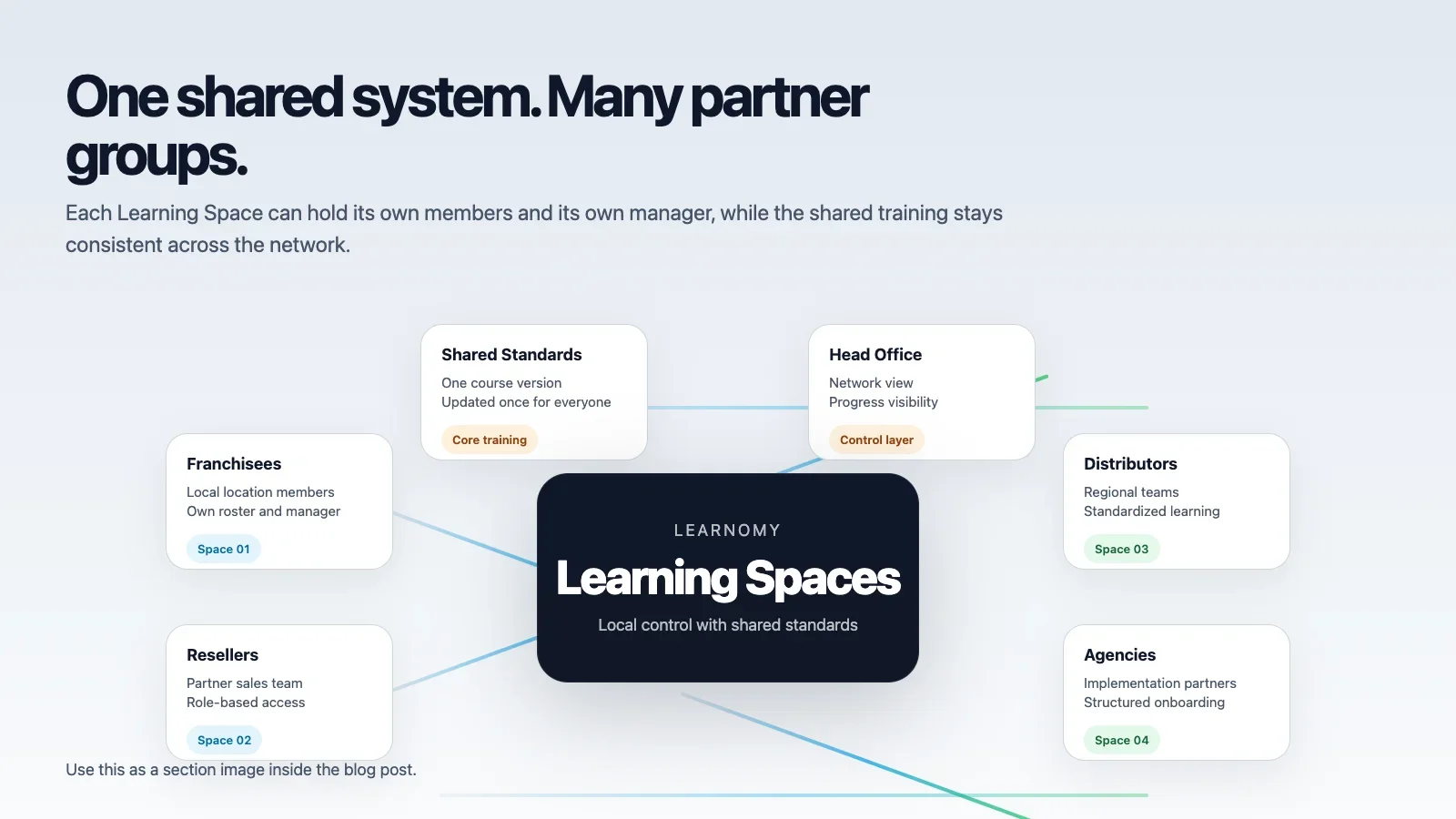
A portal for franchisees, resellers, distributors, or implementation partners has to do more than host videos. It has to keep each partner separated, keep the training sequence consistent, and give head office a clear view of progress without forcing manual admin work. If those things are not true, the site may still look useful, but it will not behave like a real operating system for partner enablement.
That is where Learnomy fits. It gives you a private portal, Spaces, learning paths, CSV roster import, reports, and white-label branding in one system. Those pieces are enough to build something that behaves like a proper partner hub instead of a loose collection of training pages.
This is the article I would use if I had to build the portal from scratch and keep it from becoming a mess six months later.
Start with private access
This should not feel like a public knowledge base. It should feel like a private operating environment. That is the first shift in thinking. A public site is designed for discovery. A partner portal is designed for control.
Once the portal is private, the rest of the design becomes clearer. You are not publishing content for anyone who lands on the page. You are giving a controlled group a place to work through the right training. That means the site should protect the sequence, protect the audience, and protect the reporting layer.
In practical terms, that gives you a cleaner foundation for every other decision. The content can still be useful, but the access model is what turns it from a library into a system of record.
Separate each partner in its own Space
One partner, one Space. That is the cleanest model. It is also the model that makes the least work for everyone once the network grows.
Riverside does not need Northgate’s people. A reseller in one region does not need another reseller’s roster. A local manager should be able to handle their own team without waiting for head office to make every change. When you separate the partner spaces this way, you stop the network from feeling like one shared folder with a login.
That separation is what makes the portal scalable. It keeps the data clean, the responsibility local, and the reporting interpretable.
If you are trying to explain the system to a non-technical team, this is the easiest sentence to use: each partner gets their own room. Once people understand that, the rest of the model is much easier to accept.
Standardize the learning path
Every partner may own its own business, but the standards should still be shared. That is the part that keeps the brand from fracturing.
Learning paths let you turn a course list into a sequence. That means the network learns the same process in the same order. Brand standards, product knowledge, compliance, launch steps, customer handling, and escalation rules can all be delivered as one flow.
That is useful because partners do not usually fail from lack of information. They fail from bad order. They learn the right thing too late, or the wrong thing too early, or the right thing in an inconsistent sequence. A learning path fixes that by making order visible.
Once you have a path, you also have a clearer way to update the program. If the sequence changes, you change the path once rather than editing each partner’s material by hand.
Use roster import instead of manual setup
HR, operations, or the partner itself will usually already have the roster in a spreadsheet. The portal should work with that reality. If it does not, the team will start working around the system instead of through it, and that is how adoption breaks down.
CSV import lets you load a real list instead of retyping names one by one. That keeps the setup fast and reduces mistakes before the training even starts. It also makes the portal fit the way the network already operates. Real companies do not manage partner intake one record at a time. They work from lists.
That is a small detail that has a big consequence. If the portal can ingest the roster cleanly, the rest of the training process starts on solid ground.
Let reports do the management work
Head office should be able to see who is on track and who is behind without asking for weekly updates from every branch. That does not mean micromanagement. It means visibility.
That is why progress reporting matters. It turns the portal into a management system, not just a content bucket. You can see what is complete, what is pending, and which locations need attention. You can also compare activity across partners without collapsing everything into one flat, unhelpful list.
When the reporting layer is clear, the conversation changes. Instead of asking “Did people finish?” head office can ask “Where is the friction?” That is a much better question because it points to action rather than guesswork.
Why white-label matters
Partner portals are part of the brand experience. If the portal feels like a generic LMS with a logo pasted on top, the training experience will feel separate from the brand promise. That is not ideal when the whole point of partner enablement is to protect the promise.
Learnomy’s white-label setting lets you present the portal under your own brand so the network feels like one system instead of a random LMS wrapped in a logo. That gives the training environment the right visual tone and keeps partners from feeling like they are inside a third-party tool that happens to contain the brand content.
For partner programs, that consistency matters more than people expect. Brand is not only a front-end design choice. It is also a trust signal inside the training process.
What I would build first
If I were rolling this out, I would keep the first version simple and explicit.
- private portal
- one Space per partner or location
- one standard learning path
- CSV roster import
- progress reports for head office
- white-label branding
That is enough to launch a real system. You can add more structure later, but this is the part that has to work first. If you overbuild before the first partner is live, you risk designing for a network that does not exist yet.
There is a reason boring rollouts usually win. They are easier to trust. They are also easier to correct when real people start using them.
What usually goes wrong
The most common failure is trying to make the portal do too much at once. Teams want custom branding, complex permissions, different training paths, regional visibility, and a perfect report view on day one. That often leads to a setup that is technically impressive and operationally fragile.
Another common failure is leaving too much to head office. If central admin has to process every roster update, the portal becomes a bottleneck. Another failure is the opposite. If every partner is allowed to improvise everything, consistency disappears and the brand starts to drift.
The portal works best when the local people can manage local people and the central team can manage standards and oversight. That is the line worth protecting.
The last failure is a naming failure. If people call the wrong thing the wrong name, the system starts to confuse itself. If the local team uses one word and head office uses another, mistakes will follow. Clear naming is not cosmetic. It is operational hygiene.
How the learner experience should feel
The learner should not feel like they have entered a giant LMS. They should feel like they have entered the right place for their job. That is a small difference on paper and a large difference in practice.
When a partner logs in, they should see only the training that belongs to them. When a local manager logs in, they should see the people they are responsible for. When head office logs in, they should see the rollup, not a random pile of unrelated tasks.
That clarity is what makes the system feel trustworthy. No noise. No accidental overexposure. No support tickets caused by the wrong person seeing the wrong roster. The portal should reduce friction before the training even begins.
How the admin experience should feel
For the people running the portal, the experience should feel predictable. A roster import should work the same way every time. A learning path should behave the same way across partners. A report should show the same fields in the same place, so no one has to relearn the interface every week.
That predictability matters because the people managing partner training are usually not being paid to babysit software. They are trying to run the business. The portal should let them do that with less friction, not more.
When the admin side is calm, the whole program becomes easier to sustain.
How to roll it out in phases
Do not try to build the whole network at once. Start with one partner. One Space. One learning path. One roster owner. One report view. That is enough to prove the model. Once that works, add the second partner and test whether the structure still makes sense.
That approach is slower than trying to sketch the entire future on a whiteboard, but it is much safer. A working first version teaches you where the real friction is. It also tells you which parts of the structure are essential and which parts are just decoration.
That is usually the moment where teams discover that they do not need as much complexity as they thought. They need fewer exceptions and clearer ownership.
What good looks like
If the portal is built well, the experience feels obvious. The right partner sees the right training. The local manager handles the local roster. Head office sees the network view. Nobody needs to stitch together answers from email threads and spreadsheets.
That is the point. The software should disappear into the workflow. The process should do the visible work.
And when the team asks what changed after launch, the answer should not be “more screens.” The answer should be “less confusion.” That is a better measure of success for a partner portal than any visual checklist.
Where the article fits in the cluster
This article is the practical middle of the cluster. It sits between the concept post and the network-level posts. If someone already understands partner enablement, this is the page that shows how the system is actually built. If someone does not know what partner enablement is yet, this page points them back to the broader definition.
That is why the internal links matter. The cluster is not just six separate posts. It is a route through the problem.
Related reading
What Is Partner Enablement? explains the wider concept. How to Train Franchisees Online with Learnomy shows the franchise-specific version. How to Give Each Partner Their Own Training Space goes deeper on the separation model.
If the network structure is the bigger question, continue with How to Organize Multiple Franchise Locations in One Training System and How to Track Partner Training Progress Across a Network.
Try Learnomy here: learnomy.app | live demo | YouTube video
References worth keeping nearby: WordPress Users and WordPress Roles and Capabilities.
What to remember
The portal is the container that makes the partner program work. If the boundary is right, the rest of the setup becomes easier to trust, easier to manage, and easier to scale.
That is also why the portal should be treated like an operating environment, not a brochure page. The structure is the product here.
Once that is clear, every other feature has a place and a purpose.
When the site behaves like a system of record, the whole partner program becomes easier to run and easier to explain.
Plugins we build and run
We maintain these ourselves, which is why we can support them on your site.
- BuddyNextThe self-hosted community engine for WordPress
- BuddyXFree community theme, Pro when you outgrow it
- ReignPremium community theme. Add pieces, build anything
- JetonomyCommunity forum and Q&A for WordPress
- EventonomyEvents and RSVPs for WordPress communities
- LearnomyCourses and learning communities on WordPress
- ListoraDirectories and listings your members can browse
- SnipShareCode sharing built for developer communities
- WB Ad ManagerAd placements that turn traffic into revenue
- WP Career BoardA job board your community actually uses
- WP Sell ServicesSell services with offers, orders, and payouts
- MediaVersePhotos, video, and media albums for members
- WB GamificationPoints, badges, and rewards that keep members active
- Product RoadmapPublic roadmaps with voting your users trust