You Patched wp2shell. Now Prove You Were Not Already Breached
Both wp2shell CVEs went into CISA's KEV catalog on 21 July and public exploits are circulating. Patching closed the door; it did not tell you whether anyone was already inside. A WP-CLI compromise-assessment runbook, and the line where cleanup stops and rebuild begins.

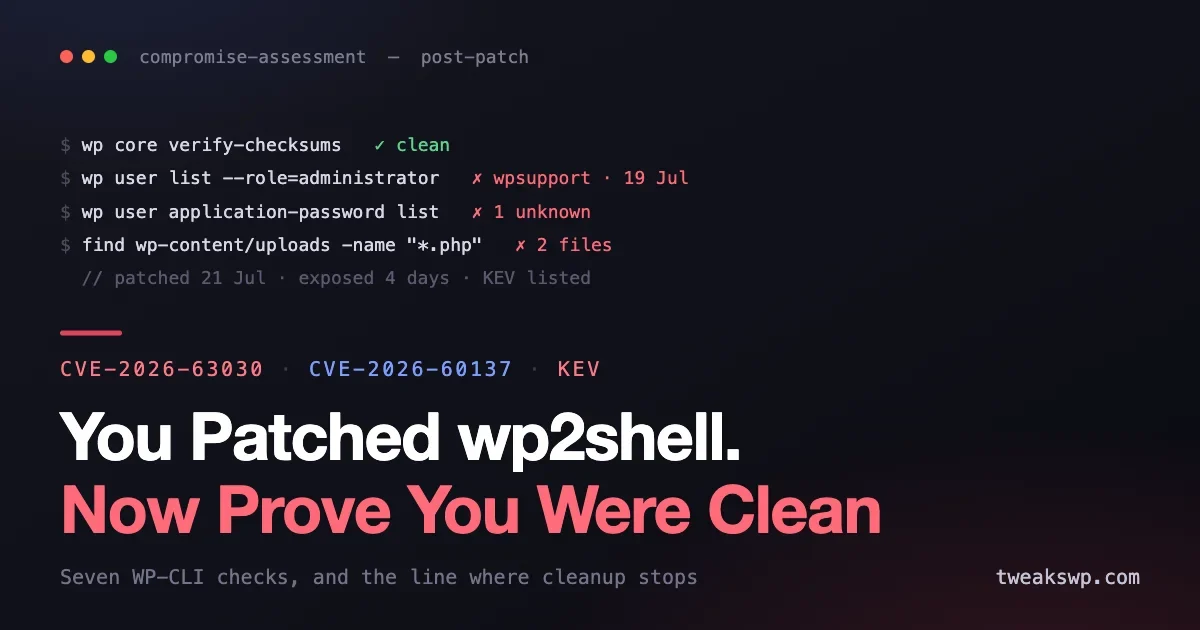
WordPress patched the wp2shell chain on 17 July. Three days later Searchlight Cyber published full technical details, public proof-of-concept exploits appeared, and on 21 July CISA added both CVE-2026-63030 and CVE-2026-60137 to its Known Exploited Vulnerabilities catalog. A KEV listing is not a warning about what might happen. It is a statement that exploitation has been observed.
If you updated in that window, you did the right thing and you are not finished. Patching removes the vulnerability; it tells you nothing about whether anyone used it first. An unauthenticated remote code execution flaw that was public for days means the honest question is no longer am I vulnerable but was I already visited. This is the runbook for answering that, at fleet scale, with WP-CLI.
Why patching is not the end of this one
Most vulnerability response ends at the update because most vulnerabilities do not grant code execution. This one did. The chain we covered earlier pairs an unauthenticated SQL injection with a second flaw to reach remote code execution through the REST API batch endpoint, on a default install, with no credentials. Affected versions were 6.9.0 through 6.9.4 and 7.0.0 through 7.0.1.
Code execution means an attacker was never limited to the flaw itself. The flaw is only the door. Once through, the usual sequence is to establish persistence that survives the patch you are about to apply: a backdoor in a file the update will not touch, a new administrator, an application password, a scheduled task. Every one of those outlives the fix. This is the specific reason a patched site can still be an owned site, and why the update log is not evidence of anything except that you updated.
The window that matters runs from roughly 17 July, when the patch and therefore the vulnerability became public knowledge, through whenever your site actually updated. Mass scanning of newly published WordPress CVEs typically begins within hours. If your site sat unpatched for even a day inside that window, assume it was probed and go looking.
Start with an inventory, not a scan
Before checking anything, know what you are checking. At fleet scale the first real question is which sites were exposed and for how long, because that determines where you spend your attention.
# Per site: what version is it on now?
wp core version

# Across a fleet, from a directory of sites:
for d in /var/www/*/; do
  printf '%s\t' "$d"
  wp core version --path="$d" --skip-plugins --skip-themes 2>/dev/null || echo "ERROR"
done
Any site currently on 6.9.0 to 6.9.4 or 7.0.0 to 7.0.1 is still vulnerable and should be patched before you do anything else in this document. Any site that was on those versions after 17 July belongs on your assessment list.
The update timestamp is the other half of the picture. Most hosts and most WordPress installs keep enough of a record to reconstruct when the update actually landed, whether that is the file mtime on a core file, your host’s update log, or your own deployment history. What you want is the gap between 17 July and your patch. A gap of hours is low concern. A gap of a week during active mass exploitation is a different conversation.
The seven checks
These are ordered by signal quality: the earliest checks catch the most common persistence with the fewest false positives.
1. Core and plugin file integrity
The single highest-value check. WordPress can compare every core file against the official checksums, and the plugin equivalent does the same for anything from the .org repository.
wp core verify-checksums
wp plugin verify-checksums --all
Clean output means core and repository plugins match what was published. Any file reported as modified or unexpected deserves your full attention, especially in wp-includes/ and wp-admin/, where nothing should ever be locally modified.
Two limits are worth stating plainly, because they are where people get a false sense of safety. Premium and custom plugins have no published checksums, so they are simply not covered. And neither command examines your theme or the uploads directory. A clean checksum run narrows the search; it does not end it.
2. Administrator accounts
Creating an administrator is the most common post-exploitation move because it is durable and looks legitimate.
wp user list --role=administrator --fields=ID,user_login,user_email,user_registeredRead this list as a person who knows the team, not as a checklist. You are looking for accounts you cannot account for: a registration date inside the exposure window, an email on a domain nobody recognises, a plausible-looking name nobody hired. Attackers pick names that survive a glance, so a login called wpsupport or admin_backup is worth more scrutiny than something obviously fake.
Also check whether existing accounts were promoted rather than created, which is quieter and easier to miss:
wp user list --fields=ID,user_login,roles3. Application passwords
This one is consistently under-checked. An application password grants ongoing REST API access, survives a password reset, and appears nowhere on the Users screen at a glance.
# For a specific user
wp user application-password list <user>

# Sweep every user
wp user list --field=ID | while read -r id; do
  echo "--- user $id"
  wp user application-password list "$id" --fields=name,created 2>/dev/null
done
Any application password you did not create, on any account, is a finding. Given that the vulnerability was reached through the REST API in the first place, an unexplained REST credential on a site that was exposed is close to a confirmation.
4. Scheduled tasks
WP-Cron is a convenient persistence mechanism because it re-executes attacker code on a schedule without any file needing to look suspicious at the moment you inspect it.
wp cron event list --fields=hook,next_run_relative,recurrenceYou are looking for hooks that do not belong to any plugin or theme you run. Legitimate hooks are almost always namespaced to something recognisable. Random-looking hook names, or anything whose purpose you cannot trace to installed code, should be investigated before it is deleted, since the hook name is often your only thread back to the payload.
5. PHP where PHP does not belong
The uploads directory should contain media. Executable code there is not ambiguous.
find wp-content/uploads -name "*.php" -o -name "*.phtml" -o -name "*.php5"Any result is a finding. There is no benign reason for PHP to live in uploads, and this check has an unusually low false-positive rate, which is why it is worth running even on sites you believe are clean.
Extend the same logic to recently modified files across the whole install, scoped to your exposure window:
# PHP files modified in the last 21 days
find . -name "*.php" -mtime -21 -not -path "./wp-content/cache/*" -ls
Expect noise from legitimate updates. What you are hunting is a modification date that does not line up with any update you performed.
6. Must-use plugins
The mu-plugins directory is a favourite because must-use plugins load automatically on every request, cannot be deactivated from the admin, and never appear in the ordinary Plugins list.
wp plugin list --status=must-use
ls -la wp-content/mu-plugins/
Most sites have either an empty mu-plugins directory or a small number of files the team put there deliberately. If you cannot name what each file does, that is the finding. This directory is not covered by checksum verification, which is exactly why it is used.
7. Options and injected content
Payloads sometimes live in the database rather than on disk, which survives a full file replacement and defeats anyone who cleans only the filesystem.
# Unusually large autoloaded options are worth a look
wp db query "SELECT option_name, LENGTH(option_value) AS len FROM $(wp db prefix --allow-root 2>/dev/null || echo wp_)options WHERE autoload='yes' ORDER BY len DESC LIMIT 20"

# Obvious injection markers in post content
wp db query "SELECT ID, post_title FROM $(wp db prefix --allow-root 2>/dev/null || echo wp_)posts WHERE post_content LIKE '%<script%eval(%' LIMIT 20"
Also confirm the two settings that quietly decide who can get in:
wp option get users_can_register
wp option get default_role
Open registration combined with a default role above subscriber is a persistence mechanism in its own right, and flipping those options is a cheap thing for an attacker to do on the way past.
What the access log tells you
File and database checks find persistence. Access logs tell you about the attempt, including attempts that failed, which is the only way to distinguish a site that was targeted and held from a site nobody tried.
The chain was reached through the REST API batch endpoint, so that is where to look:
grep -E "batch/v1|/wp-json/" access.log | grep -vE " (200|301|302) " | tail -50Two caveats keep this honest. Log retention on most shared hosting is short, often shorter than the window you care about, so absence of evidence here is genuinely not evidence of absence. And a successful exploit can look unremarkable in a log, a normal-seeming POST returning a normal-seeming status. Treat what you find as confirmation and what you do not find as inconclusive.
Where cleanup stops and rebuild begins
This is the decision people get wrong, usually by trying to clean their way out of a situation that called for a rebuild.
Cleaning in place is defensible when you find nothing, or when you find exactly one thing whose full scope you can establish: a single injected file with a known modification date, no unexplained accounts, clean checksums otherwise. In that case remove it, rotate credentials, and increase monitoring.
Rebuild from known-good when any of the following is true. You found a backdoor and cannot establish when it arrived. You found more than one unrelated indicator. Checksums show modified files in wp-includes/ or wp-admin/. You found evidence of code execution but cannot enumerate what it did. Or your logs do not go back far enough to bound the incident.
The reasoning is simple and worth being blunt about: once arbitrary code has run as your web user, you cannot enumerate everything it touched. You can only enumerate what you found. Cleaning removes what you found. Rebuilding removes what you did not.
A rebuild means fresh core, fresh plugins and themes from official sources, your content migrated deliberately rather than copied wholesale, every credential rotated including database, salts and application passwords, and the uploads directory reviewed rather than trusted. It is more work than cleaning. It is considerably less work than discovering three months later that the backdoor is still there.
Credential rotation, in the right order
If you found anything at all, rotate. Order matters, because rotating in the wrong sequence can leave a session valid that you believed you had killed.
- Salts first. Regenerating the authentication keys invalidates every existing login session at once, which is the only way to be sure you have not left an attacker signed in while you work.
- Application passwords next, since they are unaffected by user password changes and by salt rotation.
- User passwords, administrators first.
- Database credentials, then the hosting and SFTP accounts.
- Any API keys stored in the database or wp-config, on the assumption that anything readable by your web user was readable by the attacker.
That last point is the one that gets skipped. Code execution as the web user means every credential your application could read, it could read. Payment gateway keys, SMTP credentials, third-party API tokens: all of it should be treated as disclosed.
Making this repeatable
Everything above is a one-off response to one CVE. The thing worth building is the version you can run on demand, because there will be a next time and the next window will be shorter.
Wrap the seven checks in a script that runs across your fleet and writes one line per site with a pass or a finding count. Store a baseline of what normal looks like for each site, the expected administrators, the expected mu-plugins contents, the expected cron hooks, so that the next assessment is a diff rather than a judgement call. File integrity monitoring makes this continuous instead of reactive, and pairs naturally with the fleet update policy we covered: fast patching narrows the exposure window, and a baseline tells you whether anything got through it.
The general practice is unchanged and worth restating: update promptly and safely, keep 2FA on every administrator so a stolen credential is not sufficient on its own, and keep backups you have actually restored from at least once.
Frequently asked questions
My site was patched within a day. Do I still need to do this?
Run the first five checks, which take a few minutes. Mass scanning of a public WordPress CVE begins within hours, so a day of exposure during active exploitation is a real window even though it is a small one. If those checks are clean, you are in good shape and can stop there.
My security plugin scanned and found nothing. Is that enough?
It is useful evidence and not a conclusion. Signature-based scanners find known malware, and a targeted backdoor placed in mu-plugins or a database option is frequently not in any signature set. The checks above look for structural anomalies rather than signatures, which is why they catch different things. Run both.
How far back should I look?
From 17 July, when the patch and the vulnerability became public, through the date your site actually updated. If you cannot establish when your site updated, treat the whole period from 17 July to now as your window.
I found an admin account I do not recognise. What first?
Do not delete it yet. Record the account, its email, its registration date, and any content or options associated with it, then rotate salts to kill any active session. Deleting first destroys the evidence you need to bound the incident, and knowing when the account was created is often the only way to tell how long the attacker had access.
Does a clean checksum verification mean my site is clean?
It means core and repository plugins are unmodified, which is genuinely valuable and rules out a large category of tampering. It says nothing about your theme, premium plugins, mu-plugins, the uploads directory, or the database. Those are exactly where a competent attacker would put persistence, precisely because checksums do not reach them.
Should I restore from backup instead?
Only if you can identify a backup from before the exposure window, which means before 17 July. Restoring a backup taken after compromise reinstates the backdoor and costs you the ability to tell what happened. If your retention does not reach back that far, rebuild from official sources rather than from a backup you cannot date confidently.
What if I manage hundreds of sites and cannot check them all by hand?
Automate the seven checks and triage on the output. In practice exposure is not uniform: sites that patched within hours are low priority, sites that sat unpatched for days are where your attention belongs. Sort by exposure window, run the script everywhere, and review by hand only the sites that report findings.
Is it worth reporting a confirmed compromise?
If customer data may have been accessed, you likely have disclosure obligations that depend on your jurisdiction and the data involved, and that is a question for someone qualified to answer it rather than for a runbook. Technically, reporting indicators to your host helps them find other affected sites on the same infrastructure, which is usually worth doing.
The bottom line
wp2shell was an unauthenticated path to code execution, public for days, with working exploits and a KEV listing confirming real-world use. Patching closed the door. It did not tell you whether the room was empty. Run the seven checks, starting with checksums, administrators and application passwords, because those catch the common cases in minutes. Bound your exposure window honestly using the date your site actually updated rather than the date the patch shipped. And if you find something whose full scope you cannot establish, rebuild rather than clean, because the only thing cleaning can remove is the part you managed to find.
Plugins we build and run
We maintain these ourselves, which is why we can support them on your site.
- BuddyNextThe self-hosted community engine for WordPress
- BuddyXFree community theme, Pro when you outgrow it
- ReignPremium community theme. Add pieces, build anything
- JetonomyCommunity forum and Q&A for WordPress
- EventonomyEvents and RSVPs for WordPress communities
- LearnomyCourses and learning communities on WordPress
- ListoraDirectories and listings your members can browse
- SnipShareCode sharing built for developer communities
- WB Ad ManagerAd placements that turn traffic into revenue
- WP Career BoardA job board your community actually uses
- WP Sell ServicesSell services with offers, orders, and payouts
- MediaVersePhotos, video, and media albums for members
- WB GamificationPoints, badges, and rewards that keep members active
- Product RoadmapPublic roadmaps with voting your users trust