Your WordPress Site's End-of-Year Upgrade Calendar: 7.2, PHP 8.2 and MySQL 8.0 in One Plan
A week-by-week staging plan for WordPress 7.2, the PHP 8.2 deadline and MySQL 8.0, from 12 October to early January, with commands and rollbacks.

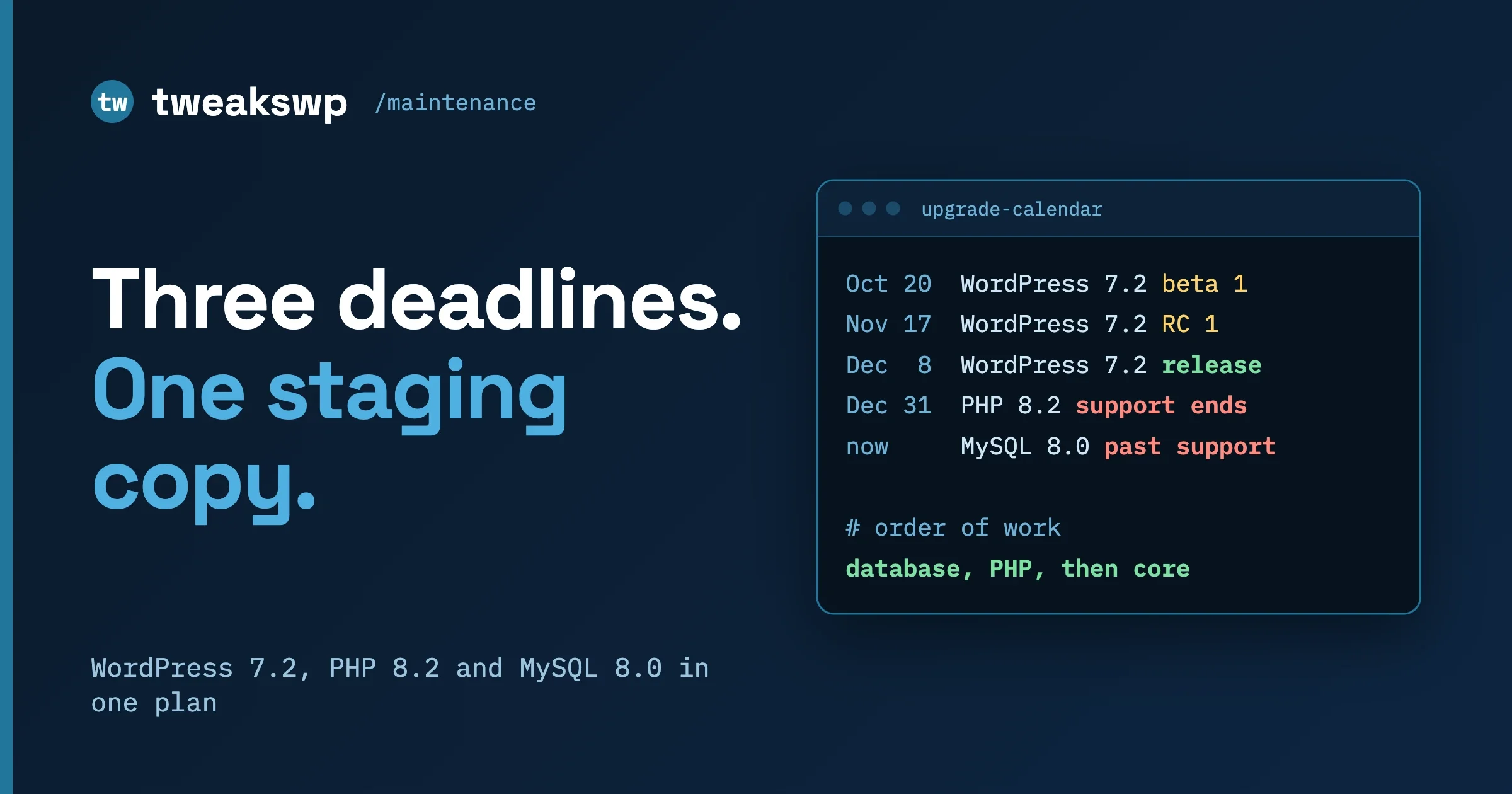
Three layers of your WordPress stack reach a deadline inside ten weeks: WordPress core (7.2 is scheduled for 8 December 2026), PHP (8.2 security support ends 31 December 2026) and the database (Oracle moved MySQL 8.0 to Sustaining Support on 21 April 2026). Do all three on one staging copy, in this order: database and PHP first, then the 7.2 betas and release candidates, then production PHP before the core release, and production core after it. The dates are below, week by week.
This plan is for people who look after WordPress sites, one or a fleet. It is operational guidance, not a guarantee: your host, plugins and theme decide what is safe, so test each step.
In this guide
- What the three deadlines are, and what each one does and does not mean
- The inventory: exact commands and a table to fill in per environment
- The week-by-week calendar from 12 October 2026 to the first week of January 2027
- How to build a staging copy that cannot email or charge real customers
- The fixed test pass to run after every change
- The order of upgrades, and why that order
- The go or no-go check after release candidate 3
- Cut-over day, with a backup and a tested rollback for each layer
- The monitoring week, and what to tell clients and when
- Questions people ask
What are the three deadlines, and what does each one mean?
Each is a different kind of event. All facts below were read on 8 October 2026.
WordPress core: 7.2 on 8 December 2026
The WordPress 7.2 release party schedule on make.wordpress.org lists four betas, three release candidates, a dry run and the release. The times are all 15:00 UTC:
- Beta 1: 20 October 2026
- Beta 2: 27 October 2026
- Beta 3: 3 November 2026
- Beta 4: 10 November 2026
- Release candidate 1 (RC 1): 17 November 2026
- RC 2: 24 November 2026
- RC 3: 1 December 2026
- Dry run and 24-hour code freeze: 7 December 2026
- General release: 8 December 2026
The roles are still marked to be announced, so dates can move; re-read before you commit client dates. The post states no minimum PHP version or feature list, so this plan claims neither. Source: WordPress 7.2 Release Party Schedule.
PHP: 8.2 security support ends 31 December 2026
PHP’s own supported versions page lists these dates:
PHP version | Active support ends | Security support ends |
|---|---|---|
8.2 | 31 Dec 2024 | 31 Dec 2026 |
8.3 | 31 Dec 2025 | 31 Dec 2027 |
8.4 | 31 Dec 2026 | 31 Dec 2028 |
8.5 | 31 Dec 2027 | 31 Dec 2029 |
“Security support” means the PHP project still ships fixes for security problems. After 31 December 2026, a site on 8.2 runs a version that no longer receives them from upstream. Your host may backport fixes for a while, but you should not plan around that. PHP 8.1 is no longer in the supported table on php.net, so any site still on it is already past the line. Source: php.net supported versions.
What does WordPress itself say? The WordPress.org requirements page (last modified 7 May 2026) recommends PHP 8.3 or greater, and MariaDB 10.11 or greater, or MySQL 8.0 or greater. The core team’s PHP compatibility page (last updated 19 August 2026) shows the support grid as a simple yes or no per PHP version and says the older “beta support” label has been retired. Read both for your own version before deciding; the links are in the sources list at the end.
Database: MySQL 8.0 and MariaDB are separate stories
MySQL and MariaDB are different products from different organisations. They share history and most commands, but they have different version numbers and different support dates. A “database version” like 10.11 means MariaDB. A version like 8.0 or 8.4 means MySQL. They are not interchangeable and a MariaDB date tells you nothing about MySQL.
- MySQL. Oracle’s end-of-life notices page says that as of 21 April 2026, MySQL 8.0 is covered under Oracle Lifetime Sustaining Support, and that users are encouraged to upgrade to MySQL 8.4 LTS or 9.7 LTS. It gives no end date for 8.4 LTS on that page. Sustaining Support is a distinct tier in Oracle’s Lifetime Support policy, so read Oracle’s policy for what it includes before you decide how urgent this is for you.
- MariaDB. MariaDB’s maintenance policy gives community long-term releases three years after general availability, with security fixes in source releases for two more years. Per its table today: 10.6 reached its community end date on 6 July 2026, 10.11 runs to 16 February 2028, 11.4 to 29 May 2029, 11.8 to 4 June 2028 and 12.3 to 12 June 2029.
So the database action depends on what you run. A site on MySQL 8.0 has a reason to move to 8.4 LTS. A site on MariaDB 10.6 is already past its community date. A site on MariaDB 10.11 or newer has time. Sources: Oracle MySQL end-of-life notices and MariaDB maintenance policy.
For the Site Health notice that triggers on old database versions, see Outdated SQL Server in Site Health After WordPress 7.1.
WooCommerce: PHP 8.1 minimum from 11.6
One more date, for stores only. The WooCommerce developer blog says WooCommerce 11.6, planned for February 2027, will require PHP 8.1 or newer. WooCommerce 11.3 adds a dismissible admin notice for stores on PHP 7.4 or 8.0, and those stores can keep updating up to 11.5. WooCommerce recommends PHP 8.3 or newer. If you are already moving to 8.3 for the 8.2 deadline, this requirement is met with room to spare. Source: New Requirement for WooCommerce 11.6: PHP 8.1+.
How do you inventory what each site runs?
Before any calendar, you need a table of what each site runs today. Fill in one row per environment (production, staging, local) because they often differ, and the staging copy is only a useful test if it matches production. Run these from the WordPress root with WP-CLI.
# WordPress version
wp core version

# PHP version used by WP-CLI (the command line), plus WP-CLI details
wp cli info
php -v

# Database engine and version (the string says MariaDB if it is MariaDB)
wp db query "SELECT VERSION();"

# Plugins, with status and version
wp plugin list --fields=name,status,version,update_version
There is a trap in the PHP line. The command line and the web server can run different PHP versions. wp cli info and php -v report the command line version. The version that serves your visitors is the web one, and it is the one that matters for the deadline. Read it in the admin under Tools, then Site Health, then the Info tab, then Server. Write down both. If they differ, that is a finding: cron jobs launched by the system run on the CLI version, while page loads run on the web version, so a mismatch can hide a bug on one side.
Fill in a table like this for each site:
Environment | WordPress | PHP (web) | PHP (CLI) | Database engine and version | Who can change it |
|---|---|---|---|---|---|
Production | |||||
Staging | |||||
Local |
If only the host can change the database, your plan for that layer is “ask the host for the date and a staging copy on the new version”, not “run an upgrade”. For a fleet, run the same commands in a loop over your sites with --path or WP-CLI aliases and collect the output into one sheet. Our post WordPress Auto-Updates at Fleet Scale: The WP-CLI Setup covers fleet setup and the auto-update side, so we skip it here.
What is the week-by-week calendar?
Each row is a week starting Monday. The “Upstream” column is what the sources say ships that week. The “You do” column is our recommendation. Dates in the upstream column are from the sources above; everything in the other column is a plan, so shift it to fit your sites.
Week of | Upstream | You do |
|---|---|---|
12 Oct | WordPress 7.1.3 is the current release (6 Oct) | Inventory every site. Sort into the three groups. Ask hosts what database and PHP options they offer and when. |
19 Oct | Beta 1 (20 Oct) | Build the staging copy. Run the fixed test pass on today’s stack as your baseline. Record results. |
26 Oct | Beta 2 (27 Oct) | On staging, move the database to the target version if you control it. Run the test pass. Fix what breaks. |
2 Nov | Beta 3 (3 Nov) | On staging, move PHP to the target (we suggest 8.3). Turn on the debug log. Run the test pass. Start the soak: leave staging running and watch the log. |
9 Nov | Beta 4 (10 Nov) | Install the 7.2 beta on a second copy of staging. Test pass. Report plugin problems to plugin authors. Production database change this week if you control it and staging passed. |
16 Nov | RC 1 (17 Nov) | Production PHP change, early in the week, with a backup. Staging moves to RC 1. Test pass on both. |
23 Nov | RC 2 (24 Nov) | Watch production after the PHP change. Staging moves to RC 2. Test pass. Send clients the date notice. |
30 Nov | RC 3 (1 Dec) | Staging moves to RC 3. Full test pass. Hold the go or no-go meeting on 2 or 3 Dec. |
7 Dec | Dry run (7 Dec), release (8 Dec) | Backups before anything. Read the release post. Cut-over from 8 Dec for sites that passed, one group at a time. |
14 Dec | None scheduled in these sources | Monitoring week: read logs daily, check orders, forms and mail. Update the rest of the fleet. |
21 Dec | Holiday period | No changes on production unless it is a security fix. Spot-check the busiest sites. |
28 Dec | PHP 8.2 security support ends 31 Dec | Confirm no site is still on PHP 8.2. Send exceptions to the owner in writing. |
4 Jan 2027 | None scheduled in these sources | Wrap-up: update the inventory sheet, send the client summary, delete the beta staging copy, note what to do for WooCommerce 11.6 in February. |
How do you build a staging copy that matches production?
A staging copy is a full duplicate of the site (files and database) running somewhere that real visitors never reach, and that cannot send real emails or take real payments. The point of this plan is that every change is tried there first, so the copy has to be close to production. A copy with a different plugin set, different data size or a different server proves very little.
- Back up production. Export the database and archive the files. The command for the database is below.
- Create the copy on a server as close to production as you can get. Same web server type, and ideally the same PHP and database versions as production today, so your baseline run reflects reality. Many hosts offer a one-click staging site; use it if so.
- Import the database and fix the URLs. Replace the production domain with the staging domain.
- Make it safe. Discourage search engines, mark the environment as staging, stop real email, and put payment gateways in test mode.
Check that mail cannot leave the staging server, payment gateways are in test mode and live API keys are swapped for sandbox keys.
# On production: export the database (store the file outside the web root)
wp db export ../backups/pre-upgrade-$(date +%F).sql

# On staging: import it, then swap the domain
wp db import ../backups/pre-upgrade-2026-10-19.sql
wp search-replace 'https://www.example.com' 'https://staging.example.com' --all-tables --dry-run
wp search-replace 'https://www.example.com' 'https://staging.example.com' --all-tables

# Make staging safe
wp option update blog_public 0
wp config set WP_ENVIRONMENT_TYPE staging
Turn on logging on staging (WP_DEBUG, WP_DEBUG_LOG, WP_DEBUG_DISPLAY false). Our post How to Read WordPress Error Logs: PHP Fatal, Warning, Notice, Deprecated explains the four levels: Deprecated warns of future breakage, Fatal is failure now.
What is the fixed test pass to run after every change?
Run the same list every time, in the same order, and write down the result. The value of a fixed pass is that you can compare run to run. Add site-specific steps to the end, never remove steps.
- Login. Log in as an administrator and as the lowest-privilege role your site uses. Log out. Check password reset email arrives (see step 6).
- The editor. Open an existing post and a new post. Add a paragraph, an image, a heading and a block from your most used block plugin. Save a draft, preview, publish, and view it on the front end. A blank editor or an endless spinner is the classic sign of a script error from the new PHP or core version.
- Forms. Submit every form type once (contact, signup, booking) and confirm the entry is stored and the notification arrives.
- The main money path. For a store: add to cart, apply a coupon, check shipping, and complete a test-mode checkout, then open the order in the admin. For a membership or donation site: the signup and renewal. For a lead site: the quote form to CRM hand-off.
- Scheduled tasks. List the scheduled events, run the due ones, and watch for errors.
- Email. Send a test message from WordPress and confirm delivery.
- The log. Read the debug log after steps 1 to 6. Note every Fatal and every new Deprecated line, and which plugin or theme file it points to.
# Step 5: scheduled tasks
wp cron event list
wp cron event run --due-now

# Step 6: email test (replace the address)
wp eval 'var_dump( wp_mail( "you@example.com", "Staging mail test", "Test body" ) );'

# Step 7: the log (path depends on your WP_DEBUG_LOG setting)
tail -n 100 wp-content/debug.log

# Before and after: compare plugin lists
wp plugin list --fields=name,status,version
In what order should you upgrade the layers, and why?
The order is: database and PHP on staging first, then the core betas and release candidates on a separate staging copy, then PHP on production before the core release, then core on production after the release. The reasons:
- One variable at a time. Moving PHP two or three weeks before core means any bug in between belongs to PHP.
- The deadline layers have fixed dates; core has a choice. PHP 8.2 support ends on 31 December and cannot be negotiated. You pick your own day to take 7.2, so take it last.
- The database is hardest to undo. Going back from a newer database engine version to an older one is not something to count on. Plan the rollback as a restore from backup, and leave the longest window between the database change and the core release.
Never put a beta on production. The WordPress Beta Tester plugin, which can switch a site to beta or release candidate builds, lists a “Don’t forget to backup before you start!” warning, and the beta channel exists for testing. Use it on the second staging copy only.
# Install a beta on the second staging copy (version string follows the zip name; confirm it on wordpress.org/download/releases/)
wp core update --version=7.2-beta1

# Back to the stable release on staging if you need to reset
wp core update --version=7.1.3 --force
The --force flag is documented as updating “even when the installed WP version is greater than the requested version”. That is the reason it is needed for a step back. Restore the matching database backup too, because a newer core can change database tables, and files alone do not undo that.
Our default PHP target is 8.3: WordPress.org and WooCommerce both recommend it, and php.net gives it security support to 31 December 2027. Treat 8.4 as a stretch goal.
How do you decide go or no-go after RC 3?
RC 3 is scheduled for 1 December, a week before release. Hold the decision meeting on 2 or 3 December with the RC 3 test pass in front of you. The question per site is simple: do we update this site on release day, or later? You are not deciding for the whole fleet at once.
A site is a go when all of these are true:
- It passed the full test pass on RC 3 with no new Fatal lines in the log.
- It runs on the target PHP and database in production already, and has done so for at least two weeks without new errors.
- Every plugin and the theme on it is either updated or confirmed compatible by its vendor, or tested by you on RC 3.
- You have a fresh backup plan and a named person who can run the rollback.
A site is a no-go, for now, when a money-path step fails on RC 3, when a plugin it depends on has no update and breaks, or when it is a high-traffic site and the release lands in a bad week for the business. No-go does not mean never. It means the site stays on 7.1.x until you have a fix or a replacement. What is not reasonable is staying on PHP 8.2 past 31 December because “nothing is broken”.
What does cut-over day look like, with a rollback for each layer?
Cut-over day is when a change goes to production. You will have three of them: the database (if you control it), PHP and WordPress core. Each follows the same shape: backup, change, test pass, watch. The rollback differs by layer, and you should test each rollback on staging before you need it.
The common steps
- Take a full backup: database export and a files archive. Confirm the files exist and are not empty.
- Test the restore on staging at least once for the first site in each group. A backup you have never restored is a hope, not a backup.
- Make the change.
- Run the test pass in production, using test or low-risk actions only (a free product, a test coupon, a test form entry marked as such).
- Watch the log for the next hour, then again the next morning.
# Pre-change backup of the database
wp db export ../backups/pre-change-$(date +%F-%H%M).sql

# Verify the file is there and has size
ls -lh ../backups/
Layer 1: database
Change: on a host you control, upgrade the engine according to the vendor’s upgrade guide (for MySQL, from 8.0 to 8.4 LTS). On managed hosting, the host does it: request the date, a staging copy on the new version, and a backup before the change. Never use a version your host does not support.
Rollback: restore the pre-change backup into the previous engine version. In-place downgrades are not something to rely on, so keep the old server or snapshot available until the monitoring period ends. Practise this on staging, with a real export, and time it.
Layer 2: PHP
Change: switch the PHP version in the host panel, the FPM pool or your server configuration. Keep the old PHP version installed. Then restart or reload PHP and confirm the web version in Site Health. Also change the CLI version if it differs, so cron and WP-CLI run on the same version as the web.
Rollback: switch the version setting back. This is the fastest rollback of the three, which is why PHP is a good production change to make early. Nothing in the database changes when you switch PHP, so there is nothing to restore, only a setting to flip. Do remember to switch the CLI back too.
Layer 3: WordPress core
Change: read the release post first. Then update, with the backup taken immediately before.
wp core update --version=7.2
wp core update-db
wp plugin list --fields=name,status,version,update_version
wp core version
Rollback: restore the backup of files and database taken just before. You can put the old core files back with wp core update --version=7.1.3 --force, but a major release can change database tables, so the database restore is what makes the rollback complete. If the site took orders between the update and the rollback, you need a plan for them; for a store, this is the best reason to update in a quiet window and to run the test pass straight away.
What happens in the monitoring week?
The week after the release (14 December in the calendar) is for watching, not for new changes. Check each updated site on a fixed rhythm: the log on day one and day two, then every second day. Look for new Fatal errors, new Deprecated lines, failed scheduled events and queued mail that never goes out.
wp cron event list
wp plugin list --fields=name,status,version,update_version
tail -n 200 wp-content/debug.log
Then update the rest of the fleet, in the groups you chose. Group one (already on target) goes first, then group two, and group three last, after their fixes. In the holiday week, make no production changes unless they are security fixes. On the week of 28 December, confirm that no site is still on PHP 8.2. For any exception, such as a site waiting on a plugin that is not compatible, get the client’s decision in writing and record the date you will revisit.
What should you tell clients, and when?
Clients need the date, the effect on them and what you need from them, not version numbers.
- Mid October, a heads-up. “Three parts of your site’s technology reach scheduled support deadlines by the end of the year. We are testing the changes on a copy first. You do not need to do anything now.” If a plugin or theme they bought is likely to need a paid update or replacement, say so now, not in December.
- Late November, the date notice. The change window, and any dates to avoid.
- The day after. “Done, tested, we are watching it this week.”
- Early January, the summary. What changed, what is now supported until when, and the next item on the horizon (for WooCommerce stores, the PHP 8.1 minimum in February).
If you must delay a site, tell the client why in plain language, and what the risk is: staying on PHP 8.2 after 31 December means running a version without upstream security fixes. We keep a written record of every such exception. This is operational advice, not legal advice; if your contracts promise a specific uptime or security standard, check the wording.
Questions people ask
Do we have to leave PHP 8.2 before 31 December?
The PHP project’s security support for 8.2 ends on 31 December 2026, per php.net. Nothing breaks on 1 January, but from then on, upstream no longer ships security fixes for that version. We plan to be off it before the date, so the move is a planned change with a rollback and not an emergency.
Is MariaDB affected by the MySQL 8.0 change?
No. MariaDB is a separate product with its own maintenance policy. The MySQL 8.0 notice from Oracle does not apply to it. Check your own engine first: the string from SELECT VERSION() says MariaDB if it is MariaDB. Then check MariaDB’s dates for your version; for example, 10.6 reached its community end date on 6 July 2026, and 10.11 runs to 16 February 2028.
Should we put the WordPress 7.2 beta on a live site?
No. Betas and release candidates are for staging. Use the beta on a copy that cannot send email or take payments, and take your backups first. If you want to help the project, report problems on a staging copy and leave production on the current stable release.
Our host controls the database version. What do we do?
Ask the host for three things: the date they will move you, whether they can give you a staging site on the new version first, and how to roll back. Put the dates in your calendar and test the staging copy. If the host will not give a date by early November, treat that as a risk and tell the client.
If you would rather hand this calendar to someone else, our WordPress maintenance services page explains how we look after updates, staging and monitoring for WordPress sites, and you are welcome to ask us about a fleet-wide plan.
Plugins we build and run
We maintain these ourselves, which is why we can support them on your site.
- BuddyNextThe self-hosted community engine for WordPress
- BuddyXFree community theme, Pro when you outgrow it
- ReignPremium community theme. Add pieces, build anything
- JetonomyCommunity forum and Q&A for WordPress
- EventonomyEvents and RSVPs for WordPress communities
- LearnomyCourses and learning communities on WordPress
- ListoraDirectories and listings your members can browse
- SnipShareCode sharing built for developer communities
- WB Ad ManagerAd placements that turn traffic into revenue
- WP Career BoardA job board your community actually uses
- WP Sell ServicesSell services with offers, orders, and payouts
- MediaVersePhotos, video, and media albums for members
- WB GamificationPoints, badges, and rewards that keep members active
- Product RoadmapPublic roadmaps with voting your users trust