Can Users Install Applications on WordPress?
Which WordPress users can install plugins and themes, why the Add New button disappears, how multisite limits admins, and how external apps connect.
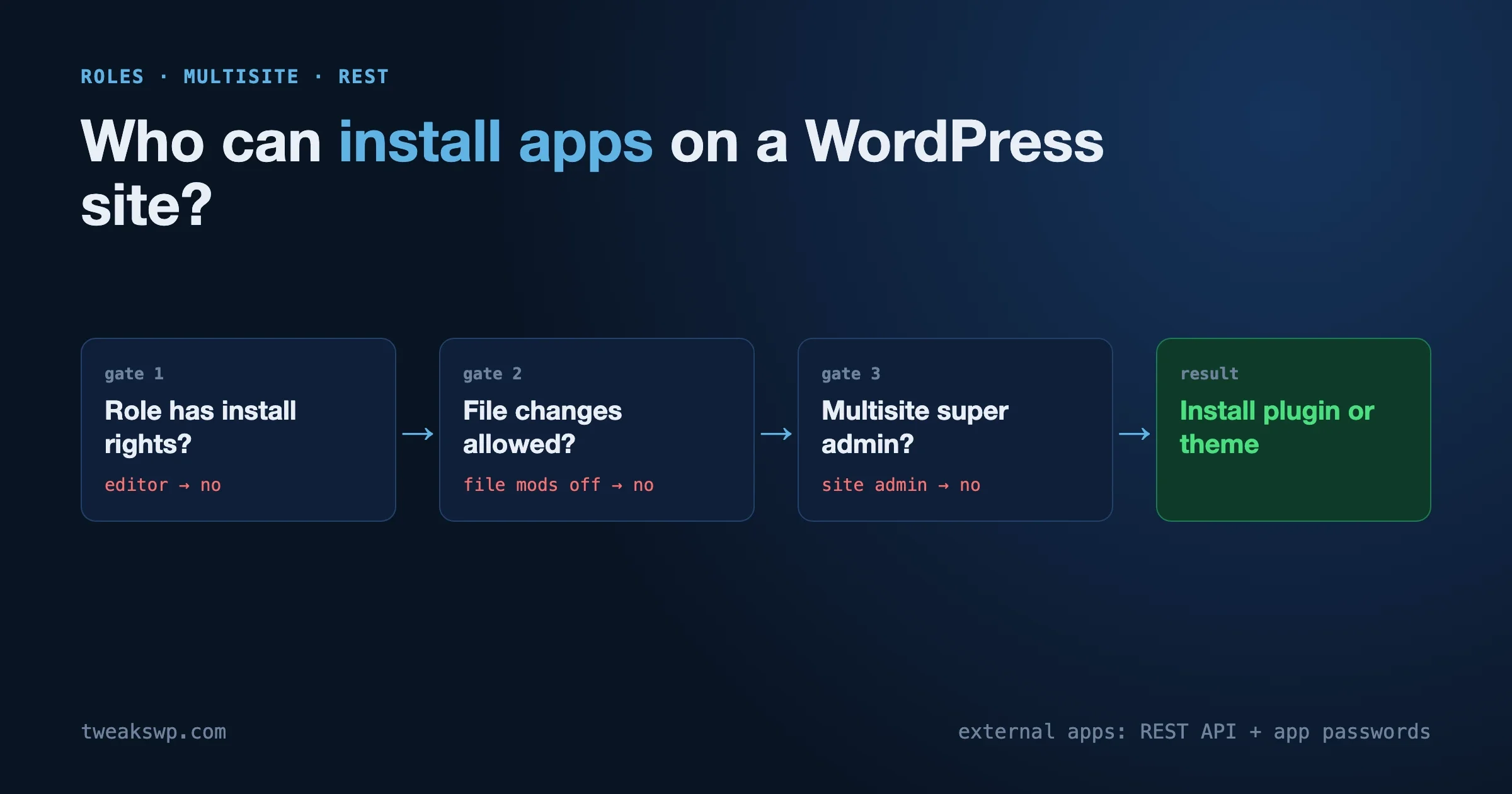
Yes, but only users whose role has the right capability, and only on a site that allows file changes. On a normal self-hosted WordPress site, Administrators can install plugins and themes, which are WordPress’s “applications”. Editors, Authors, Contributors and Subscribers cannot. On a multisite network only the Super Admin can install them, and a single line in wp-config.php can switch installs off for everyone.
External apps are a different case. A mobile app, a CRM or an automation tool does not get installed into WordPress at all; it connects from outside through the REST API, usually with an Application Password. Our team checked the rules below on 18 November 2026 against the WordPress core source code, the WordPress.org documentation and the developer handbooks, on WordPress 7.1.4.
Search Console has no recorded queries for this page yet, so the headings below follow the questions site owners and developers ask when a user cannot install something, or when they want to stop it.
What counts as an application on WordPress?
WordPress does not use the word “application” for anything you install. People usually mean one of four things, and each one has its own rules:
What people call an app | What it is in WordPress | Who can add it |
|---|---|---|
A plugin | PHP code in wp-content/plugins that adds features | Users with the install_plugins capability |
A theme | Templates and styles in wp-content/themes | Users with the install_themes capability |
An external app or integration | Separate software that talks to the site over the REST API | Any user who creates an Application Password, limited to that user’s own permissions |
Something installed on the server | A second program next to WordPress (a forum script, a Node.js app) | Whoever controls the hosting account, not WordPress users |
So “can users install applications” really splits into two questions: which WordPress users can install plugins and themes, and how outside apps get access. We cover both, then the settings that block installs.
Which WordPress users can install plugins and themes?
Only users whose role carries the install capabilities. The Roles and Capabilities documentation gives these to the Administrator role on a single site and to the Super Admin on a multisite network. No other default role has them.
Role | Install plugins | Activate plugins | Install themes | Edit plugin files |
|---|---|---|---|---|
Super Admin (multisite) | Yes | Yes | Yes | Yes |
Administrator (single site) | Yes | Yes | Yes | Yes |
Administrator (multisite site) | No | Only if the network allows it | No | No |
Editor | No | No | No | No |
Author, Contributor, Subscriber | No | No | No | No |
Having the role is not the whole story. WordPress checks these capabilities through a function called map_meta_cap, and in WordPress core (wp-includes/capabilities.php) install, update and delete actions for plugins, themes and core all pass through one gate. That gate refuses the action when file changes are disabled, and it refuses non-Super Admins on multisite, even if their role says otherwise. Uploading a plugin zip maps to the same install_plugins capability as installing from the directory.
You can see what a role has with WP-CLI. Checked on 18 November 2026 against the WP-CLI command reference:
# List every capability the Administrator role has
wp cap list administrator | grep -E "plugins|themes"

# Find who can install plugins on this site
wp user list --role=administrator --fields=ID,user_login,user_email
Note that wp cap list shows what the role stores in the database. A constant such as DISALLOW_FILE_MODS still overrides it at runtime, which is why an Administrator can have install_plugins in the list and still see no Add New button.
Why can’t an administrator see the Add New Plugin button?
Almost always one of five reasons. Work through them in this order, because the first two are the most common:
- File changes are disabled in wp-config.php. If the DISALLOW_FILE_MODS constant is true, WordPress hides plugin and theme installs, updates and deletes for every user. Managed hosts and agencies often set it on purpose.
- The site is part of a multisite network. Site Administrators cannot install anything. Installs happen in Network Admin, by the Super Admin.
- The account is not really an Administrator. An Editor sees most of the dashboard but no Plugins menu at all. Check Users, then the role column.
- A plugin removed the capability. Role editor and security plugins can strip install_plugins from Administrators. Deactivate them one by one on a staging copy to confirm.
- The site is on WordPress.com’s Free plan. Plugins there need a paid plan. Our article on what you can install on WordPress.com covers each plan.
To check the first reason quickly, read the constants from the command line instead of opening the file:
# Shows the value, or an error if the constant is not defined
wp config get DISALLOW_FILE_MODS
wp config get DISALLOW_FILE_EDIT
If the constant is set and you did not set it, ask your host or developer before you remove it. It may be part of how updates are deployed.
How does multisite limit what site admins can install?
On a multisite network, plugins and themes are installed once for the whole network, by the Super Admin. Site Administrators never get install rights, because core denies the install capabilities to anyone who is not a Super Admin on multisite.
What site admins can do depends on one network setting. The Network Admin Settings handbook page says the Plugins administration menu is disabled for site users by default, so they do not see the plugin screen until the Super Admin enables it under Network Admin, Settings, “Enable administration menus”. Once that box is ticked, site admins can activate and deactivate plugins the network has already installed, but they still cannot install new ones.
Themes work the same way. The Super Admin installs them and then enables each theme for the network or for single sites, and site admins can only switch between the enabled ones.
A plugin that is “Network Activated” runs on every site and cannot be turned off by a site admin. That is the right place for security, caching and must-run code. For code that must never be deactivated, a must-use plugin is even stricter; our mu-plugins guide explains how those load.
How do you install a plugin as a user who has permission?
There are four ways, and they all check the same capability:
- From the dashboard: Plugins, Add New Plugin, search the WordPress.org directory, Install Now, then Activate.
- By uploading a zip: Plugins, Add New Plugin, Upload Plugin. This is how premium plugins are added. Large zips can hit the PHP upload limit set by your host.
- With WP-CLI: useful on servers you manage and in deployment scripts.
- With the REST API: since WordPress 5.5 the
/wp/v2/pluginsendpoint can install a plugin from WordPress.org by slug, for a user with install_plugins.
The WP-CLI and REST versions, checked on 18 November 2026 against the wp plugin install reference and the REST API plugins reference:
# WP-CLI: install and activate from WordPress.org
wp plugin install query-monitor --activate

# WP-CLI: install a premium plugin from a local zip
wp plugin install ./my-premium-plugin.zip

# REST API: install and activate by slug, authenticated with an Application Password
curl -X POST https://example.com/wp-json/wp/v2/plugins \
  -u "admin-username:abcd efgh ijkl mnop qrst uvwx" \
  -d slug=query-monitor \
  -d status=active
In WordPress core, the REST controller checks install_plugins before it installs anything, and checks activate_plugins as well if you ask for any status other than inactive. A user without those capabilities gets a 401 or 403 error, not a silent failure.
If WordPress asks for FTP details when you click Install, the web server cannot write to wp-content. That is a file ownership problem, covered in the mistakes section below and in our file permissions guide.
How do external apps connect to WordPress?
Through the REST API, with an Application Password. The feature arrived in WordPress 5.6. Each user can create named passwords under Users, Profile, in the Application Passwords section, give one to an app, and revoke it later without changing their real login password. The Application Passwords handbook page covers the full flow, including the authorization screen apps can send users to.
Three rules matter in practice:
- The app gets the user’s permissions, nothing more. An Application Password for an Editor cannot install plugins. Create a dedicated user with the lowest role that does the job.
- HTTPS is required. In core,
wp_is_application_passwords_supported()returns true only when the site uses SSL or the environment type is local. On a plain HTTP site the feature stays unavailable until the site runs on HTTPS. - It can be switched off. The
wp_is_application_passwords_availablefilter turns the feature off site-wide, and a per-user filter can limit it to certain users. Security plugins use these filters.
If your site never needs outside apps, you can turn the feature off in a small must-use plugin. Checked against WordPress core on 18 November 2026:
<?php
/**
 * Plugin Name: Disable Application Passwords
 * Description: Turns off Application Passwords for every user.
 */
add_filter( 'wp_is_application_passwords_available', '__return_false' );
For a local development site on plain HTTP, setting the environment type to local makes the feature available without a certificate:
// In wp-config.php, above the "That's all, stop editing!" line
define( 'WP_ENVIRONMENT_TYPE', 'local' );
Can users install applications on WordPress.com?
Only on a paid plan. WordPress.com is a hosting service built on the same software, and its plugin guide (last reviewed 12 November 2026) says plugin installs work on the Personal, Premium, Business and Commerce plans, while Free sites must upgrade first. Inside a paid site the same roles apply: Administrators install, Editors and below do not. If you invite a client or a writer to a WordPress.com site, pick their role with that in mind, because the Administrator role there carries the same plugin rights as on any other WordPress site.
WordPress.com adds its own limits on top. Some plugins are blocked, Jetpack and Akismet must stay active, and no plan lets you run software other than WordPress on the server. The companion article linked in the troubleshooting list above goes through each plan, the blocked plugin list and the SSH and WP-CLI access paid plans include.
How do you stop users from installing plugins and themes?
Use the constants in wp-config.php. They apply to every user, including Administrators, and a role editor plugin cannot hand the capability back, because core denies it before roles are checked. The wp-config.php handbook page documents both:
Constant | What it blocks | What still works |
|---|---|---|
DISALLOW_FILE_EDIT | The built-in theme and plugin file editors | Installing, updating and deleting plugins and themes |
DISALLOW_FILE_MODS | Installs, updates and deletes of plugins and themes, core updates from the dashboard, and the file editors | Activating and deactivating plugins that are already installed; file changes made outside the dashboard, such as Git deployments |
// wp-config.php: block the file editors only
define( 'DISALLOW_FILE_EDIT', true );

// wp-config.php: block every plugin, theme and core file change from the dashboard
define( 'DISALLOW_FILE_MODS', true );
Or set them with WP-CLI, which writes the same lines for you:
wp config set DISALLOW_FILE_EDIT true --raw
wp config set DISALLOW_FILE_MODS true --raw
DISALLOW_FILE_MODS is the right setting when updates arrive through Git or a deployment pipeline, or when an agency manages updates for a client. The trade-off is real: nobody can apply a security update from the dashboard, so someone must update plugins another way, on a schedule. Core reads the constant through wp_is_file_mod_allowed(), which passes it through the file_mod_allowed filter, so a developer can allow one specific context while keeping the rest locked.
If you only want to stop one group, such as a client’s staff Administrators, give them a lower role instead. Editors can run a content site without ever touching plugins. Our list of wp-config.php constants covers the related settings for updates and file editing.
Can you let one user install plugins without making them an Administrator?
Yes, with a custom role. WordPress roles are lists of capabilities, so you can copy the Editor role and add only the plugin capabilities. This suits a client’s office manager who should add a form plugin but never touch users or settings.
Run this once, for example from a must-use plugin you remove afterwards, or adapt it into your own plugin’s activation routine. Checked against add_role() in WordPress core on 18 November 2026:
<?php
/**
 * Plugin Name: Site Manager role
 * Description: Editor capabilities plus plugin installs. Runs once.
 */
add_action( 'init', function () {
	if ( get_role( 'site_manager' ) ) {
		return; // Already created.
	}
	$editor = get_role( 'editor' );
	$caps   = $editor ? $editor->capabilities : array();

	$caps['install_plugins']  = true;
	$caps['activate_plugins'] = true;
	$caps['update_plugins']   = true;

	add_role( 'site_manager', 'Site Manager', $caps );
} );
Two limits still apply to this role. On multisite, core refuses install_plugins to anyone who is not a Super Admin, so the role only helps on single sites. And DISALLOW_FILE_MODS still wins over the role. Roles are stored in the database, so deleting the code later does not remove the role; use remove_role( 'site_manager' ) or a role editor plugin for that.
How do you know who installed or activated a plugin?
WordPress core does not keep an activity log, so out of the box you cannot see who added a plugin. You can add a simple record with two core hooks: upgrader_process_complete runs after a plugin or theme install or update, and activated_plugin runs when a plugin is switched on. This must-use plugin writes one line to the PHP error log for each event:
<?php
/**
 * Plugin Name: Log plugin installs and activations
 */
add_action( 'upgrader_process_complete', function ( $upgrader, $extra ) {
	if ( isset( $extra['type'], $extra['action'] ) && 'install' === $extra['action'] ) {
		error_log( sprintf( '[install] %s installed by user %d', $extra['type'], get_current_user_id() ) );
	}
}, 10, 2 );

add_action( 'activated_plugin', function ( $plugin, $network_wide ) {
	error_log( sprintf( '[activate] %s by user %d%s', $plugin, get_current_user_id(), $network_wide ? ' (network)' : '' ) );
}, 10, 2 );
For a shared or client site, a maintained activity log plugin gives you a searchable history with less effort. Either way, compare the result against wp plugin list from time to time, so a plugin nobody remembers adding stands out.
Is it safe to let more people install plugins?
Treat install rights like server access, because that is what they are. A plugin runs PHP with the same power as WordPress itself: it can read the database, create users, send email and change files. Anyone who can install a plugin can, in practice, do anything on the site.
A sensible setup for most sites looks like this:
- Keep the number of Administrators small, and give staff Editor or Author roles.
- Install plugins on a staging copy first, then on production.
- Use one person or one process for updates, so plugins do not drift out of date.
- Remove plugins you no longer use, rather than leaving them deactivated.
- Turn on DISALLOW_FILE_EDIT on every production site. The file editor is rarely needed and is a common step in attacks after a stolen login.
When something does change unexpectedly, it helps to know which plugins are active and why. Our guide to checking whether a plugin is active shows how code and WP-CLI read that state.
Common mistakes people report
These come from WordPress.org support threads and the core documentation. Sources checked on 18 November 2026.
- An Administrator with no install rights. In this WordPress.org thread an admin found that
current_user_can( 'install_plugins' )returned false and the Add New button was gone. The cause another user found was DISALLOW_FILE_MODS set to true in wp-config.php. - Looking for the installer on a multisite subsite. In an older thread about missing Add New buttons, one answer was simply that on multisite the options live in Network Admin.
- Application Passwords section missing on an HTTPS site. A user in this thread had three HTTPS sites with no Application Passwords section. A security plugin had a “disable application passwords” option switched on.
- WordPress asking for FTP credentials on every install. Reports like this one come down to the web server user not being able to write to the WordPress files. Fix the file ownership with your host first; forcing a direct filesystem method without fixing permissions only changes the error.
- Giving an external app an Administrator password. The Application Passwords handbook ties each password to one user’s permissions, so a dedicated low-privilege user limits what a leaked token can do.
Frequently asked questions
Can an Editor install plugins in WordPress?
No. The Editor role has no plugin capabilities by default. You can add install_plugins to a custom role with a role editor plugin or code, but giving that power to content staff is rarely a good idea.
Can a subscriber or customer install anything?
No. Subscribers, and customers in WooCommerce, can only manage their own profile and content the site allows. They cannot install plugins or themes.
Why does my Administrator see Plugins but no Add New button?
Usually because DISALLOW_FILE_MODS is true in wp-config.php, or the site is part of a multisite network where only the Super Admin installs plugins.
Do I need to install anything for a mobile app or Zapier to work?
Usually not. Most external services connect over the REST API with an Application Password. Some offer a companion plugin for extra features, and that plugin follows the normal install rules.
Does the file-change constant stop WP-CLI?
WP-CLI runs with server access rather than through the dashboard, and is the usual way to update sites that use this constant. Test your own setup, because hosts can wrap WP-CLI with their own rules.
Can site admins on multisite upload their own themes?
No. Only the Super Admin installs themes on a network. Site admins choose from the themes the Super Admin has enabled.
Is the WordPress mobile app an “application” I install on my site?
No. The official WordPress app runs on your phone and connects to your site over the internet. Nothing is installed on the site itself for basic use.
The short answer
On a single WordPress site, Administrators can install plugins and themes and nobody else can. On multisite only the Super Admin can. A wp-config.php constant can turn installs off for everyone, and external apps never install anything: they connect through the REST API with an Application Password that carries one user’s permissions. Decide who really needs install rights, give everyone else a lower role, and lock production sites with the file edit constants.
Plugins we build and run
We maintain these ourselves, which is why we can support them on your site.
- BuddyNextThe self-hosted community engine for WordPress
- BuddyXFree community theme, Pro when you outgrow it
- ReignPremium community theme. Add pieces, build anything
- JetonomyCommunity forum and Q&A for WordPress
- EventonomyEvents and RSVPs for WordPress communities
- LearnomyCourses and learning communities on WordPress
- ListoraDirectories and listings your members can browse
- SnipShareCode sharing built for developer communities
- WB Ad ManagerAd placements that turn traffic into revenue
- WP Career BoardA job board your community actually uses
- WP Sell ServicesSell services with offers, orders, and payouts
- MediaVersePhotos, video, and media albums for members
- WB GamificationPoints, badges, and rewards that keep members active
- Product RoadmapPublic roadmaps with voting your users trust














Related Posts
LiteSpeed Cache Vulnerability CVE-2026-93389: Check Your Version and What Was Exposed
Freemius SDK Stored XSS: How to Find Every Bundled Copy on a Client Site (Anything Under 2.13.5)