Best 8 BuddyPress Alternatives for WordPress (2026)
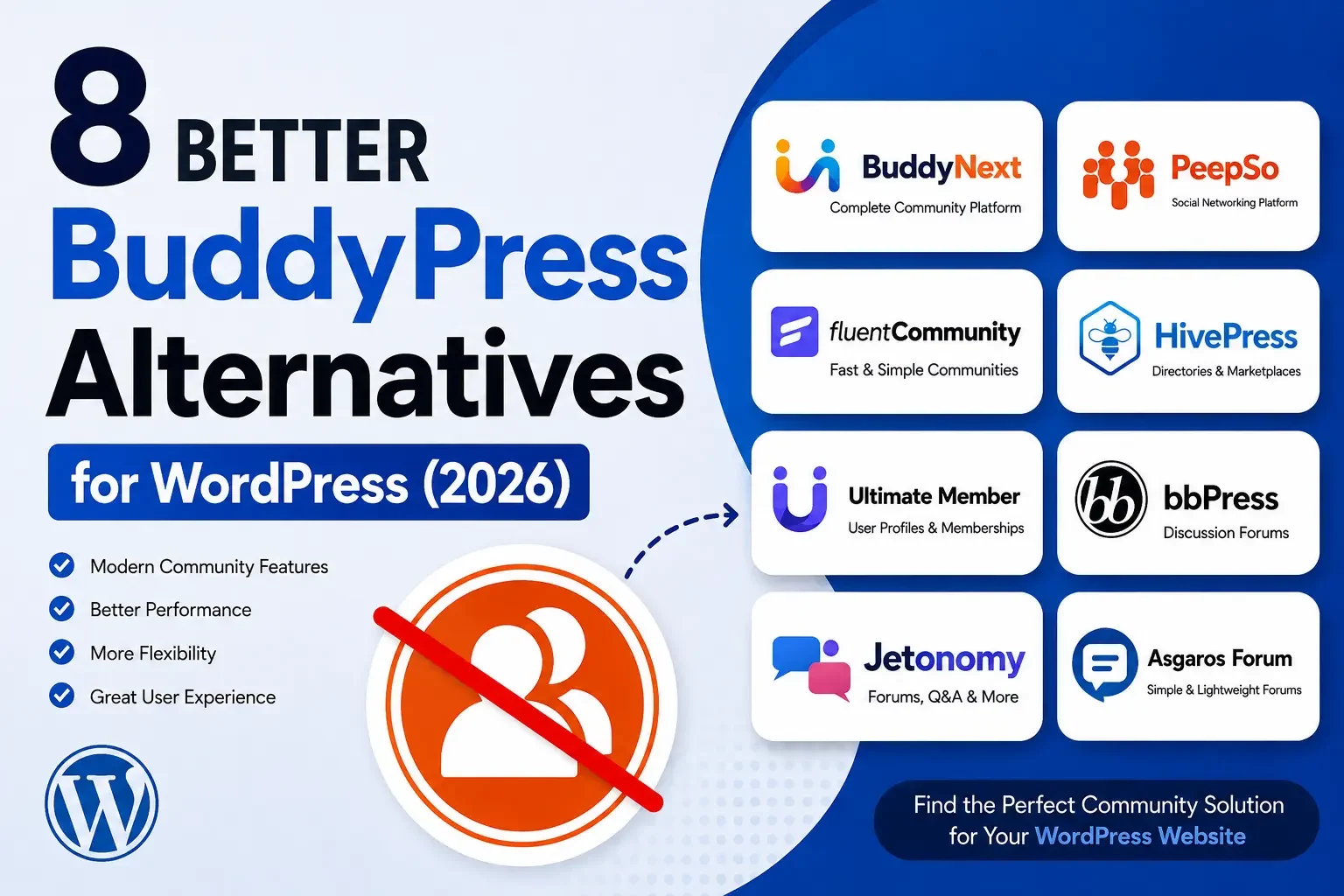
Compare 8 BuddyPress alternatives for WordPress in 2026, including BuddyNext, a complete community platform that replaces the multi-plugin BuddyPress stack.

Updated September 2026.
Looking for a BuddyPress alternative for your WordPress community? While BuddyPress remains a flexible open source option, different community projects need a more specialized approach, whether that’s a modern social networking experience, native memberships, forums and Q&A, or directory functionality.
None of that makes BuddyPress a bad plugin; it makes it one option among several that now serve very different priorities.
In this guide, we compare eight BuddyPress alternatives and explain what each one is best suited for, from a complete platform that replaces BuddyPress’s entire “pile of plugins” approach to narrow, single-purpose tools. If you’re specifically comparing a smaller set of niche membership and directory-focused tools, see our companion piece on BuddyPress alternatives for structured membership and niche communities.
Watch the video: Prefer watching instead of reading? Watch our video below for a quick look at the best BuddyPress alternatives for WordPress in 2026, then continue with the detailed comparison.
Watch on YouTube: Best BuddyPress Alternatives for WordPress
Why Consider a BuddyPress Alternative?
BuddyPress provides a foundation for WordPress communities, but your requirements may go beyond its core functionality, and it isn’t the only architecture on the market anymore.
Two decades of steady development gave it a mature, well-documented codebase and a large third-party ecosystem, real advantages that shouldn’t be dismissed just because newer options exist.
You may want any of the following, none of which BuddyPress covers natively on its own:
- A modern, app-like social community experience
- Native paid memberships instead of a separate plugin
- Dedicated discussion and Q&A features
- Directory or marketplace functionality
- A lightweight forum solution
- Different types of community spaces
- A simpler setup for a specific use case
The best alternative depends on what you want your community to do, and how much of that you want built in versus assembled from separate plugins the way a traditional BuddyPress stack requires.
Answering that question honestly before opening a single plugin comparison saves far more time than reading every feature list on this page twice.
Quick Comparison
Plugin | Best For | Main Focus | Native Memberships |
|---|---|---|---|
BuddyNext | Complete communities | Social + memberships + courses + forums | Yes |
PeepSo | Social networks | Social networking | No |
FluentCommunity | Private communities | Community + discussions | No |
HivePress | Directories | Listings + marketplaces | No |
Ultimate Member | Memberships | Profiles + access | No |
bbPress | Forums | Discussions | No |
Jetonomy | Forums and Q&A | Discussions + Q&A | No |
Asgaros Forum | Simple forums | Discussions | No |
1. BuddyNext: Best Complete BuddyPress Alternative
Best for complete WordPress communities
BuddyNext is a complete community platform for WordPress, built as a completely new architecture rather than an extension of BuddyPress. Its core includes an activity feed, Spaces, member profiles, messaging, notifications, and moderation, the same ground BuddyPress covers, but on a foundation designed for tens of thousands of members rather than a legacy post-based structure.
Where BuddyPress needs a separate membership plugin, a separate forum plugin, and a separate gamification plugin stitched together, BuddyNext builds native Stripe membership tiers, forums with accepted-answer Q&A, courses with certificates, photo and video sharing, gamification, job boards, directories, and a service marketplace directly into the platform. One team built all of it, so the pieces share design language and a REST-first architecture instead of feeling like six unrelated plugins.
Its Spaces feature is particularly useful for larger communities migrating off BuddyPress groups. Spaces can be open, private, or secret, each with their own roles, sub-spaces, and moderation settings, letting you organize a large community into focused areas without losing the shared profile and notification system.
That structure maps closely enough to BuddyPress groups conceptually that members generally adapt quickly, even though the underlying data has to be rebuilt rather than imported directly.
Key Features
- Activity feed, Spaces, and member directory
- Private messaging and notifications
- Native Stripe membership tiers, no per-member fees
- Forums with Q&A, courses with certificates
- Gamification with points, badges, and leaderboards
- Job boards, directories, and a service marketplace
- Deep native moderation tools
- Full branding and design control via the BuddyX design layer
Pros
- Complete community foundation, not a bare social feed
- No separate membership, forum, or gamification plugin required
- You own your members, content, and data outright
- Designed for scalability from a new, custom-table architecture
Cons
- Requires self-hosted WordPress rather than a hosted signup
- Old BuddyPress-only add-ons don’t run on it directly, since the architecture is new
Best for: Membership communities, creator communities, learning communities, customer communities, professional networks, and businesses that want to own their community infrastructure rather than assembling six plugins to match what BuddyPress alone can’t do.
2. PeepSo: Best for Social Networking
Best for social networking websites
PeepSo focuses on bringing social networking functionality to WordPress, with member profiles, activity feeds, groups, messaging, and community interactions built around a familiar, Facebook-style layout. It’s worth considering if your main goal is a social network that gives members familiar ways to connect.
Its modular add-on marketplace lets you enable only the specific features your community needs, keeping the core plugin itself relatively lean compared to a fully bundled platform.
Key Features
- Member profiles and activity feeds
- Groups and messaging
- Extensions and add-ons
Pros
- Social network focused
- Familiar community experience
- Extensible functionality
Cons
- Some advanced functionality requires paid add-ons
- Larger communities can require additional configuration
Best for: Social networks, interest-based communities, private groups, and member communities.
Migrating from BuddyPress to PeepSo means rebuilding groups and profile fields in PeepSo’s own data structures; expect a genuine setup project rather than an import wizard doing all the work.
3. FluentCommunity: Best for Private Creator Communities
Best for private and creator communities
FluentCommunity focuses on organized private communities with discussions and member interaction. Its approach works well for creators, educators, coaches, and membership businesses that want a focused community environment rather than a full social network.
Its course integration gives creators a lightweight alternative to running a separate LMS alongside their community, at least for simpler course structures.
Key Features
- Community spaces and discussions
- Member interaction and feed
- Course integration
Pros
- Clean interface
- Simple community structure
- Suitable for private communities
Cons
- Smaller ecosystem than more established solutions
- Advanced requirements may need additional integrations
Best for: Creators, educators, coaches, and private membership communities.
Its smaller footprint means faster initial setup than BuddyPress plus a membership plugin, though communities that later want forums, gamification, or a job board will need to add separate tools, the same limitation BuddyPress itself has.
4. HivePress: Best for Directory and Marketplace Communities
Best for directory and marketplace communities
HivePress is a specialized option for websites where community activity revolves around listings, directories, or marketplaces, rather than a general social feed. Users create and interact around listings while the site provides a structured marketplace experience.
Built-in reviews and ratings on individual listings give the marketplace its own social layer, even without a traditional activity feed sitting on top.
Key Features
- User listings and vendor profiles
- Directory and marketplace functionality
- Search and filtering
Pros
- Strong directory functionality
- Marketplace focused
- Flexible listing system
Cons
- Not primarily a social networking platform
Best for: Business directories, service marketplaces, local communities, and classified websites.
If your BuddyPress community only ever used groups as a proxy for organizing listings or vendors, HivePress is often a better architectural fit than any BuddyPress alternative that keeps trying to be a general social feed.
5. Ultimate Member: Best for Membership and User Profiles
Best for membership and user profiles
Ultimate Member focuses on user registration, customizable profiles, member directories, and access control. If your website is primarily a membership platform rather than a social network, it offers a more focused approach than BuddyPress’s broader (but shallower) feature set.
Role-based content restriction ties directly into that profile system, useful for organizations that need different membership tiers to see different content without a separate access-control plugin.
Key Features
- User registration and custom profiles
- Member directories and access control
Pros
- Strong profile functionality
- Flexible registration
- Suitable for membership websites
Cons
- Not a complete social networking platform
- Advanced functionality may require extensions
Best for: Membership websites, professional directories, private member areas, and user-based websites.
Its drag-and-drop registration and profile builder makes it approachable without custom development, though you’ll still need a separate plugin for anything resembling BuddyPress’s activity feed or groups.
6. bbPress: Best for Discussion-Focused Communities
Best for discussion-focused communities
bbPress is a lightweight WordPress forum plugin that focuses specifically on discussions. Rather than trying to provide every type of community functionality, it gives site owners a straightforward way to create forums, topics, and replies.
Its minimal footprint keeps hosting resource usage low, a real consideration for site owners downsizing from BuddyPress’s heavier requirements.
Pros
- Lightweight, free, WordPress-native
- Easy to extend
Cons
- Limited social networking features
- Additional plugins required for a broader community
Best for: Support forums, product communities, discussion boards, and knowledge-sharing websites.
Because it’s maintained by the WordPress core team, bbPress tends to stay compatible with new WordPress releases faster than most third-party plugins, a real advantage if you’re moving away from BuddyPress specifically to reduce compatibility risk.
7. Jetonomy: Best for Forums, Q&A, and Discussion Communities
Best for forums, Q&A, and discussion communities
Jetonomy is a WordPress forum and Q&A community plugin designed for websites that need more than a traditional forum. It combines forums, Q&A, an ideas board, Show & Tell, and a social feed in one plugin, storing community data in its own database tables for performance at scale.
Its frontend runs on WordPress’s Interactivity API, which keeps posting and voting fast without full-page reloads, a meaningful usability upgrade over a plugin still relying on standard page refreshes for every interaction.
For membership websites, Jetonomy includes integrations with MemberPress, Paid Memberships Pro, Restrict Content Pro, WooCommerce Memberships, and LearnDash, letting Spaces be gated according to membership plans.
Key Features
- Threaded forums and Q&A with accepted answers
- Ideas and feature-request boards
- Trust levels and reputation
- Membership gating via popular WordPress plugins
Pros
- More than a traditional forum
- Self-hosted, strong developer API
- Membership integrations built in
Cons
- More discussion-focused than a full social networking platform
Best for: Support communities, Q&A websites, product communities, course cohorts, and discussion-focused websites.
Jetonomy’s six trust levels automatically promote reliable members to lighter posting restrictions, distributing moderation load the way an active BuddyPress community with growing group counts often struggles to do manually.
8. Asgaros Forum: Best for Simple Discussion Forums
Best for simple discussion forums
Asgaros Forum is a lightweight WordPress forum plugin designed for users who want a discussion board without the complexity of a full social networking platform. Its straightforward approach suits smaller communities where discussions are the main form of engagement.
Minimal configuration options mean less flexibility than wpForo or Jetonomy, but also far less to learn before your first post goes live.
Pros
- Lightweight, simple setup, beginner-friendly, free
Cons
- Limited social networking features
Best for: Small communities, support forums, hobby communities, and discussion websites.
You can have Asgaros running minutes after deactivating BuddyPress, making it the fastest specific downgrade path for a site owner who realizes they never actually needed BuddyPress’s social features.
Why BuddyPress Alone Often Isn’t Enough Anymore
BuddyPress hasn’t gotten worse; the bar has moved. Circle, Skool, and Mighty Networks trained the market to expect memberships, courses, forums, and gamification bundled into one product. BuddyPress, by design, only covers the social layer, activity feed, groups, profiles, messaging, and expects everything else to arrive through separate plugins.
That’s a completely reasonable architecture for a developer who wants full control over every piece. It’s a much harder sell for a site owner who just wants a working community without managing five vendors and their independent update cycles. The eight alternatives above split roughly into two camps: narrow, single-purpose tools that do one job better than BuddyPress’s built-in equivalent (PeepSo for social, bbPress/Jetonomy/Asgaros for forums, Ultimate Member for profiles, HivePress for directories), and a complete platform (BuddyNext) that replaces the entire multi-plugin stack with one coherent system.
Neither camp is objectively wrong. A developer-run community with strong in-house WordPress expertise can absolutely assemble a best-of-breed stack from narrow plugins and maintain it well. The trade-off is ongoing: every WordPress core update, every plugin update, carries a small risk of breaking compatibility between tools built by different teams that were never designed to work together. A complete platform removes that specific risk by design, at the cost of being newer and having a smaller third-party ecosystem than BuddyPress’s two-decade head start.
Performance and Database Architecture
BuddyPress stores activity, groups, and much of its data in custom tables already, which is one reason it’s held up as long as it has. The real architectural gap shows up when you add the plugins BuddyPress itself doesn’t include: a membership plugin storing access rules in wp_postmeta, a forum plugin using wp_posts for every topic and reply, and a gamification plugin writing its own tables that never talk to the others.
That fragmentation is exactly what a complete platform avoids by design. BuddyNext’s custom database schema covers activity, Spaces, memberships, forums, and gamification in one coherent structure, so a query about a member’s activity, points, and membership status doesn’t have to join across data models built by three unrelated teams. Jetonomy takes a similar approach for its narrower forum and Q&A focus, with published benchmarks around 50,000 topics responding in roughly 200ms with Redis caching.
For smaller communities, this distinction matters less. A few hundred active members won’t notice the difference between a unified schema and a patchwork of plugin tables. It becomes the deciding factor once a community is planning for thousands of active members and the kind of daily activity, feed posts, forum replies, point-earning actions, that adds up to serious database load.
If you’re not sure which category your community falls into, plan for the larger number. Communities tend to grow faster than site owners expect once a platform genuinely resonates with its audience, and re-architecting after the fact is always more disruptive than building for scale from the start.
Migrating From BuddyPress: What to Expect
Whichever alternative you choose, migrating a live BuddyPress community is a genuine project, not a quick plugin swap.
- Member profiles and connections: Most alternatives can import basic WordPress user data, but custom BuddyPress profile fields typically need manual remapping.
- Groups and activity history: Expect to rebuild group structures rather than import them automatically, since group data models differ significantly between BuddyPress and newer, custom-table platforms like BuddyNext.
- Forums: If you’re running bbPress alongside BuddyPress, Jetonomy offers a direct bbPress importer with URL preservation, which is the smoothest forum-specific migration path on this list.
- URLs and SEO: Set up redirects from old BuddyPress profile and group URLs to their new equivalents before the migration goes live, not after, to protect existing search rankings.
Always test the migration on staging first, and budget more calendar time than you expect. A “quick swap” that turns into weeks of manual data cleanup is the most common way BuddyPress migrations go over budget.
A realistic migration timeline for a mid-sized BuddyPress community (a few thousand members, active groups, years of activity history) usually breaks down into four phases: exporting and auditing existing data, mapping profile fields and group structures to the new plugin’s data model, running a staging migration and QA pass, and finally cutting over with redirects in place. Compressing this into a weekend almost always means discovering data gaps after launch, when they’re far more disruptive to fix.
Communicate the migration to your members ahead of time where possible. A community that understands why the interface changed and what improved tends to adapt far more smoothly than one that logs in one day to find everything different with no explanation.
Ownership: What Every Option Here Still Gets Right
Whichever of these eight you choose, one thing stays constant: all of them are self-hosted WordPress plugins, not hosted SaaS platforms. That’s worth stating plainly, because it’s the single biggest structural advantage every option on this list shares over Circle, Skool, or Mighty Networks.
| Hosted SaaS platform | Any plugin on this list |
|---|---|---|
Where member data lives | Vendor’s servers | Your own database |
If you stop paying a subscription | Community access at risk | Site and data remain yours |
Design control | Logo and accent color on their layout | Full theme-level control |
Combining memberships, courses, forums, gamification | Locked to vendor’s roadmap and pricing tiers | Native in BuddyNext, or via additional WordPress plugins for the others |
Choosing among these eight is really a decision about how much of that “complete platform” experience you want built in versus assembled, not whether you own your community’s infrastructure. That part is already settled the moment you pick WordPress over a hosted alternative.
Keep that framing in mind as you read the feature comparisons below; the question isn’t “which plugin has more checkmarks” but “which plugin’s architecture matches how big and how complex this community will actually get.”
Common Mistakes When Leaving BuddyPress
- Choosing a replacement before mapping what you actually use. Audit which BuddyPress features your community genuinely relies on (groups, activity feed, private messaging, specific profile fields) before comparing alternatives, rather than assuming you need feature parity across the board.
- Underestimating group and profile field migration. This is consistently the most time-consuming part of any BuddyPress migration, more so than moving posts or media.
- Picking six single-purpose plugins to replicate one complete platform. If your community needs memberships, forums, and gamification together, stitching together three or four narrow BuddyPress alternatives just recreates the original “pile of plugins” problem with new names.
- Not testing on staging first. A live community migration gone wrong is far more visible and damaging than a staging environment mistake. Always dry-run first.
- Ignoring SEO redirects for old profile and group URLs. These pages often carry real search traffic and inbound links that a careless migration can silently break.
Choosing by Community Type
- Paid creator or membership community leaving BuddyPress + MemberPress: BuddyNext’s native Stripe tiers replace the separate membership plugin entirely.
- Course community currently on BuddyPress + LearnDash: BuddyNext with built-in courses and certificates, or keep LearnDash and pair it with a lighter alternative like FluentCommunity if a full platform migration isn’t feasible yet.
- Support or product community using BuddyPress groups as a workaround for Q&A: Jetonomy’s dedicated Q&A format with accepted answers is a far better structural fit than any group-based workaround.
- Directory or marketplace community that outgrew BuddyPress groups: HivePress, built for listings from the ground up rather than repurposed social groups.
- Simple internal or small hobby community: Asgaros Forum or bbPress if a lightweight discussion board is genuinely all you need, no migration project required for anything beyond that.
How to Choose the Right BuddyPress Alternative
Choose BuddyNext if you want a complete, self-hosted community platform with activity feeds, Spaces, member profiles, messaging, moderation, native memberships, courses, forums, and gamification, all in one system instead of six separate plugins.
Choose PeepSo if your priority is creating a social network with profiles, feeds, groups, and messaging.
Choose FluentCommunity if you want a clean environment for private communities, creators, and educators.
Choose HivePress if your community revolves around directories, listings, or marketplaces.
Choose Ultimate Member if member registration, profiles, directories, and access control are your primary requirements.
Choose bbPress if you mainly need a lightweight discussion forum.
Choose Jetonomy if you want forums, Q&A, ideas, Show & Tell, and a social feed within one discussion-focused WordPress plugin.
Choose Asgaros Forum if you need a simple, lightweight forum for a smaller community.
Frequently Asked Questions
Is BuddyNext built on BuddyPress?
No. BuddyNext is a completely new architecture, not a fork or extension of BuddyPress. It runs standalone, and old BuddyPress-only add-ons are not designed to run on it directly.
What’s the biggest difference between BuddyPress and BuddyNext?
BuddyPress provides the social layer and expects you to add memberships, forums, courses, and gamification through separate plugins. BuddyNext builds all of that into one platform, so there’s no separate compatibility matrix to maintain between vendors.
Can I keep my existing BuddyPress theme when switching?
Generally no, since most BuddyPress-specific themes rely on BuddyPress’s own templates and hooks. A platform switch usually means a theme switch too, which is exactly why pairing a new community plugin with a purpose-built theme (like BuddyX for BuddyNext) from the start avoids a second redesign later.
Do I need to migrate everything at once?
Not necessarily. Some site owners run a new platform in parallel for new community activity while gradually archiving or read-only-locking the old BuddyPress community, rather than attempting a single big-bang cutover.
Which alternative is easiest to migrate to from bbPress specifically?
Jetonomy, since it ships a dedicated bbPress importer with URL preservation, which keeps old thread links working and protects existing SEO value.
Is it possible to run BuddyPress and a new plugin side by side during migration?
Running two full community plugins simultaneously on one site usually causes conflicts, since both expect to own similar URL structures and user meta. A cleaner approach is a staging environment for the new platform while BuddyPress stays live, then cutting over once the new site is verified.
Do any of these alternatives offer a free migration service?
Migration support varies by vendor and changes over time; check the specific plugin’s current documentation or support channels rather than assuming, since this comparison focuses on features and architecture rather than service offerings that shift frequently.
What if my BuddyPress community relies heavily on a specific third-party add-on with no equivalent elsewhere?
This is the strongest reason to stay on BuddyPress a while longer rather than force a migration. Audit which third-party add-ons your community actually depends on day to day, and check whether any alternative on this list has a genuine equivalent before committing to a switch.
Why has BuddyPress lost ground to newer platforms if it’s still actively maintained?
Active maintenance keeps BuddyPress secure and compatible, but it doesn’t change its fundamental architecture. The market shifted toward expecting memberships, courses, and gamification bundled together, a shift BuddyPress’s modular, social-layer-only design wasn’t built to address without external plugins.
Is a smaller, newer alternative like FluentCommunity a safe long-term bet compared to more established options?
Newer plugins carry more uncertainty about long-term support and ecosystem depth than options with a longer track record. Weigh that risk against how well the plugin’s current feature set matches your specific needs; a great fit today with some long-term uncertainty can still be the right call for a smaller, lower-stakes community.
Should agencies standardize on one BuddyPress alternative across client projects?
Many do, since standardizing reduces the support burden of maintaining expertise across many different plugins. BuddyNext’s broad feature coverage makes it a reasonable single default for agencies whose clients have varied needs, while still leaving room for a purpose-built tool like HivePress when a specific client project is genuinely directory-first rather than social-first.
Final Verdict
There is no single BuddyPress alternative that’s best for every WordPress website. Your choice should depend on whether you need social networking, memberships, forums, Q&A, directories, or a combination of these features, and how much of that combination you want built into one platform versus assembled from separate tools.
For a complete self-hosted community platform that replaces BuddyPress’s entire multi-plugin approach, BuddyNext is our top recommendation. For discussion-heavy communities that want more than a bare forum, Jetonomy is a strong specialized option because it combines forums, Q&A, ideas, Show & Tell, and a social feed in one plugin. For everything in between, match the plugin to the specific gap BuddyPress leaves for your community rather than defaulting to the most popular name, or the one your last agency happened to install.
Whichever direction you take, treat this as a decision you’re making for the community’s next several years, not just its next launch. A plugin that fits perfectly at 200 members and falls over at 5,000 costs far more in a rushed migration later than the extra hour spent comparing architecture, not just feature checkboxes, would have cost today.
Start from the community’s real needs, not the plugin with the loudest marketing, and the right choice from this list of eight becomes a lot clearer.
Plugins we build and run
We maintain these ourselves, which is why we can support them on your site.
- BuddyNextThe self-hosted community engine for WordPress
- BuddyXFree community theme, Pro when you outgrow it
- ReignPremium community theme. Add pieces, build anything
- JetonomyCommunity forum and Q&A for WordPress
- EventonomyEvents and RSVPs for WordPress communities
- LearnomyCourses and learning communities on WordPress
- ListoraDirectories and listings your members can browse
- SnipShareCode sharing built for developer communities
- WB Ad ManagerAd placements that turn traffic into revenue
- WP Career BoardA job board your community actually uses
- WP Sell ServicesSell services with offers, orders, and payouts
- MediaVersePhotos, video, and media albums for members
- WB GamificationPoints, badges, and rewards that keep members active
- Product RoadmapPublic roadmaps with voting your users trust














Related Posts
Freemius SDK Stored XSS: How to Find Every Bundled Copy on a Client Site (Anything Under 2.13.5)
CVE-2026-111497: The Brotli Bug One xmlrpc.php Pingback Can Reach, and Why Turning Off XML-RPC the Usual Way Does Not Close It