Best WordPress Forum Plugins in 2026 (8 Compared)
Eight real WordPress forum tools compared honestly: BuddyNext with Jetonomy, bbPress, wpForo, Discourse, Flarum, NodeBB, phpBB, and MyBB, plus how to decide between a forum and real Q&A.
Short version, if you want to skip ahead: BuddyNext is the forum plugin we’d point you to first, paired with its Jetonomy-powered Q&A layer for anything that needs real accepted-answer discussion, not just threaded chat. Keep reading for the full, honest comparison.
What a WordPress forum plugin actually needs to do
A forum organizes long-running discussions meant to be found again later, by the people who started them and by search engines pulling in new visitors with the same question. That’s a different job from a social feed: a feed rewards fresh posts and fades old ones, while a forum’s value compounds over years as threads accumulate and keep answering the same recurring questions for new visitors. Getting that distinction right up front saves you from picking a feed tool and wondering why nobody can find last month’s thread.
What actually matters in a forum plugin: can members search and actually find old threads (a surprising number of forum tools have weak native search), does it support real threading and nested replies or just a flat list, how deep is moderation before you need a second plugin, and does it integrate with the rest of your site’s member accounts or require a separate login. If structured questions-and-answers with an accepted-answer marker is the real goal rather than open-ended discussion, that’s a meaningfully different tool than a general forum, covered specifically in the next section of this guide.
Worth being honest about scope too: if your site gets occasional questions in blog comments and that’s genuinely enough traffic to sustain a conversation, a full forum plugin is premature. Forums need a baseline of regular activity to feel alive; an empty forum with three threads from 2024 looks worse than no forum at all.
There’s a real decision hiding inside “forum plugin” that most buying guides skip past: do you want a forum as a standalone feature bolted onto an otherwise ordinary WordPress site, or as part of a member base that already has profiles, a feed, and maybe paid access. A bolted-on forum plugin is simpler to add to an existing site but creates a second identity system in miniature, since forum-only plugins often have their own user settings and notification preferences separate from the rest of WordPress. A forum that’s native to a broader community platform shares everything, at the cost of being a bigger piece of infrastructure to adopt if you only wanted the forum.
The best WordPress forum plugins, ranked
1. BuddyNext (with Jetonomy)
BuddyNext’s forum and discussion layer comes from Jetonomy, which auto-integrates into BuddyNext with no separate configuration. Inside BuddyNext’s own interface, under the Forums navigation item, you get genuine forum spaces (open discussion, categorized topics) alongside a dedicated Q&A mode with accepted answers, visually promoted to the top of a thread once the original poster or a moderator marks one as the answer, and an Ideas mode for feature requests that members vote on. That’s three distinct discussion patterns (open forum, structured Q&A, ideas board) from one coherent system, sharing the same member accounts, profiles, and moderation tools as the rest of BuddyNext.
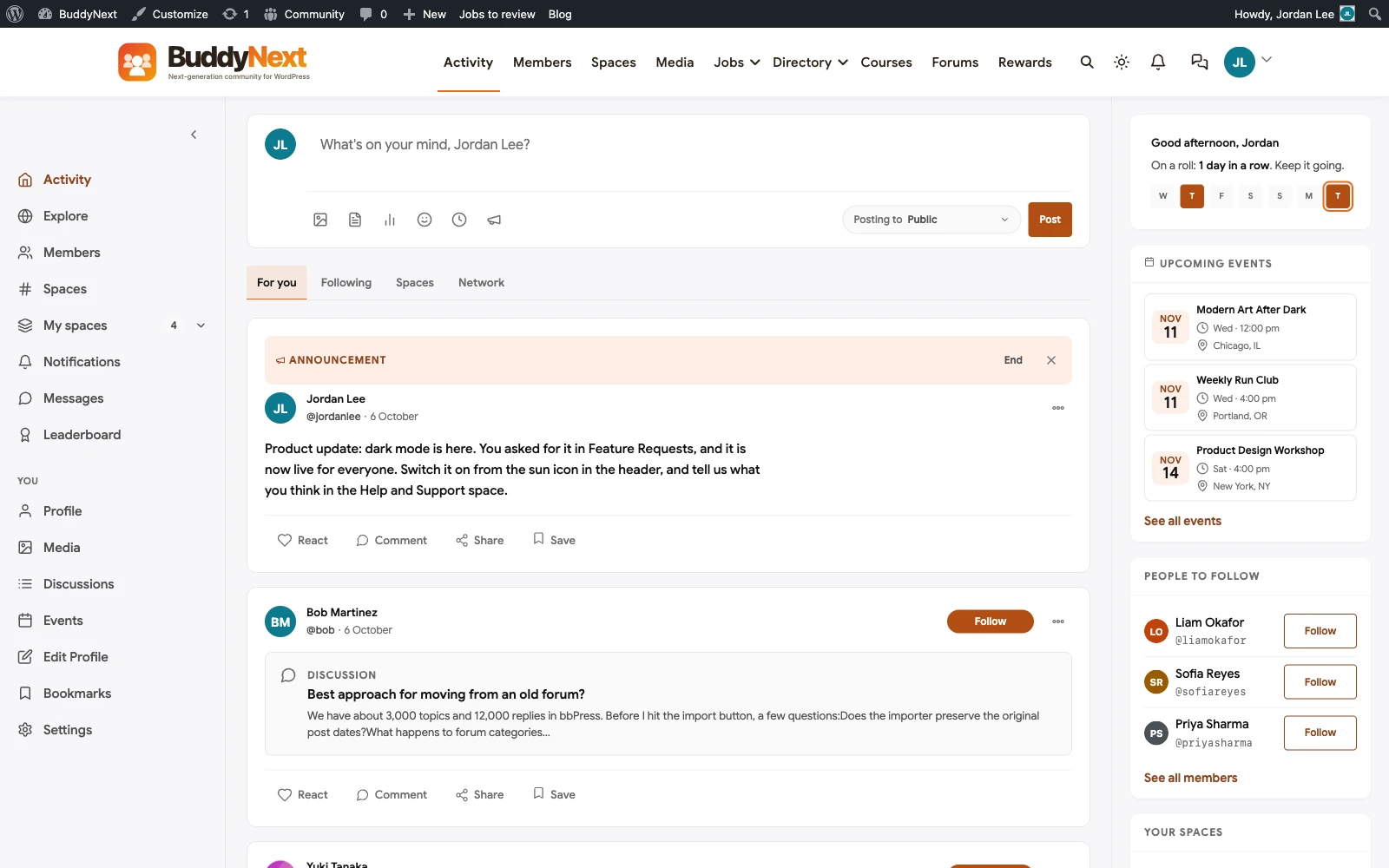
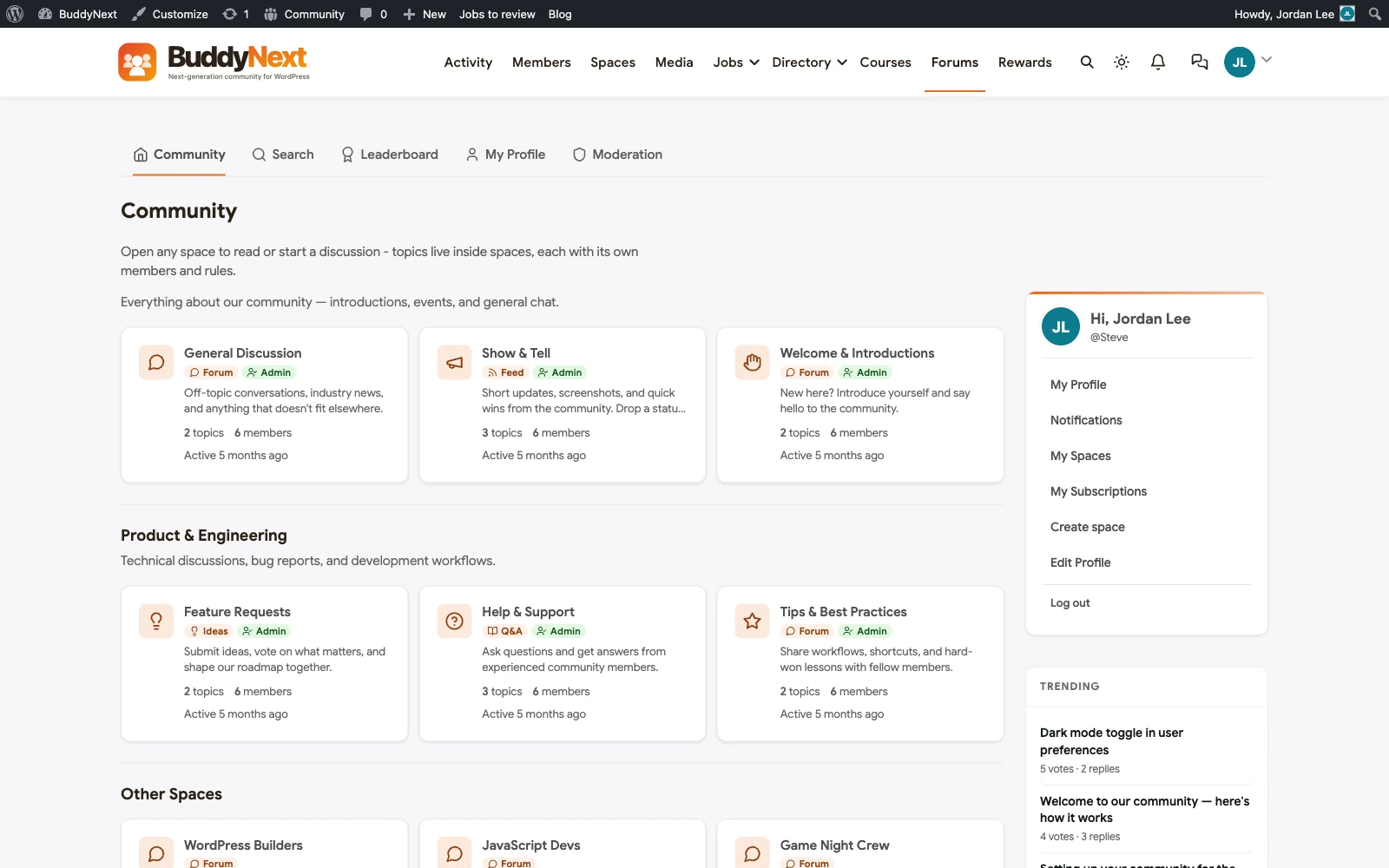
The honest comparison point: most forum plugins give you threads and replies. BuddyNext with Jetonomy gives you threads and replies, PLUS a genuine accepted-answer mechanic that surfaces the content that actually solved a problem, not just the content that got the most replies, which is the single feature that separates a real support forum from a chat log nobody can search usefully six months later. Because it’s the same codebase and member base as the rest of BuddyNext, moderators you’ve already configured for the activity feed and Spaces carry straight over to forum and Q&A moderation too, with the same reports, strikes, and banned-word lists applying everywhere rather than needing a second moderation setup for a second system.
2. bbPress
bbPress is free, stable, and has been part of the WordPress ecosystem for a long time. It handles straightforward discussion forums competently: topics, replies, basic forum roles, and tight integration with core WordPress since it’s an Automattic project. What it doesn’t do is real Q&A. bbPress forums are discussion threads, full stop, with no accepted-answer mechanic and no voting to surface the best response. Development has also slowed noticeably compared to its earlier years, which matters if you’re relying on it for new features rather than just basic stability. For a simple, free, no-frills discussion forum with no budget, it still works. For anything resembling structured support or Q&A, it’s the wrong tool, and bolting a separate Q&A plugin onto bbPress to compensate usually ends up with two half-integrated systems rather than one that does the job properly.
3. wpForo
wpForo is a genuinely solid free forum plugin: a modern, fast interface, good built-in search (a real differentiator against older forum tools), and a free tier that covers more ground than most competitors’ free tiers. Where it runs into a ceiling is the same place bbPress does: it’s a standalone forum, not part of a broader community platform, so member profiles, activity feeds, and any paid-access logic all need separate plugins layered on top, each maintained and updated independently.
4. Discourse
Discourse is free to self-host and genuinely well engineered: modern threading, strong moderation tools, and a community-driven development process that keeps it actively improving. The catch for a WordPress site is that Discourse isn’t a WordPress plugin at all, it’s a separate application (built on Ruby on Rails) that you run alongside WordPress and connect via SSO and embedding. That means two separate systems to host, secure, and keep updated, with member identity synced between them rather than genuinely shared. If you’re already comfortable running non-WordPress infrastructure, it’s worth considering. If you want one system, not two, it’s the wrong architecture regardless of how good the forum software itself is.
5. Flarum
Flarum is free, lean, and modern, built from the ground up as a single-page application rather than a traditional forum’s full-page reloads, which gives it a noticeably snappier feel than most WordPress-native forum plugins. Like Discourse, it’s not a WordPress plugin, it’s a separate application you run alongside your WordPress site, with its own extension ecosystem (over a thousand community extensions) you maintain independently of your WordPress plugin updates. The appeal is a genuinely fast, modern forum experience. The cost is the same one every non-WordPress forum carries: a second system, a second set of updates, and member identity that has to be bridged rather than shared natively.
6. NodeBB
NodeBB’s real-time, WebSocket-native design means new posts and replies appear instantly without a page refresh, which is a genuinely well-engineered piece of forum software. It runs on Node.js, which, like Discourse and Flarum, means adopting an entirely separate runtime and hosting stack alongside your existing WordPress install. For a team with Node.js operational experience already on staff, that’s a manageable addition. For a team that’s WordPress-only, it’s a meaningful new skill set to maintain just to run the forum.
7. phpBB
phpBB is free, open source, and over two decades old, which is both its strength (an enormous amount of accumulated documentation, themes, and community knowledge) and its limitation (an admin experience and a default visual style that feel exactly as dated as that history suggests). It’s at least PHP-based, so it shares a language and hosting environment with WordPress even though it’s still a separate application, not a plugin. For threads and replies with no frills and a genuinely huge amount of community support available if something breaks, it still does the job.
8. MyBB
MyBB runs on a noticeably friendlier admin panel than phpBB, which matters if whoever manages the forum day to day isn’t a developer. It covers the same core ground as phpBB (free, open source, threads and replies, a large plugin and theme ecosystem built up over many years) with a more approachable setup experience. The ceiling underneath that friendlier interface is exactly the same as phpBB’s: a standalone forum application, no Q&A, no native WordPress integration, and a separate login and hosting environment to maintain alongside your WordPress site.
Quick comparison: BuddyNext vs bbPress vs wpForo vs Discourse vs Flarum vs NodeBB vs phpBB vs MyBB
- BuddyNext (Jetonomy): forum, Q&A with accepted answers, and an ideas board, one system, shared member accounts. Best fit: anyone who wants real support Q&A, not just open discussion.
- bbPress: free, stable, discussion-only, no Q&A, slower development. Best fit: a basic free forum with no budget and no Q&A need.
- wpForo: free, fast, good search, standalone forum only. Best fit: a solid free forum that doesn’t need to be part of a bigger platform.
- Discourse: excellent forum software, separate Rails application, two systems to run. Best fit: teams already comfortable hosting non-WordPress infrastructure.
- Flarum: fast, modern, separate application with its own extension stack. Best fit: a dedicated, snappy standalone forum outside WordPress.
- NodeBB: real-time, WebSocket-native, runs on Node.js. Best fit: teams with existing Node.js operational experience.
- phpBB: free, PHP-based, dated but enormously documented. Best fit: no-frills threads and replies with maximum community support available.
- MyBB: free, friendlier admin than phpBB, same standalone ceiling. Best fit: a non-technical team wanting a simpler forum admin experience, still outside WordPress.
Notice the pattern across most of this list: outside of BuddyNext’s native Jetonomy integration and the two oldest WordPress-specific plugins (bbPress and wpForo), every genuinely well-engineered forum option on this list (Discourse, Flarum, NodeBB, phpBB, MyBB) is a separate application, not a WordPress plugin at all. That’s not a coincidence. Dedicated forum software built outside WordPress’s plugin constraints has more room to optimize specifically for forum workloads, but it trades that specialization for the operational cost of running, securing, and updating a second system indefinitely. Weigh that trade-off deliberately rather than discovering it after you’ve already committed to a separate-stack forum and your WordPress developer can’t touch it.
Related reading
If structured Q&A with accepted answers, not general discussion, is actually your main goal, our dedicated question and answer plugins roundup covers that specifically. If you want the social feed and member profiles that usually sit alongside a forum, see our community plugins roundup and membership plugins roundup. And if you’re coming from one of these tools specifically rather than starting fresh, our bbPress alternatives, Discourse alternatives, and wpForo alternatives articles go deeper on each individual migration path.
Forum or Q&A: deciding before you install anything
The single most common mistake we see isn’t picking the wrong forum plugin, it’s picking a forum when the actual need was Q&A, or the reverse. A forum rewards open-ended conversation where there isn’t always a single right answer: a general discussion space, a show-and-tell area, an off-topic lounge. Q&A rewards a different shape of content entirely: “how do I do X,” answered once, correctly, and then found by the next hundred people who search for the same question. If most of what your members will post looks like the second pattern, a true Q&A tool with an accepted-answer mechanic will outperform a generic forum every time, because the generic forum has no way to mark which reply actually solved the problem, so every answer looks equally weighted to the next visitor scanning the thread.
It’s also worth deciding your moderation model before launch, not after the first problem thread. Pre-moderation (reviewing posts before they go live) protects quality but slows down genuine discussion and frustrates real members. Post-moderation (removing problems after they’re reported) keeps conversation flowing but means bad content is visible, even briefly, before it’s caught. Most mature communities land on post-moderation with strong reporting tools and fast moderator response, but that only works if your chosen plugin actually makes reporting and reviewing easy for both members and moderators.
Search is worth a second mention here because it’s so easy to overlook during setup and so costly to fix later. A forum’s entire long-term value is that old threads keep answering new visitors’ questions, which only works if those threads are actually findable. Test your shortlisted plugin’s search with real multi-word queries, not just exact thread titles, before you commit years of content to it. A forum with a thousand genuinely useful threads and weak search performs worse for new visitors than a smaller forum with fifty threads and search that actually surfaces the right one.
Categorization matters almost as much. A flat list of threads with no topic structure becomes unusable past a few hundred posts, while a forum organized into clear categories and subcategories stays navigable indefinitely. Decide your category structure before launch, since reorganizing an active forum’s categories later means broken bookmarks, confused regulars, and search engines that have already indexed the old structure.
FAQ
Can I run a forum and a Q&A section on the same WordPress site?
Yes, and it’s common to want both: an open discussion forum for general conversation plus a dedicated Q&A section for support questions. BuddyNext with Jetonomy supports both patterns from one system with shared member accounts. Running them as two separate plugins is also possible but means maintaining two sets of settings, two moderation queues, and two places members need to learn to use.
Why does WordPress-native matter so much for a forum plugin?
A WordPress-native forum shares your existing member accounts, your existing theme and branding, your existing hosting, and your existing backup and security setup. A separate application like Discourse, Flarum, or NodeBB means a second login system (even with SSO, it’s a second thing to configure and maintain), a second hosting environment, and a second security surface to patch and monitor. Both approaches can work well; the separate-application route is a deliberate trade of more operational complexity for, in some cases, more specialized forum software.
Is bbPress still worth using in 2026?
For a genuinely simple, free discussion forum with no need for Q&A, voting, or deep moderation, yes, it’s stable and well-integrated with core WordPress. Development has slowed, so don’t expect frequent new features, and plan on pairing it with other plugins for anything beyond basic threaded discussion.
How do I migrate an existing forum to a new plugin without losing my content?
This depends heavily on which two plugins are involved, since each stores threads, replies, and user data differently. Some popular pairs have dedicated import tools; others require a custom export-and-import script or a paid migration service. Before committing to a new forum plugin, check specifically whether a migration path exists from your current one, and test it on a staging copy of your site before running it on the live forum. Budget extra time for fixing broken internal links and redirecting old thread URLs after the move, since a forum migration that loses its existing search rankings is a real, measurable cost even when the content itself transfers cleanly.
What happens to forum content if I ever switch away from a non-WordPress forum like Discourse or Flarum back to WordPress?
You’re migrating a full application’s worth of data, not just a plugin’s database tables, so this is a bigger project than switching between two WordPress plugins. Most standalone forum software supports data export in some form, but mapping that export cleanly into a WordPress-native plugin’s data model, including preserving old URLs so search rankings survive, usually needs custom migration work rather than a one-click import. Factor this into the decision upfront: choosing a non-WordPress forum is easier to reverse the sooner you do it, and gets progressively more expensive to undo the longer the forum runs and accumulates content.
Do forum plugins hurt WordPress site speed?
A forum with heavy, unoptimized database queries and a lot of real-time activity can add real load, same as any feature built around frequent reads and writes. The fix is the same as for any high-traffic WordPress feature: caching that correctly handles logged-in, personalized views, a database that’s indexed properly for the forum’s query patterns, and hosting that can handle the actual traffic you get, not just the traffic you expect on day one.
What’s the minimum number of active members a forum actually needs to feel alive?
There’s no fixed number, but the honest signal is response time, not headcount: a forum where most new threads get a reply within a day or two feels active even with a modest member count, while one where threads sit unanswered for weeks feels dead even with thousands of registered accounts. If you’re launching a new forum, consider seeding it with a handful of genuinely useful threads yourself before inviting members, so the first visitors see an active-looking space rather than an empty one, and plan on personally answering the first wave of real questions quickly, since the response speed a new forum establishes in its first few weeks tends to set expectations for how it behaves for years afterward.
Should I close old, inactive forum threads automatically?
Auto-closing threads after a period of inactivity prevents necroposting (someone reviving a years-old thread with an unrelated reply) but also risks closing a thread that’s still the correct, current answer to a question. A middle path some communities use: auto-lock replies on very old threads but leave them visible and searchable, so the content keeps helping new visitors even after the conversation itself has ended.
Do I need a forum plugin if I already run a Facebook group for my community?
A Facebook group is fine for low-stakes, ephemeral chatter, but it fails at exactly what forums are built for: a question asked once that stays findable and useful years later. Facebook’s own search inside groups is weak, the platform owns your member data and relationship, and algorithmic feed changes can bury your community overnight. A self-hosted forum means the content you build compounds as SEO value and stays searchable indefinitely, on infrastructure you control.
Plugins we build and run
We maintain these ourselves, which is why we can support them on your site.
- BuddyNextThe self-hosted community engine for WordPress
- BuddyXFree community theme, Pro when you outgrow it
- ReignPremium community theme. Add pieces, build anything
- JetonomyCommunity forum and Q&A for WordPress
- EventonomyEvents and RSVPs for WordPress communities
- LearnomyCourses and learning communities on WordPress
- ListoraDirectories and listings your members can browse
- SnipShareCode sharing built for developer communities
- WB Ad ManagerAd placements that turn traffic into revenue
- WP Career BoardA job board your community actually uses
- WP Sell ServicesSell services with offers, orders, and payouts
- MediaVersePhotos, video, and media albums for members
- WB GamificationPoints, badges, and rewards that keep members active
- Product RoadmapPublic roadmaps with voting your users trust