Best WordPress Membership Plugins in 2026 (8 Compared)
Eight real WordPress membership plugins compared honestly: BuddyNext, MemberPress, Paid Memberships Pro, Restrict Content Pro, Memberful, Ultimate Member, WishList Member, and s2Member.
Short version, if you want to skip ahead: BuddyNext is the membership plugin we’d point you to first, because it’s native membership tiers with no separate plugin and no transaction cut. Keep reading for the full, honest comparison.
What a WordPress membership plugin actually needs to do
A membership plugin gates content, courses, or community access behind a paid tier and handles the billing that goes with it. At minimum that means recurring subscriptions through a real payment processor, the ability to restrict specific pages, posts, or whole sections of a site by membership level, and a way for members to manage their own subscription (upgrade, cancel, update a card) without emailing you to do it by hand.
What actually separates a good membership plugin from a mediocre one shows up after launch, not during setup: how it handles a failed payment (does it quietly cut off access, or retry and warn the member first), whether it takes a percentage of what you charge on top of your payment processor’s own fee, whether membership is a standalone feature or bolted onto a plugin that was built for something else first, and how it handles the unglamorous edge cases: a member who wants to switch tiers mid-cycle, a refund that should only partially revoke access, a free trial that needs to convert to paid automatically without a gap in access. A membership system that was designed around an existing community or course platform tends to handle edge cases (partial refunds, plan changes mid-cycle, pausing instead of cancelling) more gracefully than one assembled from several separate tools.
If all you actually need is a single one-time paywall on a handful of pages, with no recurring billing and no member accounts to manage, a full membership plugin is more than the job requires. A simple password-protected page or a basic WooCommerce product might cover it without the ongoing overhead of a dedicated membership system.
There’s also a structural question worth asking before you look at any specific plugin, and it’s the one most buying guides skip entirely: is membership the whole product, or a feature of something bigger. A newsletter writer charging for premium posts needs a different tool than a course creator gating lessons behind a paywall, who in turn needs something different from a community site that happens to charge for access to certain spaces. The plugins below split roughly into two camps: focused billing-and-access tools that do one job well, and platforms where membership is one feature among several that share the same member base. Which camp fits depends entirely on whether you’re building a paywall or a product, and that answer should come before the plugin name does.
The best WordPress membership plugins, ranked
1. BuddyNext
BuddyNext’s membership tiers are native to the platform, not a separate plugin layered on top. Stripe-powered tiers support monthly, yearly, and one-time pricing, trials, gated Spaces (BuddyNext’s term for community groups), inline content locks, and a customer portal where members manage their own billing. There’s an MRR dashboard built in so you can see recurring revenue without exporting data to a spreadsheet. Crucially, BuddyNext takes no percentage of what members pay you beyond what Stripe itself takes, which is the single biggest structural difference between this and most of the plugins below.
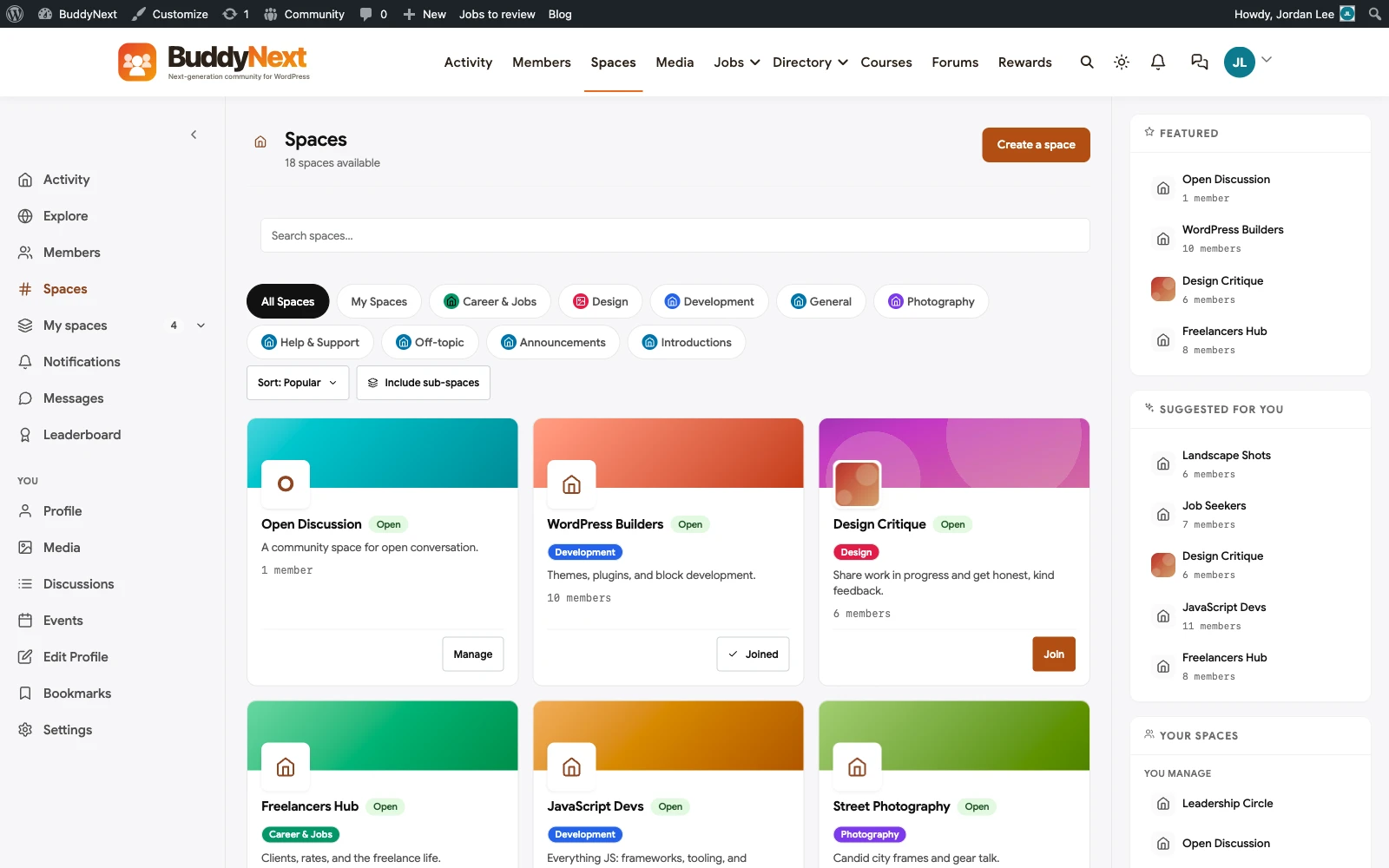
The reason this matters more than it sounds: a dedicated membership plugin solves the paywall problem well, but it solves it in isolation. BuddyNext’s tiers gate access to community spaces, courses, and content from the same platform members already have an account on, so there’s no second login, no syncing member status between two separate systems, and no risk of the membership plugin and the community plugin disagreeing about who’s actually paid. The trade-off is the same one that applies across BuddyNext’s whole platform: you’re running a complete community system, not a narrow single-purpose plugin, so it’s a bigger install than a pure paywall tool if a paywall is genuinely all you need.
Worth spelling out what “native” actually buys you here, since it’s easy to wave the word around without being specific. When a member’s subscription lapses on BuddyNext, the platform itself knows immediately, because the billing system and the access system are the same system. On a stack where a separate membership plugin talks to a separate community plugin through a webhook or a shared user role, there’s a window, sometimes minutes, sometimes longer if a webhook fails silently, where a lapsed member still has access or a newly paid member is still locked out. That gap is rare enough that most teams never notice it until a support ticket forces the question, and by then it’s a debugging session, not a design decision.
2. MemberPress
MemberPress is a genuinely solid, focused paywall and billing plugin. It handles content restriction, recurring subscriptions, and integrates cleanly with popular page builders and email tools. Where it earns its reputation is doing the paywall job well without trying to be a community platform too. Where its scope ends is exactly there: MemberPress gates content, but it doesn’t give you an activity feed, member profiles people browse, or spaces for members to interact with each other. If a community layer is part of the plan, MemberPress needs a separate plugin for that, and keeping two systems in sync (who’s a member, who’s in which group) becomes an ongoing task you own. MemberPress does have its own course-building add-on and a more recent community feature set it’s been expanding, worth checking directly against your needs since plugin roundups age faster than the plugins themselves and feature sets like this shift between releases.
3. Paid Memberships Pro
Paid Memberships Pro’s core plugin is free, with its value coming from a genuinely open, modular add-on ecosystem: dozens of free and paid add-ons for specific payment gateways, email integrations, and content restriction patterns. That openness is real power for a technical team that wants to assemble exactly the stack they need. It’s also real cost for a team that doesn’t have that technical bandwidth, since assembling and maintaining the right combination of add-ons is a job in itself, one that a single coherent platform doesn’t hand you in the first place. Paid Memberships Pro’s community and documentation are also genuinely strong, a side effect of being free and open for long enough to build a real user base that answers each other’s questions, which matters if you expect to be configuring and troubleshooting this yourself rather than hiring it out.
4. Restrict Content Pro
Restrict Content Pro’s pitch is refreshingly simple: one flat annual price per site tier (roughly $99 to $249 a year depending on site count), every feature and add-on included, no surprise costs layered on later, and no transaction fee on top of what your payment processor takes. For a team that specifically wants predictable, boring pricing with no upsell path to budget around, that’s a real selling point. The honest limitation is the same one that applies to MemberPress and Paid Memberships Pro: this is a paywall and billing tool, not a community or course platform, so anything beyond gating content is a separate plugin’s job.
5. Memberful
Memberful takes a different approach: instead of a WordPress plugin that stores everything in your own database, it’s a hosted membership service that embeds into your WordPress site, with a percentage fee on every transaction (around 4.9% on most plans, dropping on higher tiers) that compounds forever on top of whatever hosting you’re already paying for. The appeal is genuinely less setup, since the billing infrastructure lives on Memberful’s servers, not yours. The trade-off is the one every hosted add-on carries: member and payment data live partly outside your own WordPress database, and the percentage cut never goes away, unlike a self-hosted plugin’s flat licensing fee.
6. Ultimate Member (with a membership add-on)
Ultimate Member’s own strength is profiles and member directories, not billing, but its membership add-on layers subscription-gated content on top of its already-strong profile and directory system. That’s a genuinely good combination if profiles and a searchable member directory are as important to your site as the paywall itself, since you get both from one vendor’s ecosystem rather than stitching together a directory plugin and a separate billing plugin. The add-on approach means you’re paying for membership billing and profile features as separate purchases from the same company rather than one unified product, which is worth pricing out before committing.
7. WishList Member
WishList Member has been in the WordPress membership space for over a decade and built its reputation on integration breadth: it connects to a long list of email marketing tools, payment gateways, and page builders, which matters if your existing stack is already set and you need a membership layer that plugs into it without forcing you to switch other tools. It handles drip content (releasing material on a schedule after signup) well, which is a specific feature some of the plugins above treat as an afterthought. The limitation is similar to MemberPress and Restrict Content Pro: it’s a paywall and access-control tool first, with community features, if you need them, coming from elsewhere.
8. s2Member
s2Member’s free version is genuinely capable for a plugin with no cost at all: PayPal integration, basic content restriction, and a decent set of membership levels work without paying anything. The Pro version adds Stripe support, more granular access rules, and additional integrations. It has a reputation for a steeper learning curve than some of the newer entrants on this list, with an admin interface that shows its age compared to MemberPress or Paid Memberships Pro’s more modern settings screens, but for a budget-conscious setup that doesn’t need a polished admin experience, the free tier alone covers more ground than most competitors’ free tiers do.
Quick comparison: BuddyNext vs MemberPress vs Paid Memberships Pro vs Restrict Content Pro vs Memberful vs Ultimate Member vs WishList Member vs s2Member
- BuddyNext: native tiers, no transaction fee, part of a full community platform. Best fit: anyone who also wants community or courses attached to membership.
- MemberPress: focused, well-built paywall and billing, no community layer. Best fit: a straightforward content paywall with no community plans.
- Paid Memberships Pro: free core, open add-on ecosystem. Best fit: technical teams who want to assemble their own exact stack.
- Restrict Content Pro: flat annual pricing, everything included, no transaction fee. Best fit: teams who want predictable billing with zero upsell surprises.
- Memberful: hosted, less setup, percentage fee forever. Best fit: teams who’d rather trade a recurring cut for less infrastructure to manage.
- Ultimate Member: membership add-on on top of strong profiles and directory. Best fit: sites where the member directory matters as much as the paywall.
- WishList Member: broad third-party integrations, strong drip-content support. Best fit: teams with an existing email/payment stack they don’t want to replace.
- s2Member: capable free tier, dated admin interface. Best fit: budget-first setups willing to trade polish for a genuinely free feature set.
Related reading
If the community layer, not the paywall, is actually the main thing you’re building, our WordPress community plugins roundup covers that ground directly, including the same BuddyNext tiers from the community side. If forums or structured Q&A matter alongside membership, see our forum plugins comparison and question and answer plugins roundup. And if you’re specifically comparing against a hosted platform rather than a WordPress plugin, our MemberPress alternatives, Patreon alternatives, and Paid Memberships Pro alternatives articles go deeper on each specific comparison.
Getting membership billing right before you launch
The mistake we see most often with membership plugins isn’t choosing the wrong one, it’s launching without testing the failure paths. Test what happens when a card is declined: does the member get a clear email, a grace period, or an immediate lockout. Test cancellation and make sure it’s genuinely self-service, since “email us to cancel” is both a bad member experience and, in some jurisdictions, a compliance problem. And test what a partial refund or a mid-cycle plan change actually does to access, because that’s the scenario that generates a support ticket if it isn’t handled cleanly the first time a real member hits it.
It’s also worth deciding upfront how you’ll handle taxes (VAT, sales tax) on recurring subscriptions, since this varies by country and by payment processor, and retrofitting tax handling onto an already-live membership system is considerably more painful than setting it up correctly before your first paying member signs up.
Two more things worth deciding before launch, both easy to skip and both expensive to fix later. First, what happens to a member’s access when they pause rather than cancel: some plugins only support a binary active-or-cancelled state, which forces members who just want a temporary break to fully cancel and lose their original signup date, pricing, and history. Second, how dunning (the retry process after a failed card charge) actually behaves: a good system retries a few times over a week or two with clear emails at each attempt before cutting access, while a poor one either cuts access on the first failed charge or, worse, keeps charging a dead card silently without ever notifying the member or you. Read the specific plugin’s documentation on both before you commit, since marketing pages rarely mention either, and the support forum or changelog is usually a more honest source than the sales page for exactly these questions.
FAQ
Do I need a membership plugin if I’m already using WooCommerce subscriptions?
Not necessarily. WooCommerce Subscriptions handles recurring billing for products well, and if your “membership” is really just a recurring product purchase with no content-gating logic, it may already do the job. A dedicated membership plugin earns its place when you need to restrict specific pages, posts, or site sections by membership level, not just sell a recurring product. WooCommerce Memberships, a separate official WooCommerce extension, sits in between the two: it adds content restriction on top of WooCommerce’s own checkout, which can be enough if you’re already committed to the WooCommerce ecosystem for other reasons and don’t want a third-party membership plugin at all.
Can I offer more than one membership tier with these plugins?
Yes, every plugin in this list supports multiple tiers or levels. The differences show up in how flexible the tier logic is: can a member belong to more than one tier at once, can you offer a free tier alongside paid ones, and can you change someone’s tier without cancelling and re-subscribing them. Test these specific scenarios against your actual pricing plan before committing, since not every plugin handles multi-tier logic the same way, and a plan that looks identical on a pricing page can behave very differently once a real member tries to upgrade mid-cycle.
Is a free membership plugin ever the right long-term choice, not just a starting point?
For a small, stable community that isn’t trying to maximize revenue or handle complex billing scenarios at any real scale, yes, and there’s no shame in staying there if it genuinely covers what your members need. BuddyPress plus a basic free restriction plugin, or s2Member’s free tier, can run indefinitely without becoming a liability, as long as the feature set genuinely matches what the site needs and isn’t being stretched to cover gaps it was never built for. The risk isn’t using free software forever, it’s outgrowing it silently and not noticing until a member-facing problem forces the question, usually in the form of an angry email from a member who couldn’t cancel, upgrade, or get access to something they already paid for.
Which of these plugins takes the smallest cut of membership revenue?
BuddyNext and Restrict Content Pro both take no percentage fee on top of standard payment-processor charges. MemberPress and Paid Memberships Pro are self-hosted with their own licensing cost but no revenue-share model either. Memberful is the one with a standing percentage fee (around 4.9% on most plans) because it’s a hosted service, not a self-hosted plugin.
What happens to my membership data if I switch plugins later?
Member accounts themselves (as WordPress users) generally survive a switch. Subscription history, billing records, and access-level logic are modeled differently by every plugin, so they don’t transfer automatically, and you’ll typically need to re-create membership tiers and re-map members to them manually, or pay for a migration service if one exists for that specific pair of plugins. This is a strong argument for choosing carefully the first time rather than treating the decision as easily reversible.
Do these plugins handle EU VAT and other regional tax rules automatically?
Support varies significantly and changes often as tax rules change, so verify the current state directly with whichever plugin you’re evaluating rather than trusting a roundup’s snapshot. Generally, the plugins tied closely to a specific payment processor (Stripe-native tools like BuddyNext’s tiers) inherit more of that processor’s own tax-handling capability, while plugins supporting many different gateways tend to push more of the tax logic onto you or a separate tax add-on. If you sell to members across multiple countries, confirm this specifically before launch, not after your first international sale.
Should a small site start with a free membership plugin and upgrade later?
It can work, but migrating membership data between plugins is genuinely painful, as covered above, so the “start free, upgrade later” path often costs more in migration effort than it saves in year-one licensing fees. A more honest version of that advice: use a free tier if you’re still validating whether people will actually pay for access at all, and switch to a plugin built for your real feature needs once you have real paying members, accepting that the earlier you make that switch, the less painful it will be.
Can I migrate from one membership plugin to another without losing my members?
Usually yes for the member list and active subscriptions, since most membership plugins store that in standard WordPress user tables with their own meta fields, but you lose the plugin-specific configuration: drip schedules, access rules tied to the old plugin’s taxonomy, and any custom email sequences. Budget time to rebuild those rules rather than expecting a one-click import, and test with a handful of real accounts before cutting over the whole membership base.
Plugins we build and run
We maintain these ourselves, which is why we can support them on your site.
- BuddyNextThe self-hosted community engine for WordPress
- BuddyXFree community theme, Pro when you outgrow it
- ReignPremium community theme. Add pieces, build anything
- JetonomyCommunity forum and Q&A for WordPress
- EventonomyEvents and RSVPs for WordPress communities
- LearnomyCourses and learning communities on WordPress
- ListoraDirectories and listings your members can browse
- SnipShareCode sharing built for developer communities
- WB Ad ManagerAd placements that turn traffic into revenue
- WP Career BoardA job board your community actually uses
- WP Sell ServicesSell services with offers, orders, and payouts
- MediaVersePhotos, video, and media albums for members
- WB GamificationPoints, badges, and rewards that keep members active
- Product RoadmapPublic roadmaps with voting your users trust