Best WordPress Question and Answer Plugins in 2026 (5 Compared)
Five real WordPress question and answer tools compared honestly: Jetonomy, Apache Answer, Discourse's Q&A plugin, CM Answers, and DW Question & Answer, plus how a Q&A tool differs from a forum.
Short version, if you want to skip ahead: Jetonomy is the question and answer plugin we’d point you to first, because accepted answers are the actual feature a Q&A tool needs to earn its name, not an afterthought. Keep reading for the full, honest comparison.
What a WordPress Q&A plugin actually needs to do, and how it differs from a forum
A question and answer tool solves a narrower, more specific problem than a general forum. Someone asks a question, several people may answer, and the asker (or a moderator) marks one answer as correct. That accepted answer gets visually promoted to the top of the thread, so the next visitor who searches for the same question finds the right answer immediately instead of reading through a full discussion thread to figure out which reply actually worked. A forum rewards ongoing conversation. Q&A rewards resolution. Neither is better in the abstract; the mistake is picking one for content that genuinely belongs in the other, which is more common than it sounds because the two formats look almost identical in a quick screenshot and only reveal their differences once real members start actually using one.
That distinction decides which tool you actually need. If your members mostly ask “how do I,” “what’s the best way to,” or “why doesn’t this work,” a dedicated Q&A tool with accepted answers, voting, and reputation will organize that content far better than a generic forum thread list ever will, because the generic forum has no mechanism to mark which of ten replies actually solved the problem. If your content is genuinely open-ended discussion with no single right answer (opinions, show-and-tell, general chat), a forum is the better shape, and forcing it into a Q&A format where every thread needs an “accepted answer” that doesn’t really exist will frustrate members.
What to look for specifically: does accepted-answer marking actually change how the thread displays (promoted to top, visually distinct) or is it just a database flag nobody sees; does the tool support voting on both questions and answers, which helps good content rise even before anything is marked accepted; does it have a reputation or points system that rewards members for answering well over time; and does it integrate with your site’s existing member accounts or require yet another login. If your actual need is a public-facing knowledge base rather than ongoing community questions, a knowledge base plugin, covered in our separate roundup, might fit better than a Q&A tool.
Tagging and categorization deserve their own mention, since a Q&A tool without good tags becomes a wall of unrelated questions that’s genuinely hard to browse past the first few dozen entries. Good tags let a new visitor searching for “billing” or “setup” find every relevant question instantly, rather than scanning a chronological list hoping to spot something relevant. Check whether tags are a first-class feature (filterable, searchable, visible on every question) or an afterthought bolted onto a system that was never really designed around them.
Mobile experience is worth testing directly too, not assuming from a desktop screenshot on a sales page. A Q&A interface with a lot of metadata (votes, tags, reputation badges, accepted-answer markers) crammed around each entry can get cluttered fast on a phone screen, and since most community engagement now happens on mobile, a Q&A tool that looks clean on desktop but falls apart at 390 pixels wide is a real problem, not a minor cosmetic one.
The best WordPress Q&A plugins, ranked
1. Jetonomy
Jetonomy is built specifically around the accepted-answer mechanic rather than treating it as one feature among many. Members ask questions, answers get voted on, and the original poster or a moderator marks one answer as accepted, which is then visually promoted to the top of the thread. That’s the same reasoning Stack Overflow and other dedicated Q&A platforms are built on: voting alone surfaces popular content, but accepted answers surface the content that actually solved the problem, which is what matters when someone searches for the same question six months later. Jetonomy also ships an Ideas mode alongside Q&A, letting members submit and vote on feature requests with a visible status (planned, in progress, shipped), which is a genuinely useful adjacent feature for a product or community site collecting member feedback.
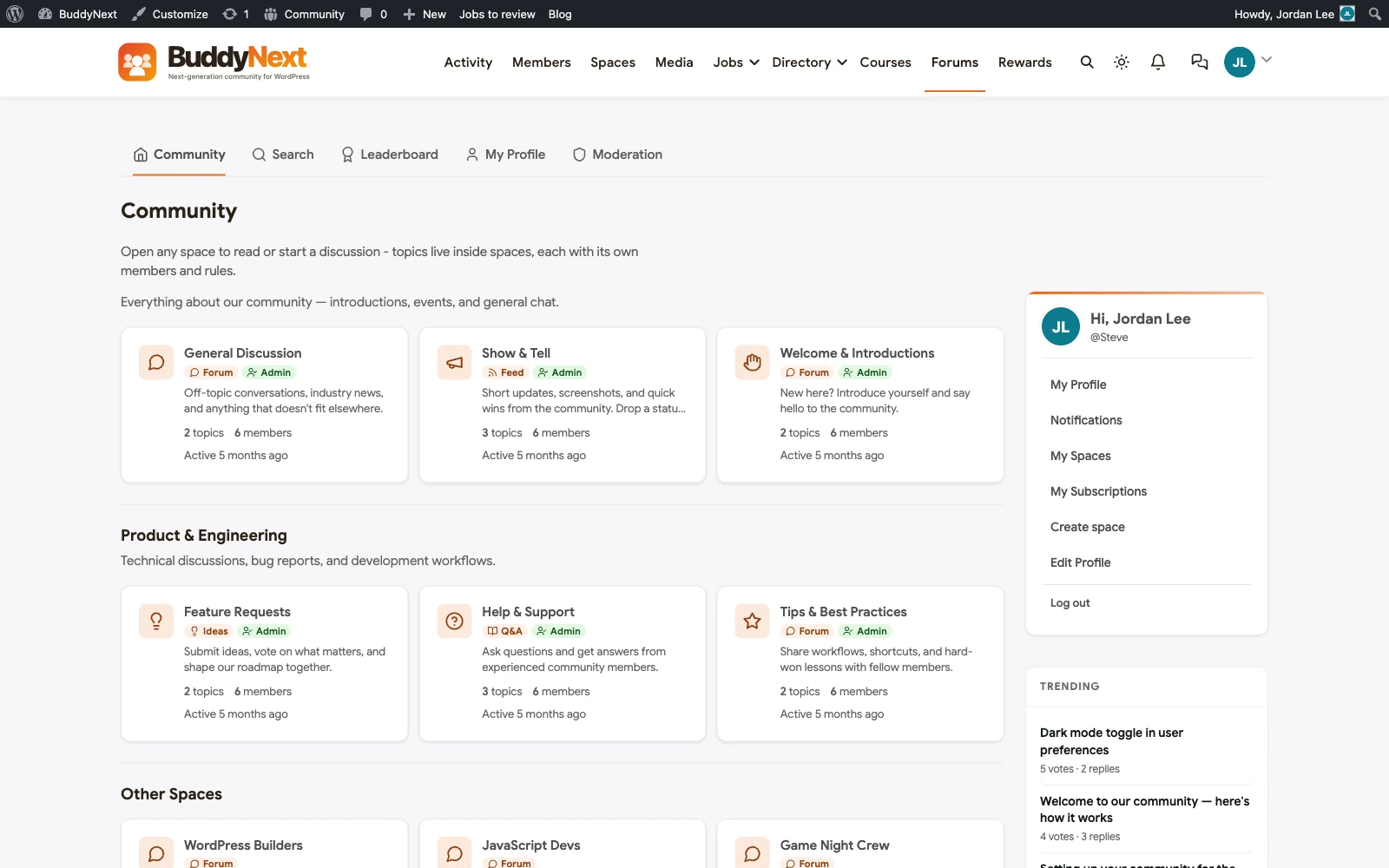
Jetonomy auto-integrates into BuddyNext with no separate configuration if you’re running that platform, and works as a standalone tool otherwise. Reputation and trust levels build up as members answer well over time, which is the mechanic that keeps a Q&A community self-sustaining rather than relying entirely on a small number of admins to answer everything. The honest trade-off: if you want pure open discussion with no accepted-answer structure at all, Jetonomy’s whole design is built around resolution, which is a feature here, not a limitation, but worth knowing before you adopt it for content that doesn’t actually fit that shape.
Because it shares BuddyNext’s member accounts and moderation tools when the two are run together, a question asked in Jetonomy carries the asker’s existing profile, reputation, and history rather than starting from a blank, anonymous-feeling slate. That continuity matters more than it sounds for community trust: a question from a member with a visible history of good answers reads differently to other members than the same question from an account created thirty seconds ago, and that context is lost entirely on tools that treat Q&A as an island separate from the rest of a member’s presence on the site.
2. Apache Answer
Apache Answer is a well-built, free, Stack-Overflow-style Q&A platform with the core mechanics done properly: voting, accepted answers, tags, and reputation. It’s open source under the Apache Software Foundation, which gives it real institutional backing and a credible long-term development story. The significant catch for a WordPress site is that Apache Answer is a separate application built in Go, not a WordPress plugin, so running it means hosting and maintaining an entirely different application stack alongside WordPress, with member identity bridged rather than natively shared. If you’re comfortable running non-WordPress infrastructure specifically for Q&A, it’s a genuinely strong piece of software. If you want one system, it’s the wrong architecture.
3. Discourse (Q&A plugin)
Discourse’s core product is a general discussion forum, but it has a Q&A plugin that adds accepted-answer functionality to specific categories, letting you run support-style Q&A and open discussion side by side within the same platform. That flexibility is real, and Discourse’s underlying software is genuinely well engineered. The same architectural issue applies as with Apache Answer: Discourse is a separate Ruby on Rails application, not a WordPress plugin, so you’re running and securing two systems rather than one, with identity synced via SSO rather than natively shared.
4. CM Answers
CM Answers is a WordPress-native Q&A plugin built specifically to mimic the Stack Overflow pattern inside WordPress itself: questions, answers, voting, and a reputation system, all as a genuine WordPress plugin rather than a separate application. That makes it one of the more directly comparable alternatives to Jetonomy on pure architecture grounds, both living inside your existing WordPress install with shared member accounts. Where it tends to differ is depth and polish in the surrounding ecosystem (moderation tooling, integration with a broader community platform) since it’s a narrower, standalone plugin rather than part of a coherent platform with community, courses, and forums sharing the same design and member base.
5. DW Question & Answer
DW Question & Answer is another WordPress-native option covering the standard Q&A pattern (ask, answer, vote, accept) with a free core and paid add-ons for extended functionality like private questions or email notifications. It’s a reasonable, budget-friendly entry point if you want basic Q&A functionality without committing to a larger platform, with the usual trade-off that a narrower tool means assembling more pieces yourself if your needs grow past basic question-and-answer into full community territory.
6. WP-Polls-style voting add-ons stacked onto bbPress
Some sites try to approximate Q&A by adding a voting plugin on top of bbPress rather than adopting a dedicated Q&A tool. This gets you upvotes and downvotes on replies, which is a real improvement over plain threaded discussion, but it stops short of the actual feature that matters: there’s still no accepted-answer mechanic that promotes the correct reply above merely popular ones. Votes and correctness aren’t the same signal, and a highly upvoted joke reply can easily outrank the answer that actually solved the problem. If you’ve already invested in bbPress and are considering this path, it’s worth pricing out a genuine migration to a dedicated Q&A tool instead, since the stacked approach solves the symptom, not the actual gap.
Quick comparison: Jetonomy vs Apache Answer vs Discourse vs CM Answers vs DW Question & Answer
- Jetonomy: WordPress-native, accepted answers, reputation, auto-integrates with BuddyNext. Best fit: a real Q&A community that needs resolution, not just discussion.
- Apache Answer: excellent Stack-Overflow-style software, separate Go application. Best fit: teams willing to run dedicated non-WordPress Q&A infrastructure.
- Discourse (Q&A plugin): forum plus Q&A in one platform, separate Rails application. Best fit: teams wanting both discussion and Q&A from one (non-WordPress) system.
- CM Answers: WordPress-native Stack Overflow pattern, standalone plugin. Best fit: a focused Q&A plugin without a bigger platform commitment.
- DW Question & Answer: WordPress-native, budget-friendly, basic feature set. Best fit: simple Q&A needs with room to grow into add-ons later.
- Voting add-on on bbPress: upvotes without a true accepted-answer mechanic. Best fit: a stopgap, not a genuine long-term Q&A solution.
Worth naming the pattern directly: every genuinely dedicated Q&A tool here that runs as a separate application (Apache Answer, Discourse) was built by teams who decided general-purpose forum or CMS software couldn’t do the job well enough and built something specialized instead. That specialization is real and shows up in details like how aggressively duplicate questions get surfaced while you’re typing, or how reputation decay works over time. The trade-off, as with the forum category, is operational: specialized software outside WordPress means a second system to host and secure indefinitely, weighed against WordPress-native tools that share your existing infrastructure but may lag slightly in Q&A-specific polish.
Related reading
If general discussion matters as much as structured Q&A, our WordPress forum plugins roundup covers that specifically, including the same Jetonomy-on-BuddyNext combination from the forum side. If you want the full social layer, activity feed, and profiles around your Q&A community, see our community plugins roundup. And if you’re evaluating Discourse or Apache Answer specifically as a migration source rather than starting fresh, our Discourse alternatives and Apache Answer alternatives articles cover that comparison in depth.
Reputation systems: the feature most roundups gloss over
A reputation or points system is what turns a Q&A tool from a one-time feature into a self-sustaining community habit. Without one, answering questions is pure altruism, and most communities find that a small number of generous members answer everything until they burn out, while everyone else just asks and never contributes back. A visible reputation score, especially one that grants real privileges (editing others’ posts, moderating flagged content, badges on a profile) as it grows, gives members a reason to keep answering well beyond the first few weeks.
The honest caveat: reputation systems can be gamed, and a system with no safeguards against vote manipulation or low-effort mass-answering will eventually reward the wrong behavior. Check whether your shortlisted tool has any anti-gaming measures (rate limits on voting, a minimum account age before reputation counts, visible audit trails for moderators) before you build a community’s incentive structure around a number that can be quietly manipulated. A practical early warning sign worth watching for after launch: a small cluster of accounts upvoting each other’s answers in a tight loop, with no corresponding growth in actual question volume. That pattern almost always means gaming, not genuine engagement, and catching it early, before reputation scores climb high enough to grant real privileges, is far easier than unwinding it after the fact.
It’s also worth deciding how publicly you want reputation displayed. Some communities thrive on visible leaderboards and competition; others find that same visibility discourages newer members from asking “basic” questions for fear of looking unqualified next to high-reputation regulars. There’s no universally correct answer here, but it’s a real design decision, not a default setting to leave unexamined.
FAQ
What’s the real difference between a Q&A plugin and a forum plugin with voting?
Voting alone just ranks replies by popularity. A true Q&A tool adds a distinct accepted-answer mechanic, usually controlled by the original asker or a moderator, that marks one specific reply as the correct resolution and visually promotes it, independent of how many votes it received. A forum with voting but no accepted-answer concept still leaves every visitor to figure out which popular reply actually solved the problem, which is a meaningfully worse experience for anyone searching for a specific answer later.
Can I run Q&A and a general forum on the same WordPress site?
Yes, and many sites benefit from both: Q&A for support-style questions with a clear right answer, and a forum for open discussion with no single resolution. Jetonomy and BuddyNext support both patterns from one system with shared member accounts, which avoids maintaining two separate moderation queues and two separate places for members to learn.
Do I need a Q&A plugin if I already have a WordPress support ticket system?
They solve different problems. A ticket system is private, one-to-one, and closes once resolved, which is right for account-specific or sensitive issues. A Q&A tool is public, one-to-many, and stays valuable indefinitely because every answered question keeps helping future visitors who search for the same thing. Many sites run both: tickets for private account issues, public Q&A for everything that benefits other members to see answered.
How do I stop a Q&A section from filling up with duplicate questions?
Good search and a “similar questions” prompt shown while someone is typing a new question are the two most effective tools, since most duplicates happen because the asker genuinely couldn’t find the existing answer, not because they didn’t look at all. A clear tagging or category system also helps both search and manual moderation catch duplicates before they multiply. Merging duplicate questions into the original thread, rather than deleting the duplicate outright, preserves the asker’s notification and keeps the content consolidated under one canonical answer.
Is a Q&A plugin worth it for a small site with only a handful of regular members?
Possibly not yet. Accepted answers and reputation systems earn their value at volume, when there’s enough question traffic that organizing and surfacing the right answers actually matters. A small site with a handful of recurring questions might do just as well with a well-maintained FAQ page or a knowledge base, both of which need far less ongoing moderation than a live Q&A community. Revisit the decision once question volume and member count grow past what a static FAQ can reasonably cover.
Who should actually be allowed to mark an answer as accepted?
Most tools default to letting only the original asker accept an answer, on the logic that they’re the one who actually knows whether it solved their problem. The real-world complication is that askers often don’t come back to close out their own question even after it’s resolved, leaving genuinely correct answers unmarked. Letting moderators or high-reputation members also accept answers, with the asker’s acceptance still weighted higher when it happens, tends to produce a cleaner, more complete set of resolved questions than relying on askers alone.
Can I import existing forum threads into a Q&A plugin?
Sometimes, but it depends heavily on which two systems are involved, and a straight import rarely produces genuinely good Q&A data, since existing forum threads were never written with a single accepted answer in mind. A more realistic approach for an existing forum with a lot of historical support-style threads is to leave the archive as read-only and start the Q&A tool fresh, manually promoting a handful of your best existing answers into the new system as seed content rather than attempting a full automated migration. This also gives you an early content base so the new Q&A section doesn’t launch looking empty, which matters for the same reason an empty forum feels dead: a new visitor’s first impression of an active-looking space is disproportionately shaped by what they see on day one, regardless of how good the tool underneath actually is.
Does SEO benefit from a dedicated Q&A plugin over a forum?
A well-structured Q&A page, with a clear question as the title, a single promoted answer, and schema markup identifying it as a Q&A page, tends to perform well in search results and can surface directly in featured snippets and AI-generated answer boxes, precisely because the content is already shaped like a direct answer to a direct question. A forum thread with the same information buried in reply fifteen of a long discussion is far less likely to earn that same visibility, even if the actual answer quality is identical.
What happens to unanswered questions in a Q&A plugin versus a regular forum thread?
This is the real functional gap between the two. A forum thread with no reply just sits there, indistinguishable from a solved one unless someone reads the whole thing. A proper Q&A plugin marks a question as unanswered in its own view, so moderators and experienced members can filter specifically for the questions nobody has addressed yet. That single filtering capability is often the difference between a support community where questions get answered reliably and one where good questions quietly die on page two.
Plugins we build and run
We maintain these ourselves, which is why we can support them on your site.
- BuddyNextThe self-hosted community engine for WordPress
- BuddyXFree community theme, Pro when you outgrow it
- ReignPremium community theme. Add pieces, build anything
- JetonomyCommunity forum and Q&A for WordPress
- EventonomyEvents and RSVPs for WordPress communities
- LearnomyCourses and learning communities on WordPress
- ListoraDirectories and listings your members can browse
- SnipShareCode sharing built for developer communities
- WB Ad ManagerAd placements that turn traffic into revenue
- WP Career BoardA job board your community actually uses
- WP Sell ServicesSell services with offers, orders, and payouts
- MediaVersePhotos, video, and media albums for members
- WB GamificationPoints, badges, and rewards that keep members active
- Product RoadmapPublic roadmaps with voting your users trust