Best WordPress Community Plugins in 2026 (7 Compared)
Seven real WordPress community plugins compared honestly: BuddyNext, BuddyBoss, BuddyPress, PeepSo, FluentCommunity, Ultimate Member, and ProfileGrid, with what to actually look for before you pick one.
Short version, if you want to skip ahead: BuddyNext is the community plugin we’d point you to first, and why is the rest of this article. Keep reading for the full, honest comparison.
What a WordPress community plugin actually needs to do
A community plugin turns a WordPress site into a place people come back to, not just a place they land once from search. That means an activity feed, member profiles, groups or spaces people can join, some form of real-time or near-real-time interaction, and moderation tools that scale past the point where you personally know every member. Anything calling itself a community plugin that skips moderation is building a liability, not a feature, because the first time a bad actor shows up without a reporting flow in place, you’re moderating by hand through the WordPress admin at 11pm.
What to actually look for: how deep the moderation tools go before you hit an upgrade wall, whether membership and monetization are built in or need a second plugin stacked on top, whether the plugin is still a plugin or has quietly become a full platform you’re meant to build the whole site around, and what happens to your member data if you ever switch plugins. That last one matters more than most roundups admit. A few more questions worth asking before you commit to one: does the plugin’s own theme or starter design look like a social app, or does it look like a WordPress admin screen wearing a community costume. Does it handle real-time presence (who’s online right now) or does everything feel like a page refresh. And does the vendor actually ship security patches on a predictable schedule, since a community plugin touches user accounts, private messages, and payment data all at once, making it one of the highest-value targets on your entire site.
It’s also worth being honest about who doesn’t need this category of plugin at all. If you run a brochure site, a small blog, or a store where customers never need to interact with each other, a community plugin is pure overhead: more surface area to secure, more settings to maintain, and a feature your visitors will never use. Community plugins earn their keep specifically when repeat engagement between members, not just between a member and your content, is the actual goal. If you’re still unsure which camp you’re in, a useful test is to ask whether your members would get real value from seeing each other at all, or whether they’re each there for their own separate reason with no need to interact; the first case justifies a community plugin, the second usually doesn’t.
There’s also a decision most roundups skip entirely: whether you want a plugin at all, or a platform. A plugin adds a feature to a site that’s fundamentally still a blog or a business site with community bolted on. A platform means the community IS the site, and everything else (your pages, your branding, your navigation) is built around it. Neither is wrong, but picking the wrong one means either fighting your theme to make community features look native, or over-building infrastructure for a feature that was always meant to be secondary. Decide which one you actually need before reading plugin names, not after.
The best WordPress community plugins, ranked
1. BuddyNext
BuddyNext is a complete community platform built as a new architecture, not a fork or extension of BuddyPress. It ships an activity feed with reactions and five-level threaded comments, Spaces with open, private, and secret visibility plus sub-spaces and per-space moderation, detailed member profiles with thirteen field types, a four-step onboarding flow with social login and two-factor authentication, and moderation tools including reports, strikes, suspensions, shadow-bans, and banned word, hashtag, and domain lists. That moderation depth is usually an enterprise-tier feature on hosted platforms. Here it’s part of the base platform, because admins and moderators are just WordPress user roles, not seats you pay extra for.
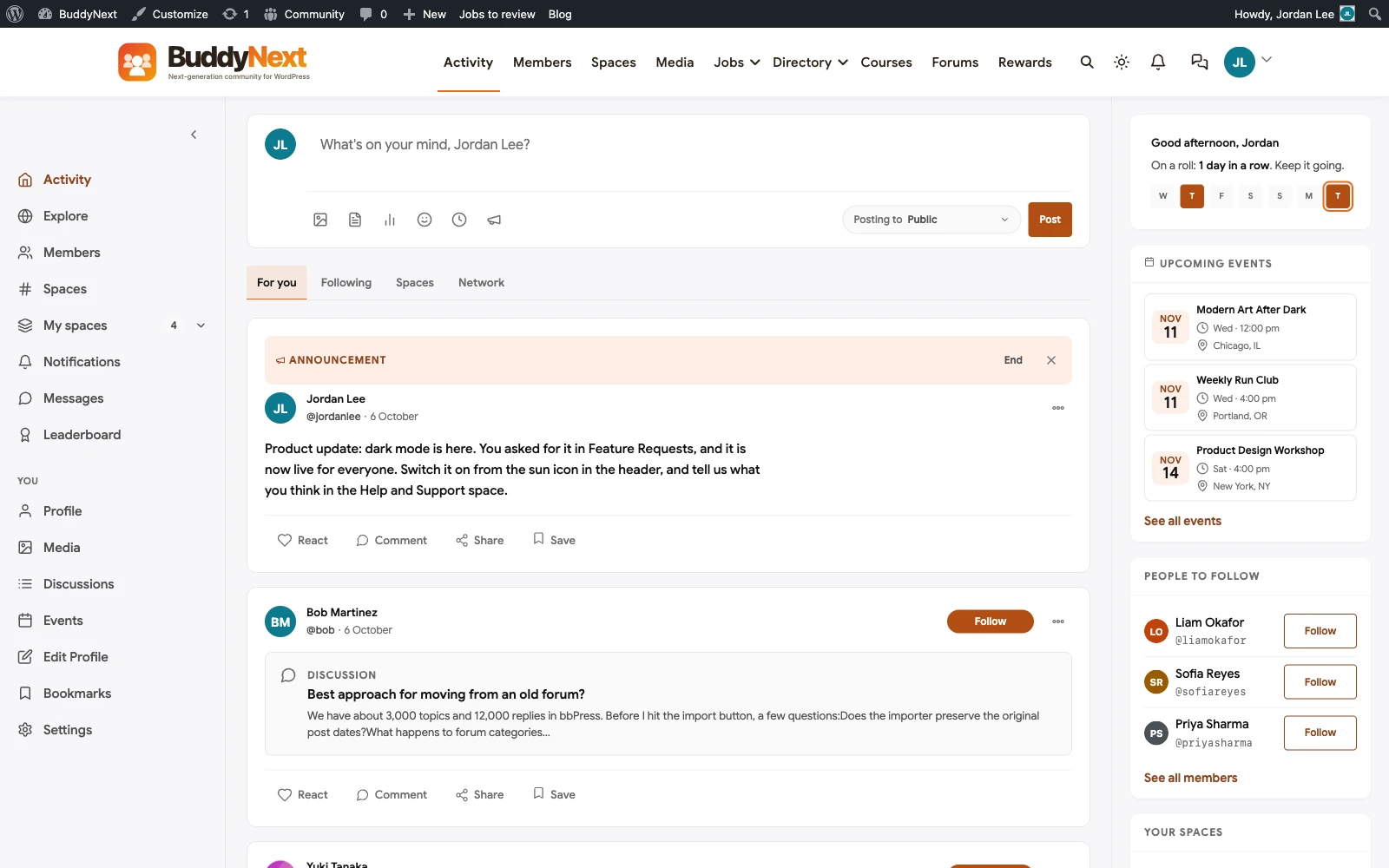
The infrastructure details matter too, and they’re the kind of thing that only shows up once you’ve actually run a community for a few months: a progressive web app so members get an app-like experience without a separate mobile build, eighteen Gutenberg blocks for laying out community pages, over a thousand hooks for developers who need to customize behavior rather than just appearance, a full REST API, WP-CLI support, webhooks, and a branded email engine with digest options so members aren’t flooded with one notification per action. It requires WordPress 6.9 and PHP 8.2 or newer, and it is a genuinely new codebase rather than a BuddyPress fork, which matters for anyone who has been burned by inherited technical debt in an older plugin.
On monetization, BuddyNext has native Stripe-powered membership tiers built into the core: monthly, yearly, one-time pricing, trials, gated spaces, and an MRR dashboard, with no per-member or transaction fee taken by the platform itself. It also connects to companion tools for courses with certificates, forums and Q&A with accepted answers, and gamification, so a single member base can carry a social feed, a paid course, and a support forum without three separate logins.
The honest trade-off: you’re running and maintaining a real WordPress platform, not a lightweight widget. That’s a fair cost for a community plugin with no seat caps and no feature ceiling, but it’s not a five-minute install if you want it configured well.
2. BuddyBoss Platform
BuddyBoss is the most direct competitor to BuddyNext: both are self-hosted, both build on top of (or replace) BuddyPress’s social core, and both ship courses, groups, and a branded mobile app path. BuddyBoss has a longer track record and a bigger existing ecosystem of themes and add-ons built specifically for it, since it’s been the default choice for WordPress community builders for years. Where it differs from BuddyNext is architecture: BuddyBoss is still built on top of BuddyPress’s data model, which means some of the same long-standing BuddyPress quirks and plugin-compatibility assumptions carry forward. BuddyBoss also sells its App product (a native mobile app builder) as a separate purchase from the core Platform plugin, which is worth budgeting for separately if a dedicated app, not just a mobile-friendly website, is part of the plan. If you want the platform with the biggest existing third-party ecosystem and the most years of production use behind it, BuddyBoss is the safer bet. If you want a community core built from scratch for 2026 WordPress with no legacy data model underneath, BuddyNext is the newer architecture.
3. BuddyPress
BuddyPress is the free, open-source plugin that started the WordPress community space, and it’s still actively maintained. Activity streams, groups, member profiles, and private messaging are all there, for free, forever. The catch is that BuddyPress alone is a social core, not a complete platform: courses, paid memberships, forums with real Q&A, and gamification all require separate plugins layered on top, each with its own settings screens, its own update cycle, and no guarantee they’ll play nicely together. Free is free, but assembling five or six plugins to match what BuddyNext or BuddyBoss ship as one coherent product is a real, ongoing maintenance cost that doesn’t show up on the price tag: each add-on has its own release schedule, its own support forum, and its own chance of breaking when WordPress core or another plugin updates. BuddyPress is also the technical foundation BuddyBoss was originally built on, so a lot of what you read about BuddyBoss’s underlying data model and known quirks applies here too, just without the polish layered on top.
4. PeepSo
PeepSo’s standout feature is real-time chat that feels closer to a native messaging app than most WordPress plugins manage, with read receipts and typing indicators out of the box. It covers the standard community basics (profiles, groups, activity feed) competently. The friction is pricing: PeepSo sells its features as a bundle of individual add-ons, and the full bundle runs from around $199 a year up to roughly $7,117 a year at the highest tier, which adds up fast once you want more than the core plus one or two extras. If real-time chat is the one feature you actually need, it’s worth the look. If you need the full platform (courses, gamification, deep moderation), price out the bundle against the alternatives above first, since the per-feature pricing model means the final bill depends entirely on which add-ons you end up needing, and that number tends to grow after launch, not shrink.
5. FluentCommunity
FluentCommunity comes from the team behind FluentCRM, and it bundles community spaces with course delivery in a single, fast, modern-feeling interface. It’s a newer entrant, which means a smaller track record and fewer third-party integrations than BuddyPress-era plugins, but it’s actively developed and the FluentCRM team has a solid reputation for shipping fast software. Worth evaluating if you’re already in the Fluent ecosystem (FluentCRM, FluentForms) and want your community plugin to match that stack, with the caveat that you’re betting on a product that hasn’t been through as many years of edge cases yet. The upside of being newer is that it was designed around how people actually use community platforms today, rather than evolving feature by feature over a decade, which shows up as a noticeably cleaner, faster admin and member experience than some of the older entrants on this list.
6. Ultimate Member
Ultimate Member’s actual strength is profiles and a member directory: custom profile fields, member types with different access rules, and a clean directory and search experience, all genuinely well executed. It is not a social-feed or activity-stream plugin, though, so if “community” to you means a feed people scroll and post to, Ultimate Member on its own won’t get you there; you’d be pairing it with something else for that layer. For a site where the member directory and gated profiles ARE the community, such as a membership association, an alumni network, or a professional registry, it’s a strong, focused choice. It also has a genuinely large extension marketplace built up over many years, which helps if your directory needs get specific (verified badges, custom search filters, social-login-only registration).
7. ProfileGrid
ProfileGrid takes a groups-first approach: instead of one flat member directory, you define distinct member types (staff, customers, students) each with their own registration fields, their own group-specific privacy rules, and their own sign-up flow. That’s genuinely useful for a site serving more than one kind of member, where a single generic registration form doesn’t fit everyone equally well. Where it runs into a ceiling is the same place Ultimate Member does: it’s a profile-and-group tool, not an activity-feed platform, so a site that actually wants a scrolling community feed will still need to add that layer separately.
Quick comparison: BuddyNext vs BuddyBoss vs BuddyPress vs PeepSo vs FluentCommunity vs Ultimate Member vs ProfileGrid
- BuddyNext: complete platform, new architecture, native Stripe tiers, no seat caps. Best fit: anyone building a community meant to grow for years.
- BuddyBoss: complete platform, built on BuddyPress’s data model, biggest existing ecosystem. Best fit: teams that want the most third-party themes and add-ons already built for it.
- BuddyPress: free social core only, no courses or paid tiers built in. Best fit: a simple, no-budget community feed, assembled with other plugins for anything more.
- PeepSo: strong real-time chat, bundle pricing that climbs fast. Best fit: chat-first communities who’ve priced the full bundle carefully.
- FluentCommunity: fast, modern, newer with a shorter track record. Best fit: Fluent ecosystem users wanting a matching community plugin.
- Ultimate Member: excellent profiles and directory, no activity feed. Best fit: directory-first communities, not feed-first ones.
- ProfileGrid: groups-first with distinct member types and sign-up flows, no activity feed. Best fit: sites serving more than one kind of member with different data needs.
Getting the setup right the first time
Whichever plugin you land on, the mistake we see most often isn’t picking the wrong one, it’s installing the right plugin and then skipping the configuration work that actually determines whether members stick around. That means setting moderation thresholds before launch, not after the first problem post; deciding your privacy defaults for new spaces and groups deliberately, rather than leaving whatever the plugin ships with; and testing the mobile experience specifically, since most community engagement now happens on a phone, not a desktop browser. A community plugin installed with default settings and no review is a liability sitting quietly until the day it isn’t.
It’s also worth testing with real test accounts, not just your own admin login, before you invite real members. Permissions bugs, broken registration flows, and moderation tools that don’t actually notify anyone when they fire are the kind of thing that only show up when you’re using the site as a normal member would, and they’re far cheaper to catch before launch than after a hundred people have already signed up.
Related reading
If membership and paid access is the actual driver behind wanting a community plugin, our WordPress membership plugins roundup covers that specifically, including where BuddyNext’s native Stripe tiers fit against dedicated paywall plugins. If forums and real Q&A matter more than a social feed, see our forum plugins comparison and our question and answer plugins roundup, both of which cover tools built specifically for discussion rather than a general social feed. And if you’re coming from a hosted SaaS platform like Circle or Skool rather than starting fresh on WordPress, our Circle alternatives and BuddyPress alternatives articles cover that specific migration path, including what you can expect to carry over and what you can’t.
FAQ
Do I need a community plugin if I already have comments enabled on my posts?
No, and you may not need one at all if post comments are genuinely enough for your site. A community plugin makes sense once people need profiles, ongoing conversations that aren’t tied to a single post, or a reason to come back to the site itself rather than just reading an article and leaving. If comments already do the job, adding a full community plugin is extra maintenance for no real gain.
Is BuddyPress still a good choice in 2026?
For a genuinely simple, free community feed with no budget at all, yes. For anything beyond that, like courses, paid tiers, or real Q&A, you’ll be assembling several separate plugins to match what a complete platform ships as one product, and that assembly carries its own ongoing maintenance cost even though BuddyPress itself is free.
Which of these plugins works best for a paid membership community?
BuddyNext, since its Stripe-powered membership tiers are native to the platform with no per-member or transaction fee taken on top. BuddyBoss also supports paid memberships through its own and third-party tools. BuddyPress, PeepSo, FluentCommunity, and Ultimate Member all need a separate membership plugin layered on top to charge for access.
Can I switch community plugins later without losing my members?
Member accounts (usernames, emails, passwords) generally survive a switch since they’re standard WordPress users. Everything built on top, profile fields, group memberships, activity history, does not transfer cleanly between different plugins, because each one models that data differently. Picking carefully the first time costs less than migrating later.
What’s the real difference between a “community plugin” and just using BuddyPress add-ons?
A complete platform like BuddyNext or BuddyBoss is built and maintained as one coherent product by one team, with courses, memberships, and moderation designed to work together from the start. A BuddyPress-plus-add-ons stack is several separate products from separate teams, each updating on its own schedule, with compatibility between them never formally guaranteed. Both can work; the platform approach just carries less ongoing risk of one update breaking another plugin’s integration.
How many members can a self-hosted WordPress community plugin actually handle?
There’s no plugin-level member cap on any of the options above, the real limit is your hosting. A well-configured WordPress site on decent hosting handles communities from a few dozen members up to tens of thousands without special infrastructure; past that, the conversation shifts to caching, database optimization, and possibly a managed WordPress host built for scale, not to a different plugin.
Do I need a separate forum plugin if my community plugin already has groups?
Groups and a forum solve different problems. Groups organize people around a shared interest or project with an ongoing feed; a forum organizes long-running threaded discussions meant to be searched and found again months later. Some communities need both. If structured Q&A with accepted answers is the actual goal, a dedicated tool like Jetonomy or a forum plugin will outperform trying to force that workflow into a generic group feed.
Will a community plugin slow down my WordPress site?
Any plugin that adds database tables, real-time features, and a steady stream of member-generated content adds some load, and a poorly built one can genuinely hurt your site’s speed. The honest fix isn’t avoiding community plugins, it’s making sure whichever one you pick is paired with caching that actually understands logged-in, personalized content (most caching plugins skip logged-in users entirely, which defeats the point on a community site) and hosting that can handle a real-time workload. This is one of the areas where a plugin built as a coherent platform, with its own query optimization baked in from the start, tends to hold up better than a stack of five separate add-ons each querying the database their own way.
Should I pick a theme built for community plugins, or can I use any WordPress theme?
You can technically run a community plugin on any theme, but a theme that was never designed for feeds, directories, and profile pages tends to show it: cramped layouts, awkward spacing around activity cards, and a mismatch between the plugin’s design language and the rest of your site. BuddyNext pairs with a dedicated theme built specifically for community screens, with a token-based styling system so the look stays consistent across feeds, directories, and profile pages rather than being patched together page by page. If you’re already committed to a specific theme for other reasons, test the actual community pages on it before launch rather than assuming it will just work.
Plugins we build and run
We maintain these ourselves, which is why we can support them on your site.
- BuddyNextThe self-hosted community engine for WordPress
- BuddyXFree community theme, Pro when you outgrow it
- ReignPremium community theme. Add pieces, build anything
- JetonomyCommunity forum and Q&A for WordPress
- EventonomyEvents and RSVPs for WordPress communities
- LearnomyCourses and learning communities on WordPress
- ListoraDirectories and listings your members can browse
- SnipShareCode sharing built for developer communities
- WB Ad ManagerAd placements that turn traffic into revenue
- WP Career BoardA job board your community actually uses
- WP Sell ServicesSell services with offers, orders, and payouts
- MediaVersePhotos, video, and media albums for members
- WB GamificationPoints, badges, and rewards that keep members active
- Product RoadmapPublic roadmaps with voting your users trust