Best wpForo Alternatives in 2026 (What a Standalone Forum Can't Do)
wpForo is a genuinely solid free forum plugin. What it can't do once a forum needs to be part of a broader community, and the alternatives, including BuddyNext with Jetonomy running forums and Q&A as a native, connected feature.
wpForo comes up constantly in our client work, usually from a team that wants an actual forum on WordPress rather than a comment section pretending to be one. It’s a reasonable plugin, and we’re not here to talk anyone out of it blind. This article looks at what wpForo actually does, where a standalone forum plugin runs into real limits, and what the alternatives look like, including a platform that treats forums and Q&A as a native part of a bigger system instead of a bolt-on feature.
The reason this question keeps landing on our desk rather than getting answered in a five-minute plugin comparison is that “which forum plugin” and “what kind of community are we actually building” turn out to be the same question asked at two different altitudes. A team that picks a forum plugin first and figures out the rest of their community strategy later often ends up doing real migration work twice: once to get the forum live, and again a year later when the membership tier or the member directory they added on top doesn’t talk to it cleanly. We’d rather walk through that altitude question once, up front, than fix the result of skipping it after the fact.
Short version, if you want to skip ahead: BuddyNext (paired with Jetonomy) is the alternative we’d point you to, and why is the rest of this article. Keep reading for the full, honest comparison.
What wpForo actually is
wpForo is a free, actively maintained WordPress forum plugin. The core is genuinely free on WordPress.org, not a crippled trial, and it covers the basics well: multiple discussion boards, three layout modes (Q&A, Threaded, and Classic Forum), user profiles, badges, built-in SEO structure, drag-and-drop board management, forum content caching for speed, and private messaging between members. Version 3.1.5 shipped in August 2026, and it holds a 4.7-star average across roughly 390 reviews on WordPress.org, a solid, stable reputation for a plugin that’s been around for years.
Where it starts costing money is the add-on ecosystem. The free core gets you a working forum; the extras (private messages beyond the basics, polls, ads management, custom user fields, and others) are sold as separate paid add-ons, with a full bundle running around $290. That’s the normal WordPress plugin model: free core, paid depth, and it’s a fair one. It just means the honest total cost of a fully-featured wpForo setup is higher than the “free plugin” framing suggests at first glance.
If what you need is specifically a forum, nothing more, wpForo is a legitimate, well-built choice, and we’d say so to any client asking. The friction shows up when the forum is meant to be part of something larger.
It’s also worth being specific about what wpForo gets right technically, because a lot of forum plugins don’t. Its SEO structure (clean, crawlable URLs for boards and threads, proper heading hierarchy) is genuinely solid out of the box, which matters a great deal for a forum, since a forum’s long-term value often comes from old threads still ranking and answering search queries years after they were posted. Its caching layer keeps high-traffic boards from becoming the slowest part of a site, something plugins built with less attention to performance routinely get wrong. These are real engineering strengths, and any honest comparison has to credit them rather than wave them away in favor of the platform we’re ultimately recommending.
Where the friction actually is
It’s a forum, not a community
wpForo does one job and does it reasonably well: threaded or Q&A-style discussion boards. It is not a social feed, not a member directory with rich profiles, not a membership or monetization layer, and it doesn’t do courses or events. If your actual need is “a forum,” that focus is a feature, not a flaw. If your actual need is “a community that happens to include a forum,” you’re going to be running wpForo alongside a separate community plugin, a separate membership plugin, and however many other tools your other requirements need, each with its own update cycle, its own user-role model, and its own potential for the kind of conflict that eats a Friday afternoon.
Q&A mode is a layout choice, not a connected feature
wpForo’s Q&A layout is genuinely useful; it gives you accepted-answer style threads instead of flat chronological replies. But it’s one of three board-level layout modes you pick per board, not a system that understands the difference between “a casual discussion” and “a support question that needs resolving” across your whole site. There’s no accepted-answer workflow that ties into a reputation system, a knowledge base, or a product roadmap elsewhere in your stack, because wpForo doesn’t have a stack elsewhere. It’s self-contained by design.
The add-on model means real features behind real paywalls, one at a time
Needing polls, or ads management, or custom profile fields means buying the specific add-on that covers that one feature, not moving up a tier that covers everything at once. For a small forum that only ever needs the free core, this is a non-issue. For a growing one that keeps discovering it needs “just one more” add-on, the cost adds up in a way that’s harder to predict upfront than a flat platform subscription would be, and each add-on is one more piece of code to keep updated and compatible with the rest.
A standalone forum is also a standalone attack surface and a standalone update cycle
This is the part that shows up in our actual client work more than in any feature comparison chart. Every plugin running on a site is something that needs its own update schedule tracked, its own compatibility checked against every core WordPress update, and its own security posture reviewed. wpForo plus a separate membership plugin plus a separate community plugin isn’t just three tools doing three jobs; it’s three separate vendors’ release cadences you’re now responsible for keeping in sync, and three separate places a vulnerability or a breaking change can originate. None of that is a knock on wpForo’s own code quality specifically. It’s the structural cost of a multi-plugin stack versus one coherently maintained platform, and it’s the kind of cost that doesn’t show up until a client calls us after an update broke something nobody could reproduce in a sandbox.
The alternatives, in order of what we’d actually recommend
1. BuddyNext with Jetonomy: forums and Q&A as a native part of one platform
BuddyNext is a complete WordPress community platform: activity feed, Spaces (groups), member profiles and a directory, messaging, deep native moderation, and native Stripe membership tiers, all in one coherently built system rather than a stack of separately maintained plugins. Forums and Q&A specifically come through Jetonomy, which auto-integrates with BuddyNext with zero extra configuration, giving you threaded discussions and accepted-answer Q&A with ideas boards (the kind of “planned to shipped” status tracking a product or support community actually needs) connected to the same member accounts, the same reputation and profile data, and the same moderation tools as the rest of the platform. Jetonomy also runs standalone if forums are genuinely all you need right now, and connects into BuddyNext later without a second migration if your needs grow.
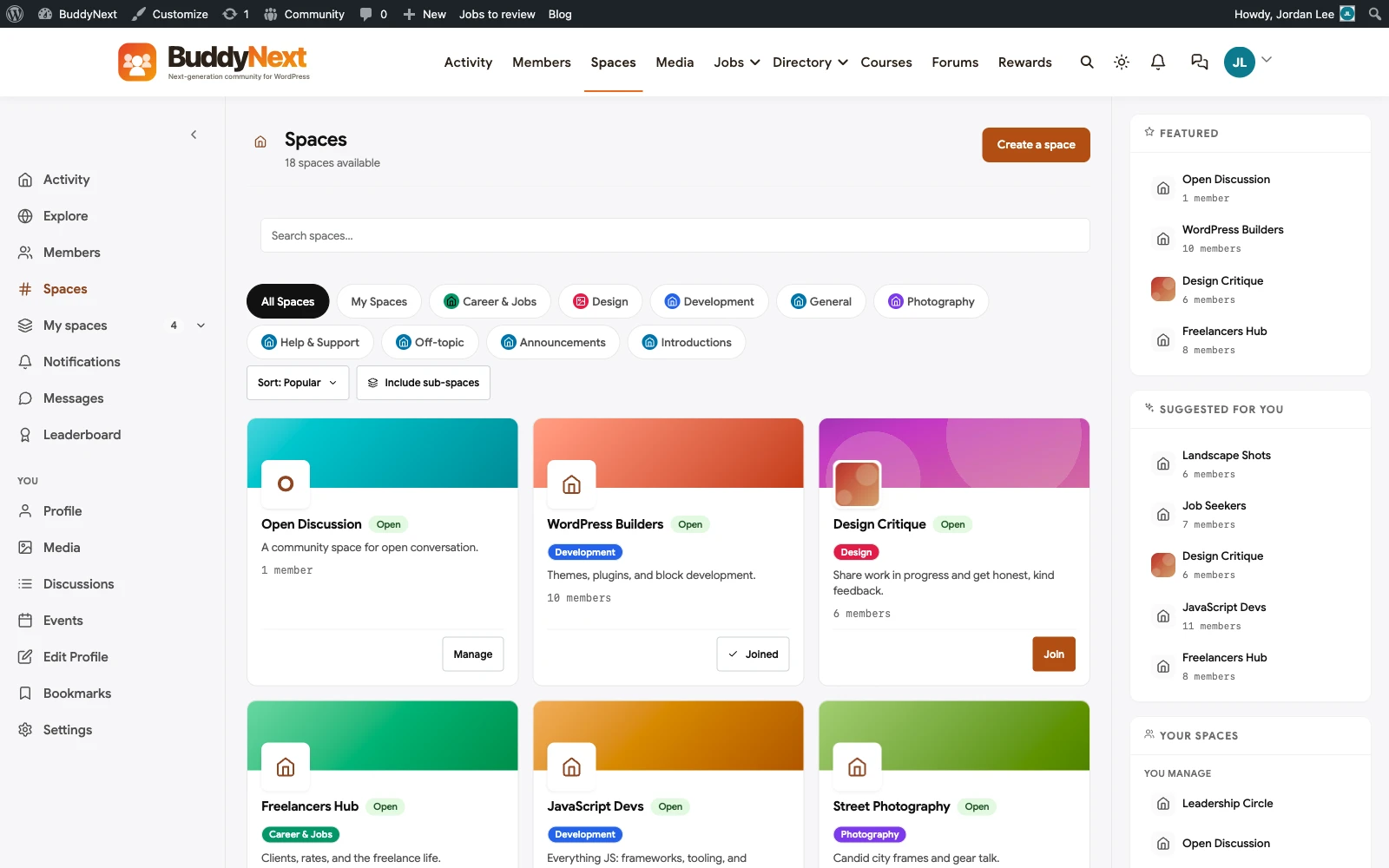
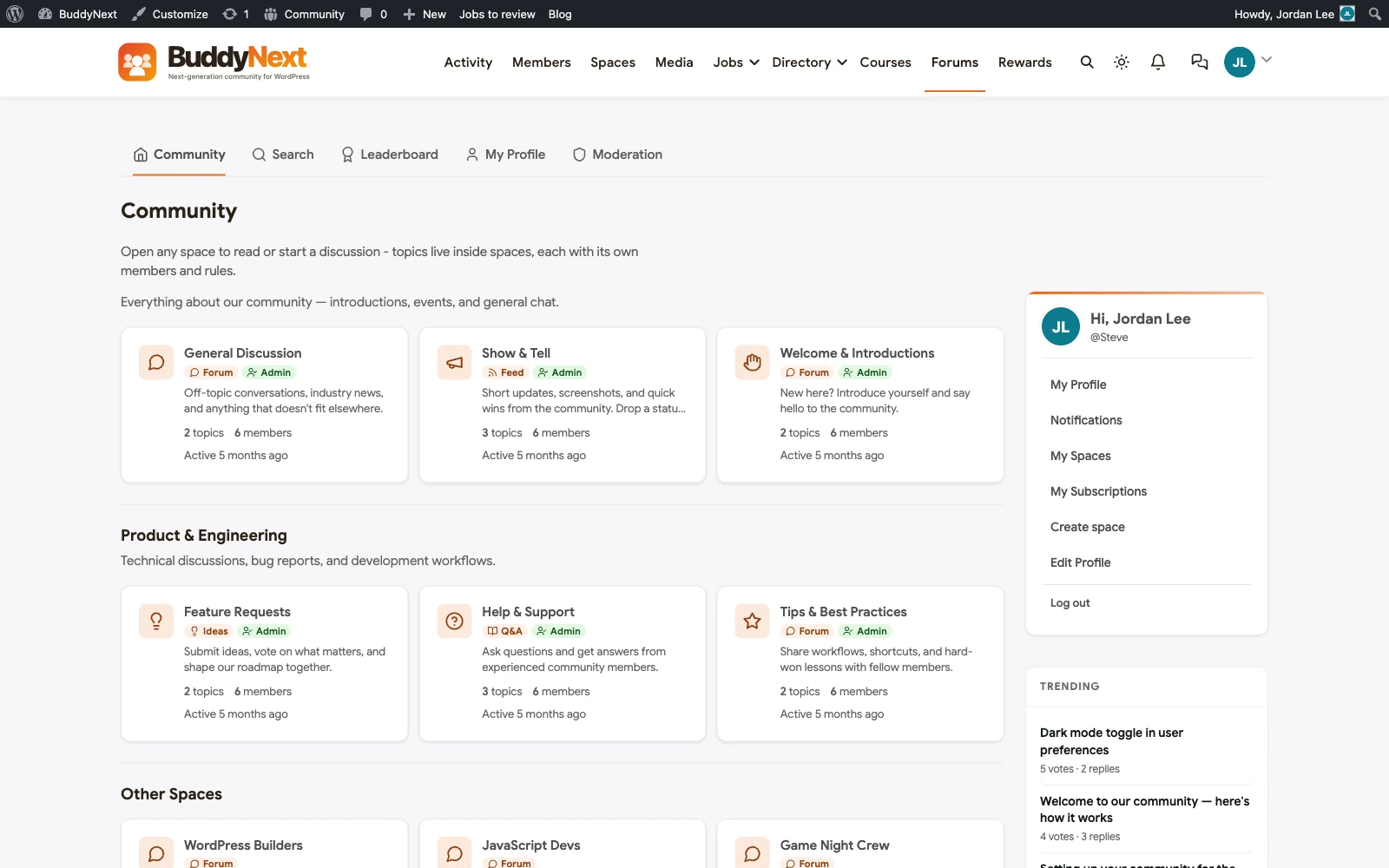
The honest comparison to wpForo: if a forum, full stop, is the entire requirement, wpForo’s free core is a lighter, cheaper starting point, and we won’t pretend otherwise. BuddyNext with Jetonomy is the right call when the forum is one piece of a broader member experience you’re building now or expect to need within the next year or two, because retrofitting a community platform around an existing standalone forum later is real migration work you can avoid by choosing the connected option up front.
The migration decision, in one sentence
If you can point to a specific feature you need beyond “a place to post threads” and name it right now (membership billing, a member directory, an activity feed, courses), move to a platform that includes it natively. If you can’t name one, wpForo plus the right single add-on is still the better-sized tool for the job.
2. Discourse: the dedicated, modern forum platform, run alongside WordPress rather than inside it
Discourse is widely considered the best-in-class dedicated forum software, full stop, independent of WordPress entirely. It’s typically run as a separate hosted or self-hosted service and linked to a WordPress site rather than installed as a plugin. If your forum’s technical and community-management needs have outgrown anything WordPress-native (very high-volume discussion, sophisticated trust-level and moderation automation, a dedicated forum-first user base), Discourse is worth evaluating on its own terms. The trade-off is real: it’s a separate system with its own hosting, its own login experience (even with SSO bridging), and its own learning curve for your team, not something that lives inside your existing WordPress admin.
3. BuddyBoss or PeepSo, if forums are secondary to a broader community need
Both BuddyBoss and PeepSo are established WordPress community platforms with their own forum or discussion capabilities built in, similar in spirit to what BuddyNext with Jetonomy offers. If you’re already leaning toward one of those ecosystems for other reasons, their native forum features may cover the job without adding wpForo at all. Worth comparing directly against BuddyNext on architecture and total feature set (see our dedicated BuddyBoss and PeepSo comparison articles) rather than treating “add a forum” as the deciding factor in isolation.
Where to actually draw the line
We get asked some version of “so which one is right for us” constantly, and the honest answer depends on three questions worth asking in order before picking anything off this list. First: do you have an actual, dated plan to add membership, profiles, or a broader social layer within the next year, or is “we might want a community someday” doing the work of a real requirement? If it’s the latter, that’s not a reason to migrate yet. Second: how much of your forum’s current value sits in search traffic to old threads versus active daily posting? A forum that’s mostly a living archive of search-indexed answers has a very different migration risk profile (redirect integrity matters enormously) than one that’s mostly live, daily discussion (member continuity matters more than URL preservation). Third: who actually maintains your WordPress install day to day, and do they already have the bandwidth to take on a bigger platform’s configuration surface, or are they already stretched thin keeping the current plugin stack updated? A team that’s barely keeping up with wpForo’s own add-ons and WordPress core updates is not a team that should also be learning a new platform’s admin UI under time pressure.
4. Stick with wpForo, and pair it deliberately
This is the honest fourth option: if wpForo’s free core plus the specific add-ons you actually need already does the job, and you don’t have a near-term plan to build a broader community around it, switching platforms purely for architectural tidiness is effort you don’t need to spend. wpForo paired intentionally with a separate, well-chosen membership or community plugin, each doing its own job well, is a legitimate stack. The point isn’t “replace wpForo no matter what.” It’s “know what you’re trading away by keeping the pieces separate, so it’s a decision and not an accident.”
Quick comparison: wpForo vs BuddyNext + Jetonomy vs Discourse vs BuddyBoss vs PeepSo
- wpForo: free core, paid add-ons. Best fit: a dedicated forum, nothing more, on a budget. Loses on being self-contained with no path into a broader community without adding other plugins.
- BuddyNext + Jetonomy: self-hosted, WordPress. Best fit: a forum or Q&A that’s part of a larger member experience now or soon. The trade-off: more platform to configure up front than a single-purpose plugin.
- Discourse: separate hosted or self-hosted platform. Best fit: high-volume, forum-first communities that have outgrown WordPress-native tools. Loses on living outside your WordPress admin entirely.
- BuddyBoss: self-hosted, WordPress, BuddyPress-based. Best fit: teams already committed to the BuddyBoss ecosystem for other reasons. Loses on the same dated BuddyPress-core architecture BuddyNext was built to move past.
- PeepSo: self-hosted, WordPress. Best fit: a social-network-style community with forum features attached, not a forum-first product. Loses on forums being a secondary feature rather than the core strength.
If you decide to move to BuddyNext and Jetonomy, here’s what actually has to happen
Migrating an active wpForo community isn’t a plugin swap, and treating it like one is how threads and reputations go missing.
The real work has three parts. First, content: wpForo’s discussion threads, including who posted what and when, need a deliberate export and import plan rather than a hope that activation handles it. Decide up front what you’re carrying over (thread content, authorship, timestamps) versus what you’ll accept rebuilding (vote counts, accepted-answer flags on old threads) so members aren’t surprised later. Second, user accounts and roles: wpForo’s moderator and user-level permissions need to be re-mapped to BuddyNext and Jetonomy’s own role system by hand, checked against your actual current moderator list, not assumed to carry over automatically. Third, URLs: wpForo’s forum and thread URLs are indexed in Google and linked to from elsewhere on your site. A careful migration maps old URLs to their new equivalents with proper redirects, so none of that indexing or inbound linking gets thrown away on cutover day.
That’s the part of this work we actually do for clients: code review, migration planning, and the redirect and data-mapping work that keeps a forum migration from quietly losing years of discussion history. If you’re seriously evaluating the move, that conversation is worth having before you deactivate a single plugin.
Worth a specific word on timing. The riskiest way to run this migration is a single weekend cutover with no parallel-running period, because a forum’s failure mode is quiet: a broken redirect doesn’t throw an error, it just serves a 404 to a search visitor who silently bounces, and you won’t notice the lost traffic until the next month’s analytics review. Run the new boards alongside the old ones (read-only on the wpForo side) for at least a week, have a handful of regular posters test their actual old threads under the new URLs, and only then make the wpForo plugin’s deactivation the last step rather than the first.
FAQ
Is wpForo actually a bad plugin, or just limited in scope?
It’s a well-built, actively maintained plugin that does its specific job, standalone discussion forums, well. It’s not bad. It’s narrow by design, and the question worth asking isn’t “is wpForo good” but “is a standalone forum actually all I need,” because that’s the honest fork in the road this whole comparison is about.
Do we lose our existing wpForo discussions if we switch to BuddyNext and Jetonomy?
Not automatically, but it’s not automatic either way. Thread content and authorship can be carried over with a deliberate export and import plan. Things tied specifically to wpForo’s internal data model, like vote counts or layout-specific metadata, are the likely losses. Plan the migration around what you can verify will transfer cleanly.
Can Jetonomy do everything wpForo’s Q&A layout does?
It covers the core of it, accepted-answer threads, and goes further by connecting that Q&A activity to member profiles, reputation, and (if you add BuddyNext) an ideas-board workflow that tracks a question from asked to resolved to shipped. What it doesn’t do is replicate wpForo’s exact layout-switching mechanic board by board, since Jetonomy’s Q&A is its own dedicated format rather than one of several interchangeable board types.
Is it worth paying for the full wpForo add-on bundle instead of switching platforms?
If a forum is genuinely your whole requirement and you’re not planning a broader community, yes, that’s a reasonable and often cheaper path than a platform migration. The add-on bundle cost is a one-time or recurring plugin expense, not a sign you’ve outgrown wpForo. Only treat it as a signal to switch if the add-ons you keep needing are really symptoms of wanting a broader community platform, not just a fuller forum.
How long does a wpForo-to-Jetonomy migration actually take?
For a small to mid-sized forum with a straightforward board structure, a careful migration with proper URL redirects and role mapping typically runs one to two weeks, most of it spent verifying content and redirects rather than the technical setup itself, which is comparatively quick. A forum with years of high-volume discussion and heavy internal linking from other parts of your site should budget more time for the redirect-mapping work specifically, since that’s what protects your existing search rankings through the move, and we’d rather quote a longer timeline upfront than discover the real scope halfway through a rushed weekend cutover.
Does Jetonomy require BuddyNext to work, or can we add just the forum piece first?
Jetonomy runs standalone. You can adopt it purely as a forum and Q&A replacement for wpForo now, and connect it into the full BuddyNext platform later if your community needs grow, without a second migration for the forum content itself.
How do we know if we’re the team that should just stay on wpForo?
If your honest answer to “what else does this community need beyond threaded discussion” is nothing concrete, stay. Revisit the question the day that answer changes, not before.
Will switching away from wpForo hurt our search rankings on old threads?
Only if the migration skips the redirect work. wpForo’s SEO structure means a lot of its value is in years of indexed, individually-ranking threads, so the single biggest risk in any migration away from it is breaking those URLs rather than losing the content itself. A proper migration maps every old board and thread URL to its equivalent on the new platform with permanent redirects before cutover, not as an afterthought once members start reporting broken links.
What if our community genuinely only needs a forum and nothing else, now or later?
Then stay on wpForo. We’re not going to manufacture a reason to recommend a bigger platform to a team that has correctly sized its own need. The honest trigger for this whole comparison is a concrete, near-term plan to add membership, profiles, or a broader social layer around the forum, not a vague sense that a “platform” sounds more serious than a “plugin.” If that plan doesn’t exist yet, revisit the question when it does.
Plugins we build and run
We maintain these ourselves, which is why we can support them on your site.
- BuddyNextThe self-hosted community engine for WordPress
- BuddyXFree community theme, Pro when you outgrow it
- ReignPremium community theme. Add pieces, build anything
- JetonomyCommunity forum and Q&A for WordPress
- EventonomyEvents and RSVPs for WordPress communities
- LearnomyCourses and learning communities on WordPress
- ListoraDirectories and listings your members can browse
- SnipShareCode sharing built for developer communities
- WB Ad ManagerAd placements that turn traffic into revenue
- WP Career BoardA job board your community actually uses
- WP Sell ServicesSell services with offers, orders, and payouts
- MediaVersePhotos, video, and media albums for members
- WB GamificationPoints, badges, and rewards that keep members active
- Product RoadmapPublic roadmaps with voting your users trust