Best Platforms to Build a No-Code Developer Community
The platform comparison lives on buddyxtheme. Here's what it takes to build a verified template library, video-heavy Q&A, and a real migration path off Facebook groups.
A no-code developer community has a different content shape than a code-heavy one, and most generic community platforms are built around the wrong assumption for it. The valuable content here is rarely a text snippet; it’s a Bubble app’s workflow editor, a Webflow component tree, an Airtable base structure, or a Zapier/Make automation chain, all of which are fundamentally visual. A platform optimized for text-and-code Q&A renders this audience’s best content as an awkward wall of screenshots with no real structure, which is exactly the failure mode that makes a purpose-built community worth the investment over a generic Facebook group.
For the full platform comparison across this audience’s real options, see buddyxtheme.com’s no-code developer community breakdown, which weighs BuddyNext against Circle, Discourse, and the Facebook-group default most of this audience starts in. This piece picks up where that comparison leaves off: what it actually takes to build a platform around visual, screenshot-and-video-heavy content, the migration path off Facebook groups specifically, and the maintenance commitment once it’s live.
Worth naming the underlying irony upfront: this is a community of people who build software without writing code, gathering to discuss tools built by other people, on a platform that, if it’s going to be worth the switch from a free Facebook group, needs real engineering behind it. That’s not a contradiction so much as a reminder that “no-code” describes what members build with, not what the community platform supporting them needs to be built with. The platform itself still benefits from genuine software engineering, even though its audience’s own craft avoids it.
What building this community actually involves
First-class support for screenshots, embedded video, and annotated walkthroughs. A no-code builder explaining a Bubble workflow needs to post a sequence of annotated screenshots or a short screen recording, not a code block. The Q&A module needs to handle multiple images per post cleanly (a gallery or stacked layout, not one image squeezed awkwardly into a single-image field), support embedded video (a Loom link or an uploaded clip rendered inline, not just a bare URL), and keep image quality high enough that a small UI detail in a screenshot is actually legible.
Tool-tagging across a genuinely fragmented landscape. Unlike the n8n or agent-developer communities, “no-code” spans Bubble, Webflow, Airtable, Softr, Glide, Zapier, Make, and others, often combined in the same project. A thread needs to be taggable by which tools it involves, searchable by tool, so a Bubble-only builder doesn’t have to wade through Webflow-specific threads to find what’s relevant. This tagging needs to support multiple tools per thread from day one, since most real no-code builds stitch two or three tools together.
A template and component library, not just discussion. The highest-value content in a mature no-code community is often a reusable asset: a cloneable Bubble template, a Webflow component, an Airtable base others can duplicate. This is a different content type from a Q&A thread (it needs a clear “what this does,” a link or file to clone/import, and a way to show it working, usually a short demo video) and benefits from living in its own structured area rather than buried as an attachment inside a forum post.
A concrete example: a template submission that’s actually trustworthy
The hard problem with any shared-template library is the same one the n8n workflow library faces: trust that the thing still works. For no-code specifically, the failure mode is worse, because a Bubble template built against an older version of the Bubble editor can break in subtle, hard-to-diagnose ways rather than failing cleanly on import. A template submission form that requires a short demo video showing the template actually working, plus a “last confirmed working” date the submitter (or a later verifier) can update, does more to build trust than any amount of written description.
Building this on Jetonomy’s Q&A content model inside BuddyNext means adding a structured post type: a video-embed field, a “last confirmed” date field, and the same community-flagging mechanism used in the n8n workflow library, so members can flag a template that no longer clones or imports correctly. This is a few days of focused work on top of the existing content model, and it’s the single highest-leverage build decision for this specific audience, since the template library is usually the main reason members stick around past their first question, long after whatever question originally brought them in has been answered and forgotten.
Moderation tooling built for a visual, screenshot-heavy community
Generic moderation tools assume the thing worth reviewing is text. Here, a moderator needs to actually look at every image in a multi-screenshot post to judge whether it contains a visible credential, and that’s a slower, more deliberate review than skimming text for a flagged keyword. The practical build: surface every image in a post at a reasonable preview size directly in the moderation queue (not as a row of thumbnails requiring a click to expand each one), and let a moderator blur or redact a specific region of an image before approving it, rather than rejecting the whole post outright over one leaked detail in one screenshot out of five.
Template submissions need a different moderation lens entirely: a moderator isn’t checking for spam so much as judging whether the demo video actually shows the template working, and whether the stated tool dependencies are accurately disclosed. This is closer to light editorial review than typical community moderation, and it’s worth being honest with your team about the time commitment that implies before launch, not discovering it once the first batch of template submissions arrives and nobody on the team has budgeted real hours to actually watch the demo videos.
If you’re migrating from a Facebook group
This audience disproportionately starts in Facebook groups, more than almost any other community type in this series, because that’s where no-code tool vendors themselves have historically pointed new users. Facebook groups have no meaningful export at all: no API access to pull historical posts at scale, no way to bulk-download shared files or images, and Facebook’s own terms restrict scraping even if you wanted to attempt it. This is the hardest migration case in the entire series to execute technically.
The realistic approach: don’t attempt a full historical migration. Manually identify and recreate the small set of genuinely evergreen, highest-value threads and templates (the ones members reference repeatedly, which a few active members usually know off the top of their head), rebuild those intentionally on the new platform, and treat everything else as a loss worth accepting rather than a migration worth attempting. Run both communities in parallel for a defined period, post the new platform’s best early content back into the Facebook group as a bridge, and set a real cutover date once the new platform has enough standalone value to justify the ask.
Be honest with the group about why you’re moving: Facebook’s own algorithm increasingly buries group content from members who don’t check in daily, and Facebook groups have no real search worth trusting for anything beyond the last few weeks of posts. Members who’ve felt that pain firsthand are receptive to this argument; members who haven’t need to see the new platform’s template library and search actually work before they believe the move is worth the disruption, so lead the announcement with a working demo of the new platform’s search surfacing a real answer in seconds, not a promise about what it will eventually do once more content exists.
A relationship most other communities in this series don’t have to manage: the tool vendors themselves
No-code tool vendors (Bubble, Webflow, Airtable, and the rest) actively court community builders, since a strong third-party community reduces their own support burden and deepens lock-in to their platform. This cuts both ways for a community owner. On the upside, it’s realistic to get a vendor’s attention for co-marketing, early access to beta features worth covering first, or even direct support channels into their team for escalating member-reported bugs, none of which are generally available to a typical community in this series.
On the downside, it means the vendor relationship needs active management, not passive hope: a breaking change to Bubble’s editor or Airtable’s API can invalidate a meaningful share of your template library overnight, and staying ahead of that requires someone on your team actually tracking vendor changelogs and beta announcements for every tool your community covers, not just reacting once members start reporting breakage. Build this monitoring into the same maintenance cadence as the template-verification work, since the two are closely related: a vendor update is usually the actual root cause behind a wave of “this template stopped working” flags, and catching that pattern early turns a confusing scattered set of individual complaints into one clear, explainable incident worth a single pinned announcement.
Security and trust, specific to this audience
No-code tools authenticate against a lot of connected services (Zapier and Make both broker access to dozens of third-party APIs), and members troubleshooting an integration will, at some point, share a screenshot that includes a visible API key, OAuth token, or webhook URL in an unredacted settings panel. The same baseline reporting and scanning flow applies as everywhere else in this series, with one adjustment: automated text-based credential scanning catches less here, since the leak is as likely to be visible inside a screenshot image as it is in post text. A pinned, specific guide on blurring or cropping sensitive fields before posting a screenshot is worth producing and repeating prominently, since this is genuinely a harder problem to catch automatically than a pasted API key in plain text, and the written reminder itself does more real work here than any detection tooling could.
There’s also a lower-stakes but real trust issue specific to template sharing: a cloned Bubble app or Airtable base can carry hidden logic (a workflow that silently calls an external API, a formula that references a third party’s paid service) that isn’t obvious from a screenshot alone. Encouraging submitters to document what external services a template depends on, and flagging templates that require the cloner’s own paid API keys to function, keeps the library honest about what “free to clone” actually requires downstream.
A practical pattern worth adopting: a short, standardized “dependencies” field on every template submission, listing every third-party service it calls, whether each one requires a paid tier to function, and roughly what that service costs at the usage level the template assumes. A member deciding whether to clone a Bubble template that quietly requires a $50/month Airtable plan to actually work should see that cost upfront, not discover it after they’ve already invested an hour setting the template up, which is exactly the kind of avoidable frustration that quietly erodes trust in a library otherwise doing everything else right.
Hosting, cost, and the template-library maintenance burden
Traffic patterns here spike around no-code tool vendors’ own feature launches and conference announcements, same burst-capacity logic as the rest of this series: page caching, CDN coverage, and PHP worker headroom sized for the spike, not the average day. Video embeds add a specific hosting wrinkle worth planning for: either host video files yourself (real storage and bandwidth cost that scales with library size) or require members to upload via a free third-party host (Loom, YouTube unlisted) and only embed the link, which keeps your own hosting bill flat regardless of how much video content the community generates.
The maintenance line item that’s easy to underweight here is the template-verification cadence: someone needs to actually act on “no longer works” flags, which requires a team member who can test a Bubble or Webflow template hands-on, not just read a flag and guess. Budget real hours for this, scaled to how fast your specific library grows, rather than assuming the flagging mechanism alone keeps the library healthy without anyone actually following up on what it surfaces.
Picking the Q&A and template layer itself
Picking the Q&A and template layer itself
BuddyNext is the community and membership layer; Jetonomy’s Q&A module is what needs the multi-image, video-embed, and structured template-submission capability described above, and getting that layer right matters more here than in most communities in this series, because the entire differentiator over a Facebook group is “this content is actually organized, searchable, and trustworthy,” not just “this has a nicer UI.” A generic WordPress forum plugin bolted onto a generic community plugin, without a shared content model built for visual, multi-tool, template-centric content, will struggle to deliver this without meaningful custom development.
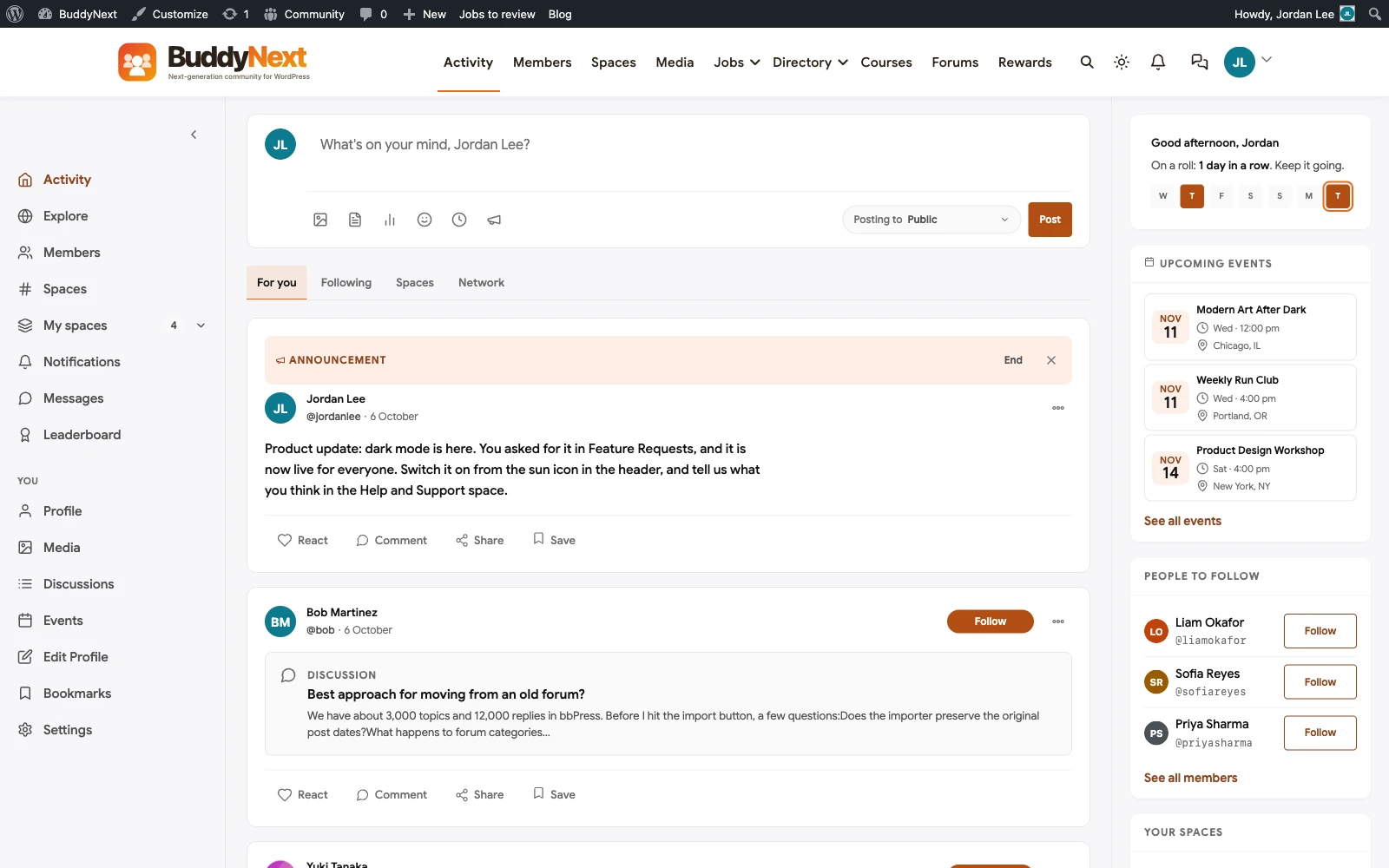
Scale the build to the real audience size: a smaller, single-tool community (just Bubble builders, say) might launch with just the Q&A and template modules active, adding course content only once there’s proven demand for structured paid training. Keep the surface area proportional to actual need, the discipline that applies across every build in this series, and resist the temptation to launch with every module turned on just because the platform makes it easy to do so.
What this actually costs to build and run
The custom pieces described above (multi-image galleries, video-embed support, the structured template-submission type, image-aware moderation tooling) are each bounded, specific additions to Jetonomy’s existing content model rather than a platform rebuild, and a focused team can typically land all of them in two to three weeks once the underlying content model is understood. Treat each as a discrete line item in the build plan, since an open-ended “make it work well for no-code builders” scope is how a reasonable build quietly becomes an expensive one.
Ongoing, budget hosting sized for the traffic-and-video pattern described above, a maintenance plan covering updates and the image-aware credential-scanning workflow, and real moderator hours for template verification specifically, which is the one cost in this list that scales with the library’s success rather than shrinking over time as the build matures. A template library that’s genuinely trusted and growing needs more verification attention over time, not less, and that’s a good problem to plan for rather than be surprised by once the library’s reputation starts actually driving new paid signups.
FAQ
How is this different from just running a well-organized subreddit for the same audience?
A subreddit gives you free hosting and an existing discovery surface, but no real control over the content model: no structured template-submission type, no multi-tool tagging built for this audience specifically, and no ownership of the member relationship if Reddit changes its API terms or your subreddit gets caught in an unrelated policy sweep. It’s a reasonable place to build initial awareness; it’s not a substitute for the owned, structured platform this piece describes once the community has real traction worth protecting.
Do we need separate sections for each no-code tool, or one unified community?
One unified community with strong tool-tagging, not separate sub-communities, is usually the better structure, since most real no-code builds combine multiple tools and a member asking about a Bubble-to-Zapier integration shouldn’t have to post in two separate places. Tagging solves the discoverability problem without fragmenting the member base.
How do we verify a shared template actually works before trusting it?
The demo-video requirement and community-flagging mechanism described above are the realistic approach; no platform can automatically verify that a Bubble template still clones correctly. Treat verification as an ongoing community process with real moderator follow-up, not a one-time gate at submission, since a tool vendor’s own update cycle will keep invalidating a share of the library regardless of how carefully each submission was reviewed on day one.
Is it worth charging for access to the template library specifically?
Yes, this is one of the more defensible paid-tier structures in this series, since a verified, actively-maintained template library has clear, demonstrable value distinct from general community access. Many successful no-code communities charge specifically for template-library access or for premium templates, with free general Q&A access as the top-of-funnel tier that drives signups into the paid tier once members see the library’s quality firsthand.
What’s the realistic risk of a cloned template breaking someone’s live app?
Real, and worth disclosing clearly: encourage members to test a cloned template in a sandbox or duplicate app before merging it into a production build, and make that caution a standard, repeated piece of pinned guidance rather than an assumption members will figure out on their own. This is a trust issue for the whole library if a bad template visibly breaks someone’s live project.
Should we migrate off Facebook entirely, or keep it running alongside the new platform?
Running both in parallel for a defined transition period, with the Facebook group gradually shifting toward “come see the real discussion on the new platform” messaging, works better than an abrupt cutover for this audience specifically, since many members found you through Facebook’s discovery surfaces and that acquisition channel has ongoing value even after the primary community moves.
How much video storage should we actually plan for?
If you require Loom or YouTube-unlisted embeds rather than direct uploads, essentially none, since the video lives on the third party’s infrastructure and you’re only storing a link. If you want native uploads for a more polished, ad-free viewing experience, budget real storage and bandwidth costs that scale with library size, and factor that into the hosting-tier decision rather than treating video as a free feature.
Do we need separate pricing for template access versus general Q&A access?
A common and defensible structure: free or low-cost general community access with Q&A and discussion, a separate paid tier specifically for the verified template library. This mirrors how a lot of successful no-code creators already monetize (a free community, a paid template shop), and the access-control build is the same tier-gating logic covered in the paid-community piece elsewhere in this series.
Related reading: for the platform comparison this build piece complements, see buddyxtheme’s no-code developer community breakdown. For adjacent technical audiences, see our AI automation community guide and our AI agent developer community breakdown. For the underlying plugin choice on WordPress generally, our WordPress community plugins comparison covers it in depth, and our Circle alternatives piece is worth reading if Circle is still on your shortlist.
Plugins we build and run
We maintain these ourselves, which is why we can support them on your site.
- BuddyNextThe self-hosted community engine for WordPress
- BuddyXFree community theme, Pro when you outgrow it
- ReignPremium community theme. Add pieces, build anything
- JetonomyCommunity forum and Q&A for WordPress
- EventonomyEvents and RSVPs for WordPress communities
- LearnomyCourses and learning communities on WordPress
- ListoraDirectories and listings your members can browse
- SnipShareCode sharing built for developer communities
- WB Ad ManagerAd placements that turn traffic into revenue
- WP Career BoardA job board your community actually uses
- WP Sell ServicesSell services with offers, orders, and payouts
- MediaVersePhotos, video, and media albums for members
- WB GamificationPoints, badges, and rewards that keep members active
- Product RoadmapPublic roadmaps with voting your users trust