Best Platforms to Build an AI Automation Community
The platform comparison lives on buddyxtheme. Here's what it takes to actually build, host, migrate to, and maintain a self-hosted AI automation community long-term.
An AI automation community has a specific failure mode other communities don’t: the content itself is unreadable on most platforms. A workflow screenshot gets pasted into a chat thread, scrolls away in a day, and the next person asking the same question never finds it. A member shares an n8n JSON export or a Make.com scenario as a wall of unformatted text, and nobody can tell where one node ends and the next begins. The platform you pick decides whether your best answers are searchable in six months or buried in a feed nobody scrolls back through, and that decision compounds: a year in, a community with a searchable, well-formatted Q&A archive has a real asset, while one that ran entirely on chat has a scroll history nobody can use.
Short version: for the full platform comparison (BuddyNext, Skool, Discord, Discourse, judged specifically on this audience’s needs), we’ve already written that breakdown at buddyxtheme.com’s AI automation community guide. BuddyNext comes out on top there for anyone who wants to own the community rather than rent it, and that’s the platform this article assumes you’re building on. What that guide doesn’t cover is what actually happens after you pick it: the real build, the migration if you’re moving an existing group off Skool or Discord, and the security and maintenance work specific to a technical audience that’s going to paste API keys into a support thread sooner or later. That’s the part we actually do for clients, so it’s the part worth getting right here.
What building this community actually involves
Three things separate a working AI automation community from a generic one, and all three are build decisions, not platform-selection decisions.
Code and workflow rendering. An n8n workflow export or a Make.com scenario JSON needs to render as a collapsible, syntax-aware code block, not a wall of plain text with broken line breaks. On a self-hosted WordPress build, this means the forum or Q&A module needs explicit support for fenced code blocks with language detection, and your theme’s typography needs a monospace font that doesn’t fall back to the browser default. We test this specifically before calling a technical community site done, because a code block that wraps badly or strips indentation makes every workflow share unreadable, and members stop bothering to share them.
Searchable history. The entire value of hosting your own Q&A and forum (through Jetonomy’s integration with BuddyNext) over a Discord server is that accepted answers get indexed and found later. That only works if the search actually indexes code content and not just the surrounding prose, and if accepted-answer status is visually obvious on the thread itself. We’ve seen self-hosted builds skip this check and end up with a forum that’s technically searchable but practically useless, because the search ranks a one-line comment above a 40-line answer with the actual fix.
Traffic spikes from viral content. AI automation communities grow in bursts. A member posts a genuinely good workflow, it gets shared on X or in a newsletter, and your member count or page views spike 5-10x for a few days. Hosting that’s fine on a normal day can fall over during that spike, right when new visitors are forming their first impression. Budget for burst capacity, not average-day capacity, when picking a host for this specific audience.
A concrete example: auto-posting workflow runs instead of screenshots
Here’s the kind of build decision that separates a real AI automation community from a WordPress forum with a misleading name. Instead of asking members to manually screenshot a workflow and paste it into a thread, a webhook from n8n or Make can post the actual execution log into a dedicated Q&A thread the moment a run finishes, formatted as a proper code block with the node names intact. A member asking “why does my HTTP Request node keep timing out” gets a thread where the actual run data is already there, searchable, instead of a text description of a screenshot nobody can verify.
This is a genuinely small build on top of BuddyNext: a webhook receiver endpoint that accepts a POST from n8n’s own webhook node, maps it to a specific Q&A thread by a shared token, and renders the payload through the same code-block formatting the rest of the Q&A module already uses. It’s maybe a day of focused development once the Q&A module’s content model is understood, not a new subsystem. The value isn’t the code volume, it’s recognizing that this specific audience’s actual blocker (unformatted, unverifiable workflow shares) has a specific, buildable answer, and that answer is what makes the difference between a community members actually use for debugging and one that collects dust next to a more active Discord server.
The same build-small-but-specific principle applies elsewhere: a “tested on n8n X.Y” tag on Q&A threads (since automation tooling versions matter more here than in most communities), or a simple status badge showing whether a shared workflow still imports cleanly into the current n8n version. None of this is complicated engineering. All of it requires actually understanding what this specific audience gets stuck on, which is the part a generic platform setup skips.
If you’re migrating from Skool or Discord
Most AI automation communities that move to a self-hosted platform are migrating an existing group, not starting cold. The honest version of what that takes:
Skool exports members and basic post content, but space structure and the specific gamification state (points, levels) doesn’t translate to a different platform’s model, so plan to rebuild your engagement mechanics rather than import them. Discord has no real export at all beyond manually scraping message history through its API, which is a genuine engineering task, not a button click, and it only captures text, not the context of which channel or thread a message belonged to.
The practical migration path we run for clients: keep the old platform live and read-only for 60-90 days after cutover, import what content genuinely transfers (member list, key pinned resources, your best existing Q&A threads rewritten by hand rather than auto-migrated), and announce the move with a specific date rather than a soft “we’re moving eventually” that never gets enforced. A community that straddles two platforms indefinitely loses engagement on both.
For a Discord-specific migration, the practical path is a bot account with message-history read permission pulling channel history through Discord’s API, rate-limited to stay well under the API’s own throttling (this is slow by design, not a bug in the migration tooling), then a manual pass sorting the pulled messages by the workflow or topic they actually discuss rather than dumping them into a single undifferentiated archive. The result is closer to a curated set of source material for rewriting the best threads as proper Q&A entries than a true migration, because a chat log and a structured knowledge base are different shapes of content, and pretending otherwise produces an archive nobody reads.
Security, for an audience that pastes credentials into chat
This is the part generic community-platform advice skips entirely, and it matters more here than almost any other niche. Members sharing n8n workflows or Make scenarios will, at some point, paste a screenshot or export that still has a live API key, webhook URL, or OAuth token embedded in it, because that’s exactly the kind of detail that’s easy to forget to redact from a workflow screenshot. A plain Discord server has no tooling for this at all. A self-hosted WordPress build should have, at minimum: a reporting flow that lets any member flag a post for review within seconds (not a multi-step email process), an admin alert for posts matching common credential patterns, and a documented policy on how fast the team actually responds, since a leaked key sitting live for six hours because nobody checked the report queue is a real incident, not a hypothetical one.
Beyond that specific risk, run the same baseline hardening any production WordPress site handling member logins and payments needs: current PHP, a real tested backup, and a code review of any member-facing plugin before it goes live, since a vulnerable plugin in a community full of people who can read source code gets found fast, and not always reported quietly.
Hosting that actually survives a viral spike
The traffic pattern for an AI automation community doesn’t look like a normal content site’s. Most days are quiet, a few hundred logged-in members browsing and posting. Then a workflow gets picked up by a newsletter with real reach, or someone screenshots your community’s “best n8n error-handling pattern” thread and it does numbers on X, and you get a few thousand first-time visitors in a six-hour window, most of them hitting the same handful of pages.
Shared hosting and most entry-level managed WordPress plans are built around average daily traffic, not burst capacity, and they handle this badly: either the site slows to the point of being unusable right when it matters most, or the host’s own rate limiting starts serving error pages to real visitors. What actually holds up is a setup with page caching in front of the database (so a logged-out visitor reading a public thread never touches PHP or MySQL at all), a CDN that can absorb the spike at the edge, and enough PHP worker capacity that the logged-in member experience doesn’t degrade just because anonymous traffic tripled. This is infrastructure work, not a plugin you install once, and it’s the single most common reason a self-hosted community site embarrasses itself in front of its first real wave of attention.
Budget accordingly: a community expecting to stay under a few hundred active members can run comfortably on a mid-tier managed WordPress host. One with real growth ambitions, or one already attached to a creator with an existing audience that will drive spikes from day one, needs a host built for traffic variability, not just storage and uptime.
What this actually costs to run, honestly
Self-hosting isn’t free, and pretending otherwise is how these migrations go wrong. The real ongoing costs: hosting built for the traffic pattern above (not the cheapest tier), a WordPress maintenance plan or in-house time for updates and security patching, and the time cost of actually moderating a technical community where “moderation” sometimes means verifying a shared workflow doesn’t contain a credential, not just removing spam. None of that shows up on a hosted platform’s pricing page, because the platform is doing it for you, bundled into the subscription.
What you get in exchange is the thing that actually matters for a community built around a creator’s reputation and a growing archive of genuinely useful content: no per-member fee that climbs as you succeed, no risk of the platform changing its terms or pricing tier structure under you, and full ownership of the Q&A archive your members built, which is the actual long-term asset here, not the chat log. For a community that’s past the proof-of-concept stage and growing, that trade usually favors ownership. For one still finding its audience, the hosted platform’s bundled convenience is worth paying for until you know the trade is worth making.
Ongoing care, not a one-time setup
A community site isn’t finished at launch any more than the community itself is. The maintenance work that actually matters for this audience, specifically: WordPress core and plugin updates tested on staging before they touch the live site (a broken update during an active community discussion is a bad look, not just an inconvenience), a real backup that’s been test-restored at least once so you know it actually works, and a monthly pass checking that search is still indexing new Q&A threads correctly, since a search index that silently stops updating is the kind of failure nobody notices until a member complains that “the answer used to be searchable.”
This is also where the earlier credential-leak reporting flow needs an actual owner, not just a feature that exists. Someone on the team checks the report queue on a defined cadence (daily, not “whenever”), and that responsibility is written down somewhere, not assumed. A reporting tool nobody monitors is worse than no tool, because it gives members false confidence that flagging a problem will get it handled fast.
Who should actually stay on a hosted platform
Being direct about this: if you’re testing whether an AI automation community has an audience at all, and you have fewer than a few hundred members, start on Skool or a free Discord server. The setup and maintenance cost of a self-hosted build isn’t worth it until you know the community has real traction. Move to something you own once you’re past that proof stage and the platform fees and lock-in start actually costing you something, not before.
Related reading: if you’re also weighing a paid tier for this same community, our guide to paid AI automation communities covers the monetization-specific build decisions. If your community leans more toward people building actual AI agents rather than no-code automations, the AI agent developer community breakdown covers that narrower audience. For the underlying plugin choice on WordPress generally, see our WordPress community plugins comparison, and if Circle is still on your shortlist as a hosted option, our Circle alternatives piece covers it in depth.
Picking the Q&A and forum layer itself
Picking the Q&A and forum layer itself
BuddyNext is the application layer, not the thing that actually renders threaded Q&A with accepted answers. That piece is Jetonomy, and the integration matters more here than the buddyxtheme comparison piece covers, because the quality of that specific module is what decides whether this build is worth doing over just using Skool. Jetonomy’s Q&A supports accepted-answer marking, upvoting, and the fenced code blocks this audience actually needs, and it’s built to sit inside BuddyNext’s existing member and space structure rather than as a bolted-on plugin with its own separate login and navigation. That architectural choice is why the code-rendering and searchable-history requirements above are achievable without custom development for the core case, and why a generic WordPress forum plugin paired with a generic community plugin usually isn’t: the two weren’t built to share a content model, and features like “accepted answer shows a badge in the activity feed” fall through the gap between them.
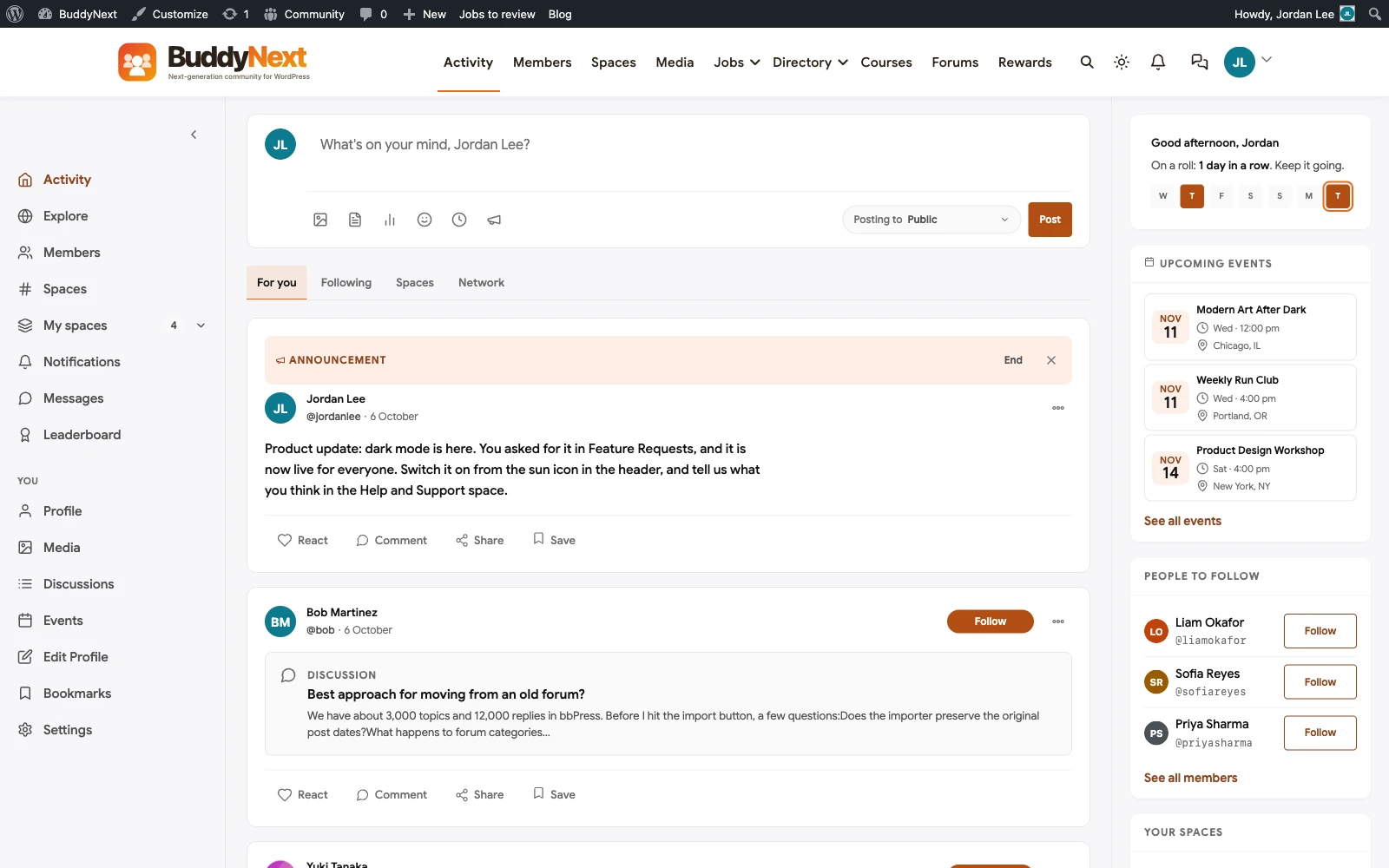
Worth saying plainly: this doesn’t mean every automation community needs every Jetonomy feature turned on. A smaller community might only need the Q&A module active, with the course and events pieces left off until there’s actual demand for them. Turning on more than the community needs just adds surface area to secure and maintain, which runs against everything above about keeping the build proportional to the actual audience.
FAQ
Do I need a developer to set up code-block rendering for workflow shares?
Not for the basic case. BuddyNext’s Jetonomy-powered Q&A module supports fenced code blocks out of the box, and most themes include a reasonable monospace fallback. You’ll want a developer for anything beyond that, like custom syntax highlighting for n8n’s specific JSON structure or a dedicated workflow-preview renderer, which isn’t a standard feature on any platform in this space yet.
How long does migrating an existing Skool community actually take?
For a community under 1,000 members with a straightforward structure, budget two to four weeks for the technical build and content migration, plus the 60-90 day parallel-running window before fully retiring the old platform. Larger or more complex communities, especially ones with paid cohort structures tied to Skool’s own payment system, take longer because the monetization migration has to be planned around active payment cycles, not just content.
What happens to our Skool gamification (points, levels) when we move?
It doesn’t transfer as data, since no platform shares a common gamification schema. What you can do is rebuild the mechanic you actually cared about (a leaderboard, a level system) on the new platform from scratch, treating the old point totals as a clean-slate reset rather than trying to force a 1:1 import that will never be accurate anyway.
Is a self-hosted community actually more secure than Discord for sharing workflows?
Only if you build the reporting and moderation tooling described above. A default WordPress install with no specific hardening isn’t automatically safer than Discord’s built-in moderation tools. The advantage of self-hosting is that you control and can customize that tooling specifically for the credential-leak risk this audience has, where Discord gives you no path to do that at all.
Can we run both a free Discord and a paid BuddyNext community at the same time?
Yes, and it’s a common structure: a free, high-volume Discord for real-time chat and quick questions, with a paid, self-hosted community for the structured content, searchable Q&A archive, and course material. The two serve different jobs and don’t need to be the same platform, as long as you’re clear with members about which one is for what.
How do we actually catch a leaked API key before it causes damage?
Tooling helps but doesn’t replace revocation habits: regex-based scanning for common key patterns (OpenAI, Anthropic, Google, AWS) on new posts catches the obvious cases and should trigger an immediate admin alert, not just a flag for later review. The more reliable fix is cultural, not technical: tell members up front that any shared workflow should use placeholder values for credentials, and treat a real leak as a signal to tell the member to rotate that key immediately, regardless of how fast the post gets removed, since the key was live the moment it was posted.
Does this build work if our community is also selling an automation course, not just hosting discussion?
Yes, and it’s one of the more common reasons clients move off Skool specifically: course content tied to a Q&A community works better when the course material and the discussion about it live in the same searchable system, rather than a course platform bolted onto a separate chat tool. BuddyNext’s course and Q&A modules share the same member and content model, so a question tied to lesson 4 can link directly to that lesson rather than requiring a member to describe which course it’s about.
Plugins we build and run
We maintain these ourselves, which is why we can support them on your site.
- BuddyNextThe self-hosted community engine for WordPress
- BuddyXFree community theme, Pro when you outgrow it
- ReignPremium community theme. Add pieces, build anything
- JetonomyCommunity forum and Q&A for WordPress
- EventonomyEvents and RSVPs for WordPress communities
- LearnomyCourses and learning communities on WordPress
- ListoraDirectories and listings your members can browse
- SnipShareCode sharing built for developer communities
- WB Ad ManagerAd placements that turn traffic into revenue
- WP Career BoardA job board your community actually uses
- WP Sell ServicesSell services with offers, orders, and payouts
- MediaVersePhotos, video, and media albums for members
- WB GamificationPoints, badges, and rewards that keep members active
- Product RoadmapPublic roadmaps with voting your users trust