The Paywall That Wasn't: How WordPress Membership Sites Leak Protected Content
A large share of WordPress membership sites leak their paid content - not because the plugin is broken, but because the content lives in files, APIs, feeds, and caches the paywall never guards. The real leak paths, and how to audit your own site as a stranger.

A membership site sells one thing: access to content other people cannot get. The entire business depends on the paywall actually holding. So it is a special kind of disaster when the gated content, the course videos, the premium downloads, the members-only posts, turns out to be sitting in plain view for anyone who knows where to look. The uncomfortable truth is that a large share of WordPress membership sites leak their protected content, not because the membership plugin is broken, but because the content lives in places the plugin never guards. The visible page is locked; the file behind it is wide open.
This is a practical guide to how that happens and how to find out before someone else does. It covers the specific ways WordPress leaks paywalled content, why the membership plugin does not catch them, and a concrete audit you can run on your own site today. If you sell access to anything, this is worth an hour of your time.
The gap: the page is protected, the content is not
Here is the core misunderstanding. A membership plugin protects posts and pages. When a non-member visits a locked post, the plugin intercepts the request and shows a paywall instead of the content. That works for the post. But the content inside that post, the video file, the PDF, the image, the raw text, exists independently of the post, and it usually has its own URL that the plugin never checks. The plugin guards the front door while the content sits by an unlocked side door with a predictable address.
Once you see it this way, the leaks are obvious. The paywall is a rule about who can view a page. It is not a rule about who can fetch a file, read an API response, or open a feed, and those are all separate paths to the same content.
How one leak drains a membership business
The damage is not abstract. Picture a course creator selling a video library for a monthly fee. Their membership plugin locks every lesson page perfectly, and they have never had a complaint, so they assume the paywall works. But the videos sit in the public uploads folder with sequential, guessable names. One member notices, grabs the direct URLs, and posts the whole library to a file-sharing forum. Now the core product is free everywhere, and every prospective customer who searches finds the pirated copy before the paid one.
Nothing was hacked. No password was stolen. The plugin did exactly what it was configured to do, protect the page, while the actual product sat unprotected one layer down. This is the quiet way membership businesses bleed: not a dramatic breach, but paid content quietly reachable by anyone patient enough to look, until it ends up somewhere public and the paywall becomes theater. The fix costs an afternoon; the leak can cost the business.
The ways membership content actually leaks
These are the paths that betray a paywall, roughly in order of how often they bite real sites.
1. Direct media file URLs
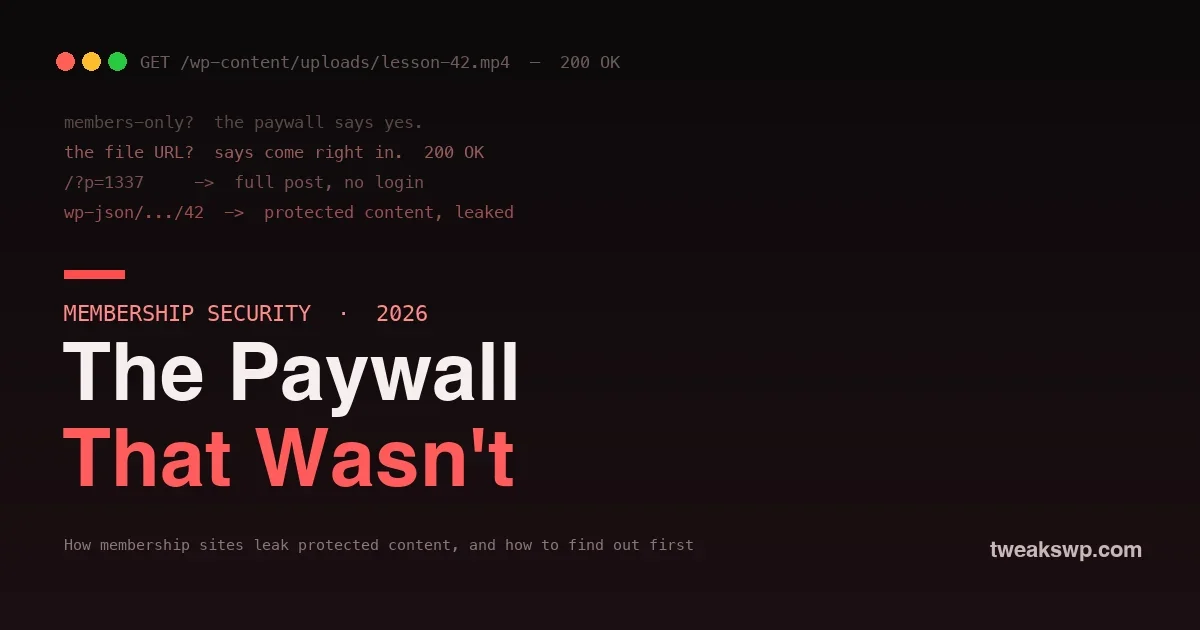
This is the big one. A protected lesson embeds a video stored at /wp-content/uploads/2026/course/lesson-42.mp4. The post is locked, but the file is served straight off disk by the web server, which knows nothing about your membership plugin. Anyone with the URL, and the URLs are guessable and often leaked in page source, shared links, or the media library, downloads it with no login at all. The same applies to premium PDFs, audio, and downloadable files. The paywall never runs, because fetching a file in uploads does not load WordPress.
2. Predictable post IDs and preview links
WordPress content is reachable by ID as well as by pretty URL. Depending on setup, a locked post may be readable via ?p=1337, through a preview link, or via a REST request, in ways that can bypass a plugin that only filters the main pretty-permalink query. If the protection hooks the wrong query or misses one path, the content renders for anyone.
3. The REST API
WordPress exposes posts over the REST API by default. If a membership plugin filters the themed page but not the REST endpoint, a request to /wp-json/wp/v2/posts/1337 can return the full protected content as JSON, paywall untouched. This is one of the most common leaks on otherwise well-configured sites, because the owner tested the page in a browser and never checked the API. Locking down the REST surface is the same discipline as blocking user enumeration and XML-RPC.
4. RSS and Atom feeds
WordPress publishes feeds that can include full post content. If your feed serves the complete text of protected posts, anyone can read it by loading /feed/ or a post-specific feed, no membership required. Sites that show excerpts on the page but full content in the feed leak the whole thing to any feed reader.
5. Search, sitemaps, and archives
Protected posts can leak through the seams: a site search that returns the full excerpt or content of members-only posts, a sitemap that lists the URLs and tips off scrapers, or category and author archives that render protected content in the loop when the plugin only guards single-post views. Each is a place the content appears without going through the front-door check.
6. Caching that serves the members view to everyone
A page cache that stores the logged-in, unlocked version of a page and then serves it to anonymous visitors hands your protected content to the public. Misconfigured full-page caching is a classic way to defeat your own paywall, because the cache does not know the difference between a member and a stranger unless you tell it.
The leak paths at a glance
| Leak path | What leaks | Why the paywall misses it |
|---|---|---|
| Direct media URL | Videos, PDFs, downloads | Web server serves the file without loading WordPress |
| REST API | Full post content as JSON | Plugin filters the page, not the API endpoint |
| RSS/Atom feed | Full text of protected posts | Feed generates content outside the page check |
| Post ID / preview | The rendered post | Protection hooks the wrong query path |
| Search / archives | Excerpts or full content | Loop renders gated posts the plugin only guards singly |
| Page cache | The members view | Cache serves a stored unlocked page to strangers |
Reading down the “why” column, the pattern is clear: every leak happens somewhere the page-level paywall is not running. Protecting a membership site means putting an access check on each of these rows, not just the first.
Why the membership plugin does not catch these
None of this means your membership plugin is bad. It means the plugin operates at the layer it was built for, the WordPress page request, and most leaks happen at other layers: the web server serving a file, the REST API returning JSON, the feed generator, the cache. A plugin filtering the_content on a themed page simply is not in the request path when someone fetches an MP4 directly or hits an API endpoint. Protecting a membership site is not one setting; it is closing each path the content can travel, and the plugin only owns one of them.
How to audit your own site
You can find most of these yourself in under an hour. The method is simple: become a stranger and try to reach your paid content. Open a private browser window with no login, and work through this list against a real protected post.
- Grab a media URL. View the source of a locked lesson while logged in, copy the direct file URL of the video or PDF, then paste it into the logged-out window. If it plays or downloads, your files are leaking, the most important thing to fix.
- Hit the REST endpoint. Load
/wp-json/wp/v2/posts?slug=your-protected-slugwhile logged out. If the full content comes back in the JSON, the API is bypassing your paywall. - Try the ID and feed. Load the post by
?p=IDand open/feed/logged out. If either shows the protected content, you have a leak. - Search your own site. Run the site search logged out for a phrase that only appears in members-only content. If the result reveals it, search is leaking.
- Check the cache. Load a protected page as a member, then immediately as a logged-out stranger. If the stranger sees the members version, your cache is serving protected content.
Anything that shows content to the logged-out window is a hole. Write down which paths leak; that list is your fix plan.
How to actually close the leaks
Fixing the leaks means protecting the content at each layer, not just the page.
- Protect files, do not just link them. Store premium media outside the public
uploadspath or behind a script that checks membership before serving the file, so a direct URL hits an access check instead of the raw file. Reputable membership and file-protection plugins offer this; the point is that fetching the file must run your access logic. - Lock down the REST API and feeds for protected types. Ensure protected content is filtered in REST responses and feeds, not only on the themed page. Serve excerpts, not full content, in feeds, and confirm the API does not return gated posts to anonymous requests.
- Exclude protected content from search, sitemaps, and archives. Keep members-only posts out of anonymous search results and public sitemaps, and confirm archive loops respect the paywall.
- Configure caching to respect membership. Exclude protected pages from full-page cache, or ensure the cache varies by login state, so a member’s unlocked view is never served to a stranger.
- Do not rely on obscurity. Hard-to-guess URLs are not protection; they leak through source, referrers, and sharing. Every path must enforce access, not hope nobody finds it.
Keep it locked over time
Closing the leaks once is not the end, because a membership site changes: you add media, install plugins, change caching, and update the theme, and any of those can reopen a path. Build a habit around it. Re-run the logged-out stranger audit after any significant change, especially after adding a caching layer, a new media type, or a plugin that touches content or the REST API. Keep protected media out of the public uploads path as a standing rule so new files inherit protection instead of needing it bolted on. And watch for your own content appearing where it should not, a sudden drop in conversions or your material showing up in search on other sites is a signal a door has opened. Protection is a state you maintain, not a switch you flip once and forget.
Frequently asked questions
Isn’t my membership plugin supposed to handle all this?
It handles page-level protection, which is its job, but most leaks happen below that layer, at the file, the API, the feed, or the cache, where the plugin is not in the request path. Good membership and file-protection plugins offer options for these, but they are usually not on by default, so you have to configure and verify them. The plugin is a tool, not a guarantee.
How do attackers find leaked content in the first place?
Rarely through sophisticated hacking. They read your page source, follow shared links, guess predictable file and ID patterns, check your feed and REST API, and scrape your sitemap. The content leaks through ordinary, discoverable paths, which is exactly why the audit above, done as a logged-out stranger, finds what they would find.
Are downloadable files harder to protect than streamed video?
Both need the same principle: the request for the media must run an access check. A file served straight from uploads is unprotected whether it streams or downloads. The fix is to route media through a script or storage that verifies membership before delivering the bytes, rather than exposing the raw file URL at all.
Does a security plugin stop content leaks?
Not directly. A general security plugin adds firewalling and monitoring, which is valuable defense in depth, but it does not know which of your posts are paid or gate your media files. Content-leak protection comes from configuring the content layers correctly, then hardening around them with measures like security headers and access controls.
I use a page builder and a caching plugin. Does that change anything?
It raises the caching risk specifically. Aggressive full-page caching is one of the most common ways paywalls break, because a cached members view can be served to everyone. If you cache, the single most important check is loading a protected page as a member and then as a stranger to confirm the stranger does not get the members version.
Should I move my membership media off WordPress entirely?
For high-value media it is worth considering. Serving premium video through a provider that enforces signed, expiring URLs or domain restrictions adds a strong layer the raw uploads folder cannot match. It is not required, protecting files in place with an access-checking script works, but for a business whose whole product is the media, dedicated protected delivery is a reasonable investment.
Does hiding my sitemap or feed fix the leak?
No, and it is a trap. Hiding a discovery path is obscurity, not protection; the content is still reachable directly by anyone who has, or guesses, the URL. Fix the leak at the source by enforcing access on the content itself, then you do not have to worry about which discovery paths expose the URL, because the URL alone will not grant access.
How often do membership sites actually have this problem?
Far more often than owners realize, precisely because it is invisible from the inside. The owner tests while logged in, sees the paywall, and assumes it holds. The leak only shows up when you test as a stranger, which most people never do, so sites can run for years quietly leaking until the content surfaces publicly. Running the audit is how you find out you are the common case rather than the exception.
What is the very first thing I should check?
Your media files. Log in, copy the direct URL of a protected video or download, and open it in a private window with no login. If it plays or downloads, that is your highest-impact leak and the one attackers exploit most, so fix file protection before anything else. It is a two-minute test that tells you whether your actual product is exposed.
The bottom line
A membership site’s paywall protects pages, but the content lives in files, API responses, feeds, and caches that the paywall never touches, and that gap is where paid content leaks. The fix is not a single setting; it is closing each path the content can travel: protect media behind an access check instead of a raw URL, filter the REST API and feeds, keep gated posts out of search and sitemaps, and make caching respect login state. Start by auditing your own site as a logged-out stranger, because whatever you can reach without paying, so can everyone else. Treat any AI-assisted or bolted-on protection code with the same skepticism you would any other, using a security review gate, because a paywall you have not tested from the outside is a paywall you are only assuming works. The content you sell is only protected if every door to it is locked, not just the one out front.
Plugins we build and run
We maintain these ourselves, which is why we can support them on your site.
- BuddyNextThe self-hosted community engine for WordPress
- BuddyXFree community theme, Pro when you outgrow it
- ReignPremium community theme. Add pieces, build anything
- JetonomyCommunity forum and Q&A for WordPress
- EventonomyEvents and RSVPs for WordPress communities
- LearnomyCourses and learning communities on WordPress
- ListoraDirectories and listings your members can browse
- SnipShareCode sharing built for developer communities
- WB Ad ManagerAd placements that turn traffic into revenue
- WP Career BoardA job board your community actually uses
- WP Sell ServicesSell services with offers, orders, and payouts
- MediaVersePhotos, video, and media albums for members
- WB GamificationPoints, badges, and rewards that keep members active
- Product RoadmapPublic roadmaps with voting your users trust