Scaling WordPress to 50,000 Rows: Why Your Admin Lists and Queries Break
WordPress runs fast until a dataset hits tens of thousands of rows, then admin lists crawl and queries time out. The specific patterns that break at scale - unbounded queries, N+1 loops, counting by loading, missing indexes - and how to fix each one.

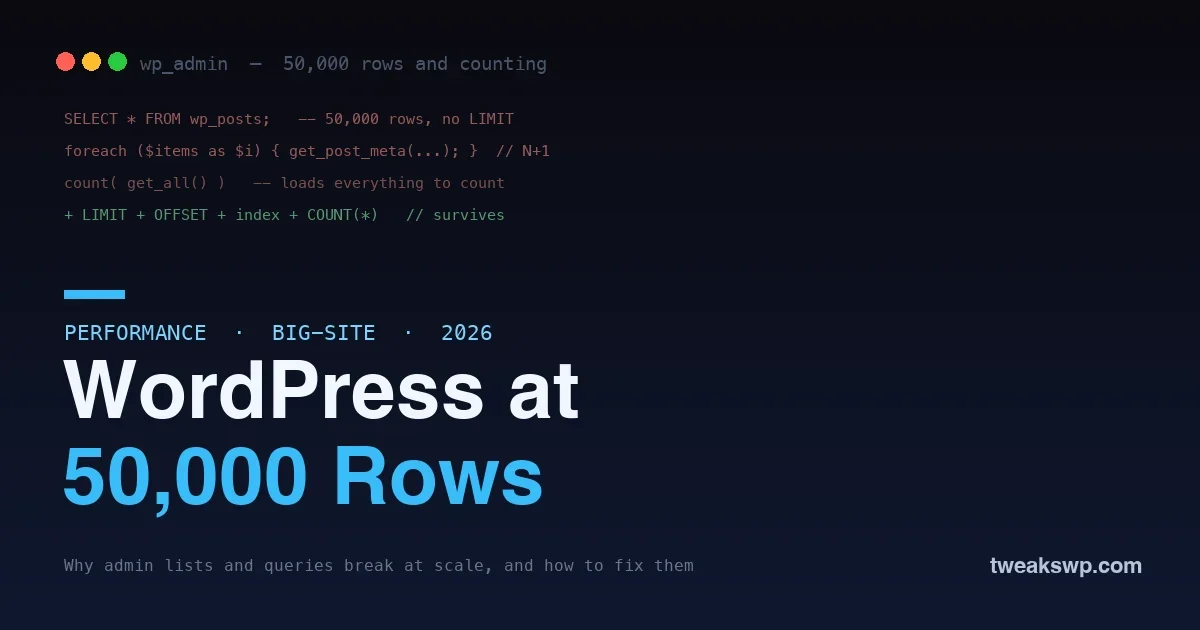
WordPress feels fast until it does not. A site runs beautifully with a few hundred posts, then the client’s directory grows to fifty thousand listings, or the store hits a hundred thousand orders, or a custom table fills with millions of rows, and suddenly the admin lists crawl, pages time out, and the database pegs the CPU. Nothing was rewritten; the same code that flew at small scale falls over at large scale. The reason is that a handful of common WordPress patterns are fine at a hundred rows and disastrous at fifty thousand, and knowing which ones lets you build sites that stay fast as they grow instead of hitting a wall.
This guide covers what actually breaks in WordPress at scale, why, and how to fix each one. It is written for the developer building a list, a grid, a report, or a custom table that will hold serious data, and the goal is code that works at fifty thousand rows on day one, not code you patch after a client complains.
Why small-scale code fails at large scale
The trap is that WordPress makes the expensive thing easy. Fetching every matching row, looping over results, counting a collection, all of it reads naturally and works instantly on a small dataset, so it ships. The cost is hidden until the data grows, because these patterns do not slow down gradually; they hit a cliff. A query with no limit is invisible at a hundred rows and fatal at fifty thousand. A per-row query inside a loop is a rounding error at ten items and a timeout at ten thousand. Scale does not reveal new bugs so much as it magnifies the ones that were always there, so the discipline is to write for the large dataset from the start, because you cannot always predict which site will grow.
The scaling failures at a glance
| Pattern | Fine at 100 rows | Fatal at 50,000 | Fix |
|---|---|---|---|
| Unbounded query | Instant | Loads everything into memory | LIMIT + paginate |
| Count by loading | Instant | Fetches all rows to count | SELECT COUNT(*) |
| N+1 loop | A few queries | 50,000 extra queries | Batch-fetch upfront |
| No index | Fast scan | Full table scan every time | Add the index |
| Autoload bloat | Tiny | Loads on every request | Trim autoloaded options |
Read down the middle columns and the pattern is unmistakable: every one of these is invisible in development and catastrophic in production, because development rarely has the data that triggers it. That is exactly why building to the standard from the start matters more than testing at small scale, which will never surface the problem.
The unbounded query
The single most common scaling failure is fetching everything. Code that asks for all matching posts, users, or rows, with no limit, is fine until the result set is huge, at which point it loads tens of thousands of rows into memory on every request.
// Fatal at scale: loads every matching post into memory
$posts = get_posts( array( 'numberposts' => -1 ) );

// Survives: page through a bounded set
$posts = get_posts( array(
  'posts_per_page' => 50,
  'paged'          => $current_page,
) );
The fix is always the same: bound the query and paginate. Fetch a page of results with a LIMIT and an OFFSET, show prev and next controls, and never load the whole set to display a slice of it. If code genuinely needs to process every row, do it in batches rather than one giant query, so no single request has to hold the entire dataset. Any list, grid, or table that could grow needs pagination built in from the first commit, not bolted on after it breaks.
Counting the wrong way
A subtle but brutal one: counting a collection by loading it. It is tempting to show a total by fetching everything and counting the array, and it works perfectly until the collection is large, at which point you have loaded fifty thousand rows just to display the number fifty thousand.
// Fatal: loads all rows to count them
$total = count( get_all_items() );

// Survives: ask the database for the count directly
$total = $wpdb->get_var( "SELECT COUNT(*) FROM {$wpdb->prefix}items" );
The database can count rows without handing them to you, which is orders of magnitude cheaper. Use a dedicated count query, SELECT COUNT(*), for any total you display, and never instantiate a full result set just to measure its size. This one change alone rescues many slow admin screens, because pagination controls need a total, and computing that total the wrong way defeats the pagination you added.
The N+1 query problem
The N+1 problem is where a list becomes death by a thousand queries. You fetch a list of items in one query, then loop over them and run another query per item to get related data, its meta, its author, its terms. One query becomes one plus N, and at fifty thousand rows that is fifty thousand extra queries.
// N+1: a query per item inside the loop
foreach ( $items as $item ) {
  $meta = get_post_meta( $item->ID, 'price', true );  // fires every iteration
}

// Batched: fetch what you need up front
$ids = wp_list_pluck( $items, 'ID' );
// prime the cache for all IDs in one go, then read from cache
update_meta_cache( 'post', $ids );
The fix is to batch-fetch related data before the loop, not inside it. WordPress offers tools for this: priming the meta cache for a set of IDs at once, using WP_User_Query with an include list instead of one lookup per user, or a single join in a custom query. The rule is that no per-row query should live inside a foreach; either fetch the related data up front in one query, or accept the cost with a clear comment explaining why.
Missing indexes
Even a properly bounded query is slow if the database has to scan a whole table to run it. When you filter or sort on a column that has no index, the database examines every row, which is fine at a hundred rows and painful at fifty thousand. Every column you use in a WHERE, ORDER BY, or JOIN needs an index behind it.
This bites hardest on wp_postmeta, the largest and least-indexed table for how sites use it, and on custom tables where developers forget to add keys. Before shipping a query, check that its filtered and sorted columns are indexed, and add the index if not. For the postmeta case specifically, our guide to adding custom database indexes to wp_postmeta walks through doing it safely, and diagnosing which queries need one is covered in the slow query optimization guide.
The hidden tax: autoloaded options and cruft
Not every scaling problem is a query you wrote; some is accumulated weight that loads on every single request. WordPress autoloads a set of options on each page load, and over time plugins, especially abandoned ones, leave large autoloaded rows behind. At scale this becomes a tax paid on every request, before your code even runs. Audit what autoloads, and stop autoloading the large, rarely-used entries. The same goes for expired transients and orphaned metadata piling up in the database; they bloat the tables your queries scan and slow everything down. Periodic cleanup of autoload bloat, expired transients, and orphaned rows is basic hygiene for a large site, and it is often the fastest win available because it speeds up every page at once rather than one query.
Building admin lists that survive
WordPress admin list tables are where scaling problems become most visible, because they combine all the above: they query a set, count a total for pagination, and often render related data per row. A list table that will hold serious data needs every technique at once, a bounded, paginated query, a separate COUNT(*) for the total, batched fetching of any per-row data, indexes on whatever it filters and sorts by, and real filter and sort controls, because a list of fifty thousand items is unusable without a way to narrow it. The native WP_List_Table class supports all of this when you use it correctly; the failures come from shortcuts, loading everything to paginate in PHP, counting by fetching, or rendering meta per row. Build the list assuming it will hold fifty thousand rows and it will still be usable when it does.
When to reach for a custom table
There is a point where bending WordPress’s default structure stops paying off and a purpose-built table is the right answer. If you are storing a large volume of a specific kind of data that you query and sort by value, event logs, transactions, analytics rows, membership records, cramming it into posts and postmeta means fighting the key-value structure at every query. A custom table with the columns and indexes your queries actually need is dramatically faster, because you can index exactly what you filter on and avoid the meta join entirely. The trade is that you lose some built-in WordPress conveniences and take on the responsibility of schema, queries, and the three access surfaces, frontend, admin, and API, yourself. For genuinely large, structured datasets that is a worthwhile trade, and it is how serious WordPress applications keep large data fast. Reserve it for the data that has outgrown postmeta, not as a default, but do not be afraid of it when the scale calls for it.
Caching what stays expensive
Some work is expensive and unavoidable at scale, an aggregate across many rows, a complex report, a count that is costly even done right. For those, compute once and cache the result rather than recomputing on every request. A persistent object cache turns a repeated expensive query into a single lookup, which is often the difference between a report that loads and one that times out. Our guide to setting up a Redis object cache covers this, and the principle is simple: bound and index what you can, and cache what remains costly, with a clear plan to invalidate the cache when the underlying data changes.
Will more server resources fix a scaling problem?
Only temporarily and expensively. Throwing CPU and memory at an unbounded query or an N+1 loop buys a little headroom, but the cost still grows with the data, so you are paying more to delay the same cliff. Fixing the pattern makes the work cheap regardless of dataset size, which is both faster and far cheaper than scaling hardware to cover inefficient code. Optimize the query first; upgrade the server only if it is still needed after.
How do I test that my code actually scales?
Seed a realistic large dataset on a staging copy, thousands to tens of thousands of rows, and exercise your lists, reports, and pages against it while watching Query Monitor and the slow log. Small test data hides every scaling problem, so the only reliable test is against data at the size you expect to reach. Generating a large seed set with WP-CLI takes minutes and reveals in development what would otherwise surface as a production incident.
The REST API and front-end lists at scale
The same rules apply the moment your data leaves the admin. A REST endpoint that returns a list must paginate, request only the fields it needs, and lean on indexed queries, because an unbounded or over-fetching endpoint fails exactly as an unbounded admin query does, only now it can be hit repeatedly by a front end or an app. Ask for a bounded page, limit the fields returned rather than sending every column, and avoid triggering per-item work on the server for each row in the response. On the front-end side, an archive or a directory page rendering thousands of items needs pagination or lazy loading just as much as the admin list does; shipping fifty thousand items to a browser is a failure of the same kind. Whichever surface the data appears on, frontend, admin, or API, the discipline is identical: bound it, index it, and never make one request do the work of the whole dataset.
Frequently asked questions
At what size do these problems actually appear?
There is no single threshold, but trouble typically starts in the low thousands and becomes serious in the tens of thousands, depending on the query and the hosting. The important point is that the failure is sudden, not gradual, so a site that is fine today can fall over the week its data crosses the line. Building for scale from the start avoids the scramble, because you cannot always predict which dataset will grow.
Does a caching plugin fix scaling problems?
Only partly. Page caching helps anonymous, cacheable views by skipping the work entirely for those hits, but logged-in users, the admin, dynamic requests, and any uncacheable page still run the queries directly. An unbounded query or an N+1 loop keeps hurting everywhere the cache does not reach, so you fix the query first and cache on top, rather than relying on caching to hide a structural problem.
How do I know which of these is slowing my site?
Use Query Monitor on a staging copy to see the queries a slow page runs, sorted by time and grouped by source, and the MySQL slow query log to catch offenders under real production load. Together they tell you whether you are facing an unbounded query, an N+1 loop, or a missing index, which points directly at the matching fix rather than guessing.
Should I use custom tables instead of postmeta at scale?
For data you query heavily by value, often yes. The key-value shape of wp_postmeta is flexible but expensive to filter and sort at scale, so promoting a heavily-queried value to a real, indexed column on a custom table can be far faster. It is more work and not always necessary, so reserve it for the specific data whose meta queries show up in your slow logs rather than rebuilding everything.
Is WordPress just bad at scale?
No. WordPress runs some of the largest sites on the web; what fails at scale is specific patterns, not the platform. Unbounded queries, N+1 loops, counting by loading, and missing indexes would sink any system, and avoiding them is ordinary database discipline. Written with scale in mind, WordPress handles very large datasets well, which is why the fix is better code, not a different platform.
Does this apply to WooCommerce and other big plugins?
Yes, and they feel it first because their data grows fastest. Orders, customers, and products pile up, and a store that runs fine early can slow markedly at scale if custom code around it uses the failing patterns. The same fixes apply, and modern WooCommerce has moved high-volume data toward dedicated tables for exactly this reason, which is the custom-table lesson applied at the platform level.
The bottom line
WordPress does not slow down evenly as it grows; it hits a cliff when specific patterns meet a large dataset. The patterns are always the same, an unbounded query that loads everything, a count that fetches to measure, an N+1 loop that queries per row, and a filter or sort with no index behind it, and each has a known fix: paginate, count with COUNT(*), batch-fetch before the loop, and index every filtered and sorted column. Build every list, grid, report, and custom table assuming it will hold fifty thousand rows, add the filter and sort controls that make that many rows usable, and cache what stays expensive. Do that and your site stays fast as it grows, instead of running beautifully in the demo and falling over the week real data arrives. Scale is not a problem you fix later; it is a standard you build to from the very first commit you write.
Plugins we build and run
We maintain these ourselves, which is why we can support them on your site.
- BuddyNextThe self-hosted community engine for WordPress
- BuddyXFree community theme, Pro when you outgrow it
- ReignPremium community theme. Add pieces, build anything
- JetonomyCommunity forum and Q&A for WordPress
- EventonomyEvents and RSVPs for WordPress communities
- LearnomyCourses and learning communities on WordPress
- ListoraDirectories and listings your members can browse
- SnipShareCode sharing built for developer communities
- WB Ad ManagerAd placements that turn traffic into revenue
- WP Career BoardA job board your community actually uses
- WP Sell ServicesSell services with offers, orders, and payouts
- MediaVersePhotos, video, and media albums for members
- WB GamificationPoints, badges, and rewards that keep members active
- Product RoadmapPublic roadmaps with voting your users trust