MySQL Tuning for WordPress: innodb_buffer_pool_size and Key Settings
MySQL tuning guide for WordPress covering innodb_buffer_pool_size, max_connections, thread_cache_size, tmp_table_size, slow query log, and a complete my.cnf configuration.

MySQL’s InnoDB storage engine determines how fast WordPress reads and writes data. The default configuration ships tuned for minimal memory use on shared hardware. On a dedicated WordPress server, the defaults leave most of the available RAM unused and produce unnecessary disk I/O. This guide covers the settings that directly affect WordPress query performance, starting with the one that has the highest impact.
innodb_buffer_pool_size: The Most Important Setting
The InnoDB buffer pool is shared memory used to cache data pages, index pages, and other InnoDB structures. When a query can be satisfied from the buffer pool, no disk read occurs. When it cannot, MySQL reads from disk - the single most expensive operation in a WordPress database workload.
The default innodb_buffer_pool_size is 128MB. On a server with 4GB+ of RAM running only MySQL and PHP, this is dramatically undersized.
# /etc/mysql/my.cnf or /etc/mysql/mysql.conf.d/mysqld.cnf
[mysqld]
innodb_buffer_pool_size = 2200M
The standard recommendation is 70-80% of available RAM for a dedicated database server. On a server running both PHP-FPM and MySQL, calculate it as total RAM minus PHP-FPM worker memory (workers x memory_per_worker) minus OS overhead (typically 512MB). On a 4GB server running 20 PHP-FPM workers at 64MB each, that leaves roughly 2.2GB for the buffer pool.
Verifying Buffer Pool Hit Rate
After setting the buffer pool size and running under real traffic for a few hours, check the hit rate. A healthy buffer pool hit rate is above 99%:
SHOW GLOBAL STATUS LIKE 'Innodb_buffer_pool_read%';

-- Hit rate = 1 - (Innodb_buffer_pool_reads / Innodb_buffer_pool_read_requests)
-- Innodb_buffer_pool_reads          -> physical disk reads (want this low)
-- Innodb_buffer_pool_read_requests  -> logical reads served from memory
If the hit rate is below 99%, the buffer pool is too small to hold the working set of your data. Increase innodb_buffer_pool_size and recheck after another few hours of traffic. Innodb_buffer_pool_reads (physical disk reads) vs Innodb_buffer_pool_read_requests (logical reads) is the metric that matters.
innodb_buffer_pool_instances: Reduce Contention
When multiple threads access the buffer pool simultaneously, they compete for its internal mutex. innodb_buffer_pool_instances splits the pool into independent chunks, each with its own mutex, reducing contention under high-concurrency workloads:
[mysqld]
innodb_buffer_pool_size = 4G
innodb_buffer_pool_instances = 4
Set this to one instance per GB of buffer pool size, up to 8. So a 4GB buffer pool should use 4 instances. This requires a restart of MySQL to take effect and only applies when innodb_buffer_pool_size is at least 1GB.
max_connections: Match Your PHP-FPM Pool
MySQL’s max_connections limits how many simultaneous client connections it accepts. Each PHP-FPM worker that is executing a WordPress request can hold one MySQL connection. If your PHP-FPM pool has 50 workers and max_connections is 150 (a common default), you have headroom - until a traffic spike pushes PHP-FPM to spawn more workers than your max_connections allows. At that point, new connections fail with “Too many connections”:
[mysqld]
max_connections = 150

# Check current usage:
# SHOW STATUS LIKE 'Threads_connected';
# SHOW VARIABLES LIKE 'max_connections';
Each open connection uses roughly 1MB of MySQL memory. 300 connections = 300MB. Factor this into your total memory budget. For WooCommerce sites where checkout creates long-lived transactions, the actual concurrent connection count is higher than the number of PHP workers would suggest - account for this when sizing max_connections.
thread_cache_size: Reduce Connection Overhead
Creating and destroying OS threads for each connection is expensive. The thread cache keeps recently used threads in memory for reuse. For WordPress with PHP-FPM’s persistent connections disabled (the default), every page load creates and closes a database connection - making the thread cache valuable:
[mysqld]
thread_cache_size = 30

# Monitor effectiveness:
# SHOW GLOBAL STATUS LIKE 'Threads_created';
Set it to your expected peak concurrent connections. If PHP-FPM runs 30 workers at peak, set thread_cache_size=30. Monitor the Threads_created status variable - a low rate means the cache is working. A rapidly increasing rate means the cache is too small.
tmp_table_size and max_heap_table_size: Keep Sorts in Memory
WordPress generates queries with GROUP BY and ORDER BY clauses regularly - especially with plugins that do post meta joins. When MySQL sorts these result sets, it creates temporary tables. If the temp table fits in memory, the sort is fast. If it overflows to disk, performance drops significantly:
[mysqld]
tmp_table_size = 64M
max_heap_table_size = 64M

# Check the disk-spill ratio:
# SHOW GLOBAL STATUS LIKE 'Created_tmp%';
Both settings must be set together - MySQL uses the lower of the two. Start at 64MB and check Created_tmp_disk_tables vs Created_tmp_tables. If more than 10% of temp tables are going to disk, increase the limit.
Using MySQLTuner to Validate Your Configuration
MySQLTuner is a Perl script that analyzes your MySQL status variables and configuration, then provides specific recommendations. Run it after the server has been under real traffic for at least 24 hours:
wget http://mysqltuner.pl/ -O mysqltuner.pl
perl mysqltuner.pl --user root --pass yourpassword
MySQLTuner outputs recommendations in three categories: critical failures, performance recommendations, and general suggestions. Pay attention to the buffer pool and temp table recommendations first - these have the highest impact on WordPress performance. Ignore recommendations about the query cache if you are on MySQL 8.x - the query cache was removed in that version.
innodb_log_file_size and Write Performance
The InnoDB redo log records changes before they are written to data files. A larger log file means MySQL can batch more writes before flushing, improving write throughput. For WordPress sites with WooCommerce or high post volume, write performance matters:
# MySQL 5.7 / MySQL 8.0 before 8.0.30
[mysqld]
innodb_log_file_size = 512M
innodb_log_files_in_group = 2

# MySQL 8.0.30+ (replaces both settings above)
[mysqld]
innodb_redo_log_capacity = 1G
Set it to 25% of the buffer pool size. On MySQL 8.0.30+, the parameter was renamed to innodb_redo_log_capacity, which replaces both innodb_log_file_size and innodb_log_files_in_group. The 25% rule still applies as a starting point.
The Complete MySQL Configuration for WordPress
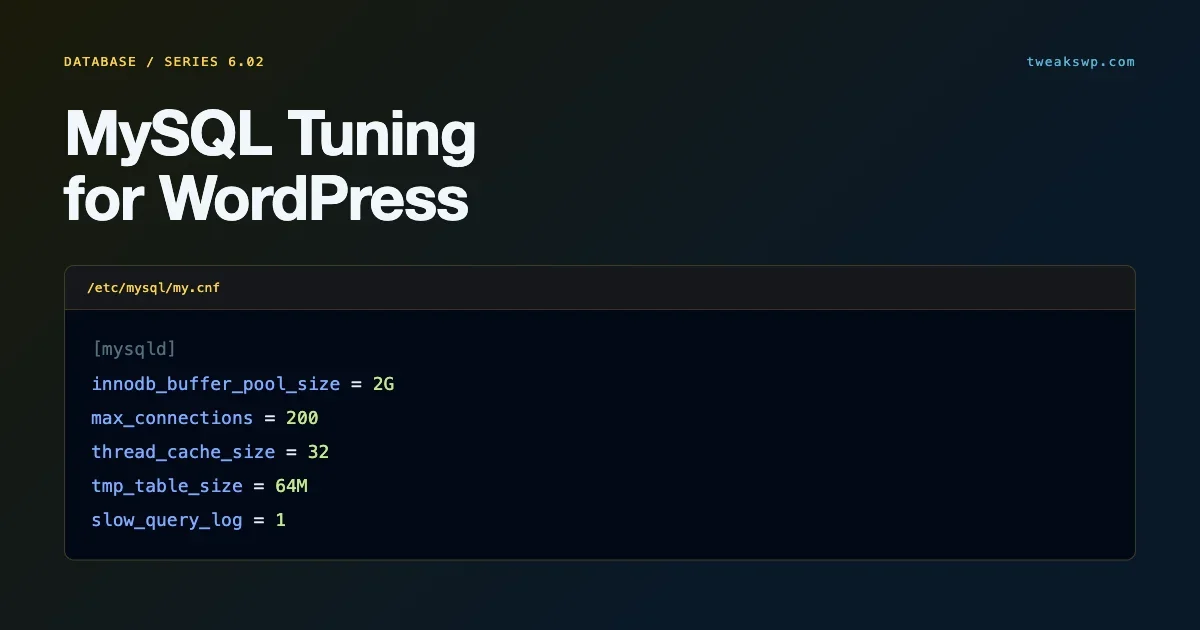
A complete my.cnf configuration block for a 4GB server running WordPress with WooCommerce:
[mysqld]
# Buffer pool - 70-80% of available RAM minus PHP-FPM/OS overhead
innodb_buffer_pool_size = 2200M
innodb_buffer_pool_instances = 2

# Connections - match PHP-FPM pool size with headroom
max_connections = 150
thread_cache_size = 30

# Temp tables - keep sorts and GROUP BY in memory
tmp_table_size = 64M
max_heap_table_size = 64M

# Write performance - 25% of buffer pool
innodb_redo_log_capacity = 550M
innodb_flush_log_at_trx_commit = 1

# Per-connection buffers - WordPress defaults are fine
read_rnd_buffer_size = 256K
sort_buffer_size = 2M

# Slow query log
slow_query_log = 1
slow_query_log_file = /var/log/mysql/mysql-slow.log
long_query_time = 1
log_queries_not_using_indexes = 1
After applying this configuration, restart MySQL and run MySQLTuner again after 24 hours of traffic. The database connection and charset configuration that complements this performance tuning - SSL, collation settings, and repair constants - is covered in the WordPress database connection guide. For the OPcache settings that reduce PHP overhead on top of these database improvements, the PHP OPcache configuration guide walks through memory_consumption, max_accelerated_files, and revalidate_freq settings for WordPress workloads.
Slow Query Log: Finding Unindexed Queries
Before tuning server settings, identify the queries causing the most load. MySQL’s slow query log captures queries that exceed a time threshold and, optionally, queries that do not use indexes:
[mysqld]
slow_query_log = 1
slow_query_log_file = /var/log/mysql/mysql-slow.log
long_query_time = 1
log_queries_not_using_indexes = 1
With log_queries_not_using_indexes=ON, MySQL logs any query that requires a full table scan. On a WordPress site, the most common culprits are meta queries with non-indexed meta keys, ORDER BY clauses on non-indexed columns in wp_posts, and JOINs without proper indexes.
Analyze the slow query log with pt-query-digest (part of Percona Toolkit) to get aggregated counts and average execution times. This tells you which queries to prioritize for index optimization versus which to address through configuration changes. Most WordPress performance problems are better solved by adding an index than by increasing buffer pool size.
pt-query-digest /var/log/mysql/mysql-slow.log > slow-query-report.txtKey WordPress Tables and Their Index Patterns
WordPress core creates specific indexes on its tables. Plugins that add custom queries against core tables sometimes miss these indexes or create queries that cannot use them. Knowing the existing indexes helps diagnose slow query log output:
Table | Key Indexes | Common Miss |
|---|---|---|
wp_posts | post_name, type_status_date, post_parent, post_author | Queries filtering on post_meta without a JOIN to wp_postmeta |
wp_postmeta | post_id, meta_key | Queries with WHERE meta_value = on high-cardinality meta values |
wp_options | option_name (unique), autoload | Queries scanning all autoloaded options without WHERE option_name |
wp_usermeta | user_id, meta_key | Queries joining users to meta with LIKE on meta_key |
wp_term_relationships | term_taxonomy_id | Taxonomy queries with many terms using object_id without the index |
For the wp_options table specifically, autoloaded options are the single most common performance issue on mature WordPress sites. Every page load executes SELECT option_name, option_value FROM wp_options WHERE autoload = 'yes'. If this returns 5,000+ options, it is pulling megabytes of data on every request regardless of buffer pool size.
-- Total autoloaded payload size
SELECT COUNT(*) AS option_count, SUM(LENGTH(option_value)) AS total_bytes
FROM wp_options WHERE autoload = 'yes';

-- The 20 heaviest autoloaded options
SELECT option_name, LENGTH(option_value) AS bytes
FROM wp_options
WHERE autoload = 'yes'
ORDER BY bytes DESC
LIMIT 20;
read_rnd_buffer_size and sort_buffer_size
These per-connection buffers are allocated when a query requires a sort or a random read operation. On a server with many concurrent connections, over-allocating them wastes memory. On a server with complex ORDER BY queries, under-allocating forces disk-based sorts:
[mysqld]
read_rnd_buffer_size = 256K
sort_buffer_size = 2M
The defaults (256KB and 2MB respectively) are reasonable for WordPress. Increase sort_buffer_size only if the slow query log shows ORDER BY queries being slow and EXPLAIN confirms they are using filesort. Increasing it beyond 4MB per connection has diminishing returns and adds up quickly across concurrent connections.
innodb_flush_log_at_trx_commit: Durability vs. Performance
This setting controls when MySQL writes and flushes the redo log to disk. The default value of 1 provides full ACID compliance - every committed transaction is guaranteed durable even if the server crashes immediately after. Values 0 and 2 trade some durability for write throughput:
Value | Behavior | Risk |
|---|---|---|
1 (default) | Flush to disk on every commit | Safe - no data loss on crash |
2 | Write to OS buffer every commit, flush every second | Up to 1 second of transactions lost on OS crash |
0 | Write and flush every second regardless of commits | Up to 1 second of transactions lost on MySQL crash |
For WordPress on a server with a RAID controller that has battery-backed write cache, value 2 provides a meaningful write throughput increase with minimal practical risk. For a WooCommerce store, keep it at 1 - losing order data on an OS crash is not an acceptable tradeoff for the performance gain.
query_cache_type: Disable It on MySQL 5.7, Gone on 8.0
MySQL’s query cache caches the full result set of SELECT queries. It sounds useful, but it is a global mutex - every write to any table invalidates all cached queries for that table. On a WordPress site with regular writes (comments, orders, post views), the query cache creates contention that hurts performance more than it helps.
If you are on MySQL 5.7, disable it explicitly. On MySQL 8.0, the query cache was removed entirely.
# MySQL 5.7 only - removed entirely in MySQL 8.0
[mysqld]
query_cache_type = 0
query_cache_size = 0
Object caching (Redis/Memcached) is the correct answer for WordPress query result caching. It caches at the application layer with targeted invalidation, not at the database layer with global table-level invalidation. For the WordPress object cache configuration, the guide on WP memory limits covers how to allocate memory across PHP, the object cache, and the MySQL buffer pool on a single server.
Tune Based on Data, Not Defaults
Run MySQLTuner after 24 hours of real traffic before finalizing any configuration. The status variables it reads reflect your actual workload, not a theoretical benchmark. Buffer pool hit rate, tmp_disk_tables ratio, and thread cache misses all give you specific, actionable numbers. Tune based on those numbers, then recheck.
Plugins we build and run
We maintain these ourselves, which is why we can support them on your site.
- BuddyNextThe self-hosted community engine for WordPress
- BuddyXFree community theme, Pro when you outgrow it
- ReignPremium community theme. Add pieces, build anything
- JetonomyCommunity forum and Q&A for WordPress
- EventonomyEvents and RSVPs for WordPress communities
- LearnomyCourses and learning communities on WordPress
- ListoraDirectories and listings your members can browse
- SnipShareCode sharing built for developer communities
- WB Ad ManagerAd placements that turn traffic into revenue
- WP Career BoardA job board your community actually uses
- WP Sell ServicesSell services with offers, orders, and payouts
- MediaVersePhotos, video, and media albums for members
- WB GamificationPoints, badges, and rewards that keep members active
- Product RoadmapPublic roadmaps with voting your users trust