How to Disable XML-RPC and Block REST API User Enumeration in WordPress
Disable XML-RPC, block REST API user enumeration, and stop ?author= redirects with exact PHP hooks, Apache/.htaccess, and Nginx config examples.

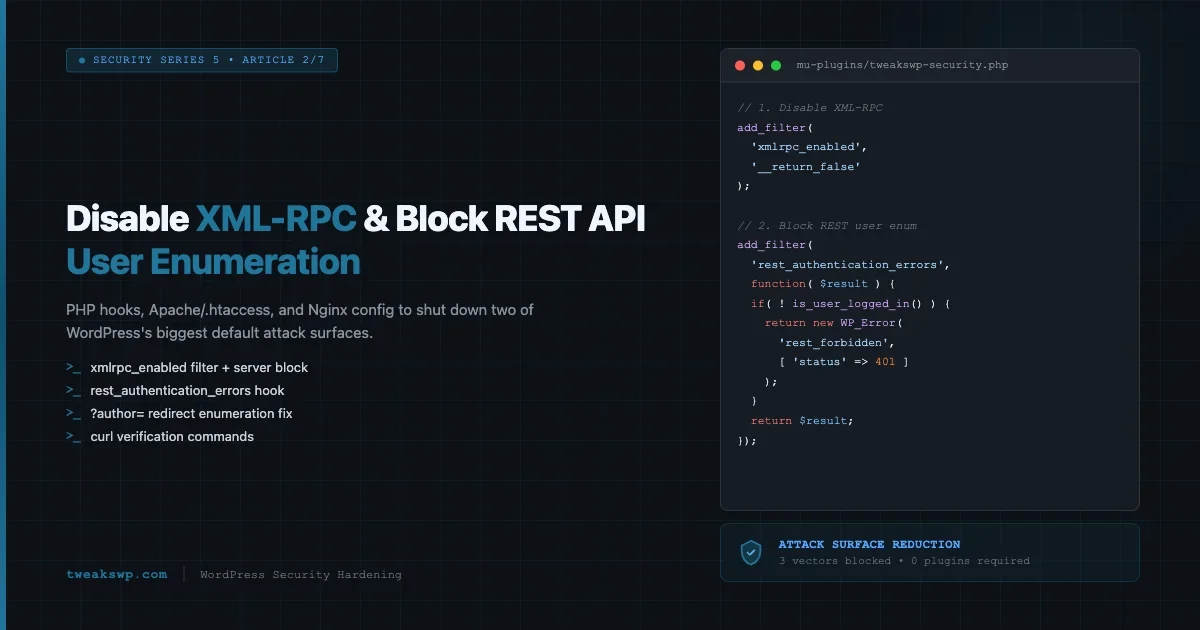
Two attack vectors consistently appear at the top of WordPress security audits: XML-RPC and REST API user enumeration. Both ship enabled by default. Both expose your site to automated brute-force attacks, credential stuffing, and reconnaissance that feeds larger campaigns. This guide covers the exact PHP hooks, server config blocks, and curl verification commands to shut them down completely.
Why XML-RPC Is a Security Risk
XML-RPC (/xmlrpc.php) was introduced in WordPress 2.6 as a remote publishing protocol. Mobile apps and services like Jetpack used it before the REST API existed. Today it is largely obsolete, but it sits live on nearly every WordPress install out of the box.
Brute-Force Amplification via Multicall
The most abused feature of XML-RPC is the system.multicall method. A single HTTP request can contain hundreds of nested wp.getUsersBlogs calls, each testing a different username/password pair. An attacker sends one request and gets hundreds of login attempts past any per-request rate limiter. Standard fail2ban rules and login-attempt counters never see more than one request, so they never fire.
# Example multicall attack payload structure (truncated)
POST /xmlrpc.php HTTP/1.1
Content-Type: text/xml

<?xml version="1.0"?>
<methodCall>
  <methodName>system.multicall</methodName>
  <params><param><value><array><data>
    <value><struct>
      <member><name>methodName</name><value>wp.getUsersBlogs</value></member>
      <member><name>params</name><value><array><data>
        <value>admin</value><value>password1</value>
      </data></array></value></member>
    </struct></value>
    <!-- repeated 500 more times with different passwords -->
  </data></array></value></param></params>
</methodCall>
DDoS Amplification
Beyond credential attacks, XML-RPC endpoints have been used as amplification vectors in distributed denial-of-service campaigns. A botnet floods /xmlrpc.php with pingback requests, each of which causes your server to make an outbound HTTP request to a third-party target. Your server becomes an unwilling participant in an attack against someone else, and your outbound bandwidth gets exhausted in the process.
Unless you are actively using Jetpack, a mobile publishing app, or a remote posting client that specifically requires XML-RPC, there is no reason to keep it enabled. Disable it.
How to Disable XML-RPC in WordPress
There are three places to block XML-RPC: at the PHP level using a WordPress filter, at the web server level via .htaccess (Apache), or via an Nginx server block. Use the layer that matches your stack. For defense in depth, combine all three.
Method 1: The xmlrpc_enabled Filter (PHP)
WordPress provides the xmlrpc_enabled filter specifically for disabling the interface. Add this to your theme’s functions.php or, better, to a must-use plugin so it cannot be deactivated.
<?php
/**
 * Disable XML-RPC entirely.
 * Place in /wp-content/mu-plugins/disable-xmlrpc.php
 */
add_filter( 'xmlrpc_enabled', '__return_false' );
This is the cleanest WordPress-native approach. It tells the XML-RPC handler to return a 403 before processing any method calls. The file is still accessible (a request reaches PHP), but every method returns an authentication error. Combine this with a server-level block so the PHP process is never invoked at all.
Method 2: Block at the Apache Level (.htaccess)
Blocking at the Apache level prevents any PHP execution for requests to /xmlrpc.php, which reduces server load and stops the file from being hit even if a plugin re-enables the filter.
# Add inside the <IfModule mod_rewrite.c> block in .htaccess
# Block XML-RPC
<Files xmlrpc.php>
    Order Deny,Allow
    Deny from all
</Files>
If you are on Apache 2.4+ with the unified access control directives, use the following instead:
<Files xmlrpc.php>
    Require all denied
</Files>
Method 3: Block at the Nginx Level
On Nginx, add a location block to your site’s server configuration. This returns a 403 before the request ever reaches PHP-FPM.
# Inside your server {} block in nginx.conf or a site-specific conf
location = /xmlrpc.php {
    deny all;
    access_log off;
    log_not_found off;
}
The access_log off and log_not_found off directives keep your logs clean. Without them, automated scanners hammering the endpoint flood your access log with 403 entries that provide no diagnostic value.
REST API User Enumeration: What Gets Exposed
The WordPress REST API ships with a /wp-json/wp/v2/users endpoint that returns a JSON array of registered users. By default, this endpoint is publicly accessible to unauthenticated requests. Any visitor, bot, or attacker can call it and receive usernames, display names, avatar URLs, and user slugs for every author who has published at least one post.
# What an attacker sees with a single unauthenticated request:
curl -s https://yoursite.com/wp-json/wp/v2/users | python3 -m json.tool

# Sample response
[
  {
    "id": 1,
    "name": "admin",
    "slug": "admin",
    "link": "https://yoursite.com/author/admin/",
    "avatar_urls": { ... }
  }
]
That slug field is your WordPress username in most default setups. Combined with the site URL, an attacker now has a confirmed, valid username and can begin a targeted brute-force attack against wp-login.php without any guesswork.
The Author Archive Enumeration Route
The REST API is not the only enumeration path. WordPress also redirects ?author=1, ?author=2, etc. to author archive URLs like /author/admin/. An attacker can iterate through integer IDs to discover every author username without touching the REST API at all. You need to block both vectors.
How to Block REST API User Enumeration
Method 1: Restrict the Users Endpoint to Authenticated Requests
The most targeted fix uses the rest_authentication_errors filter. This filter runs on every REST API request. When the current request is unauthenticated (user is not logged in), you can return a WP_Error to block access.
<?php
/**
 * Block unauthenticated access to the REST API users endpoint.
 * Place in /wp-content/mu-plugins/block-rest-user-enum.php
 */
add_filter( 'rest_authentication_errors', function( $result ) {
    // If authentication already failed for another reason, pass that through.
    if ( ! empty( $result ) ) {
        return $result;
    }

    // Block the users endpoint for unauthenticated requests.
    if ( ! is_user_logged_in() ) {
        $route = isset( $GLOBALS['wp']->query_vars['rest_route'] )
            ? $GLOBALS['wp']->query_vars['rest_route']
            : '';

        if ( strpos( $route, '/wp/v2/users' ) === 0 ) {
            return new WP_Error(
                'rest_forbidden',
                __( 'Authentication required.' ),
                array( 'status' => 401 )
            );
        }
    }

    return $result;
} );
This approach is surgical: it blocks only the users endpoint for unauthenticated visitors while leaving all other REST API routes functional. The Gutenberg editor, WooCommerce, and any plugin that calls other REST routes continues to work without issue.
Method 2: Remove the Users Endpoint Entirely
If you do not rely on the users endpoint at all (no headless front end, no external API consumers that need user data), you can remove the endpoint registration entirely using the rest_endpoints filter.
<?php
/**
 * Remove the /wp/v2/users REST endpoint entirely.
 * Place in /wp-content/mu-plugins/block-rest-user-enum.php
 */
add_filter( 'rest_endpoints', function( $endpoints ) {
    // Remove user listing and single-user endpoints.
    if ( isset( $endpoints['/wp/v2/users'] ) ) {
        unset( $endpoints['/wp/v2/users'] );
    }
    if ( isset( $endpoints['/wp/v2/users/(?P<id>[\d]+)'] ) ) {
        unset( $endpoints['/wp/v2/users/(?P<id>[\d]+)'] );
    }
    return $endpoints;
} );
Removing the endpoint causes a 404 response rather than a 401. This approach is more complete but can break the Gutenberg editor’s author-attribution features and any plugin that queries user data via the REST API. Test in staging before applying to production.
Method 3: Combined Approach (Recommended)
The production-grade approach combines the authentication check with the endpoint filter so authenticated admin requests still work while unauthenticated external requests are blocked:
<?php
/**
 * Combined REST API user enumeration protection.
 * File: /wp-content/mu-plugins/rest-user-enum-protection.php
 */

// 1. Remove the endpoint for unauthenticated users via authentication filter.
add_filter( 'rest_authentication_errors', function( $result ) {
    if ( ! empty( $result ) ) {
        return $result;
    }

    if ( ! is_user_logged_in() ) {
        $rest_prefix = trailingslashit( rest_get_url_prefix() );
        $request_uri = isset( $_SERVER['REQUEST_URI'] )
            ? esc_url_raw( wp_unslash( $_SERVER['REQUEST_URI'] ) )
            : '';

        if ( false !== strpos( $request_uri, $rest_prefix . 'wp/v2/users' ) ) {
            return new WP_Error(
                'rest_not_logged_in',
                __( 'You must be logged in to access user data.' ),
                array( 'status' => 401 )
            );
        }
    }

    return $result;
} );

// 2. Remove endpoint from the route list entirely to prevent
//    disclosure via /wp-json discovery.
add_filter( 'rest_endpoints', function( $endpoints ) {
    if ( ! is_user_logged_in() ) {
        unset( $endpoints['/wp/v2/users'] );
        unset( $endpoints['/wp/v2/users/(?P<id>[\d]+)'] );
    }
    return $endpoints;
} );
The second filter also removes the users route from the REST API index (/wp-json). Without this, the endpoint still appears in the schema discovery response even when access is blocked, which gives attackers a map of what routes exist.
Blocking the ?author= Redirect
Author archive enumeration via ?author=1 works independently of the REST API. WordPress sees the query, resolves the user ID to an author slug, and issues a 301 redirect to the author archive URL. The redirect response itself leaks the username in the Location header.
# What the attacker sees:
curl -I "https://yoursite.com/?author=1"

# Response reveals the username:
HTTP/1.1 301 Moved Permanently
Location: https://yoursite.com/author/admin/
Block this redirect at the PHP level using the template_redirect action. If the request includes an author query parameter and the current user is not logged in, redirect to the home page or return a 404.
<?php
/**
 * Block ?author= enumeration for unauthenticated visitors.
 * File: /wp-content/mu-plugins/block-author-enum.php
 */
add_action( 'template_redirect', function() {
    if ( ! is_user_logged_in() && isset( $_GET['author'] ) ) {
        wp_die(
            'Author parameter not allowed.',
            'Forbidden',
            array( 'response' => 403 )
        );
    }
} );
If your site uses author archives for public display (an author bio page that visitors browse), you need a different approach: allow the /author/slug/ URL to work but block the numeric ?author=ID redirect. The hook above targets only the query parameter form, so author archive URLs continue to work normally.
Blocking at the Nginx Level
You can also catch the author parameter before PHP runs by adding a rule to your Nginx config:
# Add to your server {} block
if ( $query_string ~* "author=([0-9]*)" ) {
    return 403;
}
Note that using if in Nginx location blocks has well-documented edge cases. Place this at the server block level, not inside a nested location block, to avoid unexpected behavior with other rewrites.
Testing That Your Blocks Work
After applying any of the above, verify each protection independently with curl. Do not rely on browser testing alone since browsers follow redirects, cache responses, and may have session cookies that affect access.
Verify XML-RPC Is Blocked
# Test 1: Expect 403 Forbidden (or your configured block response)
curl -v -X POST https://yoursite.com/xmlrpc.php \
  -H "Content-Type: text/xml" \
  -d '<?xml version="1.0"?><methodCall><methodName>system.listMethods</methodName></methodCall>'

# Test 2: Confirm the response code
curl -o /dev/null -s -w "%{http_code}" https://yoursite.com/xmlrpc.php
# Expected output: 403
If the response is 200 with XML content, your block is not working at the server level. Check that the .htaccess or Nginx config was saved and the server reloaded (sudo nginx -s reload or sudo systemctl reload apache2).
Verify REST API User Enumeration Is Blocked
# Test 3: REST users endpoint - expect 401 or 404
curl -s -o /dev/null -w "%{http_code}" https://yoursite.com/wp-json/wp/v2/users
# Expected: 401 (authentication filter) or 404 (endpoint removed)

# Test 4: Verbose output to inspect the response body
curl -s https://yoursite.com/wp-json/wp/v2/users | python3 -m json.tool
# Expected: {"code":"rest_not_logged_in"...} or {"code":"rest_no_route"...}

# Test 5: Confirm users do NOT appear in the API index discovery
curl -s https://yoursite.com/wp-json | grep -i 'users'
# Expected: no output (route stripped from index)
Verify Author Enumeration Is Blocked
# Test 6: author parameter - expect 403 (not a redirect to /author/slug/)
curl -v "https://yoursite.com/?author=1" 2>&1 | grep -E "HTTP/|Location:"
# Expected: HTTP/1.1 403 Forbidden
# Bad result: HTTP/1.1 301 with Location: https://yoursite.com/author/admin/

# Test 7: Confirm no username disclosed in redirect headers
curl -s -o /dev/null -w "%{redirect_url}" "https://yoursite.com/?author=1"
# Expected: empty output (no redirect)
Putting It All Together: One Must-Use Plugin
Instead of scattering multiple files across your codebase, consolidate all three protections into a single must-use plugin. Must-use plugins live in /wp-content/mu-plugins/ and load before regular plugins, before the theme, and cannot be deactivated through the admin UI.
<?php
/**
 * Plugin Name: TweaksWP Security Hardening
 * Description: Disables XML-RPC, blocks REST user enumeration, blocks ?author= enumeration.
 * Version:     1.0.0
 * Author:      TweaksWP
 *
 * Place this file at: /wp-content/mu-plugins/tweakswp-security.php
 */

defined( 'ABSPATH' ) || exit;

// -----------------------------------------------------------------------
// 1. Disable XML-RPC
// -----------------------------------------------------------------------
add_filter( 'xmlrpc_enabled', '__return_false' );

// -----------------------------------------------------------------------
// 2. Block REST API user enumeration for unauthenticated requests
// -----------------------------------------------------------------------
add_filter( 'rest_authentication_errors', 'tweakswp_block_rest_user_enum', 10, 1 );

function tweakswp_block_rest_user_enum( $result ) {
    if ( ! empty( $result ) ) {
        return $result;
    }

    if ( ! is_user_logged_in() ) {
        $rest_prefix  = trailingslashit( rest_get_url_prefix() );
        $request_uri  = isset( $_SERVER['REQUEST_URI'] )
            ? esc_url_raw( wp_unslash( $_SERVER['REQUEST_URI'] ) )
            : '';

        if ( false !== strpos( $request_uri, $rest_prefix . 'wp/v2/users' ) ) {
            return new WP_Error(
                'rest_not_logged_in',
                __( 'Authentication required to access user data.' ),
                array( 'status' => 401 )
            );
        }
    }

    return $result;
}

// -----------------------------------------------------------------------
// 3. Strip users endpoint from REST API index (schema discovery)
// -----------------------------------------------------------------------
add_filter( 'rest_endpoints', 'tweakswp_strip_user_endpoints', 10, 1 );

function tweakswp_strip_user_endpoints( $endpoints ) {
    if ( ! is_user_logged_in() ) {
        unset( $endpoints['/wp/v2/users'] );
        unset( $endpoints['/wp/v2/users/(?P<id>[\d]+)'] );
    }
    return $endpoints;
}

// -----------------------------------------------------------------------
// 4. Block ?author= enumeration
// -----------------------------------------------------------------------
add_action( 'template_redirect', 'tweakswp_block_author_enum', 1 );

function tweakswp_block_author_enum() {
    if ( ! is_user_logged_in() && isset( $_GET['author'] ) ) {
        wp_die(
            'Access denied.',
            'Forbidden',
            array( 'response' => 403 )
        );
    }
}
Drop this file into /wp-content/mu-plugins/ and WordPress loads it automatically on every request. No activation step required, no risk of a site admin accidentally deactivating it.
WP-CLI Commands for Verification
If you have WP-CLI access, these commands give you a fast sanity check from the server side without making external HTTP requests:
# Check that the xmlrpc_enabled filter returns false
wp eval 'echo apply_filters("xmlrpc_enabled", true) ? "ENABLED" : "DISABLED";'
# Expected: DISABLED

# Check registered REST endpoints (confirm /wp/v2/users is absent for guests)
wp rest route list --user=0
# Scan the output for /wp/v2/users - should not appear

# Verify the mu-plugin is loaded
wp plugin list --mu
# Expected: tweakswp-security listed as mu-plugin
What This Does Not Cover
These hardening steps target two specific attack vectors. They are not a complete security posture. Other areas to address as part of a full hardening pass include:
- wp-login.php rate limiting: Brute-force attacks against the login form remain possible even with XML-RPC disabled. Add rate limiting at the Nginx or application level.
- File editor access: Disable the theme and plugin file editor via
define( 'DISALLOW_FILE_EDIT', true );inwp-config.php. - Database table prefix: Non-default prefixes make SQL injection harder to automate.
- wp-config.php location: Moving
wp-config.phpone directory above the web root removes it from the public document tree. - Application passwords: WordPress 5.6+ ships application passwords enabled by default. If you are not using them for REST API authentication, disable via the
wp_is_application_passwords_availablefilter.
This article is part of the TweaksWP WordPress Security Hardening series. Part 1 covered locking down wp-config.php and applying server-level security tweaks. Part 3 will cover rate limiting wp-login.php at the Nginx level with fail2ban integration. For HTTP security headers including HSTS and CSP, see WordPress Security Headers: How to Add CSP, HSTS, and X-Frame-Options.
Disabling Application Passwords
WordPress 5.6 introduced application passwords, which let external services authenticate against the REST API without needing the account’s main password. The feature is enabled by default. If your site does not expose REST API endpoints to authenticated external consumers, you gain nothing by leaving it on, and you create an additional credential surface that can be abused if an admin account is compromised.
Check whether any application passwords exist on your site before disabling the feature:
# List all users who have application passwords set
wp user list --fields=ID,user_login --format=csv | while IFS=',' read id login; do
  count=$(wp user application-password list "$id" --format=count 2>/dev/null)
  [ "$count" -gt 0 ] && echo "User $login (ID: $id) has $count application password(s)"
done
If no application passwords are in use, disable the feature entirely with a filter. Add this to the same must-use plugin file:
<?php
// Disable application passwords entirely.
// Safe to add unless a service actively uses them for REST API auth.
add_filter( 'wp_is_application_passwords_available', '__return_false' );
This filter prevents the application passwords section from appearing in user profiles and returns false to any REST API check for application password support. Existing application passwords stop working immediately, no database cleanup needed. If you later want to re-enable for a specific integration, flip the filter to __return_true or add conditional logic based on user ID or role.
Common Mistakes When Hardening These Endpoints
A few implementation errors appear repeatedly in security audit findings. These are worth knowing before you ship any of the above to production.
Blocking Jetpack Without Allowlisting Its IPs
If you use Jetpack and block XML-RPC at the server level, Jetpack’s module sync stops working. The solution is not to leave XML-RPC open, but to add Jetpack’s IP ranges to an allowlist in your server config before adding the blanket deny. Automattic publishes the current IP list at jetpack.com/support/update-ips-whitelist/. Verify your Jetpack connection status with WP-CLI after applying any XML-RPC block:
wp jetpack status
# Look for: "Jetpack is connected" and "Your Jetpack is up to date"
Forgetting That Authenticated Requests Bypass the Users Filter
The rest_authentication_errors and rest_endpoints filters both include an is_user_logged_in() check deliberately. Logged-in admins need access to the users endpoint for the Gutenberg editor, user management screens, and some plugins. If you remove that check and block the endpoint for everyone, the block editor’s author dropdown stops working and user-management REST calls from the wp-admin will return 401 errors.
Testing with a Cached Session Cookie
After logging in to your WordPress admin, your browser stores an authentication cookie. If you then navigate to /wp-json/wp/v2/users in your browser to test the block, WordPress sees you as authenticated and returns the full user list, making it look like the filter is not working. Always test with curl and no cookies, or use a private/incognito browser window that has never logged in. The curl commands in the testing section above explicitly avoid session state, use them, not browser tab testing.
Using plugins.htaccess vs .htaccess
Some managed hosts (WP Engine, Kinsta, Flywheel) do not process .htaccess files for WordPress rewrites or may restrict certain directives. On these platforms, XML-RPC and file-level blocks must be applied through the host’s own firewall or the WordPress PHP filter instead of .htaccess. Check with your host’s documentation before assuming .htaccess changes are in effect. The PHP-level xmlrpc_enabled filter and hook-based REST API blocks work on all hosts regardless of the web server layer.
Summary
Here is the full checklist for this article’s changes:
- Add
add_filter( 'xmlrpc_enabled', '__return_false' );to a must-use plugin - Block
/xmlrpc.phpin.htaccess(Apache) or a location block (Nginx) - Add the
rest_authentication_errorsfilter to return 401 for unauthenticated/wp/v2/usersrequests - Add the
rest_endpointsfilter to strip the users route from schema discovery - Add the
template_redirectaction to block?author=numeric enumeration - Run curl verification tests for each block after deployment
- Confirm with WP-CLI that the mu-plugin is active and the filter returns the expected value
Every one of these changes can be reverted by removing or commenting out a single function. Apply them to a staging environment first, run your curl verification suite, then deploy to production via your standard deployment pipeline.
Plugins we build and run
We maintain these ourselves, which is why we can support them on your site.
- BuddyNextThe self-hosted community engine for WordPress
- BuddyXFree community theme, Pro when you outgrow it
- ReignPremium community theme. Add pieces, build anything
- JetonomyCommunity forum and Q&A for WordPress
- EventonomyEvents and RSVPs for WordPress communities
- LearnomyCourses and learning communities on WordPress
- ListoraDirectories and listings your members can browse
- SnipShareCode sharing built for developer communities
- WB Ad ManagerAd placements that turn traffic into revenue
- WP Career BoardA job board your community actually uses
- WP Sell ServicesSell services with offers, orders, and payouts
- MediaVersePhotos, video, and media albums for members
- WB GamificationPoints, badges, and rewards that keep members active
- Product RoadmapPublic roadmaps with voting your users trust