WordPress SSL/TLS Performance: OCSP Stapling, TLS 1.3, and HTTP/2 Setup
WordPress SSL/TLS performance guide covering OCSP stapling, TLS 1.3 cipher config, session resumption, HTTP/2 setup, FORCE_SSL_ADMIN, mixed content fixes, and Cloudflare Full Strict mode.

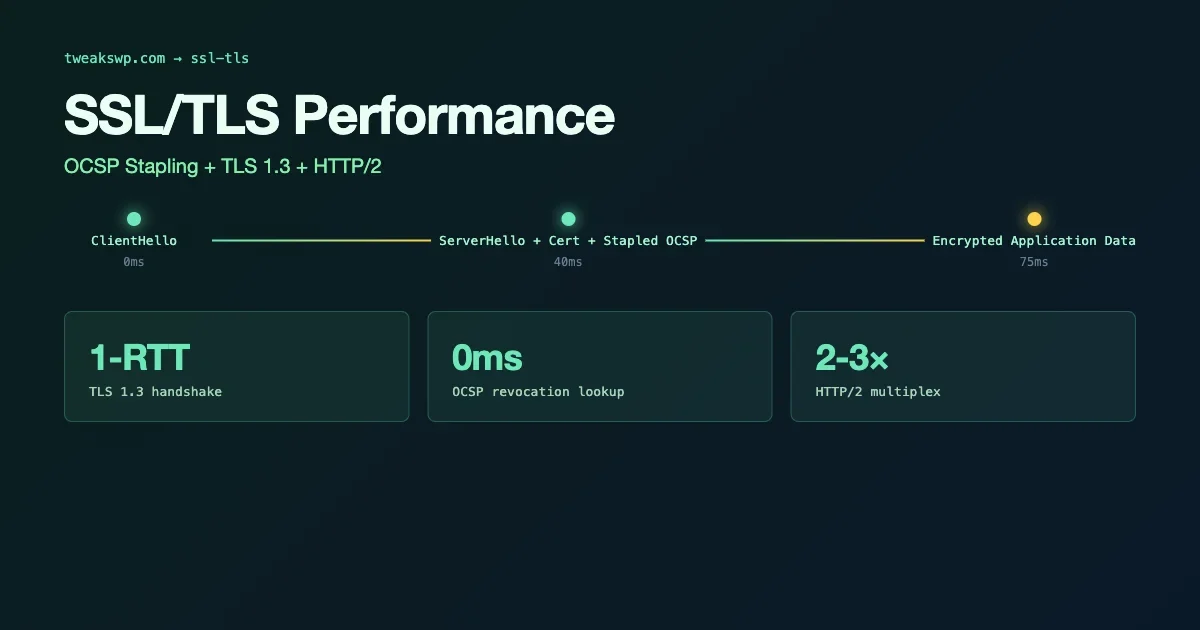
TLS configuration affects both security and performance. Weak cipher suites expose your site to downgrade attacks. Disabled session resumption forces a full TLS handshake on every connection, adding 100-300ms of latency on HTTPS. This guide covers OCSP stapling, TLS 1.3 configuration, HTTP/2 setup, and the WordPress-side changes that prevent mixed content and force SSL for admin access.
OCSP Stapling: Faster Certificate Validation
OCSP (Online Certificate Status Protocol) is how browsers verify that your SSL certificate has not been revoked. Without stapling, browsers make a real-time request to the certificate authority’s OCSP responder during every new TLS connection - adding network latency and privacy concerns. OCSP stapling has the server fetch and cache the OCSP response, then include it in the TLS handshake:
The ssl_trusted_certificate directive should point to the full certificate chain including the CA’s certificate but not your server certificate. Verify stapling is working with: openssl s_client -connect yourdomain.com:443 -status 2>&1 | grep "OCSP response". You should see “OCSP Response Status: successful”.
TLS 1.3 and Cipher Suite Configuration
TLS 1.3 removes the cipher negotiation complexity of TLS 1.2 and enables 0-RTT resumption for repeat connections. Most modern server software supports it, but you need to explicitly enable it and configure the cipher order correctly:
The ssl_protocols line enables TLS 1.2 and 1.3. Drop TLS 1.0 and 1.1 - they are deprecated by RFC 8996 and fail PCI DSS compliance. The cipher suite list prioritizes ECDHE (forward secrecy) and AES-GCM (authenticated encryption). ssl_prefer_server_ciphers off with TLS 1.3 allows the client to choose from its preferred cipher order, which is the correct behavior for TLS 1.3.
Session Resumption: Reducing Handshake Overhead
TLS session resumption allows clients to reconnect without a full handshake, reducing connection setup time for returning visitors. Two mechanisms handle this: session cache (for TLS 1.2) and session tickets (for 1.2 and 1.3):
The ssl_session_cache allocates shared memory for session data across all Nginx worker processes. 10MB stores approximately 40,000 sessions. Set ssl_session_timeout to match your expected reconnection interval - 1 day is appropriate for returning visitors. Ensure ssl_session_tickets off if you cannot rotate session ticket keys regularly, as reused ticket keys enable forward secrecy attacks.
HTTP/2: Enabling Multiplexed Connections
HTTP/2 multiplexes multiple requests over a single connection, eliminating the head-of-line blocking of HTTP/1.1. For WordPress with many assets (CSS, JS, fonts, images), this reduces connection overhead significantly. On Nginx, enabling HTTP/2 is a single keyword change:
HTTP/2 is negotiated via ALPN during the TLS handshake - it requires HTTPS. Verify HTTP/2 is active with: curl -I --http2 https://yourdomain.com/ 2>&1 | grep -i "HTTP/". You should see HTTP/2 200 in the response. On Apache, HTTP/2 requires mod_http2 and the Protocols h2 http/1.1 directive.
FORCE_SSL_ADMIN in wp-config.php
WordPress’s FORCE_SSL_ADMIN constant forces login and admin pages to use HTTPS, regardless of how the user navigated to wp-admin. It does not affect front-end pages:
Add this to wp-config.php before the /* That's all, stop editing! */ comment. For sites where the entire site should be HTTPS (all sites in 2025), also ensure the WP_HOME and WP_SITEURL constants use https://. A mismatch between the site URL constants and actual HTTPS delivery causes redirect loops.
Fixing Mixed Content
Mixed content occurs when an HTTPS page loads resources over HTTP. Browsers block mixed content requests or warn users, breaking functionality and undermining the security benefit of HTTPS. The most common source in WordPress is stored URLs in the database that still use http://:
The WP-CLI search-replace on serialized data updates URLs stored in serialized PHP arrays (widget data, Elementor content, plugin settings) as well as plain text fields. Run with --dry-run first to see what would change before executing. Back up the database before running the live version.
After the database fix, check for remaining mixed content with browser DevTools or an online mixed content scanner. Common remaining sources: hardcoded URLs in theme PHP files, CDN configurations pointing to HTTP assets, and external embeds (YouTube, social widgets) that themselves load HTTP sub-resources.
HSTS: Preventing Protocol Downgrade
HTTP Strict Transport Security tells browsers to only ever connect to your domain over HTTPS, even if the user types http://. After a browser sees the HSTS header, it automatically upgrades requests to HTTPS for the duration of the max-age:
The includeSubDomains flag applies HSTS to all subdomains - only add it if all your subdomains are on HTTPS. preload indicates intent to be included in the browser’s HSTS preload list (hardcoded into browsers). To submit to the preload list, the site must have been live on HTTPS for at least 18 weeks and the max-age must be at least 31,536,000 (one year). The full HSTS configuration including the CSP headers that complement it is covered in the WordPress security headers guide.
Let’s Encrypt Certificate Renewal with Nginx
Let’s Encrypt certificates expire every 90 days. Certbot handles automatic renewal, but Nginx needs to reload its configuration to pick up the new certificate. Add a post-renewal hook:
The deploy hook runs after each successful renewal. nginx -t tests the configuration before reloading - if the test fails, the reload is skipped, preventing a configuration error from taking down the server. Test renewal with certbot renew --dry-run to verify the hook runs correctly.
Verifying Your TLS Configuration
Test the complete TLS setup with SSL Labs before deploying to production:
Target an A or A+ rating on SSL Labs. Common reasons for below-A ratings: TLS 1.0/1.1 still enabled, weak cipher suites in the list, missing OCSP stapling, or short HSTS max-age. The SSL Labs report is specific about which criteria failed and what to change. For the full wp-config.php security constants that work alongside TLS configuration, the wp-config.php constants guide covers FORCE_SSL_ADMIN, DISALLOW_FILE_EDIT, and the complete set of security-relevant constants.
HTTP/3 and QUIC: The Next Step
HTTP/3 uses QUIC (UDP-based transport) instead of TCP. For WordPress, the main benefit is faster connection establishment - QUIC’s 0-RTT connection setup eliminates TCP’s 3-way handshake plus the TLS handshake, reducing latency on first connection by one to two round trips. Nginx added HTTP/3 support in 1.25.x:
HTTP/3 is negotiated via an Alt-Svc header. The add_header Alt-Svc 'h3=":443"; ma=86400' header tells clients that HTTP/3 is available on port 443 and they should use it for the next 86,400 seconds (one day). On subsequent visits, browsers connect via HTTP/3 directly. HTTP/2 remains the fallback for clients without QUIC support. Verify HTTP/3 support with: curl --http3 -I https://yourdomain.com/.
WordPress Behind a Load Balancer: X-Forwarded-Proto
When WordPress runs behind a load balancer or reverse proxy that terminates TLS, the PHP-FPM process sees HTTP on the internal connection even though the external connection is HTTPS. This causes WordPress to generate HTTP URLs and mark the connection as not-secure internally:
The HTTPS server variable override tells WordPress the connection is secure when the load balancer passes the X-Forwarded-Proto: https header. Without this, is_ssl() returns false and WordPress generates HTTP URLs for assets and redirects. This is a common misconfiguration on Cloudflare, AWS ALB, and Cloudways setups where TLS terminates at the proxy layer.
Certificate Transparency and CAA Records
Two DNS-level controls complement server-side TLS configuration:
- CAA records specify which Certificate Authorities are allowed to issue certificates for your domain. If you use Let’s Encrypt, add a CAA record allowing only letsencrypt.org. This prevents an attacker who compromises a different CA from issuing a valid certificate for your domain.
- Certificate Transparency logging is mandatory for publicly trusted certificates. All major CAs submit certificates to public CT logs. Monitor these logs for unexpected certificate issuance for your domain using services like crt.sh or Certificate Transparency Monitor.
Add the CAA record via your DNS provider. For Cloudflare, it is under DNS records as type CAA. The issue tag allows certificate issuance; issuewild allows wildcard certificates. Both need explicit records if you use both standard and wildcard certificates from Let’s Encrypt.
TLS Performance Benchmarking
Measure TLS overhead before and after applying these changes. The most useful metrics:
- Time to first byte (TTFB) on first connection (includes TLS handshake):
curl -w "%{time_connect} %{time_appconnect} %{time_starttransfer}" -o /dev/null -s https://yourdomain.com/ - Time to first byte on subsequent connection with session resumption active: run the curl command twice and compare the second result against the first
- HTTP/2 vs HTTP/1.1 asset loading: WebPageTest can run both protocols and show the waterfall comparison
OCSP stapling typically saves 50-150ms per new connection (eliminating the separate OCSP responder request). TLS session resumption saves the full handshake overhead on returning connections, typically 100-200ms. HTTP/2 multiplexing reduces total asset loading time by eliminating connection overhead per asset, with the most benefit on pages with 20+ assets. These are cumulative improvements - apply all three to maximize the benefit.
Cloudflare SSL Mode Settings and WordPress Compatibility
If your WordPress site is behind Cloudflare, the SSL/TLS mode setting in the Cloudflare dashboard affects how traffic flows between Cloudflare and your origin server. The wrong setting causes redirect loops or security warnings:
CF SSL Mode | Cloudflare to Origin | Certificate Required on Origin | Use When |
|---|---|---|---|
Off | HTTP only | None | Never - exposes internal traffic |
Flexible | HTTP | None | Temporary (origin has no cert) - causes redirect loops with FORCE_SSL_ADMIN |
Full | HTTPS (not validated) | Any cert (self-signed ok) | Better - but allows MITM on origin connection |
Full (Strict) | HTTPS (validated) | Valid cert required | Correct mode for production |
Use Full (Strict) mode for production WordPress. Flexible mode with FORCE_SSL_ADMIN in wp-config.php creates redirect loops because WordPress sees HTTP from Cloudflare and redirects to HTTPS, which Cloudflare serves as HTTP again. Full (Strict) mode sends HTTPS to your origin, and WordPress receives the connection as secure.
Test Certificate Renewal Before It Matters
Run certbot renew --dry-run and verify the post-renewal hook executes without errors before your certificate’s expiry approaches. A failed auto-renewal on an active site serves expired certificate warnings to every visitor. The dry run takes less than a minute and eliminates this risk entirely.
Plugins we build and run
We maintain these ourselves, which is why we can support them on your site.
- BuddyNextThe self-hosted community engine for WordPress
- BuddyXFree community theme, Pro when you outgrow it
- ReignPremium community theme. Add pieces, build anything
- JetonomyCommunity forum and Q&A for WordPress
- EventonomyEvents and RSVPs for WordPress communities
- LearnomyCourses and learning communities on WordPress
- ListoraDirectories and listings your members can browse
- SnipShareCode sharing built for developer communities
- WB Ad ManagerAd placements that turn traffic into revenue
- WP Career BoardA job board your community actually uses
- WP Sell ServicesSell services with offers, orders, and payouts
- MediaVersePhotos, video, and media albums for members
- WB GamificationPoints, badges, and rewards that keep members active
- Product RoadmapPublic roadmaps with voting your users trust