WordPress Hook Priority Explained: How Action and Filter Execution Order Works
How WordPress hook priority numbers work, how to remove object method and closure callbacks, and runtime tools like doing_action(), did_action(), and $wp_filter inspection.

WordPress hook priority is one of those internals that developers treat as a black box until it bites them. A function that runs before its dependencies are loaded, a filter that fires after the value it should modify has already been used, or a remove_action call that silently fails because it runs at the wrong time - all of these trace back to priority misunderstanding. This guide covers how priority numbers work, how to remove actions from closures and object methods, and the runtime inspection functions that help you debug priority conflicts.
How Priority Numbers Work
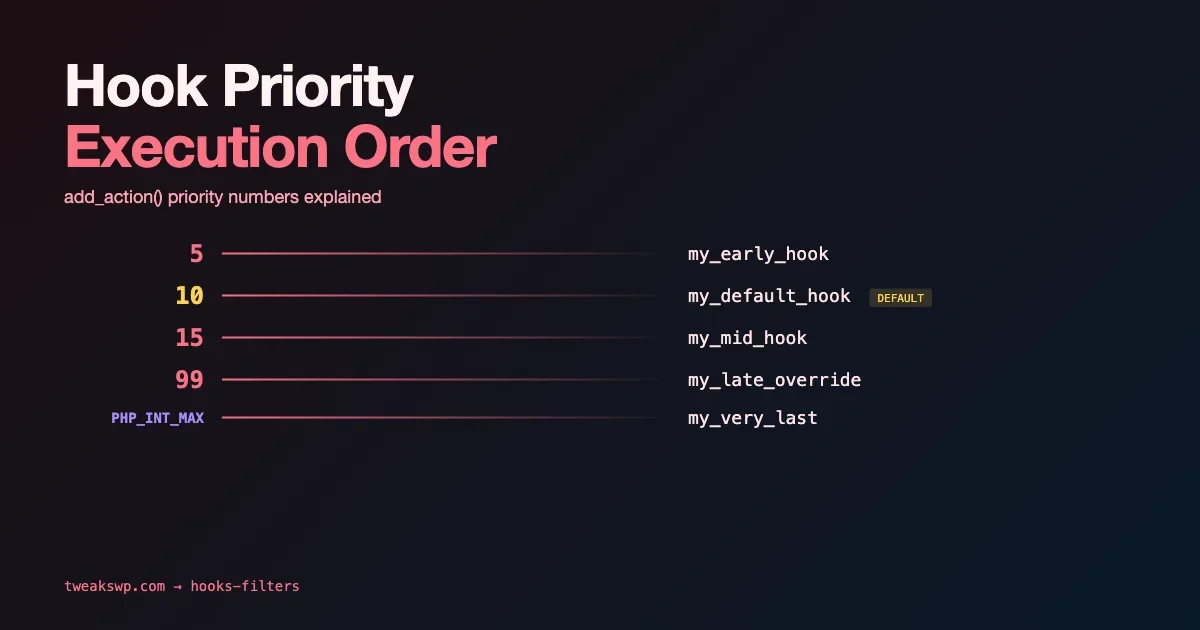
When you register a hook with add_action() or add_filter(), the third argument is the priority. Lower numbers run first. The default priority is 10. Two functions on the same hook at the same priority run in the order they were registered.
The priority range is effectively -INF to INF (PHP integer bounds), but in practice most WordPress code uses 1-100. WordPress core uses specific priority values for its own hooks that you need to know to position your code correctly relative to them.
Common core priority reference points:
Hook | Core Priority | What Runs There |
|---|---|---|
init | 0 | WPML language detection |
init | 10 | register_post_type, register_taxonomy (default) |
init | 99 | Some plugin setup that requires CPTs to exist |
wp_head | 1 | Some SEO plugins’ meta output |
wp_head | 10 | Default WordPress scripts/styles queue |
wp_footer | 20 | wp_print_footer_scripts() |
save_post | 10 | Default post meta processing |
the_content | 10 | wptexturize, wpautop, shortcode_unautop |
Late Hooks: Running After Everything Else
PHP_INT_MAX and large priority values are commonly used to ensure a function runs after all other registered callbacks on a hook. This is a pattern for code that needs to operate on the fully assembled value:
PHP_INT_MAX (9223372036854775807 on 64-bit systems) guarantees your callback runs last. A priority of 9999 or 99999 works in practice but is not guaranteed to be last if another plugin uses a higher value. For truly “must be last” scenarios, PHP_INT_MAX is the correct choice.
remove_action and remove_filter: The Common Failure Cases
remove_action() removes a previously registered callback from a hook. The priority argument must exactly match the priority used in add_action(). The most common failure is calling remove_action() with a different priority than the original registration:
The second failure mode: calling remove_action() before the hook is registered. If a plugin adds its callback in plugins_loaded at priority 10, your remove_action() call must run after that - at plugins_loaded priority 11 or later, or in a hook that fires after plugins_loaded.
Removing Callbacks from Object Methods
Removing a callback added by a class method requires a reference to the same object instance that registered it. Class methods registered via add_action( 'hook', array( $this, 'method' ) ) can only be removed if you have the $this reference:
For third-party plugin instances where you do not have direct access to the object, you can iterate $wp_filter to find and remove the callback:
This approach traverses the internal hook structure to find callbacks by method name without needing the object reference. It is fragile - it breaks if the plugin registers multiple callbacks with the same method name on the same hook at different priorities. Use it only when no other option exists.
Removing Closures
Closures (anonymous functions) registered with add_action() cannot be removed via remove_action() unless you hold a reference to the original closure object:
Closures registered in third-party code that you do not have a reference to are effectively non-removable through standard means. The same $wp_filter traversal technique applies, but identifying the correct closure requires inspecting the callback’s code or argument count. This is a design problem in the original code - closures should be used for throwaway callbacks, not for functionality that other code needs to be able to remove.
has_filter() and has_action(): Checking Registration
has_filter() and has_action() return the priority of a registered callback, or false if it is not registered. Use them to guard conditional registration and to debug priority issues:
When called with only the hook name (no callback), has_filter() returns true if any callback is registered on that hook. This is the correct way to check if any plugin is using a hook before you make decisions based on hook state.
doing_action() and did_action()
These two functions are your runtime debugging tools for hook execution state:
doing_action() returns true if the specified hook is currently executing. did_action() returns the number of times a hook has fired. These are invaluable for debugging priority conflicts where you need to know whether your code is running before or after the expected execution point. In combination with Query Monitor’s hooks panel, they give you a complete picture of hook execution order on any request.
Priority Conflicts Between Plugins
Priority conflicts occur when two plugins make assumptions about when they run relative to each other. Common patterns:
- Filter ordering conflict: Plugin A filters
the_contentat priority 10 expecting to receive processed HTML. Plugin B processesthe_contentat priority 5 expecting to receive raw content. Depending on registration order and what “raw” means to each, one may break the other. - Initialization dependency: Plugin A registers a custom post type at
initpriority 10. Plugin B tries to register a taxonomy linked to that CPT atinitpriority 10 in a plugin that loads first alphabetically. The taxonomy registration fails silently because the CPT does not exist yet. - Cleanup conflict: Plugin A caches data in a transient on
save_postat priority 10. Plugin B clears all transients onsave_postat priority 11. Every save invalidates A’s cache immediately after creating it.
For debugging hook execution order, Query Monitor’s “Hooks & Actions” panel shows every hook that fires on the current request, with its registered callbacks and their priorities. The Query Monitor tutorial covers this panel in detail, including how to filter by hook name and identify callbacks from specific plugins.
The all Hook and Global Hook Monitoring
The all hook fires on every hook call in WordPress. It is a debugging tool, not something to use in production:
Adding a callback to all lets you log every hook that fires during a request, with its priority context. This is expensive - it runs on every one of the hundreds of hooks WordPress fires per request. Use it only in development to map the execution order of hooks you are investigating, then remove it immediately.
For ongoing hook debugging in production without the overhead of the all hook, the WP_DEBUG constants guide covers how to configure selective logging that captures the specific hooks and callbacks you need to monitor without the full overhead of debug mode.
Accepted Arguments: The Fourth Parameter
The fourth parameter to add_filter() and add_action() is the number of arguments the callback accepts. The default is 1. WordPress passes additional arguments on some hooks - if your callback needs them, you must declare the accepted count:
A common mistake: registering a callback with the default accepted_args of 1 on a hook that passes multiple arguments. The callback receives only the first argument. This is not an error - PHP silently drops the extra arguments if the function does not declare them as parameters. But if your callback needs the second or third argument, you get a wrong or undefined variable instead of the actual value.
Check the hook’s documentation or the WordPress core source for the arguments each hook passes. The $args parameter in WP_Hook’s apply_filters() contains all passed arguments - use the all hook with func_get_args() to inspect what any hook actually passes during development.
Action vs. Filter: When Each Applies
Actions and filters use the same underlying hook mechanism in WordPress. The distinction is semantic and enforced by convention:
- Actions (
add_action,do_action): run code at a point in execution. Return value is ignored. Use for side effects - sending emails, updating database rows, registering resources. - Filters (
add_filter,apply_filters): receive a value, optionally modify it, and return it. The returned value replaces the original. Use for transforming data - modifying post content, changing query arguments, adjusting plugin output.
Technically, you can use add_action() on a filter hook and vice versa - they are the same WP_Hook system. The distinction matters because a filter callback that does not return a value causes the filtered value to become null, breaking the output. Always return the first argument in a filter callback, even if you are not modifying it.
The $wp_filter Global: Internal Hook Storage
WordPress stores all registered hook callbacks in the $wp_filter global, which is an associative array of WP_Hook objects keyed by hook name. Understanding its structure helps debug complex priority scenarios:
The structure is: $wp_filter['hook_name']->callbacks[priority][] where each entry has function (the callable), accepted_args (the declared argument count), and an auto-generated ID. This structure is what has_filter(), remove_filter(), and the hook traversal patterns in this guide operate on. Reading $wp_filter directly is a debugging technique - never modify it directly in production code; use the official add/remove functions.
Dynamic Hook Names and Variable Priorities
WordPress uses dynamic hook names extensively - hooks that include a variable as part of the hook name, like save_post_{$post_type} or manage_{$post_type}_posts_columns. These are standard string concatenation in PHP - the hook name is just a string, and WordPress has no awareness that part of it is variable:
Dynamic hook names allow targeting a specific post type or taxonomy without a conditional check inside the callback. They run only when the specific entity triggers the hook, rather than on all save_post calls where you would need to check $post->post_type manually. Priority rules apply identically to dynamic hooks.
Use Query Monitor Before Guessing Priority Values
Before adjusting priority values to fix a hook conflict, use Query Monitor to see the actual execution order. The hooks panel shows exactly what fires and when, eliminating the guesswork. Priority changes made without this data often move the problem rather than fix it.
When hook conflicts stem from a deeper architectural problem rather than a priority mismatch, Wbcom Designs offers WordPress plugin development services to untangle and rebuild the affected functionality properly.
Plugins we build and run
We maintain these ourselves, which is why we can support them on your site.
- BuddyNextThe self-hosted community engine for WordPress
- BuddyXFree community theme, Pro when you outgrow it
- ReignPremium community theme. Add pieces, build anything
- JetonomyCommunity forum and Q&A for WordPress
- EventonomyEvents and RSVPs for WordPress communities
- LearnomyCourses and learning communities on WordPress
- ListoraDirectories and listings your members can browse
- SnipShareCode sharing built for developer communities
- WB Ad ManagerAd placements that turn traffic into revenue
- WP Career BoardA job board your community actually uses
- WP Sell ServicesSell services with offers, orders, and payouts
- MediaVersePhotos, video, and media albums for members
- WB GamificationPoints, badges, and rewards that keep members active
- Product RoadmapPublic roadmaps with voting your users trust