How to Prevent XSS in WordPress: Sanitization and Escaping Functions Guide
Maps every WordPress esc_*, wp_kses_*, and sanitize_* function to its exact context, with the 'sanitize on input, escape on output' rule that eliminates XSS.

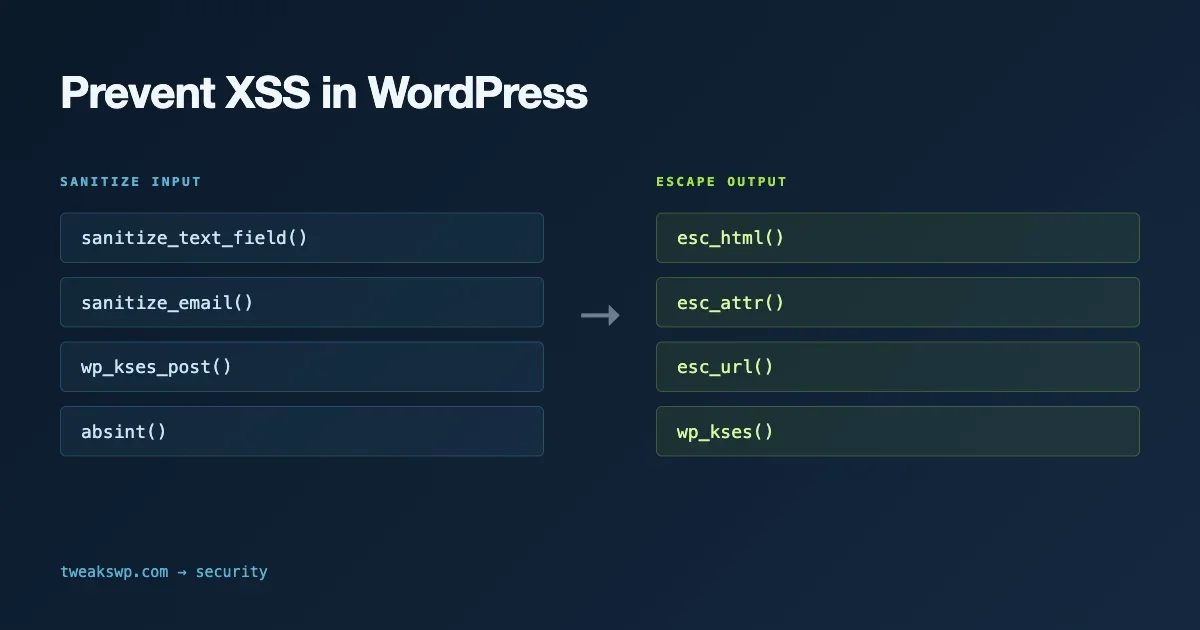
WordPress ships with over 60 sanitization and escaping functions. Using the wrong one, or using it in the wrong place, creates XSS vulnerabilities that bypass your other security controls. This guide maps every major wp_kses_*, esc_*, and sanitize_* function to the exact context where it belongs, and explains why “sanitize on input, escape on output” is the rule that resolves every confusion.
The Fundamental Split: Sanitization vs. Escaping
These two operations serve different purposes at different points in your data’s lifecycle:
- Sanitization happens when data enters your system - from a form submission, API request, or user input. It validates and cleans the data before you store it. The question is: “Is this value acceptable to store?”
- Escaping happens when data leaves your system - when you output it to HTML, a JavaScript context, a URL, or an attribute. It prevents stored data from being interpreted as executable code. The question is: “How do I safely display this value in this specific context?”
The failure mode that creates XSS is doing one without the other, or doing both in the wrong context. Sanitizing on output is too late and may break legitimate content. Escaping on input does not protect against stored content that gets injected into a different context later.
The esc_* Functions: When to Use Each
esc_html()
Converts <, >, ", ', and & to HTML entities. Use this for any text that should display as plain text inside an HTML element - not in an attribute, not in a URL, not in a JavaScript string.
<h2><?php echo esc_html( $post_title ); ?></h2>
<p><?php echo esc_html( get_the_author_meta( 'display_name' ) ); ?></p>
Common mistake: using esc_html() inside an attribute value. The correct function for attribute values is esc_attr().
esc_attr()
Use for HTML attribute values. It encodes the same characters as esc_html() but is semantically correct for attribute context. Always use this inside attribute quotes.
<input type="text" name="company" value="<?php echo esc_attr( $company_name ); ?>" />
<div class="<?php echo esc_attr( $custom_class ); ?>"></div>
esc_url() and esc_url_raw()
esc_url() is for URLs displayed in HTML - it encodes the URL for HTML output and removes dangerous protocols (javascript:, data:, vbscript:). Use it in href and src attributes.
<a href="<?php echo esc_url( $affiliate_link ); ?>">Visit Site</a>

<?php
// Storing a URL - use esc_url_raw(), not esc_url()
update_post_meta( $post_id, '_external_link', esc_url_raw( $_POST['link'] ) );
esc_url_raw() is for URLs being stored in the database or passed to functions that accept raw URLs. It strips the same dangerous protocols but does not HTML-encode the output. Use esc_url_raw() before update_option(); use esc_url() before echo.
esc_js()
For outputting PHP values into inline JavaScript. It escapes single quotes, double quotes, and backslashes, and adds slashes before newlines.
<script>
var userName = '<?php echo esc_js( $current_user_display_name ); ?>';
</script>
Avoid inline JavaScript for passing data to your scripts. The preferred path is wp_localize_script() or wp_add_inline_script() with properly JSON-encoded values. Those functions handle escaping internally and are more maintainable than building inline script strings by hand.
esc_textarea()
Specifically for textarea content. It calls esc_html() but is semantically distinct because the textarea context requires consistent encoding to avoid breaking multi-line content with embedded HTML entities.
<textarea name="bio"><?php echo esc_textarea( $user_bio ); ?></textarea>The wp_kses_* Functions: Allowing Specific HTML
The wp_kses_* family is for contexts where you want to allow some HTML but not all of it. It strips any tags or attributes not in your allowed list.
wp_kses_post()
Allows the HTML tags that WordPress uses in post content: headings, lists, links, blockquotes, images, and similar. Use this when you are outputting content from the database that may contain HTML from a trusted editor but should not allow scripts.
<div class="widget-content">
    <?php echo wp_kses_post( $widget_instance['description'] ); ?>
</div>
wp_kses() with Custom Allowed Tags
When you need to allow a custom subset of HTML - for instance, only <a> and <strong> tags in a widget title - define your own allowed tags array.
<?php
$allowed = array(
    'a'      => array( 'href' => array(), 'title' => array() ),
    'strong' => array(),
);
echo wp_kses( $widget_title, $allowed );
The second argument is an associative array where keys are tag names and values are arrays of allowed attributes. An empty array as the attribute value means no attributes are allowed for that tag.
wp_kses_data()
A stricter version that allows only a minimal set of inline HTML elements and no block-level tags. Useful for short descriptions, meta text, or any context where you want to strip block-level structure but allow basic inline formatting.
Input Sanitization: The sanitize_* Functions
These run at input time - before storing to the database. The function you choose should match the type of data you expect.
Function | Use For | What It Does |
|---|---|---|
| Single-line text | Strips tags, removes extra whitespace, strips octets |
| Multi-line text | Like sanitize_text_field() but preserves line breaks |
| Email addresses | Removes invalid characters, lowercases |
| URLs before storage | Strips dangerous protocols, removes invalid characters |
| Option names, slugs | Lowercase, alphanumeric + underscores + hyphens only |
| Slugs from titles | Converts to URL-safe slug format |
| File names | Removes path traversal sequences, restricts characters |
| Positive integers | Absolute value of intval() - returns 0 for non-numeric |
<?php
$name    = sanitize_text_field( $_POST['name'] );
$bio     = sanitize_textarea_field( $_POST['bio'] );
$email   = sanitize_email( $_POST['email'] );
$website = sanitize_url( $_POST['website'] );
$post_id = absint( $_POST['post_id'] );

update_user_meta( $user_id, 'bio', $bio );
Context Mapping: Which Function Goes Where
The most practical way to remember the rules is to anchor each function to its output context.
Output Context | Function |
|---|---|
HTML text node |
|
HTML attribute |
|
href / src |
|
Inline JavaScript |
|
Textarea content |
|
Rich HTML output |
|
JSON in HTML |
|
Double-Escaping: The Secondary Problem
Double-escaping happens when data is escaped on input and then escaped again on output. The result is visible entities in the rendered page - users see & instead of &, or ' instead of '.
The most common cause is storing data with sanitize_text_field() and then outputting with esc_html(). sanitize_text_field() does not HTML-encode, so this combination is correct. The problem is when htmlspecialchars() or addslashes() is applied on input in addition to the WordPress sanitization functions, creating pre-encoded values in the database.
The rule: store raw or minimally sanitized values; escape at output time for the specific context. If you find double-encoded entities in your database, the fix is to run html_entity_decode() on the stored values and remove the input-time encoding from your code.
Practical Audit: Finding Missing Escaping in a Plugin
Use grep to find echo statements that output variables without escaping.
# Finds echo statements outputting a raw variable, not wrapped in esc_*/wp_kses_*
grep -rnE "echo\s+\\$[a-zA-Z_]+\s*;" wp-content/plugins/your-plugin/ \
  | grep -vE "esc_html|esc_attr|esc_url|esc_js|esc_textarea|wp_kses"
This finds echo statements where the output is a variable not wrapped in an escaping function. False positives include variables that have already been sanitized (like post IDs that went through absint()), so manually review each hit to determine whether the output context requires escaping.
For a full hardening audit that goes beyond escaping and covers file permissions, login protection, and server-level tweaks, the WordPress security hardening guide covers the complete wp-config.php and server-level checklist.
The Relationship Between Nonces, Capabilities, and Escaping
Escaping solves the “output is safe” problem. It does not solve the “the right user ran this action” problem. Those are handled by nonces and capability checks respectively.
- Nonces (
wp_verify_nonce(),check_admin_referer()) prevent CSRF - a different user’s browser triggering an action on behalf of an authenticated user. - Capability checks (
current_user_can()) ensure only users with the right role can perform an action. - Escaping ensures that whatever gets stored and displayed does not execute as code in the browser.
All three are needed. Escaping without a nonce check means a logged-in user can be tricked into submitting a form. A capability check without escaping means the right user stored safe data, but it gets injected when output to a different context. The Content Security Policy headers guide adds a transport-layer protection that limits the damage when escaping does fail.
Handling User-Generated Content in REST API Endpoints
REST API endpoints introduce a different input vector than form submissions. The sanitization rule is identical, but the entry point is the request body parsed by the REST API framework.
<?php
register_rest_route( 'myplugin/v1', '/comment', array(
    'methods'  => 'POST',
    'callback' => 'myplugin_save_comment',
    'args'     => array(
        'message' => array(
            'required'          => true,
            'sanitize_callback' => 'sanitize_textarea_field',
            'validate_callback' => function ( $value ) {
                return is_string( $value ) && strlen( $value ) <= 2000;
            },
        ),
    ),
    'permission_callback' => function () {
        return is_user_logged_in();
    },
) );
The sanitize_callback in your schema definition runs before your endpoint’s callback function receives the parameter. This is the right place for sanitization in a REST endpoint - not inside the callback itself. Output from the endpoint goes through rest_ensure_response(), which handles JSON encoding, but if your endpoint builds HTML or echoes directly, you still need to escape output manually.
wp_kses() Performance on Large Content Blocks
wp_kses() runs a recursive HTML parser over the input. On large content sections (long-form posts, imported content), it can add measurable processing time. Profile it with Query Monitor before applying it to high-frequency paths like loop output or AJAX responses.
The typical approach for stored post content is to sanitize with wp_kses_post() on save (the content_save_pre filter handles this automatically), then output the stored value with wp_kses_post() only for untrusted sources. For content stored via the Gutenberg editor that went through Gutenberg’s own sanitization, using the_content() or get_the_content() is sufficient.
Testing Your Escaping Implementation
After implementing sanitization and escaping, test with inputs that expose common failures.
<script>alert(1)</script>– basic script injection; should appear as literal text in HTML context, stripped by wp_kses_post() in rich content" onmouseover="alert(1)– attribute injection; esc_attr() should encode the quote so it cannot break out of the attributejavascript:alert(1)as a URL value; esc_url() should strip the javascript: protocol<img src=x onerror=alert(1)>– event handler injection; wp_kses_post() strips the onerror attribute even if img is allowed- Unicode and multibyte characters in text fields; sanitize_text_field() should handle these without breaking
Run these through your form or API and check both the stored value in the database and the rendered output. The stored value should contain the safe, sanitized form. The output should be HTML-entity-encoded where appropriate.
For SQL-level injection testing alongside XSS checks, the SQL injection audit guide covers the complementary grep-based approach for database queries. Covering both the output context (XSS) and the query context (SQLi) closes the two most common injection attack surfaces in WordPress plugins.
XSS in the Wild: Common Plugin Vulnerability Patterns
Understanding where XSS vulnerabilities actually appear in WordPress plugins tells you where to audit first. The Wordfence vulnerability database shows recurring shapes that appear across hundreds of plugins. Knowing these helps you spot them in code review before attackers find them in the wild.
Reflected XSS Through Search Parameters
Plugins that build search results pages frequently take a search term from a URL parameter and output it back to the page without escaping. The shape: user searches for something, the plugin displays “Results for: [search term]”, and the search term goes directly into the HTML. An attacker crafts a URL with a script tag as the search term and shares the link. Anyone who clicks it runs the script in their browser under the site’s origin.
The fix is a single call to esc_html() around the output. The vulnerability exists because the developer assumed the search term would only ever be a normal text string, never executable code. This assumption is always wrong in a web context.
Stored XSS Through Custom Fields
Plugins that accept HTML in custom field values and then output those fields in templates without escaping store the XSS payload for later. The attacker submits a custom field value containing a script tag through a form that accepts HTML input. Every visitor to the affected post or page then executes the stored script.
The fix requires both sanitization on storage and escaping on output. For custom fields that should accept plain text only, sanitize_text_field() on save and esc_html() on output. For fields that accept limited HTML, wp_kses() with an explicit allowlist on save, and wp_kses() or wp_kses_post() on output.
DOM-Based XSS Through JavaScript
DOM-based XSS occurs entirely in the browser. The server sends a safe page, but client-side JavaScript reads a value from a URL fragment, query parameter, or cookie and writes it to the DOM without sanitization. PHP-level escaping does not help here because the vulnerability is in the JavaScript, not the PHP template.
The defense is to avoid innerHTML, document.write(), and eval() when writing URL-derived values to the page. Use textContent instead of innerHTML when you only need to display text. When you need to allow some HTML in client-side output, use a client-side sanitization library like DOMPurify.
Escaping Translated Strings
Translated strings require the same escaping as any other value. WordPress provides combined functions that translate and escape in one call.
esc_html_e()– translates and echoes with HTML escapingesc_html__()– translates and returns with HTML escapingesc_attr_e()– translates and echoes with attribute escapingesc_attr__()– translates and returns with attribute escaping
Using esc_html_e() instead of _e() is the right default for any translation that goes into an HTML text node. The combined function removes a step where escaping could be accidentally omitted.
Integrating Escaping Checks into Code Review
The most reliable way to catch missing escaping is to make it a code review checklist item rather than a post-deployment audit. A minimal escaping checklist for every PR that touches template files:
- Every
echostatement outputs through an escaping function. The function name matches the output context (html, attr, url, js, textarea). - Every translated string output through
_e()has been replaced withesc_html_e(),esc_attr_e(), or the appropriate combined function. - No raw
innerHTMLassignments ordocument.write()calls receive URL-derived values. - All custom field values used in templates are passed through the right escaping function for their output context.
- REST API endpoint output that renders HTML uses
wp_kses_post()or the custom allowlist appropriate for that endpoint’s content type.
Running the grep audit for missing escaping (covered earlier in this guide) as part of CI gives automated coverage for the most obvious cases. Manual review catches the edge cases - values that went through sanitize functions and seem safe but end up in a context that still requires escaping.
Apply the Pattern Consistently
The checklist for any template file: every echo outputs through an escaping function matched to its context. Every form submission sanitizes before storing. Every AJAX handler verifies a nonce and checks capabilities before processing. Once that discipline is consistent across a plugin or theme, the surface area for XSS is close to zero.
Plugins we build and run
We maintain these ourselves, which is why we can support them on your site.
- BuddyNextThe self-hosted community engine for WordPress
- BuddyXFree community theme, Pro when you outgrow it
- ReignPremium community theme. Add pieces, build anything
- JetonomyCommunity forum and Q&A for WordPress
- EventonomyEvents and RSVPs for WordPress communities
- LearnomyCourses and learning communities on WordPress
- ListoraDirectories and listings your members can browse
- SnipShareCode sharing built for developer communities
- WB Ad ManagerAd placements that turn traffic into revenue
- WP Career BoardA job board your community actually uses
- WP Sell ServicesSell services with offers, orders, and payouts
- MediaVersePhotos, video, and media albums for members
- WB GamificationPoints, badges, and rewards that keep members active
- Product RoadmapPublic roadmaps with voting your users trust