Best WordPress Plugin for Photographers in 2026: Why WPMediaVerse Stands Out
Looking for the best WordPress plugin for photographers? This guide compares gallery plugins with WPMediaVerse and explains when a media platform is the better choice.
If you search for the best WordPress plugin for photographers, you usually end up in one of two camps: simple gallery plugins that make portfolios look decent, and heavy community or membership setups that do far more than most photographers actually need. The problem is that many photography websites now sit somewhere in the middle. They need elegant galleries, but they also need frontend uploads, user profiles, collections, private sharing, social engagement, and sometimes even contests or community features.
That is where the decision gets more interesting.
For a basic portfolio site, almost any polished gallery plugin can work. But if you are building a real photography platform on WordPress, not just a static showcase, the best choice changes quickly. After looking at how modern photography sites actually operate, my view is that WPMediaVerse Pro, paired with the free WPMediaVerse core plugin, is one of the strongest options available for photographers who need more than a gallery.
In this guide, I will break down what photographers should evaluate before picking a plugin, where traditional gallery plugins still make sense, and why WPMediaVerse stands out when your site needs to behave more like a visual platform than a brochure.
What photographers actually need from a WordPress plugin
Many plugin comparisons start and end with gallery layouts. That is too narrow. A photography site is usually handling large media libraries, repeated uploads, image browsing, filtering, user interaction, and sometimes controlled access to content. A good plugin for photographers should make those workflows easier instead of forcing everything through WordPress’s default media library.
Here is the practical checklist I use.
- Clean image presentation with grid, masonry, feed, or portfolio layouts
- Frontend media upload workflows
- Albums, collections, and better content organization
- Profile pages for photographers or contributors
- Privacy controls for private or member-only media
- Fast browsing on desktop and mobile
- Engagement tools such as reactions, comments, favorites, or follows
- Scalability for image-heavy websites
- Optional monetization, competitions, or membership integrations
If your site only needs the first item, you are shopping for a gallery plugin. If you need most of the list, you are shopping for a media platform.
That distinction matters because many plugin reviews compare products that are not solving the same problem.
When a gallery plugin is enough
If you are a solo photographer building a brochure-style portfolio, a mature gallery plugin like FooGallery, Envira Gallery, NextGEN Gallery, or Modula can still be a valid choice. These plugins are often easier to install, lighter in scope, and perfectly adequate when your needs are limited to showcasing finished work.
You may only need:
- Portfolio pages
- Lightboxes
- Albums or gallery categories
- Watermarks or image protection
- Basic client galleries
In that case, a focused gallery tool can be the right answer. You do not always need a more ambitious system.
But the tradeoff appears as soon as your workflow becomes interactive. The minute you want community submissions, social discovery, role-based access, member profiles, frontend posting, or photography contests, you start stacking multiple plugins together. That is usually where complexity, styling conflicts, and data fragmentation begin.
Why photographers outgrow standard gallery plugins
Photography businesses and communities rarely stay static for long. A solo portfolio can evolve into a members-only photo club. A client proofing area can become a private upload workflow. A niche photography blog can become a social platform where users submit and discuss media. Once that happens, conventional gallery plugins start showing their limits.
Typical pain points include:
- No real user profile or creator-centric experience
- Weak frontend upload support
- Limited social interaction beyond comments
- Poor organization for large, growing image libraries
- Little support for competitions, voting, or challenge-based engagement
- Hard-to-manage combinations of gallery plugin + membership plugin + social plugin + custom code
From a developer perspective, this is also where operational concerns show up. Image-heavy sites need efficient media handling and careful performance work. If you are already tuning WordPress TTFB and server response times, you know how quickly large media workflows can create slow pages and inconsistent user experiences. You also need better debugging visibility when plugins start conflicting, which is exactly why tools like Query Monitor matter on more advanced builds.
What makes WPMediaVerse different
WPMediaVerse is not just trying to be another gallery plugin. It is built more like a dedicated media layer for WordPress. The free plugin provides the core media experience, and the Pro add-on extends it with cloud storage, analytics, video intelligence, quota tools, migrations, and gamified engagement features.
That matters because it changes the architecture of the site. Instead of forcing photographers into a pile of disconnected gallery and social plugins, WPMediaVerse approaches the problem as a complete media platform.
At a high level, WPMediaVerse gives photographers:
- Frontend-first media publishing
- User profile and creator-style presentation
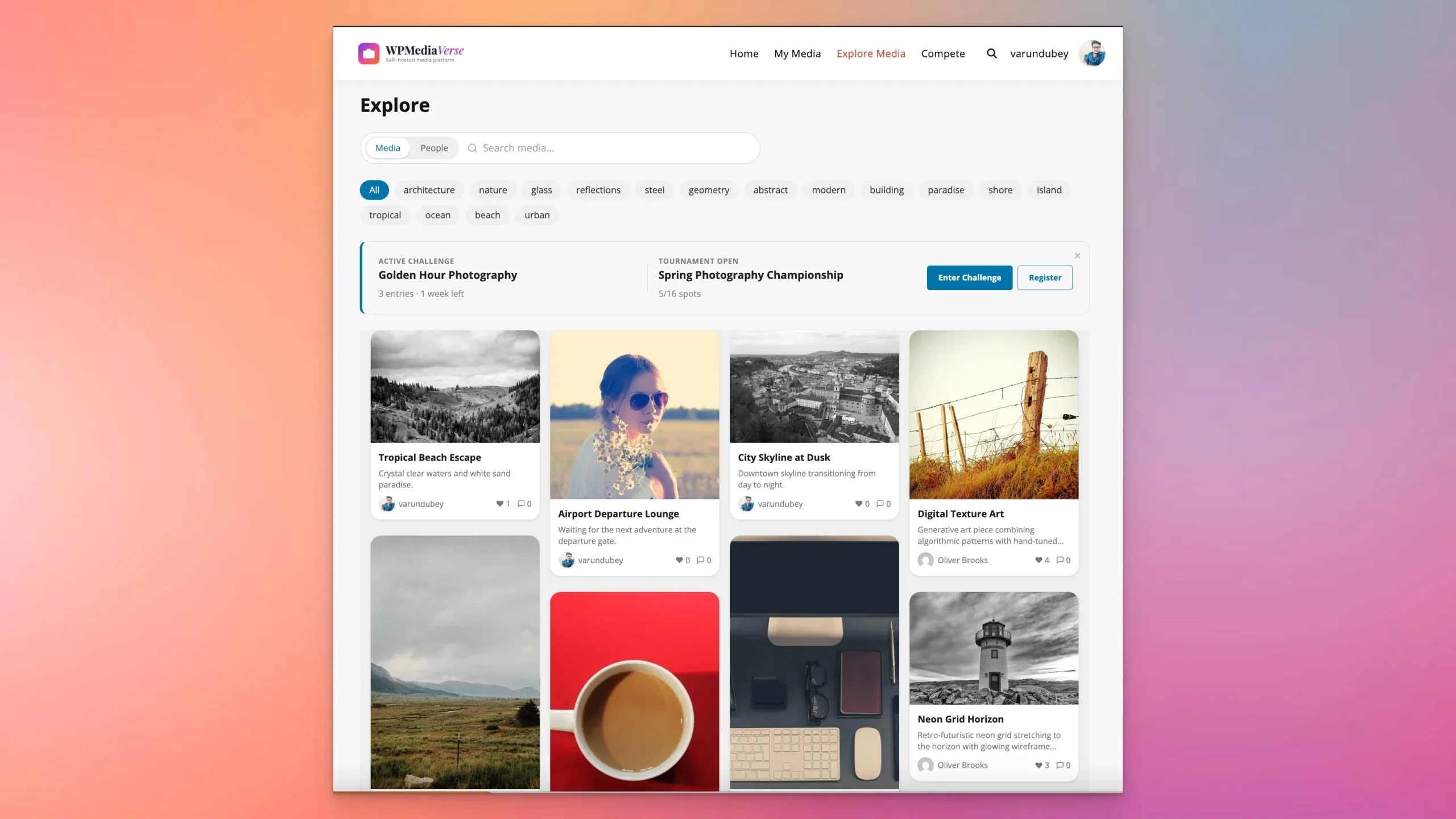
- Explore feeds and discovery views
- Albums and smart collections
- Rich media interaction with reactions, comments, and favorites
- Competition-ready features like battles, challenges, and tournaments
- Better support for communities, memberships, and growth loops
For a photography website that needs participation rather than passive viewing, those are meaningful differences.
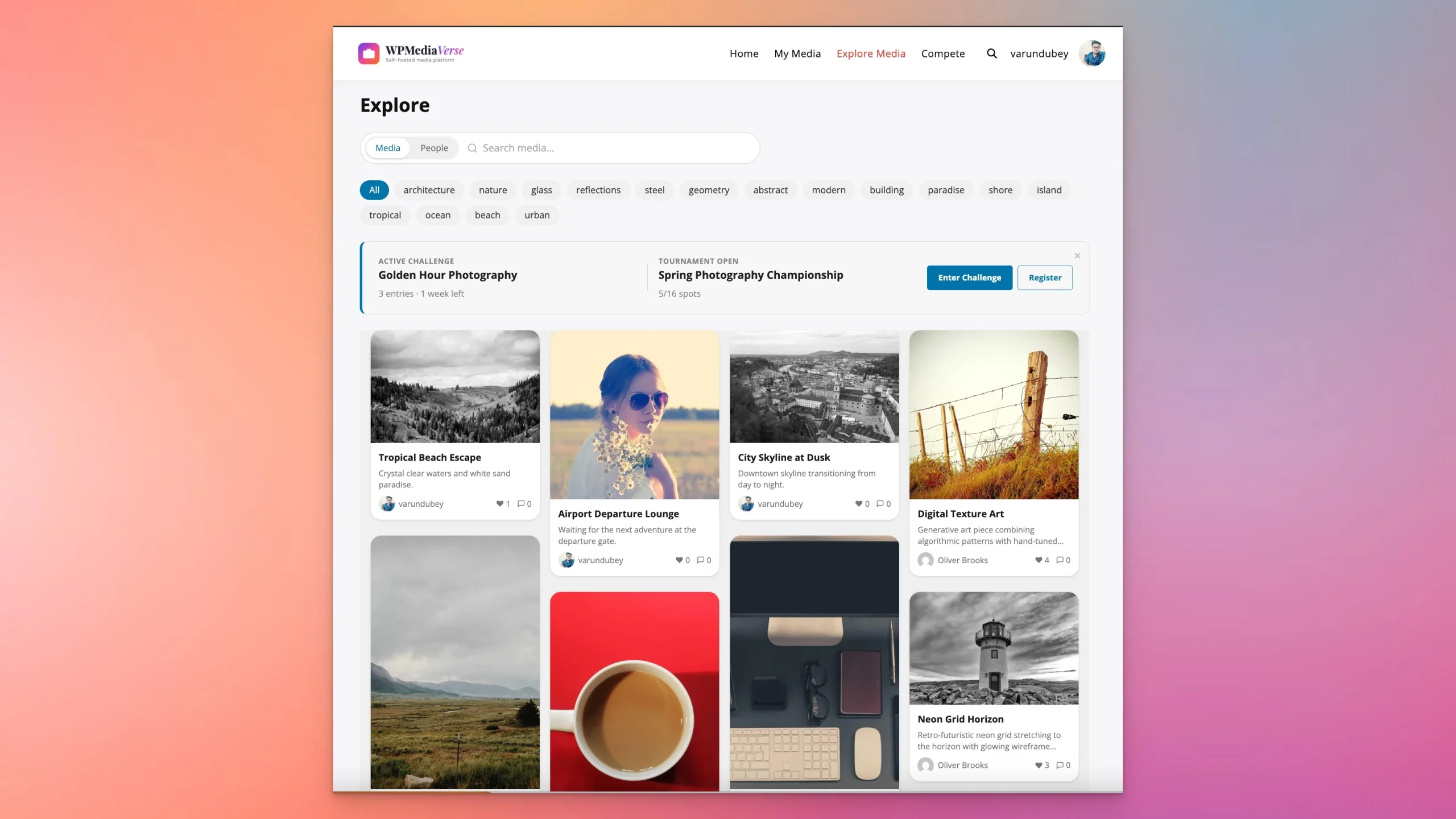
1. Frontend uploads are much better for photography workflows
Most photographers do not want every media action tied to the WordPress admin area. If the site has multiple contributors, students, club members, clients, or community participants, the backend quickly becomes the wrong interface. Frontend uploads are cleaner, safer, and easier to explain.
WPMediaVerse handles this much more naturally than typical gallery plugins. Uploading is treated as a primary workflow, not a side feature. The interface supports different media types and gives users a guided flow that feels closer to a modern media app.
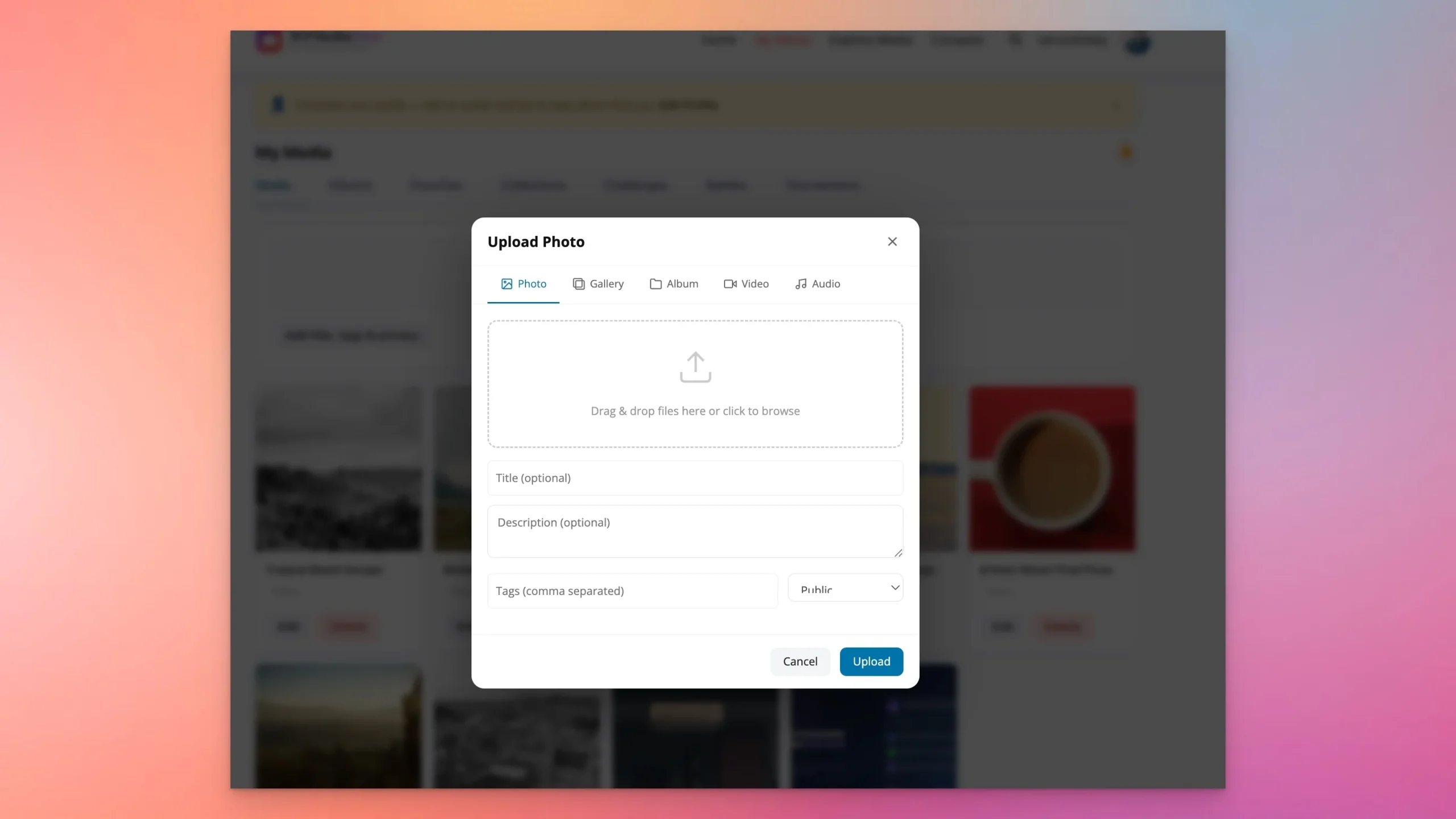
For photography communities, workshops, clubs, or portfolio platforms, this alone can be a deciding factor.
2. It is built around photographers and visual creators, not just posts
A lot of WordPress plugins still think in terms of posts first and media second. Photographers need the opposite. Images are the product. Profiles, feeds, and organization should support the media, not bury it.
WPMediaVerse creates a much more creator-centric experience. User profile pages display work in visual grids, while social actions such as following and messaging make the site feel more like a dedicated creator network than a WordPress install with galleries bolted on.
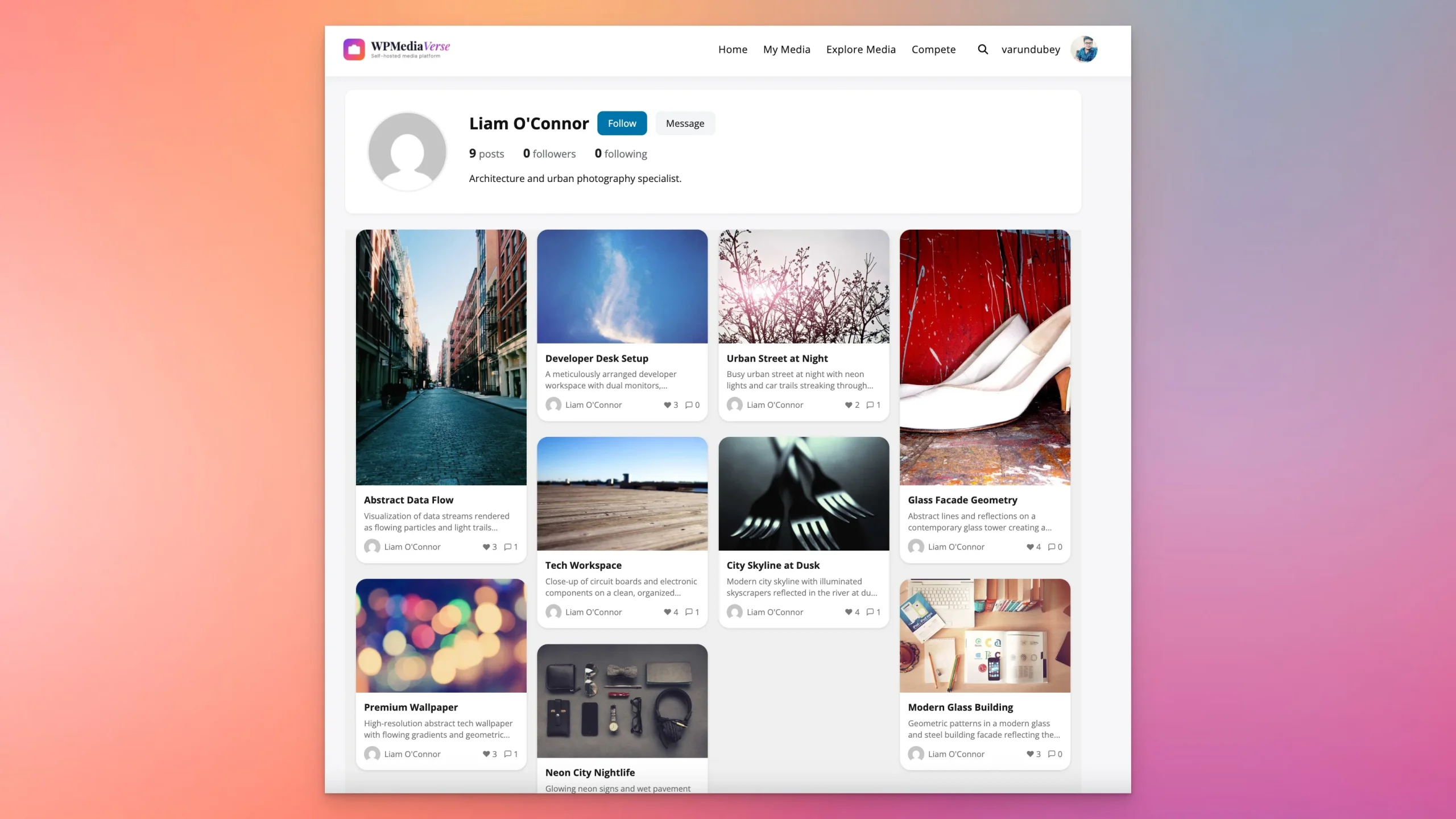
This is especially useful for:
- Photography communities
- Membership sites with creator profiles
- Course communities where students share work
- Agencies or collectives with multiple photographers
- Submission-driven websites
3. Albums and smart collections help large media libraries stay usable
As a photography site grows, organization becomes one of the most important product decisions. Standard albums help, but larger libraries often need more than manual grouping. WPMediaVerse supports both albums and collections, including smart collection behavior that can organize media more dynamically.
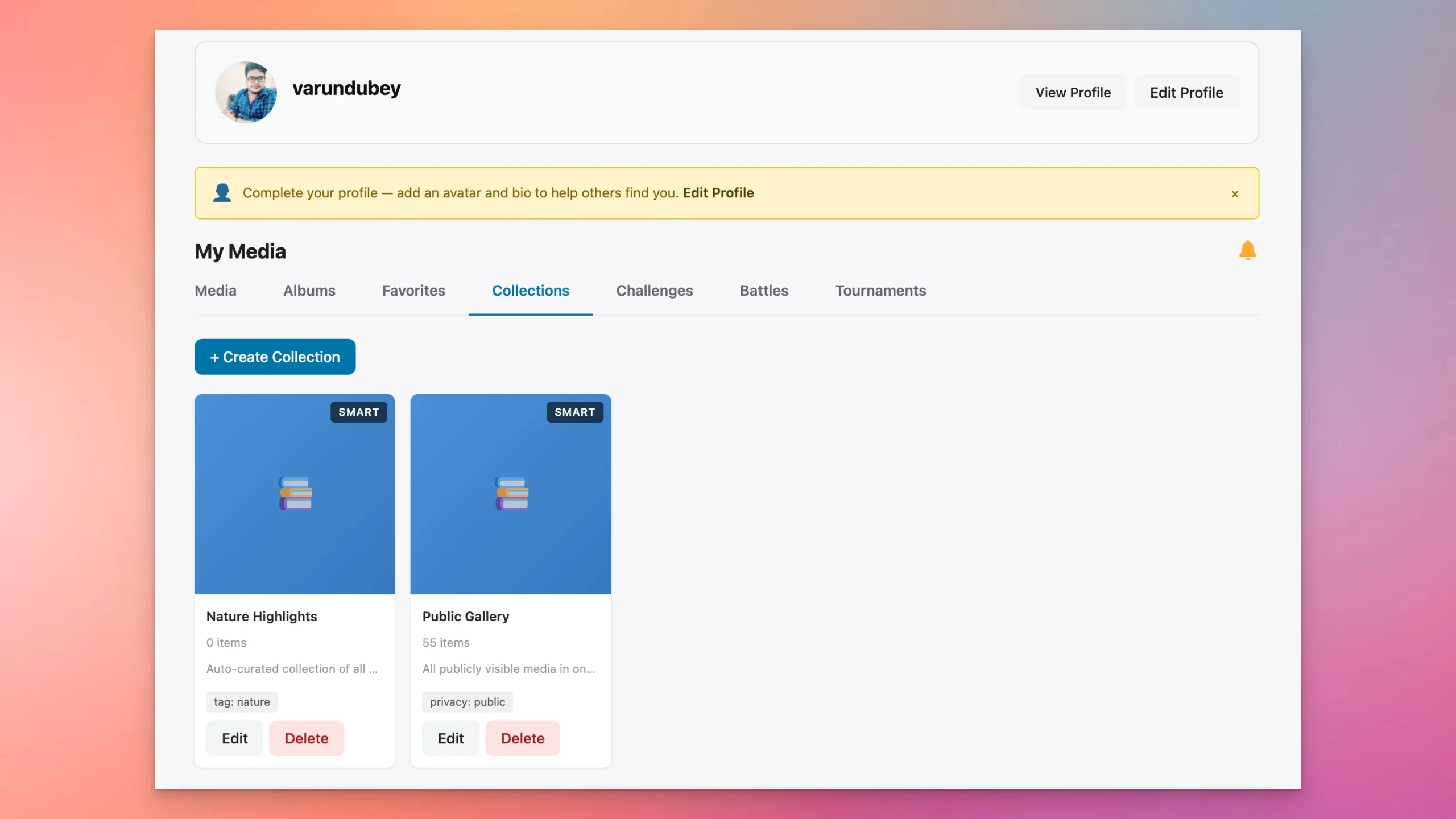
That makes the plugin a better fit for:
- Theme-based photography archives
- Tag-driven discovery systems
- Public and private content splits
- Large contributor platforms
If your workflow has ever turned into “upload now, organize later,” this is one of the places where WPMediaVerse earns its value.
4. It supports engagement features gallery plugins usually skip
Photographers do not always want pure social features, but engagement tools can be extremely valuable when they are attached to the right use case. Favorites, comments, reactions, profile activity, and discoverability can increase repeat visits and content depth, especially on community-driven or niche vertical sites.
This is where WPMediaVerse overlaps nicely with broader community setups. If you are already considering a creator or member ecosystem, there is a logical connection to social platforms such as BuddyPress. If that is relevant to your project, TweaksWP already has a broader BuddyPress guide that can help you think through the community layer.
But the key point here is simpler: WPMediaVerse does not stop at display. It gives your visual content a living environment.
5. The gamification angle is unusually strong for photographers
This is the feature set that most gallery plugins simply do not attempt.
WPMediaVerse Pro includes photography-specific engagement modes like battles, challenges, and tournaments. For many sites, that is not a gimmick. It is an actual retention and participation engine. Communities need reasons to come back. Weekly challenges, themed contests, and head-to-head voting create those reasons naturally.
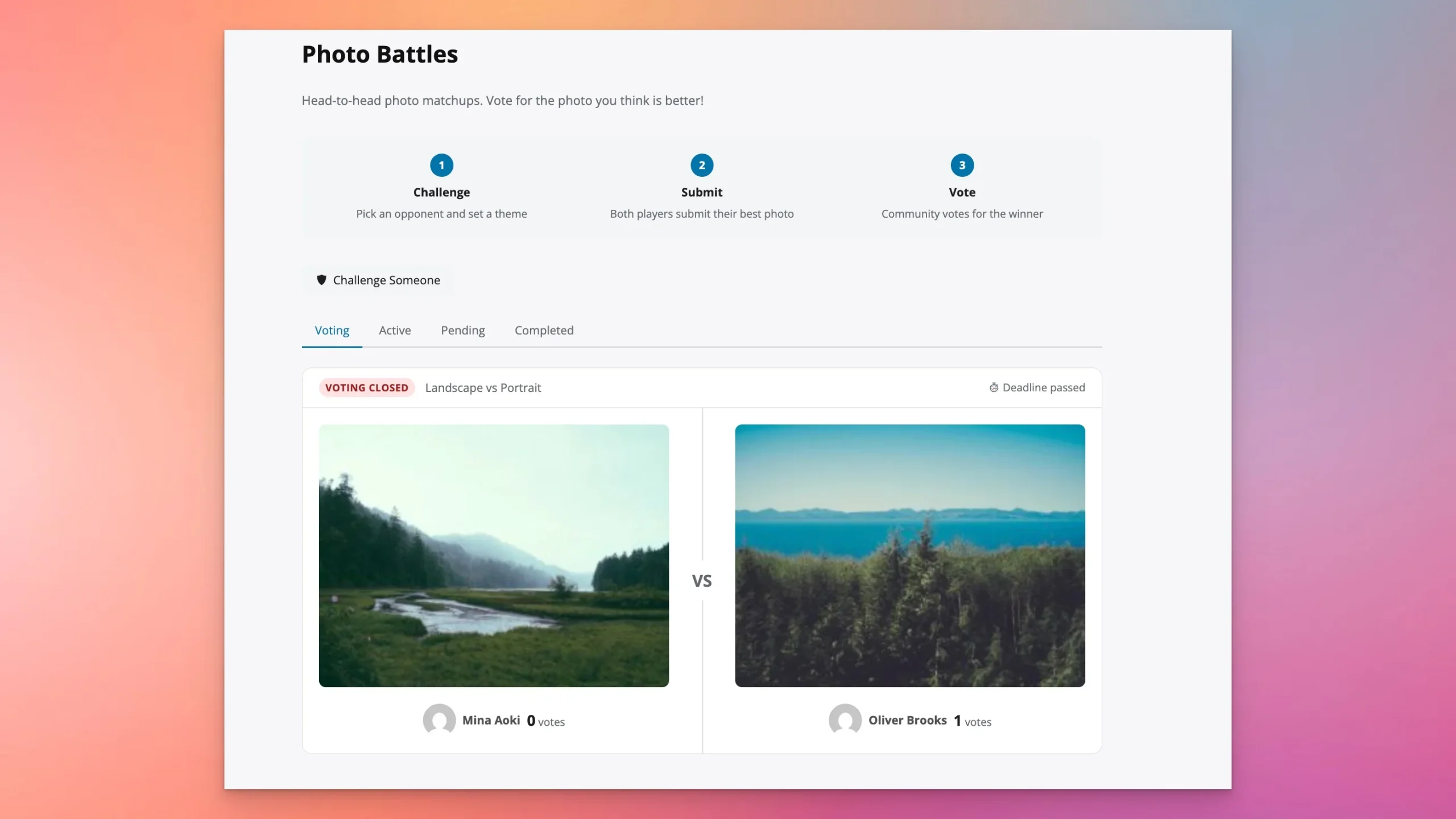
If you are building any of the following, these features immediately matter:
- A photography challenge website
- A camera club or school project site
- A member engagement program
- A UGC platform for photographers
- A branded photo community for a niche vertical
This is a major reason I would not classify WPMediaVerse as “just a gallery plugin.” It is closer to a product platform for visual communities.
6. The mobile experience is not an afterthought
Photography audiences browse on phones constantly. Any plugin that looks good only on desktop is incomplete. WPMediaVerse’s mobile layouts show that it has been designed for scrolling, discovery, and image-first browsing across devices.
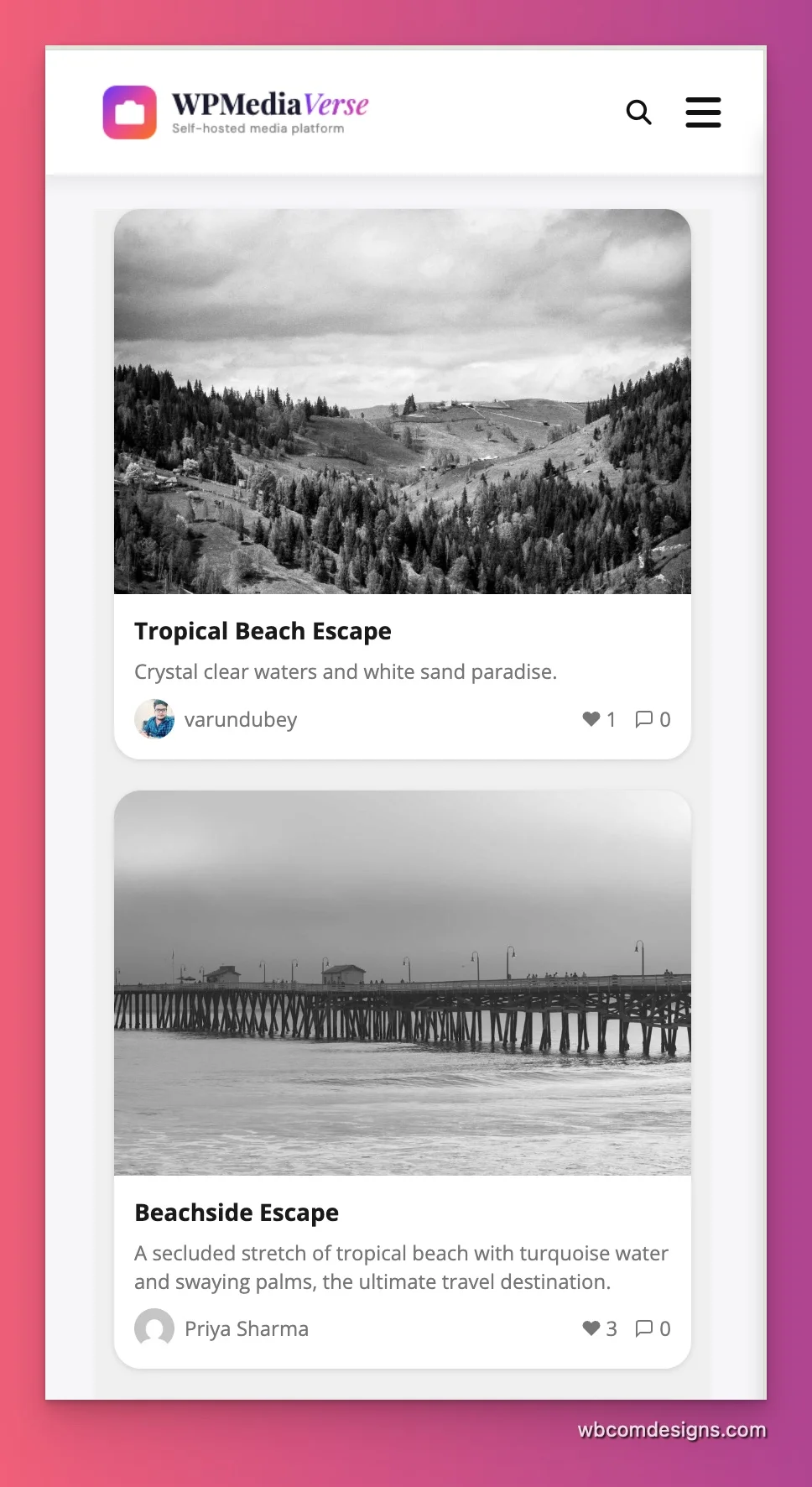
That may sound obvious, but it is still where many plugin stacks feel stitched together. If a photography site depends on browsing and discovery, mobile UX is part of the product, not a secondary polish item.
WPMediaVerse Pro features that matter for serious builds
The free version already covers the core media experience, but Pro is where the plugin becomes more compelling for advanced projects. From a site architecture perspective, these are the features that stand out most:
- Cloud storage support for Amazon S3 and BunnyCDN
- Video support with transcoding, captions, chapters, and resume playback
- Analytics for media usage and engagement
- Quota management for per-user or per-role storage control
- Watermarking and content protection tools
- Migration tooling from other media ecosystems
Those features make WPMediaVerse relevant not only for hobby or community photography sites, but also for businesses operating at a larger scale. If your concern is not just appearance but operations, Pro starts to make more sense.
How WPMediaVerse compares to traditional photography plugins
Need | Traditional Gallery Plugin | WPMediaVerse |
|---|---|---|
Portfolio galleries | Usually strong | Strong |
Frontend media uploads | Often limited or addon-based | Core strength |
User profiles for photographers | Rare | Built in as a key experience |
Collections and discovery feeds | Limited | Strong |
Reactions, favorites, social engagement | Usually minimal | Designed for it |
Photography contests and voting | Usually absent | Major differentiator |
Cloud storage and advanced media ops | Varies by stack | Available in Pro |
That is why I would summarize the market this way: if you need a gallery, buy a gallery plugin. If you need a photography platform, WPMediaVerse deserves very serious consideration.
Who should choose WPMediaVerse
WPMediaVerse is a particularly good fit for the following use cases:
- Photographers building a creator-style portfolio with real interaction
- Photography clubs and local communities
- Course creators running student submission galleries
- Membership websites with protected media areas
- Branded photo contest or challenge sites
- Multi-author visual communities
If your website has users who contribute, discover, organize, and interact with media, the plugin is operating in the right problem space.
Real-world photography site scenarios where WPMediaVerse makes sense
It helps to move this discussion out of feature lists and into actual builds. Here are the kinds of WordPress projects where WPMediaVerse feels like a natural fit instead of an over-engineered option.
1. A photography club or camera community
Members need profiles, uploads, favorites, challenge participation, and browsing tools. A gallery plugin alone is rarely enough here. You end up wanting feeds, collections, and social interaction. WPMediaVerse lines up well with that workflow.
2. A course or coaching site where students submit assignments
Frontend uploads matter, moderation matters, and organization matters. Students should not be trained to work in wp-admin just to submit photography assignments. A media-first frontend is far more practical.
3. A niche stock-style or premium media site
If media is the product, you need strong browsing, taxonomy filters, better presentation, and often access control. This is also where storage growth becomes a real concern, making the Pro storage and quota features more relevant.
4. A brand community built around contests and weekly prompts
This is one of the clearest fits. If your growth strategy depends on recurring participation, battle and challenge features are much more useful than another set of slideshow options.
5. A creator network with multiple photographers
Once every contributor needs a profile and their own visual presence, the site starts behaving more like a media network than a portfolio site. WPMediaVerse is much closer to that use case than a classic gallery tool.
Common mistakes when choosing a photography plugin for WordPress
The biggest mistake is buying based on screenshots instead of workflows. A plugin can produce beautiful grids and still be a poor fit for a real photography business or community.
These are the mistakes I see most often:
- Choosing for gallery aesthetics only and ignoring upload workflows
- Assuming the default WordPress media library is enough for multi-user photography sites
- Treating mobile browsing as secondary
- Ignoring organization needs until the media library becomes unmanageable
- Stacking separate gallery, membership, social, and contest plugins without thinking about long-term maintenance
That last point is the one developers usually feel first. A stack of narrowly scoped plugins can look cheaper on day one, but the integration cost shows up later in styling work, duplicate metadata, fragmented permissions, and support overhead.
Photography sites are also unusually sensitive to performance regressions because the payload is already heavy. If image sizing, lazy loading, caching, or media queries are misconfigured, your plugin choice only amplifies the problem. That is why plugin selection should be made alongside a real performance plan, not after it.
What to evaluate during a test install
If you are trialing WPMediaVerse or comparing it against alternatives, do not just import demo content and click around for five minutes. Test the workflows that actually matter to your project.
- Upload media from the frontend as a non-admin user
- Create albums and collections with realistic media volume
- Check profile, feed, and lightbox behavior on mobile
- Measure page speed before and after adding the plugin
- Test privacy or membership rules if the site has gated content
- Verify moderation, reactions, favorites, and comments if community features matter
- Stress-test discovery pages with enough items to expose layout or query issues
This will tell you much more than a comparison table. A plugin that looks “feature rich” can still be wrong for your project if the core workflow feels awkward. In WPMediaVerse’s case, the strength is that the key photography workflows feel like the primary use case rather than an adaptation.
Who should choose something simpler
WPMediaVerse will be overkill for some photographers. That is not a criticism. It is just scope.
You may be better off with a simpler gallery plugin if:
- You only need a static portfolio
- You do not want profile pages or community features
- You do not need frontend uploads
- You want the smallest possible plugin surface area
- You already have a mature gallery workflow and are not expanding beyond it
In those cases, a narrowly focused gallery plugin may be easier to maintain. This is especially true if your site is already complex and you are trying to keep plugin count and integration risk low.
Developer considerations before you install it
Because WPMediaVerse does more than display images, you should evaluate it like a real application component, not like a cosmetic addon.
Ask these questions:
- Do you want a media platform or just gallery output?
- Will multiple users upload content?
- Do you need privacy, quotas, moderation, or role-based access?
- Are contests, voting, or social features part of the roadmap?
- Will storage and performance matter as the media library grows?
If the answer to most of those is yes, WPMediaVerse is aligned with the problem. If the answer is mostly no, choose something smaller.
As with any advanced plugin, you should also test it the same way you would test any serious WordPress component: measure performance, inspect conflicts, and watch for query load or asset bloat. If you are troubleshooting plugin behavior during implementation, guides like our WP_DEBUG constants walkthrough and Query Monitor tutorial are worth keeping close during setup.
Final verdict: the best WordPress plugin for photographers depends on the job, but WPMediaVerse is the strongest platform-style option
There is no universal best WordPress plugin for every photographer. A minimalist portfolio owner and a photography community operator are not solving the same problem.
But if the goal is to build a modern photography website that goes beyond static galleries, WPMediaVerse stands out because it combines presentation, uploads, profiles, organization, discovery, and engagement inside one coherent system. That is not something most traditional gallery plugins can claim.
My practical recommendation is simple:
- If you only need elegant galleries, shortlist a focused gallery plugin.
- If you need a visual platform with contributors, interaction, and room to grow, start with WPMediaVerse and evaluate whether WPMediaVerse Pro fits the rest of your roadmap.
You can also review the codebases directly if you want to inspect the architecture yourself: the free plugin repository and the Pro repository are both public.
FAQ
Is WPMediaVerse good for photography portfolios?
Yes, but its biggest advantage appears when the portfolio needs interaction, user profiles, frontend uploads, or community features in addition to layout.
Can WPMediaVerse handle private or member-only media?
Yes. Its broader media and privacy model makes it more suitable than many gallery-only plugins for protected content use cases.
Does WPMediaVerse support photography contests?
Yes. WPMediaVerse Pro includes battles, challenges, and tournament-style competition features that are especially relevant for photography communities.
Is WPMediaVerse better than a gallery plugin like FooGallery or Envira?
It is better when your site needs platform features beyond galleries. If you only need a polished portfolio or static image display, a simpler gallery plugin may still be the better fit.
Does it work well on mobile?
Yes. The interface and discovery views are clearly designed with responsive browsing in mind, which is critical for image-driven websites.
Plugins we build and run
We maintain these ourselves, which is why we can support them on your site.
- BuddyNextThe self-hosted community engine for WordPress
- BuddyXFree community theme, Pro when you outgrow it
- ReignPremium community theme. Add pieces, build anything
- JetonomyCommunity forum and Q&A for WordPress
- EventonomyEvents and RSVPs for WordPress communities
- LearnomyCourses and learning communities on WordPress
- ListoraDirectories and listings your members can browse
- SnipShareCode sharing built for developer communities
- WB Ad ManagerAd placements that turn traffic into revenue
- WP Career BoardA job board your community actually uses
- WP Sell ServicesSell services with offers, orders, and payouts
- MediaVersePhotos, video, and media albums for members
- WB GamificationPoints, badges, and rewards that keep members active
- Product RoadmapPublic roadmaps with voting your users trust